The CMSIS-Pack Management for Eclipse is created by ARM to provide a open-source reference implementation for the support of the CMSIS-Pack and CMSIS-Zone specification in the Eclipse environment. It implements the fundamentals to access the information and resources contained in Software Packs and can be re-used by the ARM eco-system in any type of tools, for example configuration utilities or development environments.
ARM is commited to maintain this CMSIS-Pack Management for Eclipse to ensure consistency with future extensions and modifications to the CMSIS-Pack Specification.
Releases can be found on the releases page of this repository containing:
- Release Notes
- Eclipse Plug-In Binaries
- Source Code archives
For evaluation you need CMSIS-Pack compliant Software Packs that are available for download from the CMSIS Pack Repository.
The software is provided under the Eclipse Public License Version 2.0. Contributions to this project are under the same license and there is no additional Contributor License Agreement (CLA) required.
The Apache FreeMarker 2.3.29 is delivered under the Apache License 2.0: https://freemarker.apache.org/docs/app_license.html
The eo-yaml 7.0.9 is delivered under BSD 3-Clause "New" or "Revised" License (BSD-3-Clause) : https://github.com/decorators-squad/eo-yaml/blob/master/LICENSE
This release of the CMSIS-Pack Management for Eclipse has been tested on Eclipse 2023-06 and 2023-12.
This repository contains the source code of the CMSIS-Pack Management for Eclipse that consists of the following plug-ins:
- com.arm.cmsis.pack - core responsible for loading pack data and managing the RTE (Run-Time Environment) configurations
- com.arm.cmsis.pack.common - generic base code, constants and utilities
- com.arm.cmsis.pack.common.tests - basic JUnit tests com.arm.cmsis.pack.common
- com.arm.cmsis.pack.data - base classes for pack data
- com.arm.cmsis.pack.dsq - default implementation of Debug Sequences Framework
- com.arm.cmsis.pack.ui - set of reusable GUI elements that can be used to manipulate pack and RTE data
- com.arm.cmsis.pack.project - CDT project management
- com.arm.cmsis.pack.installer - Pack management functionality back-end
- com.arm.cmsis.pack.installer.ui - Pack management GUI
- com.arm.cmsis.pack.build.settings - Toolchain adapter extension point and generic adapter
- com.arm.cmsis.pack.build.setting.armcc - adapter for ARMCC 5.x toolchain (DS-MDK built-in)
- com.arm.cmsis.pack.build.setting.armgcc - adapter for ARM GCC toolchain (DS-5 built-in)
- com.arm.cmsis.pack.build.setting.gnuarmeclipse - adapter for Cross ARM GNU toolchain: http://gnuarmeclipse.github.io/
- com.arm.cmsis.pack.parser.yml - DOM-like wrapper over eo-yaml YAML parser
- com.arm.cmsis.config - Configuration Wizard editor
- com.arm.cmsis.help - integrated help
- com.arm.cmsis.pack.refclient - a reference example for engineers integrating CMSIS-Pack plug-in into their development environments (not included in binary build)
Starting from version 2.5.0 CMSIS-Zone functionality is supported. It includes the following plug-ins:
- com.arm.cmsis.zone: datatypes, parser and algorithms
- com.arm.cmsis.zone.ui: code generation based on FreeMarker templates, an editor for zone files (*.azone), wizards and dialogs to manipulate memory regions, support for CMSIS Zone project* new project
- com.arm.tpip.freemarker: OSGI wrapper of Apache FreeMarker 2.3.29 freemarker.jar
- com.arm.cmsis.zone.tests: JUnit-based integration test of CMSIS-Zone code generator
The following projects are added in version 2.5.0 to support Mave-based build:
- com.arm.cmsis.parent: Maven parent project containing master pom file.
- com.arm.cmsis.target: target platform
- com.arm.cmsis.pack.feature: Eclipse feature combining CMSIS-Pack plug-ins
- com.arm.cmsis.zone.feature: Eclipse feature combining CMSIS-Zone plug-ins
- com.arm.cmsis.pack.repository: P2 repository project containing the features
Requirements: This release of the CMSIS-Pack Management for Eclipse requires JRE 11 to run and JDK 11 to build.

The presentation is available on YouTube, slides to download: Enhanced Project Management for Embedded C/C++ Programming using Software Components

-
Download the CMSISPackPlugin_x.x.zip from corresponding release
-
Use the Eclipse menu command: Help - Install New Software.... Click Add... and the Archive... and specify the location of the CMSISPackPlugin_x.x.zip file.
-
(Optional) Download com.arm.cmsis.pack.refclient_x.x.x.x.jar to dropin folder of your Eclipse installation.
-
Start Eclipse with installed CMSIS-Pack Management Plug-In.
-
Specify the location of the installed Software Packs with the Eclipse menu command Window - Preferences - CMSIS Packs. The CMSIS Pack root folder is the base directory, for example C:\Keil_v5\ARM\Pack.
-
Switch to "CMSIS Pack Management perspective" and press
 "Check for Updates on Web" toolbar button
-
Install required Packs using "Packs" view
-
(Optional) Install supplied ARM.RefClient.0.2.0.pack to evaluate example importing functionality

- Open New C/C++ Project wizard using Elipse menu command File -> New -> Project... -> C/C++ -> C Project.
- In the first page specify Project name, select desired Toolchain and "CMSIS RTE C/C++ Project" type, press Next.

- In the second page select a Toolchain Adapter and press next.


Note: CMSIS-Pack Eclipse plug-in contains adapters for the following toolchains:
- ARM Compiler 5 (ARM DS-MDK built-in)
- Cross ARM GCC (http://gnuarmeclipse.github.io/)
If one of those toolchains is selected in the first page, the matching adapter is selected automatically.
For any other toolchain select Generic Toolchain Adapter and a toolchain family (defines component filtering).
That does not set all required compiler options, but allows to experiment with RTE Project management.
4. In the third page select a device from the installed Software Packs and press Finish or continue to the next pages.

-
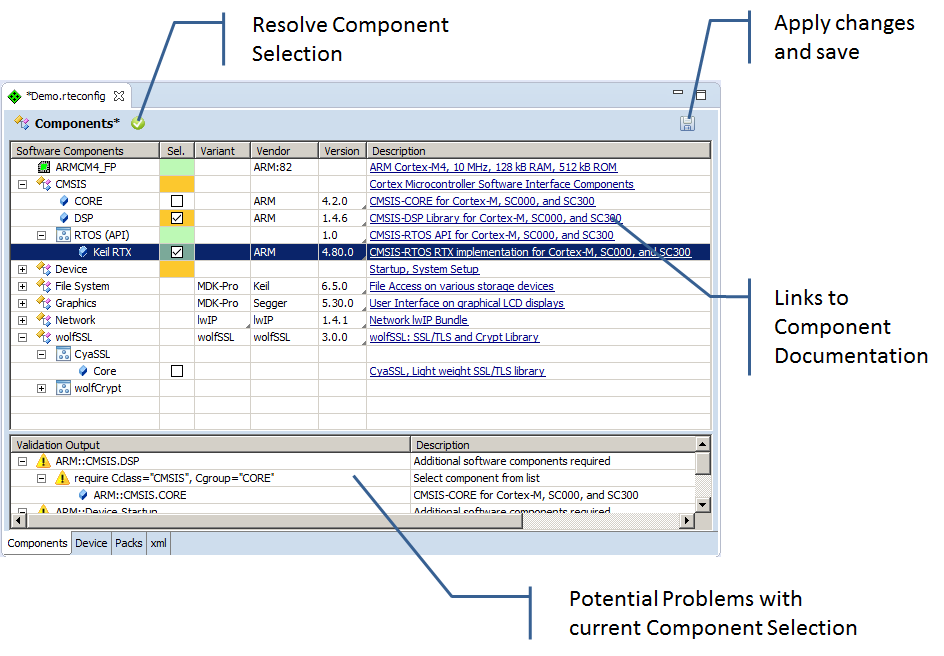
New C/C++ will be created and the RTE configuration editor will open. The editor allows you to select the Software Components that are available based on your device and compiler selection. You may change the component selection and use the Resolve toolbar button.
-
Save the configuration by pressing Save toolbar button. This will trigger project update. You can now investigate project content, compiler settings and build the project.

Copyright (c) 2014-2024, ARM Limited and Contributors. All rights reserved.