
Scan a repository into structured evidence, inspect its dependencies and ownership, and give coding agents and PR reviews concrete source context.

Run locally · Watch the walkthrough · Explore the evidence

Watch the 95-second developer walkthrough →
aletheore-walkthrough.mp4
With background music and on-screen explanations. Follow a scan of Aletheore's own CLI source, inspect dependencies and related tests, then see how the evidence connects to MCP and PR review. The walkthrough separates captured local output from explanations of hosted features.
Requires Python 3.11–3.14 and pipx. Run these commands from a repository you want to inspect:
pipx install aletheore
aletheore scan .
aletheore query hotspots
aletheore dashboard .
Open the dashboard at the local URL printed in your terminal. The scan writes
.aletheore/air.json, a compact .aletheore/air.toon, and history snapshots.
The deterministic scanner does not call an LLM. Local scanning and structural queries
need no Aletheore account or model API key. Registry lookups and optional scanner integrations
can use the network; see Data and network behavior.
Already installed? Update with pipx upgrade aletheore.
For a virtual environment or source installation, see the setup guide.
aletheore demo
The demo creates a small synthetic Python repository with local Git history and runs
the real scanner to build reusable evidence, retrieve source, trace imports, and execute
a local MCP tool call. In a terminal, arrow-key menus guide one screen at a time,
with actions to open the sample dashboard or try your own repository. Use aletheore demo --plain
for a printable report; piped output also runs without prompts.
You can also select Take the guided demo from the aletheore home menu.
Tests are suggested, not executed. Git must be installed; no account,
model, or repository clone is needed. The sample and evidence remain in a temporary
directory for follow-up queries and the dashboard. Delete that directory when finished.

A real local scan of Aletheore's CLI source. Hover modules in the dashboard to explore resolved imports. Security checks were disabled for this capture; graph nodes do not represent a clean security verdict.
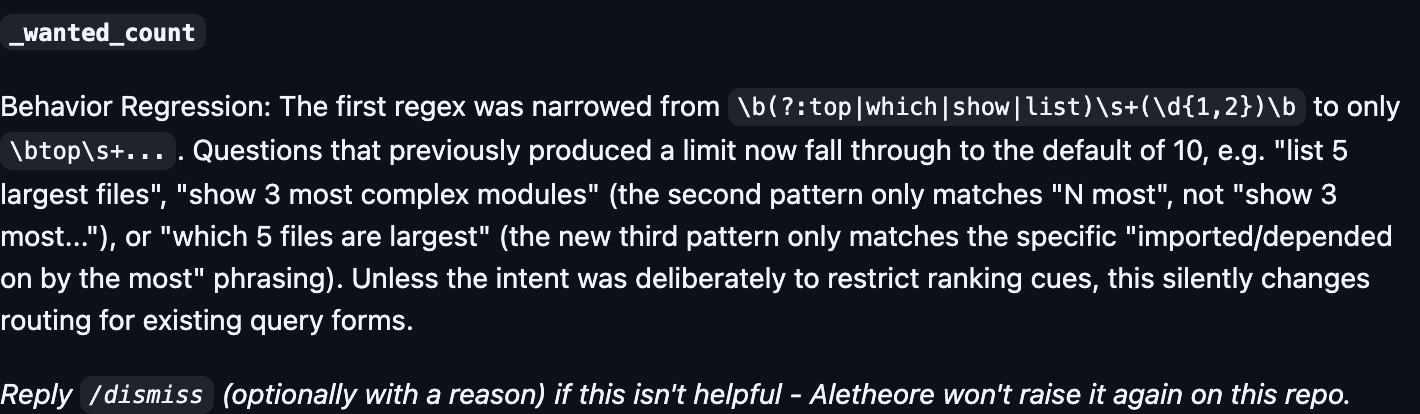
An actual bot comment on PR #1128. The screenshot shows the review surface; a finding remains something to investigate.
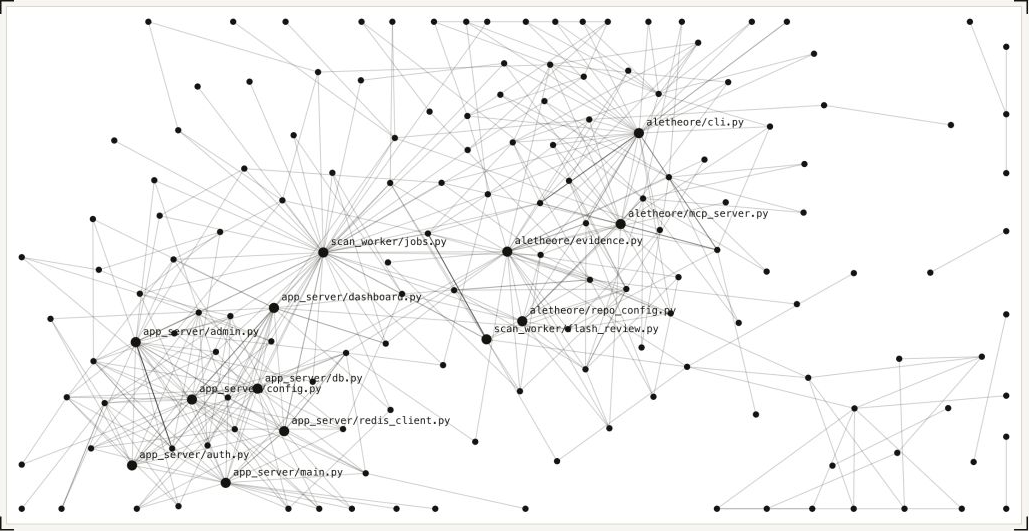
The public AIRview demo, captured from the website using Aletheore's own module graph. Try the interactive version to drag modules and trace imports. This is the public demo rather than an authenticated hosted workspace.
Run a scan first. Replace the example paths and symbol with names from your repository.
| What you need to know | Command |
|---|---|
| Where is a function defined? | aletheore locate find_ownership |
| Who imports this file, directly or indirectly? | aletheore dependents src/example.py |
| Where is this symbol referenced? | aletheore usages parse_config |
| Which tests are related to this file? | aletheore tests-for src/example.py |
| Which files change frequently? | aletheore query hotspots |
| Who has contributed to a file? | aletheore query ownership src/example.py |
| Which endpoints are mapped? | aletheore query endpoints |
| Which secret findings need review? | aletheore query secrets |
| Are there circular imports? | aletheore cycles |
dependents follows resolved import edges. tests-for identifies candidates from import
relationships and naming conventions; it does not execute tests or establish coverage.
Ownership reflects Git history, rather than an assignment of responsibility.
Use aletheore query to list available query kinds and aletheore COMMAND --help for options.
aletheore mcp-install . --target cursorThis writes client configuration so Cursor can launch the repository's MCP server.
Restart or reload the client as needed. Other supported targets include Claude Code,
VS Code, Kiro, Opencode, Antigravity, Codex CLI, and Claude Desktop; list the current
options with aletheore mcp-install --help.
An agent can inspect symbols, imports, dependents, owners, endpoints, and related evidence without starting each investigation from an unstructured repository dump. For example, ask your agent:
Before changing this function, use Aletheore to locate its definition, inspect its references and import dependents, and identify candidate tests. Cite the evidence and distinguish resolved relationships from uncertainty.
For clients you configure manually, the server command is aletheore mcp ..
Optional AI answering, semantic indexing, and external tools have their own setup and
network requirements. See the MCP guide.
Shield is a local safety net for AI-written changes in a Git repository. It makes no model call.
pipx install aletheore   # or: pip install aletheore
aletheore shield
aletheore shield shows every change it plans, with a diff for each file, then waits.
Type yes to set it up. Nothing is written before that. Once Shield is on, the same command shows
its status. The explicit forms are aletheore shield setup and aletheore shield status; setup
run again shows only what needs updating. Setup changes:
.claude/settings.local.json: Claude Code hooks for four events (before an edit, after an edit, end of turn, end of session), each the Python interpreter plus arguments, so no shell quoting is involved. This file is personal and is not committed. Entries an earlier Shield wrote as one shell-command string are noted byaletheore shield status;aletheore shield setupupdates them in place.- The Git
pre-commithook: a marked block that prints Shield's report and never fails the commit. Tools that generate Git hooks (pre-commit, lefthook, husky) can overwrite that block;aletheore shield statusthen notes that the Git hook is missing, andaletheore shield setupputs it back. .git/info/exclude: a marked block that keeps Shield's files out ofgit status..gitignoreis not touched..aletheore/shield/config.json, and private records under the Git directory.- A first local scan into
.aletheore/, if the repository has no evidence yet.
What it does:
- Guard. After edits, at the end of a turn and at commit, it reports new or suspicious
dependencies (checked against PyPI and npm), files the change reaches and candidate tests,
signature changes (stated per file that imports the module, not per call site), and new secrets
and import cycles. Vulnerability and layer-convention findings appear only when the evidence came
from a full
aletheore scan. - Checkpoints. Before an agent edits, Shield saves the working tree as a Git commit under
refs/aletheore/checkpoints/. Your branches, index and stash are not touched. Put files back withaletheore shield undo; it saves a safety checkpoint first and never deletes a file. - Receipts. At the end of a session,
.aletheore/shield/receipts/gets a file listing what changed and what the guard found.
What it does not do:
- It never blocks a commit or an agent turn.
- It does not run the candidate tests. Dependency and signature checks work at the import level, not the call level.
- Only PyPI and npm are checked. Any other dependency is reported as "not checked".
- It does not refresh stale scan evidence inline; checks that need fresh evidence say they were skipped.
- Each hook has a time limit. Anything the guard could not finish in time is listed as not checked, never reported as a finding. Measured on two 9,400-file repositories: about 0.6 s per hook on a copy of this repository and 0.45-0.8 s on a generated one (1.2-1.3 s at session end on both).
Registry lookups send only the package name to pypi.org or registry.npmjs.org, never versions,
paths or source. They run only at turn end, at commit and in aletheore shield check. Turn them off
with ALETHEORE_SHIELD_OFFLINE=1 or "registry_lookups": false in
.aletheore/shield/config.json. With lookups on, the answers are cached in
~/.cache/aletheore/shield-registry-cache.json (under your user profile on Windows), outside the
repository; off --purge leaves that file. Checkpoint refs are local; git push --mirror pushes every ref
including them, so avoid it or delete the refs first. Undo writes files the way git checkout
would, following your line-ending and filter settings.
aletheore shield off removes the hooks, config and marked blocks and keeps checkpoints and
receipts; --purge deletes those too. Scan evidence in .aletheore/ stays, and so does a
one-line git exclude for it until you delete .aletheore/ and run off again.
Shield targets macOS, Linux and Windows; CI runs the unit tests and a CLI smoke test of setup, the
four hooks and off on all three. It has not been run against a real Claude Code session on Windows. See the
command reference for options, limits and exit codes.
| Surface | Purpose | Start here |
|---|---|---|
| Local CLI | Scan, locate code, inspect risks, and compare evidence | aletheore scan . |
| Local dashboard | Explore dependency and cluster graphs and scan history | aletheore dashboard . |
| MCP server | Let a coding agent query repository evidence | aletheore mcp-install --help |
| AI audit | Generate a report using a configured coding-agent CLI or API provider | aletheore audit --help |
| Hallbook | Search the bundled coding-agent skill catalog | aletheore hallbook search "code review" |
| Shield | Check and undo what a coding agent changes in a Git repository | aletheore shield |
| Agent context tools | Inspect tool overhead and local context savings | aletheore tokens meter |
| GitHub Action | Report new and resolved findings between a PR's base and head | Action setup |
| Hosted GitHub App | Run PR reviews and use managed repository features | Install the app |
Hallbook skills have individual instructions, dependencies, and licenses; review a skill before installing or executing it. Token auditing can invoke your configured agent; context profiles are optional and change which tools that agent can access.
The hosted GitHub App adds PR reviews, managed audits, AIRview architecture pages, AI-marked symbol documentation, and endpoint monitoring with source context. Availability depends on the selected plan. Free AI reviews are globally rate-limited and subject to availability. See current plans and limits rather than relying on a price copied into this README.
Install the Aletheore GitHub App and choose the repositories to connect.
GitHub Actions workflow and execution notes
For a deterministic PR diff in your own workflow:
name: Aletheore
on: [pull_request]

permissions:
  contents: read
  pull-requests: write

jobs:
  evidence:
    runs-on: ubuntu-latest
    steps:
      - uses: Aletheore/[email protected]
        with:
          fail-on-new-secrets: true
The Action scans both refs and reports new/resolved secrets, dependency vulnerabilities,
and layer-convention violations. It runs scan and diff, rather than an AI audit.
The example pins an existing release; review and pin a commit SHA for your own deployment
policy. Fork PRs can have read-only tokens: comment posting may be unavailable even when
analysis succeeds. See Action inputs and the CLI reference.
Dependency graph support, with language-specific resolution limits:
Language support, available evidence, and analysis limits
Dependency graphs support Python, JavaScript/JSX, TypeScript/TSX, Go, Rust, Java, Kotlin, Ruby, PHP, C, C++, C#, and Swift, with language-specific resolution limits. Secrets and Git analysis can still apply to other source files. Dependency checks depend on supported manifests, resolved versions, and registry coverage.
The evidence can include imports, symbols, clusters, Git ownership and activity, secret findings, dependency vulnerabilities and licenses, static analysis, endpoints, database schema, infrastructure, and error handling. Some checks depend on installed external scanners or explicit configuration. Missing tools and unsupported analysis must be distinguished from a clean result.
Static evidence is a starting point for investigation. Dynamic dispatch, runtime configuration, external services, and unresolved imports can leave gaps. A source citation makes a claim inspectable; it does not by itself prove that a bug exists or that a change is safe. Read resolution details and configuration for the limits that apply to your language.
Local scans build evidence on your machine. Enabled registry checks, optional integrations, crash reporting, and AI features have their own network behavior.
Network requests, crash reporting, and offline scan flags
The local deterministic scan builds evidence on your machine. Its network behavior depends on enabled checks and integrations:
- Dependency vulnerability and license checks contact OSV and package registries.
- Semgrep can fetch rules and send its own metrics; optional integrations such as SonarQube have separate submission behavior.
- CLI startup can check PyPI for updates. Set
ALETHEORE_NO_UPDATE_CHECK=1to disable that check. - Crash reporting is enabled by default and can be disabled with
aletheore config crash-reporting offorALETHEORE_CRASH_REPORTING=0. - AI audits, hosted features, and configured semantic services send the context required by the selected workflow to their configured services. Local evidence can contain sensitive metadata or source excerpts; review it before sharing.
Before scanning, inspect potential traffic for the resolved configuration:
aletheore scan . --explain-networkThis prints the conditional network paths and exits without scanning. It is an explanation of configured behavior, rather than a firewall or packet trace.
To skip registry and static-scanner checks for a local scan:
aletheore scan . --no-check-vulnerabilities --no-check-licenses --no-check-static-analysisThese scan flags do not configure every other command or service. Review CLI configuration and crash reporting, security information, and the hosted privacy policy for the workflow you choose.
Explore published scan examples and benchmarks with methodology and limits. The separate benchmark repository contains the PR-review evaluation harness. Results depend on repository, task, model, and sample; they do not guarantee the same result on your code.
- Report a bug or request a feature.
- Read CONTRIBUTING.md to work on the project.
- Use SECURITY.md for vulnerability reports.
- Sponsor development.
Repository map
| Directory | Contents |
|---|---|
src/ |
CLI implementation and command reference |
site/ |
Next.js marketing site |
docs/operations/ |
Operational baselines and runbooks |
benchmarks/ |
Repository benchmark material |
The hosted application is maintained separately from this public repository.
The CLI and other code in this repository are open source under the GNU Affero General Public License v3.0 (AGPL-3.0). You can use, study, modify, and redistribute it, including at a company and for internal tooling, as long as you follow the AGPL. The part that matters most:
- If you modify Aletheore and convey that covered work, or provide it for network interaction in circumstances covered by AGPL section 13, follow the AGPL's corresponding-source and notice requirements for the covered work.
- Independent code and separate components may remain under their own licenses; whether a combination is a covered work depends on the AGPL and the facts of the distribution.
- Running the unmodified CLI or Action on your own code does not put your code under the AGPL.
If those terms don't fit, for example you want to embed Aletheore in a closed-source product or run a modified version as a service without publishing it, a commercial license is available. See COMMERCIAL-LICENSE.md, or email [email protected]. The hosted, paid tier is Aletheore AIR.
Copyright (C) 2026 Arihant Kaul. See NOTICE.
Releases through 0.8.12 were Apache 2.0, and 0.8.13 through the version before this change were PolyForm Noncommercial 1.0.0. Copies you already received keep the license they came with.