SOHQ is an open-source office hours queue that allows students to sign up for office hours and instructors to manage the queue.
For a brief usage guide, click here.
- Node.js >= 18.17
Clone the reposity and cd into it.
For the .env setup, Refer to the .env.example file for the format of the required environment variables. The setup is as follows:
Run cp .env.example .env to create the .env file.
Ably
Ably is used for real-time communication (i.e. queue updates)
-
Create an account on Ably.
-
Create a new app.
-
Go to the "API Keys" tab. You should have 2 API keys, one for the server (top) and one for the client (bottom). Copy the server API key and paste it into the
ABLY_SERVER_API_KEYvariable in the.envfile. Copy the client API key and paste it into theNEXT_PUBLIC_ABLY_CLIENT_API_KEYvariable in the.envfile. Your client API key should have theSubscribeandPublishpermission enabled.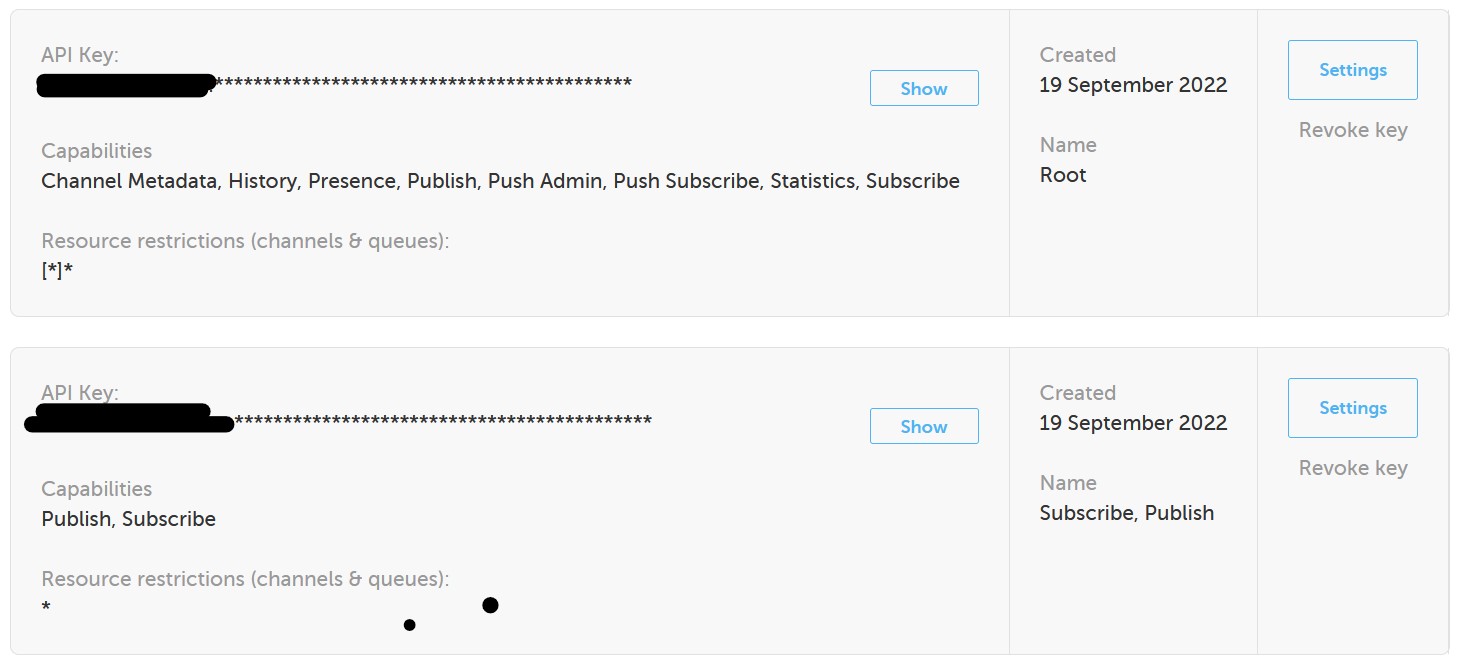

Google OAuth
Google OAuth is used for authentication.
-
Create a new project on Google Cloud Platform.
-
Navigate to the Credentials tab. Press the "Create Credentials" button and select "OAuth client ID". Go throuth the process of filling out the form. Select
Externalif you're given the option. Press the "Create Credentials" button again. This time select "Web application" as the application type. -
Create a new OAuth client ID. Make sure to set the Authorized JavaScript origins to
http://localhostand redirect URI tohttp://localhost:3000/api/auth/callback/google. When deployed, add new entries, replacinglocalhost/localhost:3000to the new URL.
-
Copy the client ID and paste it into the
GOOGLE_CLIENT_IDvariable in the.envfile. -
Copy the client secret and paste it into the
GOOGLE_CLIENT_SECRETvariable in the.envfile.

Database
For local development we run a docker container serving a mySQL database.
-
Install Docker on your machine.
-
Start the container by running:
docker compose up
Note that if you are using an M1 Mac, you may need to change the docker image in docker-compose.yaml to 'arm64v8/mysql'. This is because the official image for MySQl, as of writing, does not currently support the ARM architecture.
For the production environment, you can self-host a database or consider a hosted provider such as Planetscale, Aiven, AWS RDS, etc.
-
Create a new database on your platform.
-
Copy the database URL and paste it into the
DATABASE_URLvariable in the.envfile.
NextAuth
Run openssl rand -base64 32 (you may need to download openssl) and put the result inside of NEXTAUTH_SECRET.
After your .env file is set up, run the following commands to install dependencies populate the database with the schema:
npm install
npx prisma db push
We need to populate the database with the default settings and first user. Go to prisma/seed.ts and change the YOUR_EMAIL_ADDRESS variable to your email. Then run:
npx prisma db seed
If you want to run the server in development mode (to see live changes), run the following command:
npm run dev
If you want to create a production build, run the following commands:
npm run build
npm run start
If you'd like to view or edit your database locally at any point, you can run
npx prisma studio
This project is built using the T3 stack, specifically these aspects:
- Next-Auth.js for authentication (Google)
- Prisma for database management
- tRPC for API management
- Chakra UI for UI components
- MySQL for database
- Ably for real-time updates
If you'd like to contribute, please make a pull request. If you have any questions, feel free to open an issue.
To run the Biome formatter/linter:
npm run fmt