A Java-based architecture for FTC robots designed to parse text files into AUTONOMOUS sequences (using RoadRunner Actions) and robot configurations. This system replaces hard-coded autonomous code with a decoupled, registry-based system, allowing for rapid iteration and configuration without code redeploys. See the docs for more.
- Text-Based Configuration: Manage robot constants, goal positions, and intake settings through simple .txt files.
- Registry-Based Actions: Decoupled Mini Actions (base commands) and Big Actions (composed sequences) managed via a central registry.
- Validation & Dry Run: A robust parser that validates syntax, types, and parameter counts during initialization, reporting errors via Telemetry to prevent OpMode crashes.
- Hierarchical Loading: Supports base configurations (e.g., GeneralRobotSettings) with autonomous-specific overrides.
- Comment Support: Clean text files using // comment style.
The project is divided into three main layers:
- MetaField: Interface for complex data types (e.g., Pose2d, IntakeSetting) that defines parameter types and identifiers.
- MetaAction: Interface for creating executable Actions from parameterized strings.
- Mini Action: class for making registerable primitive actions (e.g., GO.TO.POSE2D).
- Big Action: class for making registerable composite actions (e.g., BLUE.LOAD.INTAKE) parsed from MetaActionSettings.
- MetaFieldRegistry: Maps field names (e.g., RedGoalPose) to specific data types and default values.
- MetaActionRegistry: A factory and storage for both primitive Mini Actions and user-defined Big Actions.
- ConfigParser: Handles file I/O, string cleaning, and strict type validation (e.g., ensuring boolean values aren't mistakenly parsed from numbers).
- AutoParser: Orchestrates the loading of the robot's state, scanning for [ACTIVE] autonomous routines and validating required fields like Starting.
- Install Git on your computer.
- Open a terminal or command prompt.
- Type
git clone https://github.com/bco44/autosequenceparser.gitand press enter.
- Note: Using GitHub Desktop will also work
- Open Android Studio.
- Select "Open" from the welcome screen or File menu.
- Navigate to the folder where you cloned the project.
- Select the root folder and wait for the project to load and sync.
To run a program, find the file, right-click the green arrow next to the class or main method, and select "Run".
If you are first time running them:
- Click on the Run/Debug configuration tab on the left of the green arrow
- Click on the "+" to add new configuration on top left.
- Select "Application".
- Change "cp: " to "autosequenceparser.purejava.main" in the menu.
- Set "main class" to the program you want to run.
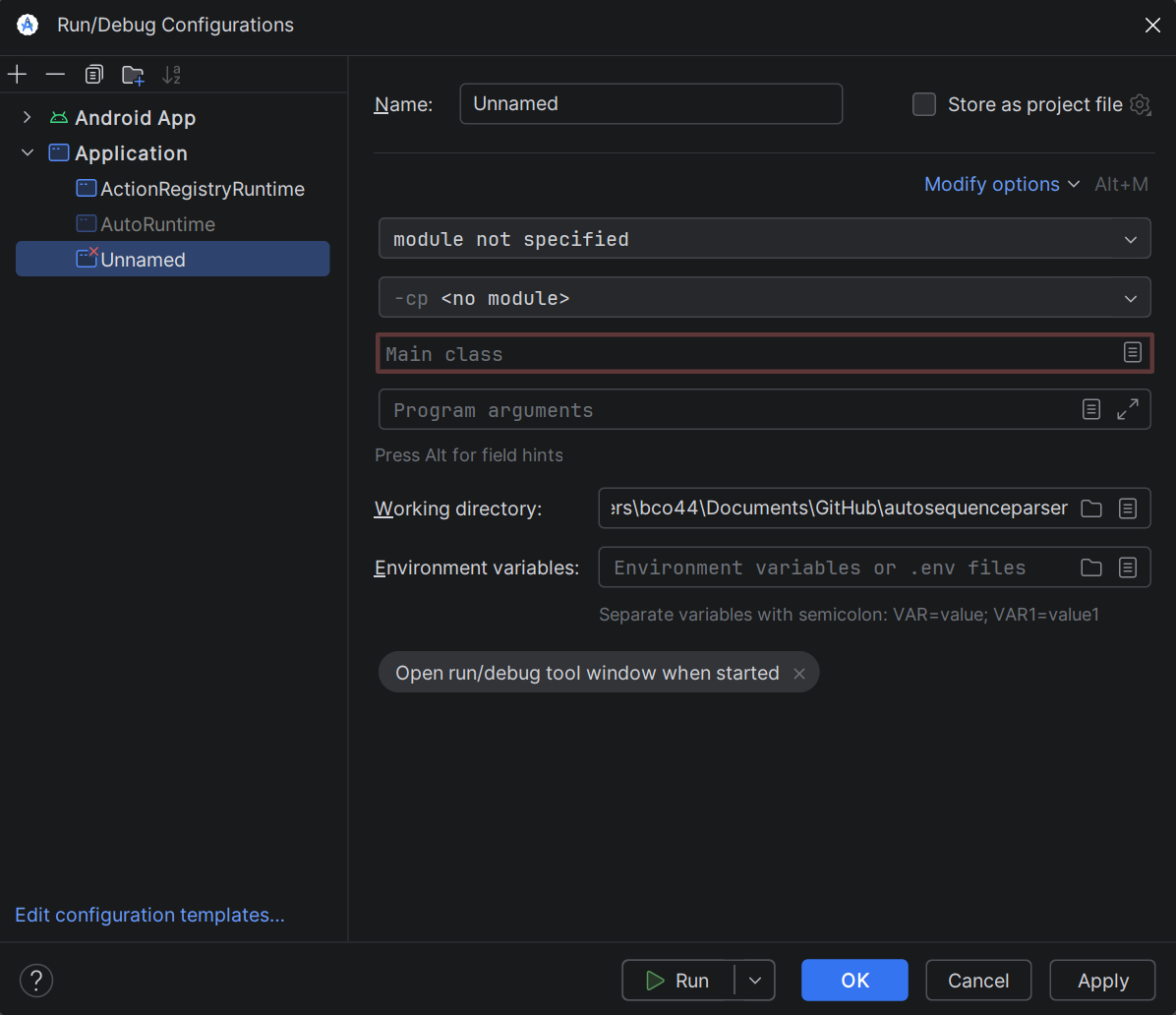

| Program | File Path | What it does |
|---|---|---|
| TeleOpRuntime | pureJava/src/main/java/com/example/purejava/TeleOpRuntime.java | Tests the configuration parser. It reads GeneralRobotSettings and prints values to verify they are loaded correctly. |
| RegistryRuntime | pureJava/src/main/java/com/example/purejava/RegistryRuntime.java | Tests the action registry. It loads MetaActionSettings and lists all registered actions to verify sequences. |
| AutoRuntime | pureJava/src/main/java/com/example/purejava/AutoRuntime.java | The main autonomous entry point. It scans for [ACTIVE] files, lets you pick one, validates it, and runs the sequence. |
File: pureJava/src/main/java/com/example/purejava/textfiles/GeneralRobotSettings
- DO:
- Use the format
FieldName = Value(e.g.,maxPower = 0.8). - Use
pose2d(x, y, h)for position fields. - Use
//at the start of a line or after code to add comments.
- Use the format
- DO NOT:
- Use numbers like
1or0for true/false (must betrueorfalse). - Remove the
=sign. - Use field names that are not in the registry.
- Use numbers like
File: pureJava/src/main/java/com/example/purejava/textfiles/MetaActionSettings
- DO:
- Define sequences using
NAME={ Action1, Action2 }. - Use commas to separate multiple actions.
- Put actions on new lines for readability.
- Define sequences using
- DO NOT:
- Forget the closing
}. - Use actions inside the curly braces that are not registered.
- Forget the closing
Directory: pureJava/src/main/java/com/example/purejava/textfiles/
- DO:
- Start filenames with
ACTIVE(e.g.,ACTIVERedSideAuto). - Always include a
Starting=POSITIONfield (e.g.,Starting=RED.FAR). - Use
Title=My Nameto give your auto a label.
- Start filenames with
- DO NOT:
- Delete all
[ACTIVE]files (at least one must exist). - Forget the
Startingfield, as the program will trigger a critical error.
- Delete all
File: pureJava/src/main/java/com/example/purejava/configs/MetaFieldRegistry.java (Line 31)
- DO:
- Add
registerField("YourName", Type.class, defaultValue);inside the static block. - Use standard types like
Double.class,Boolean.class, orString.class.
- Add
- DO NOT:
- Register the same field name twice.
File: pureJava/src/main/java/com/example/purejava/actions/MetaActionRegistry.java (Line 21)
It is possible to manually register additional mini and hard-coded big actions through code.
- To add a MiniAction: Add
register(new MiniAction("NAME", params -> ...));in the static block. - To add a hard-coded BigAction: Add
register(new BigAction("NAME", listOfSubActionStrings, false));in the static block. - DO NOT:
- Use duplicate names for actions.
- Java 8+
- Android Studio (Panda 2 version advised)