GV

GeezerVison

The World Wide Web, restored to 800 pixels of glory.

Home|About|Gaming cabinet|Archives|How it works|Starter sites

On this site

  • Sign in
  • ActionsCI/CD and automation
  • CodespacesCloud development environments
  • All Features
  • Documentation
  • Training
  • Certifications
  • Build with Copilot
  • Customize Copilot
  • Integrations
  • Trending repos
  • GitHub Sponsors
  • Developer articles
  • Enterprises

This view

  • Original page
  • New address

GeezerVison is showing github.com — GitHub - ChinaFunBoy/StatusBarUtil: A util for setting status bar style on Android App.

BranchesTags
Open more actions menu


Latest commit


History

12 Commits
12 Commits

Folders and files

NameName
Last commit message
Last commit date
gradle/wrapper
gradle/wrapper
 
 
img
img
 
 
library
library
 
 
sample
sample
 
 
.gitignore
.gitignore
 
 
README.md
README.md
 
 
build.gradle
build.gradle
 
 
gradle.properties
gradle.properties
 
 
gradlew
gradlew
 
 
gradlew.bat
gradlew.bat
 
 
settings.gradle
settings.gradle


Repository files navigation

StatusBarUtil

A util for setting status bar style on Android App. It can work above API 19(KitKat 4.4).

中文版点我

Sample

Download StatusBarUtil-Demo

Features

  • Set status bar color

     StatusBarUtil.setColor(Activity activity, int color)
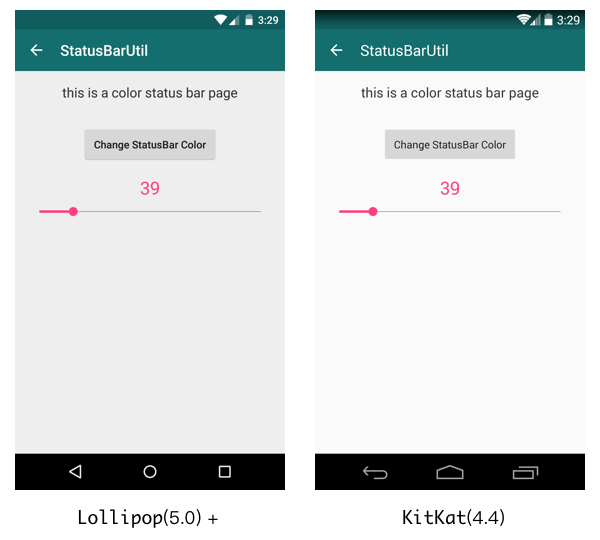
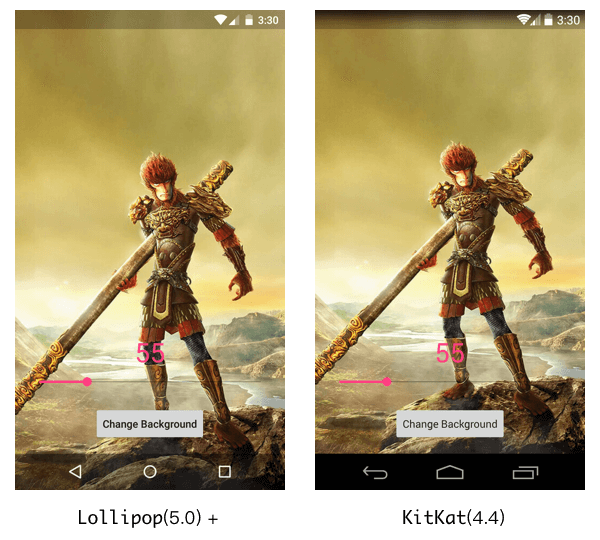
  • Set status bar translucent

     StatusBarUtil.setTranslucent(Activity activity, int statusBarAlpha)
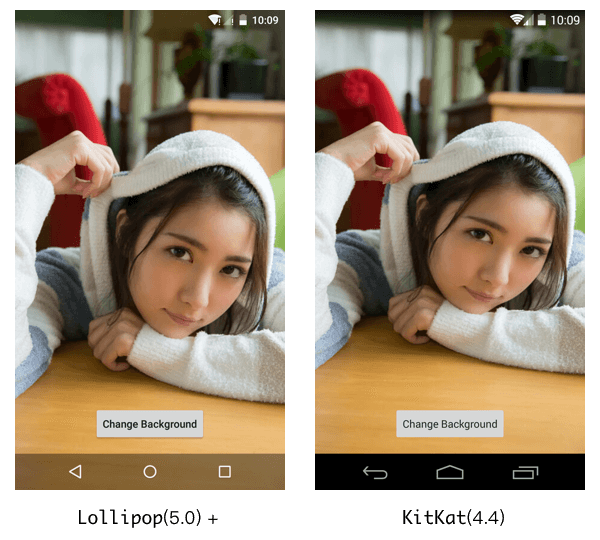
  • Set status bar transparent

     StatusBarUtil.setTransparent(Activity activity)
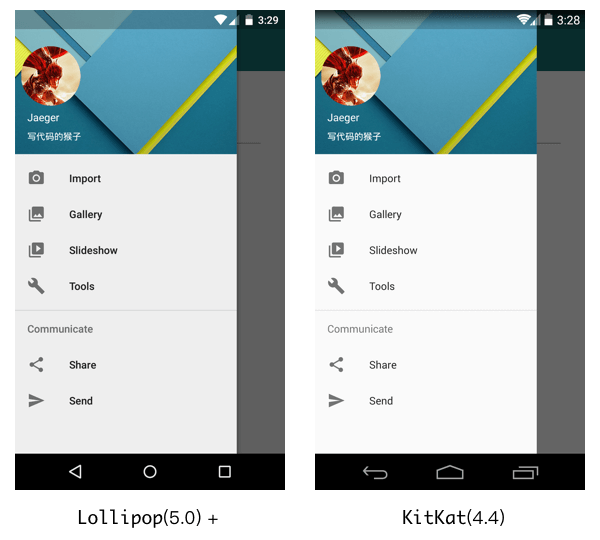
  • Set status bar color for DrawerLayout

     StatusBarUtil.setColorForDrawerLayout(Activity activity, DrawerLayout drawerLayout, int color)
  • Pass statusBarAlpha param when necessary to change your status bar alpha, which is 112 by default.

Usage

1. Add the dependencies to your build.gradle file, StatusBarUtil is avaiable in JCenter:
compile 'com.jaeger.statusbaruitl:library:1.0.0'
2. Call method you need after setContentView(), such as :
setContentView(R.layout.main_activity);
...
StatusBarUtil.setColor(MainActivity.this, mColor);
3. If you use this util in a page which containing a DrawerLayout, you need add android:fitsSystemWindows="true" for DrawerLayout in your layout XML:
<android.support.v4.widget.DrawerLayout
    xmlns:android="http://schemas.android.com/apk/res/android"
    xmlns:app="http://schemas.android.com/apk/res-auto"
    android:id="@+id/drawer_layout"
    android:layout_width="match_parent"
    android:layout_height="match_parent"
    android:fitsSystemWindows="true">

    ...

</android.support.v4.widget.DrawerLayout>
4. All statusBarAlpha value you set should between 0 ~ 255

License

Copyright 2016 Jaeger Chen

Licensed under the Apache License, Version 2.0 (the "License");	you may not use this file except in compliance with the License.
You may obtain a copy of the License at

	http://www.apache.org/licenses/LICENSE-2.0

Unless required by applicable law or agreed to in writing, software
distributed under the License is distributed on an "AS IS" BASIS,
WITHOUT WARRANTIES OR CONDITIONS OF ANY KIND, either express or implied.
See the License for the specific language governing permissions and
limitations under the License.

About

A util for setting status bar style on Android App.

laobie.github.io/android/2016/03/27/statusbar-util.html

Resources

Readme
Activity
Custom properties

Stars

1 star

Watchers

8 watching

Forks

0 forks
Report repository

Releases

Packages

Contributors

Languages

You are visitor 01402775 — GeezerVison does not store the pages you look up.
Best viewed with Netscape Navigator 4.7 or Internet Explorer 6 at 800×600. No cookies required.