GV

GeezerVison

The World Wide Web, restored to 800 pixels of glory.

Home|About|Gaming cabinet|Archives|How it works|Starter sites

On this site

  • Sign in
  • ActionsCI/CD and automation
  • CodespacesCloud development environments
  • All Features
  • Documentation
  • Training
  • Certifications
  • Build with Copilot
  • Customize Copilot
  • Integrations
  • Trending repos
  • GitHub Sponsors
  • Developer articles
  • Enterprises

This view

  • Original page
  • New address

GeezerVison is showing github.com — GitHub - FreekDS/GodotAudioEvents: A simple solution to generate events while playing a sound resource

BranchesTags
Open more actions menu

Latest commit


History

16 Commits
16 Commits

Folders and files

NameName
Last commit message
Last commit date
.github/ISSUE_TEMPLATE
 
 
addons/AudioEvents
addons/AudioEvents
 
 
doc
doc
 
 
example
example
 
 
.gitattributes
.gitattributes
 
 
.gitignore
.gitignore
 
 
LICENSE
LICENSE
 
 
README.md
README.md
 
 
project.godot
project.godot


Repository files navigation

Godot Audio Events

A simple solution to generate events while playing a sound resource.

Ever wanted to recreate the silly koopa dance that is timed with the music (BAH BAH)?

BahBah

With this solution that is possible!

Installation

AudioEvents is available from the offical asset library!

  1. Open Godot
  2. Navigate to AssetLib on the top
  3. Search for AudioEvents
  4. Download!

Alternatively, clone the repository and copy the addons/AudioEvents to your own addons/ directory in the project. Do not forget to enable the plugin in the Project settings!

How to use?

  1. Create an AudioEventPlayer
  2. Attach an AudioStreamPlayer. (alternatively, add the AudioEventPlayer as child to the AudioStreamPlayer)
  3. Create an AudioEventStream resource under the AudioStreamPlayer.
  4. Give the AudioEventStream resource an audio file as resource and (optionally) a name.
  5. Fill the Event Times array with float numbers that indicate the time at which an event needs to be fired.
    TIP: use the Audio preview feature on the audio source to have an idea of the timings.
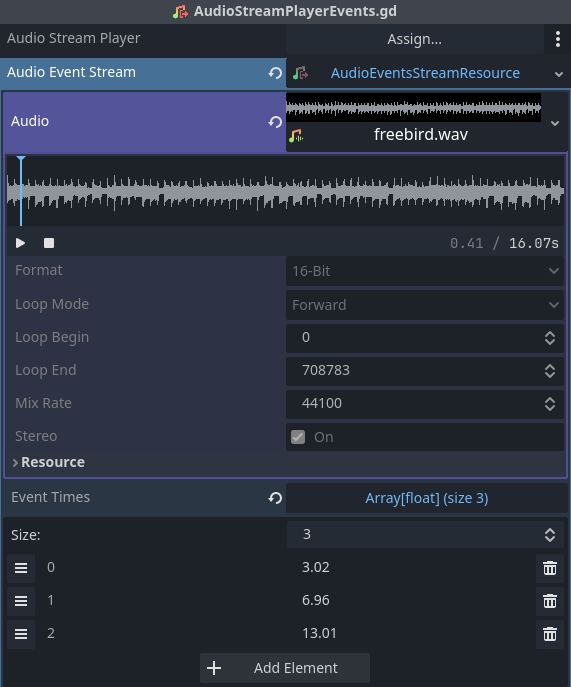
  6. Connect to the soundEvent signal from the AudioEventPlayer

Example

Open example.tscn for a simple example.

Contributing

If anything is not working, please open an issue via the issue tracker on GitHub.
Feel free to create a pull request with suggestions/bug fixes!

License

This project is MIT licensed, you can do whatever you want with it :)

About

A simple solution to generate events while playing a sound resource

Resources

Readme
MIT license
Activity

Stars

7 stars

Watchers

2 watching

Forks

1 fork
Report repository

Releases

Packages

Contributors

Languages

You are visitor 01402792 — GeezerVison does not store the pages you look up.
Best viewed with Netscape Navigator 4.7 or Internet Explorer 6 at 800×600. No cookies required.