Modeled off wpilib for FRC, the ftclib uses modularization and class dependencies for easy robot programming. No need for multiple third-party libraries. Everything can be found right here.
Before using this project, please acknowledge that the FTCLib project is still in Alpha! That means that there are possibly bugs that exist in the code. The FTCLib library is continuing to grow, and part of that process is testing and fixing. By using this project, you except the risk of possible issues that exist in the library.
This being said, FTCLib is a still in development, so bugs, exceptions, or errors are being fixed as the project progresses. Fixing bugs, exceptions, problems, and/or issues is a big priority for FTCLib, and your help would be greatly appreciated on that task. If you find an issue with FTCLib, please don't hesitate to contact us for a solution/workaround. Issues can be submitted through GitHub, or by email at [email protected].
While those two options are the most convenient for most things, another way it to contact one of our members through the FTC Discord .
This is the first official release of FTCLib! The project is still in the Alpha stage, with many things being untested. The project is being added to constantly, and there will most likely be smaller updates to come in the near future. If you want to contribute to the project, be sure to read the Contributing.MD
There is still a great need for Alpha testers, so also please contact us if you are interested in that.
Features:
- WPILib - Style code base
- Commander - Based System
- Command manager for OpMode
- Can add a sequential command
- Commands can have a scheduled timeout before the next command
- Commands can have modifiable time between loop iterations
- Ability for custom commands
- Ability for custom subsystems
- Command manager for OpMode
- Controllers
- P Controller
- Set the P gain
- Runs a given Motor with a given setpoint and a previous value
- PIDF Controller
- Proportional (P), Integral (I), Derivative, (D), and Feedforward (F) gains
- Set a setpoint and a measured value
- Can set a custom error tolerance for position and velocity
- Can set the time period for the iteration of the control loop
- Calculate the output at any time
- P Controller
- Drive Bases
- Abstract drive base classes for all kinds of drive bases!
- Each one has a customizable power range and max speed limit
- Can clip a value to fit a range
- Can normalize the speeds for a given set of powers
- Can square an input
- Make your own drive base with a certain abstract class
- Includes robot-centric and field-centric driving
- Customizable for a specifc robot dimensions
- Includes many of the most common drive bases
- Differential (Tank) Drive
- Mecanum Drive
- H-Drive
- Swerve Drive
- Includes a Swerve Module with a built-in P controller
- Can turn motor to an angle
- Robot Drive
- Abstract drive base class with basic methods
- Use to create your own drive bases
- Gamepad
- Has many different functions and classes for getting the most out of a gamepad
- GamepadEx class
- Set up with a normal Gamepad
- Read any button value
- Read any trigger value
- ButtonReader class
- A class that represents a gamepad button
- Many uses including the current state, the recent state, and more
- TriggerReader class
- A class that represents a gamepad trigger
- Includes simlular state - changing methods like GamepadButton
- Can set the trigger name for telemetry
- Geometry
- Lots of geometry - related classes and functions
- Vector2d
- Pose2d
- Rotation2d
- Hardware
- Has a lot of hardware classes, interfaces, and items
- Includes ready made hardware devices not included in the SDK
- Many different types of motors and motor related things
- CRServo
- EncoderEx
- Motor
- MotorEx
- MotorGroup
- Other types of servos
- SimpleServo
- ServoEx
- Lots of different sensors and other items, some can be custom - implemented
- ExternalEncoder (abstract)
- JSTEncoder
- GyroEx (abstract)
- Rev IMU
- SensorColor
- RevColorSensorV3
- SensorDistance (interface)
- SensorDistanceEx (interface)
- SensorRevTOFDistance
- Kinematics
- Odometry!
- Has odometry for a couple of common drive bases
- DifferentialOdometry
- MecanumOdometry
- Easily used and integratable
- Supports multiple forms of ododmetry
- Two wheel + Gyro
- Three wheel + Gyro
- Three wheel
- Utility
- Has a few differnt utility functions
- Direction
- Represents a logical direction
- LEFT, RIGHT, UP, DOWN, FORWARDS, BACKWARDS
- Safety
- Represents an arbitrary safety level
- SWIFT, EASE_OFF, DEFAULT, BREAK
- Timing
- Has a few different functions for a Timer
- Can set the timer
- Can pause the timer
- Can stop the timer
- Can read if timer is done
- Can reset the timer
- Also includes a Rate
- Can set a rate
- Can reset the rate
- Can see if rate has expired yet for refreshing
- Has a few different functions for a Timer
- Some Examples in the TeamCode module (limited)
-
Open up your FTC SDK Project in Android Studio.
-
Go to your
build.common.gradlefile in your project.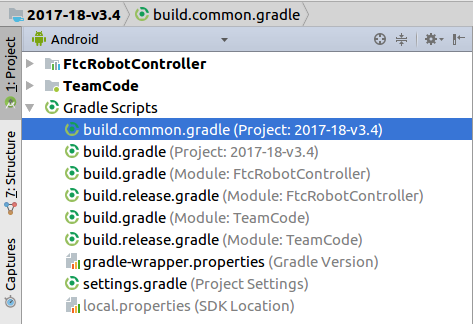
-
Add the following to the
repositoriessection at the bottom of the file.maven { url "https://ftclib.bintray.com/FTCLib" } -
Open the
build.gradlefile in your TeamCode module.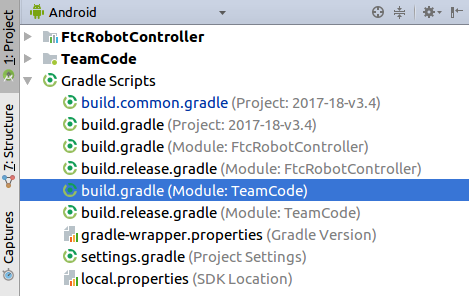
-
Go to the bottom of the file, and add the following.
dependencies { implementation `com.arcrobotics:ftclib:1.0.0` } -
Perform a gradle sync to implement your changes.
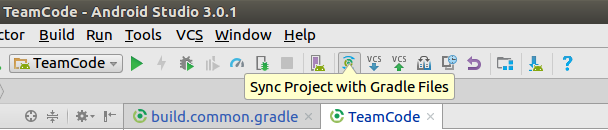
-
When the sync finishes, you are done! You can now use FTCLib in your code.


NOTE: If your module has a few dependencies, you might have an error related to multidex on building the project.
This is caused by the project exceeding the limit for imports enforced by Android Studio. To solve this,
add multiDexEnabled true to the below location inside the build.common.gradle file.
    defaultConfig {
        applicationId 'com.qualcomm.ftcrobotcontroller'
        minSdkVersion 19
        targetSdkVersion 26


multiDexEnabled trueThank you for using the FTCLib library for your code! All of the people who worked on it have put a lot of effort into making FTCLib and amazing library. We thank you for putting our effort to work with your own projects. We hope you have great luck and success with your programming.
The mission of FTCLib is briefly summarized in the following quote made by Jackson from ARC Robotics, who started the library.
Our goal is to make programming easier and more efficient through effective classes and detailed examples of implementation. - Jackson ARC Robotics
For drivetrain kinematics, you can do:
MecanumDrive dt = new MecanumDrive(motors);

x = gp1.joyLeft.x;
y = gp1.joyLeft.y;
turn = gp1.joyRight.x;

dt.driveRobotCentric(x, y, turn);
For a simple CV pipeline that aligns the robot with a skystone using a camera server:
// create server
CameraServer cmr = new CameraServer("webcam");

// obtain server info for a certain instance
res = cmr.getInstance();

// if the skystone is not in range
while (!res.hasObject(VisualObject.SKYSTONE)) {
    robot.strafe(Safety.SWIFT, Direction.RIGHT);
    res = cmr.getInstance();
}
robot.stop(Safety.EASE_OFF)

// align robot with the skystone
robot.centerRobotWithObject(res.getObject(VisualObject.SKYSTONE));
If you want to have the robot switch to an automatic mode during teleop:
// upon a button pressed on gamepad1
if (gp1.aButtonPressed()) {
    // end manual mode -> immediate seize of toolop commands
    robot.endManual();
    robot.forceReset(Safety.EASE_OFF); // stop the robot, but easily

    // set safety mode to determined default
    robot.setSafetyMode(Safety.DEFAULT);

    // cycle stones from human player
    robot.setAutoState(AutoState.CYCLE_STONES);
}
As you can see, FTC programming would be much more intuitive with the above systems. All we have to do is add enough documentation so that even someone who has never programmed in FTC before can write an incredible robot program in a relatively minimal amount of time.
You think can help us out? Well, you can make a pull request at any time. And, if you have FRC or external FTC library experience, then feel free to contact us at any time for potential collaborator status.
Jackson from ARC Robotics, Daniel from JDroids, Pranav from TecHounds, Noah from Radical Raiders, Peter from E-lemon-ators, Ryan from CircuitRunners Green.
Install images linked from the OpenFTC Team This project would not be made possible for use without the incredible help and explanations of OpenFTC.