- Cause
Vox files are widely used in telephone recording system. I need deal with them by python. But seems python just has interface for PCM encoding format audio, vox's encoding format is Dialogic ADPCM.
- Two solutions come to mind:
- read data from vox file directly
- convert vox to PCM file
- I found some C++, C# and java code for above work, but not python.
Usage for exe file
1. copy 'use-exe-tool/vox_2_wav.py' and 'use-exe-tool/Vox2Pcm.exe' to your folder
2. run vox_2_wav.py
Usage for python
1. run 'use-python/dialogic_ADPCM.py'
- Performance
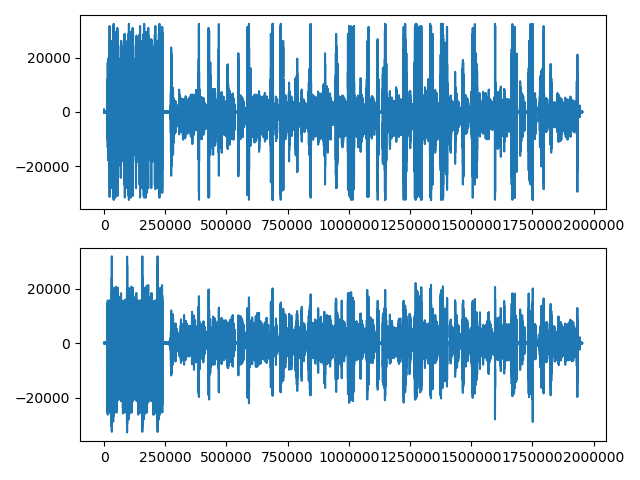
The upper part is the result of .exe.
And the lower part is the result of python code.
They're not very different.
The top one looks better.
But the one down there can keep data in the RAM not use HDD, Time-consuming IO are avoided.

- Appendix
1. Thanks to the zhanzr !!!! I found his blog about IMA ADPCM, which similar to Dialogic ADPCM. And he posted Python implementation. I got in touch with him, and he gave me some ideas. Follow his instructions, I changed his code to Dialogic ADPCM.
2. Vox2Pcm.exe was provided by the "BlueSpace Co" open source. You can got other transfor tools in here. Thanks this company!!!
3. vcecopy.exe was provided by the "Dialogic Co" and documents is here. I cound't find how to install it but I found a offline-way to use it.And it seems like many .dll files to dependent.
4. You also can use command "sox" to do convert. For me,it worked. I can implement vox file to wav file by use sox. But, the wav file's time domain waveform deviant. The center of the signal deviates from the zero axis as a whole. I can't fixed. Because the original Dialogic ADPCM algorithm is decode 4bit to 12bit, not 16bit. The "sox" use the default version.
5. I also found some other blog or issue about Dialogic ADPCM. They are also very useful!
6. Dialogic ADPCM algorithm.