GV

GeezerVison

The World Wide Web, restored to 800 pixels of glory.

Home|About|Gaming cabinet|Archives|How it works|Starter sites

On this site

  • Sign in
  • ActionsCI/CD and automation
  • CodespacesCloud development environments
  • All Features
  • Documentation
  • Training
  • Certifications
  • Build with Copilot
  • Customize Copilot
  • Integrations
  • Trending repos
  • GitHub Sponsors
  • Developer articles
  • Enterprises

This view

  • Original page
  • New address

GeezerVison is showing github.com — GitHub - JustLookAtNow/vscode-gitlab-mr: gitlab mr creater for vscode

BranchesTags
Open more actions menu

Latest commit


History

119 Commits
119 Commits

Folders and files

NameName
Last commit message
Last commit date
.github/workflows
.github/workflows
 
 
.vscode
.vscode
 
 
img
img
 
 
src
src
 
 
test
test
 
 
.gitignore
.gitignore
 
 
.vscodeignore
.vscodeignore
 
 
CHANGELOG.md
CHANGELOG.md
 
 
LICENSE
LICENSE
 
 
README.md
README.md
 
 
esbuild.js
esbuild.js
 
 
eslint.config.js
eslint.config.js
 
 
jsconfig.json
jsconfig.json
 
 
package-lock.json
package-lock.json
 
 
package.json
package.json


Repository files navigation

VS Code - Gitlab MR UI

forked from https://marketplace.visualstudio.com/items?itemName=jasonn-porch.gitlab-mr

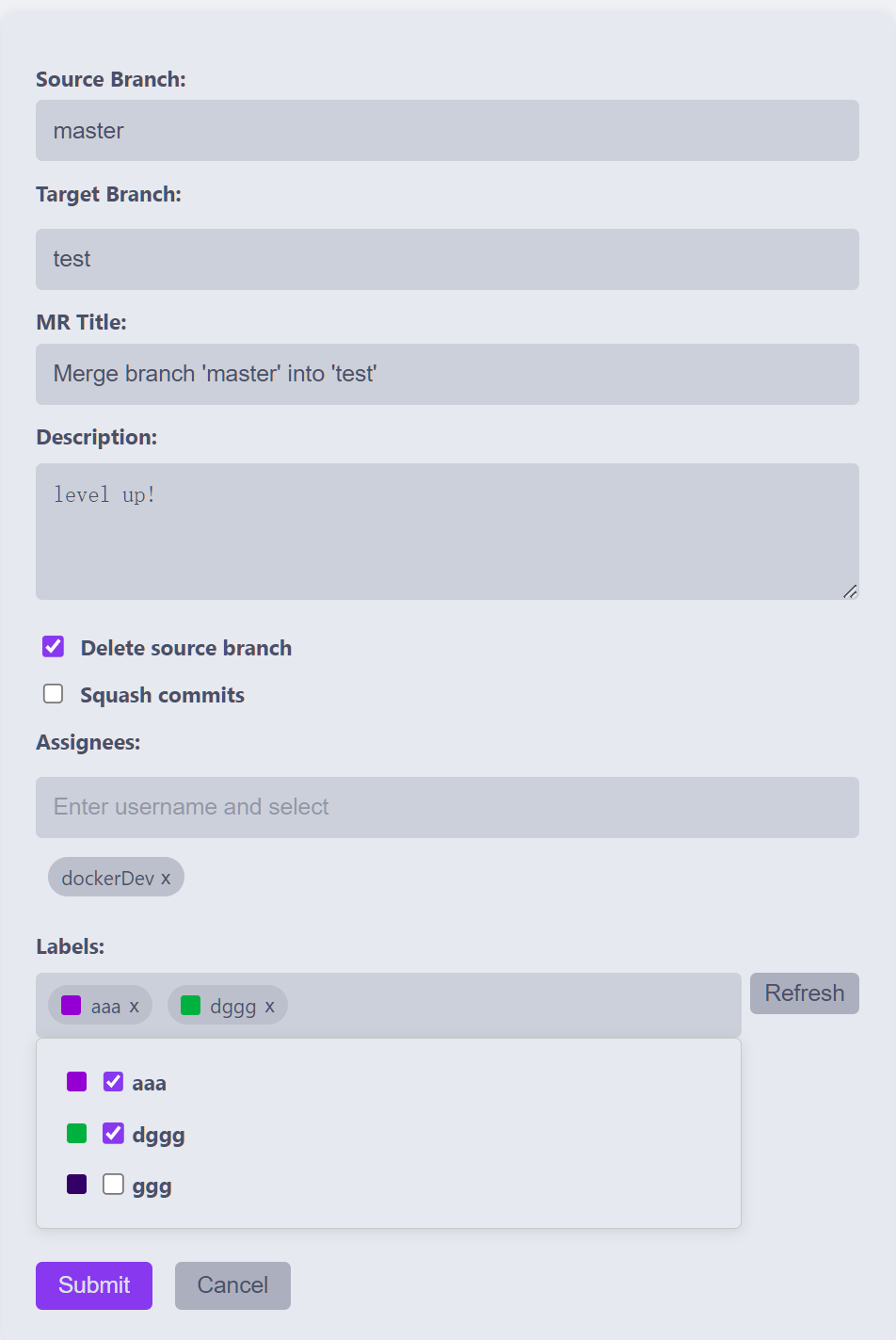
Add UI interface for creating merge requests.

Quickly search and select target branches, assignees, and automatically read tag lists in the UI interface.

Only support old version of Gitlab (about 10.x to 14.x).

Features

  • Supports both Gitlab.com and Gitlab CE/EE servers.
  • Configurable default remote (e.g. origin) and branch (e.g. master).

Create MR(UI)

Create an MR from VS Code by providing a branch name and commit message.

Workflow

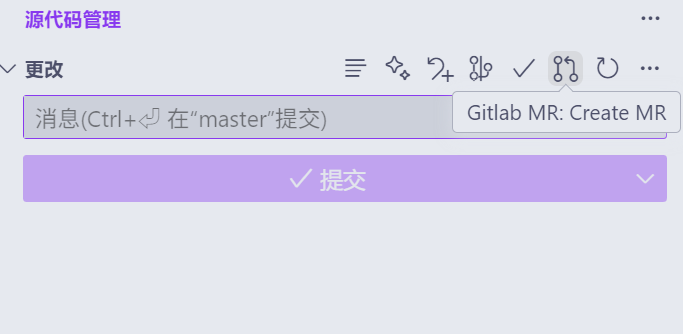
  1. Click the 'Create MR' icon in the Source Control (SCM) view's title bar. image
  2. Enjoy the UI! image

Extension Settings

  • gitlab-mr.accessToken: Access token to use to connect to the Gitlab.com API. Create one by going to Profile Settings -> Access Tokens.
  • gitlab-mr.accessTokens: Access token to use to connect to Gitlab CE/EE APIs. Create one by going to Profile Settings -> Access Tokens.
  • gitlab-mr.apiVersion: Gitlab API version. Note, v4 is the only supported API version, but this setting can be used as an escape hatch in case your Gitlab instance is still on v3.
  • gitlab-mr.targetBranch: Default target branch for MRs (defaults to master).
  • gitlab-mr.targetRemote: Default target remote for MRs (defaults to origin).
  • gitlab-mr.useDefaultBranch: When creating MRs, use default_branch set in repository as target branch.;
  • gitlab-mr.autoOpenMr: Open newly created MRs in your browser.
  • gitlab-mr.openToEdit: Open and edit newly created MRs in your browser.
  • gitlab-mr.removeSourceBranch: When creating MRs, enable the option to remove the source branch after merging.

Access Tokens Example

"gitlab-mr.accessTokens": {
    "https://gitlab.domain.com": "ACCESS_TOKEN_FOR_GITLAB.DOMAIN.COM"
}

more usage

Install from marketplace https://marketplace.visualstudio.com/items?itemName=JustLookAtNow.gitlab-mr-ui

About

gitlab mr creater for vscode

Resources

Readme
MIT license
Activity

Stars

1 star

Watchers

1 watching

Forks

1 fork
Report repository

Releases

Packages

Used by

Contributors

Languages

You are visitor 01402520 — GeezerVison does not store the pages you look up.
Best viewed with Netscape Navigator 4.7 or Internet Explorer 6 at 800×600. No cookies required.