GeezerVison is showing github.com — GitHub - KnIfER/AndroidVectorPathTweaker: Android Sutido Plugin to Modify SVG Vectors and more ! ...
Folders and files
| Name | Name | Last commit message | Last commit date |
|---|
| | | |
| | | |
| | | |
| | | |
| | | |
| | | |
| | | |
| | | |
| | | |
|
Repository files navigation
Android customize vector drawable plugin. support multiple pathData grammars, no need to manually modify the data. (中文文档)
- Support to translate, scale, flip and transpose android vector drawables.
- Support modify chained path data。(M...zM...z).
- Revert modifications by a single click if needed(revert).
- Modify continuously. Click 'rebase' and all afterward mods will be based on the current state.
- Realtime updating and previewing.
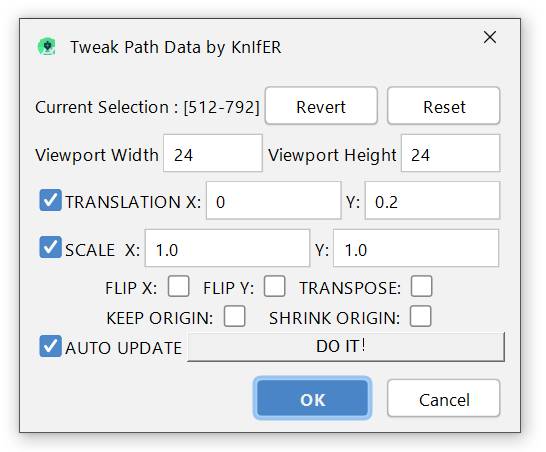
- Step 1: Open AndroidStudio or IDEA.
- Step 2: Preferences -> Plugins -> Browse repositories...
- Step 3: Search VectorPathTweaker and install. Then restart IDE.
- Step 1: Download AndroidLocalizePlugin.zip file.
- Step 2: Open AndroidStudio or IDEA.
- Step 3: Preferences -> Plugins -> Install plugin from disk...
- Step 4: Select VectorPathTweaker.zip and Restart IDE.
- Step 1: Open one xml vector drawable.
- Step 2: Select the part of pathData where you wants to modify.
- Step 3: Right click. In the context menu select 'Tweak Vector Path'.
- Step 4: Make sure you have the same viewport size in the tweaker dialog .
- Step 5: Open AndroidStudio's Preview Panel and adjust the vector to your need!
Copyright 2020 KnIfER. https://github.com/KnIfER
Copyright 2018 Airsaid. https://github.com/airsaid

Licensed under the Apache License, Version 2.0 (the "License");
you may not use this file except in compliance with the License.
You may obtain a copy of the License at

   http://www.apache.org/licenses/LICENSE-2.0

Unless required by applicable law or agreed to in writing, software
distributed under the License is distributed on an "AS IS" BASIS,
WITHOUT WARRANTIES OR CONDITIONS OF ANY KIND, either express or implied.
See the License for the specific language governing permissions and
limitations under the License.
About
Android Sutido Plugin to Modify SVG Vectors and more ! ...
Topics
Resources
Stars
17 stars
Watchers
1 watching
Forks
