

A native macOS capture tool — screenshots, recordings, annotation, pins, and on-device OCR — built to cost nothing while it waits in the menu bar.
一个原生 macOS 截图工具:截图、录屏、标注、贴图和端侧 OCR,常驻菜单栏时几乎不耗电。
English | 简体中文
Website & Demo · Why OhMyShot · Features · Power budget · Getting started · Contributing · Changelog
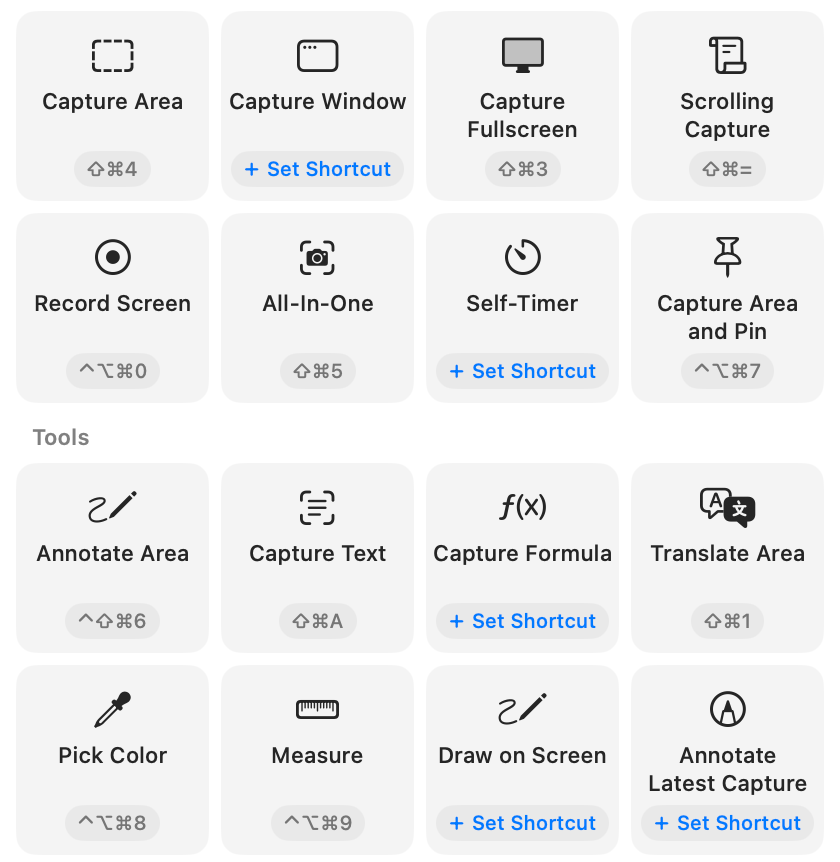
One click on the menu bar icon opens the capture launcher.
| In the menu bar it runs no timers, polls nothing, and holds no capture streams or event taps: 0 wakeups and 26 MB after launch. Every number is measured and published, misses included. | Copy the text from any part of the screen, search your capture history by it (Chinese included), translate it in place, and read tables, formulas, and charts with optional on-device model packs. |
| Captures, recognized text, file names, and clipboard contents stay on your Mac by default — they leave your Mac only when you explicitly share them (via email, macOS Share, or uploads to storage you own) or enable cloud OCR with your own API key, and are never sent to MMFoundation. Release builds send anonymous daily usage counts (on by default since v0.3.0, one-click opt-out in Settings › General › Usage Data; Privacy Notice). | Swift 6, SwiftUI, and AppKit, following macOS conventions down to permissions and VoiceOver. GPL-3.0, with no subscription and no paid upgrades. |
Area, window (with or without its shadow, on a background), full display, the previous area, and an interactive
self-timer (D or 1–5 on screen, Esc to cancel). Areas can
cross displays, and the screen freezes while you choose. All-In-One sets up any of them from one bar.
|
A card for each capture (dockable to any of the four screen corners) to copy, save, mark up, pin, upload, or drag out, plus a searchable history with text-in-image search, date and app filters, multi-select, 5-second Undo Trash, and multi-column collages. |
An editor, or drawing straight on the frozen selection: arrows, shapes with adjustable corner radius, text, a
highlighter that snaps to text, counters, Magnifier, Erase, blur and pixelation (with redaction suggestions from
recognized text), tool locking, cross-editor copy/paste, crops, backgrounds, and .ohmyshot project
files you can open again.
|
Capture Text copies text from any area (stripping narrow code-editor gutter line numbers); the zoomable Recognized Text window supports inline table editing with CSV/TSV export, link and QR/barcode actions, and Translation Lens over the original image. Optional on-device model packs improve CJK accuracy, convert formulas to LaTeX with configurable delimiters, and read tables and charts (with custom download mirror support). How it works → |
Screen, window, or area to MP4 or GIF (with frame-rate and size presets), with system audio, live microphone meter
and mute, camera (with background blur or removal), clicks, and keys. Studio edits recordings with timeline audio
waveforms, master fades, non-destructive crop, draggable speed stretches (0.5×–4×) and cuts, cursor-following or
fixed zooms, and portable .omsstudio project packages. On macOS 27, with Replay on, the last 15
seconds can be saved at any time.
|
Always-on-top pictures, text, and wide-gamut colors (restore up to 5 recently closed pins); a screen color picker and a pixel ruler that snaps to edges. Edge snapping → |
| Four-direction scrolling (down, up, left, or right) by hand or with adjustable-speed Auto-scroll, stitched into one long picture. |
Uploads to your own S3-compatible (including Cloudflare R2), WebDAV, or custom HTTP storage (ShareX
.sxcu import supported); printing, email, and the Share menu.
|
Drop-in CleanShot X URL compatibility: swap cleanshot:// to ohmyshot:// in existing
scripts and workflows, plus OhMyShot commands (capture-formula, annotate-area,
translate-area, pick-color, measure, draw-on-screen,
save-replay, pin-from-clipboard, toggle-pins), Shortcuts and Spotlight
actions, and a Raycast extension. URL commands →
|
English, Simplified and Traditional Chinese, Japanese, Spanish, and French. Add a translation → |
OhMyShot also appears in other apps' Share menu (to mark up, pin, or recognize text in a picture; switch it on in System Settings › General › Login Items & Extensions › Sharing) and in Finder's Open With for images.

Measure snaps to UI edges in real pixels — try Capture Area, OCR, Measure, and Pick Color live in your browser →
Every milestone is gated on measured numbers. The latest, with Debug builds on an Apple silicon Mac running macOS 27 beta (a 6K ultrawide beside a built-in XDR display):
| Metric | Target | Measured |
|---|---|---|
| Idle CPU after launch (60 s average) | 0.0% | 0.06–0.09%, from macOS updating the menu bar; no timers of the app's own |
| Idle wakeups | < 1 per second | 0 ✅ |
| Memory after launch | < 30 MB | 26 MB ✅ |
| Memory after use, idle | < 60 MB | 57 MB after recording ✅; 68 MB after reading formulas and tables ❌ |
| Shortcut → selection overlay | p95 < 50 ms | p95 9.8 ms ✅ |
| Shortcut → frozen picture | p95 < 150 ms | p95 47.7 ms ✅ |
| Text from a 1000 × 600 px area | < 300 ms | p50 187 ms ✅, p95 370 ms ❌ |
| Recording 1080p at 60 fps | < 15% CPU | 15.7% ❌ |
| App size, without model packs | < 30 MB | 37 MB installed (v0.5.0 release: 14.5 MB DMG / 18.2 MB ZIP) ❌ |
Model packs run in a helper process that exits when it is done, so they cost the app's own memory nothing. The full
log, with methods, dates, and caveats, is in Docs/perf.md; measure your own Mac with
Scripts/power-sample.sh and Scripts/latency.sh.
- Download
OhMyShot-<version>.dmgfrom ohmyshot.org or the latest GitHub release. - Open it and drag OhMyShot onto Applications.
- Open OhMyShot. A getting-started guide walks you through allowing Screen Recording and your first capture.
Releases are signed with a Developer ID and notarized by Apple, and the app keeps itself up to date from then on (Settings › General › Updates).
- macOS 26 or later on Apple silicon
- Xcode 27 or later (the app is built with the macOS 27 SDK), with its Metal Toolchain (the VLM pack's MLX kernels
need it):
xcodebuild -downloadComponent MetalToolchain - XcodeGen:
brew install xcodegen
git clone https://github.com/MMFoundation/OhMyShot.git
cd OhMyShot
Scripts/bootstrap.sh   # generate OhMyShot.xcodeproj from project.yml
Scripts/run.sh         # build the Debug app ("OhMyShot Dev") and launch it
Scripts/test.sh        # run both packages' unit tests (OhMyShotKit, OhMyShotVLM)
build.sh and run.sh regenerate the project when project.yml changes. Debug builds use their own bundle
identifier (….ohmyshot.dev), URL scheme (ohmyshot-dev://), and default shortcuts (⌃⌥⌘ plus a digit), so they
can run next to a release build without fighting over permissions or shortcuts.
macOS ties the Screen Recording permission to the app's code signature, so an ad-hoc signed build looks like a new
app after every rebuild and loses it. To keep it, copy Config/Signing.local.xcconfig.example to
Config/Signing.local.xcconfig and fill in your Apple Development team (a free personal team works).
Tip
After you grant Screen Recording, relaunch the app: macOS applies the permission only to new processes.
Scripts/reset-tcc.sh clears the Debug build's permissions when you want to start over.
Release builds check for updates with Sparkle about every six hours (Settings › General ›
Updates), fetching the EdDSA-signed appcast via www.ohmyshot.org (which streams the GitHub release appcast
unchanged, with a direct GitHub fallback on transport failure). Nothing downloads or installs before you confirm it;
Debug builds never check. How releases are made, signed, and notarized is in Docs/release.md.
Settings › General › Usage Data is on by default since v0.3.0 and can be turned off there at any time; Reset to Default Settings keeps that choice. See the full Privacy Notice for retention details. While it is on, OhMyShot sends www.ohmyshot.org
one report for each UTC day, updated as the day goes on, under a random ID that changes each UTC day. It says:
- how many times each feature was used (named as its keyboard shortcut is,
captureArea), and whether from a shortcut, the menu bar, or automation (the URL API and Shortcuts); - what came of it: screenshots, recordings, and text recognitions kept, uploads finished or failed, saves and copies that failed, and captures stopped for want of Screen Recording permission;
- the app version, macOS version (
26.4), chip (M3 Pro), number of displays, and the app's language; - whether Quick Access, copying, saving, and uploading after a capture are on, the screenshot format, and how long captures are kept;
- how long ago OhMyShot first ran, in spans (its first day, a week, a month, three months, a year), from the age of its Application Support folder;
- on how many of the 28 days before it something was used, counted on the Mac from the days it has seen while the setting was on.
Reports exclude captures, recognized text, file and window names, clipboard contents, and persistent device identifiers. The website merges each report into daily totals, every detail counted on its own, and keeps the daily ID only to merge retries. When the app runs, it retries unsent counts from the last seven UTC days and drops older reports. Turning the setting off stops sending and clears the local report file, with the days it was used. Debug builds leave the reporting service inactive.
| Document | What it covers |
|---|---|
| Docs/keyboard.md | Every key, from the capture overlay to the editor, pins, and History |
| Docs/automation.md | URL commands, Shortcuts, Spotlight, and the Raycast extension |
| Docs/ocr.md | How text recognition is layered, and its benchmark |
| Docs/capture-picker.md | The magnifier at the pointer while you choose an area |
| Docs/measurement-snapping.md | The pixel ruler's edge snapping |
| Docs/localization.md | Adding or improving a translation |
| Docs/perf.md | Every performance and power measurement |
| Docs/release.md | Building, signing, and notarizing a release |
| PRODUCT.md and DESIGN.md | What OhMyShot is for, and how it should look and feel |
Contributions are welcome, whether code, translations, bug reports, or measurements from a Mac other than ours.
- Report a bug or ask for a feature in Issues. Include your macOS version, your displays, and the steps that lead to the problem. For security vulnerabilities, please follow SECURITY.md instead of opening a public issue.
- Ask a question or talk with us on MMFoundation's Discord.
- Translate. You don't need Xcode: Docs/localization.md explains how.
- Send a pull request. Run
Scripts/test.shbefore you push, and write commit messages as Conventional Commits (feat(ocr): …,fix(studio): …). Changes that could affect idle cost or latency should come with numbers fromScripts/power-sample.shorScripts/latency.sh. Read PRODUCT.md and DESIGN.md before larger changes.
OhMyShot is a project of MMFoundation, which takes sponsorship on Open Collective, where every contribution and every expense is public. Sponsors appear here: a company with its logo and a link, a person with their avatar. Sponsoring unlocks nothing; OhMyShot is free and complete for everyone.
OhMyShot is built with Sparkle, KeyboardShortcuts, MLX Swift, and Swift Numerics. Their notices are in App/Acknowledgments.md.
OhMyShot is free software, licensed under the GNU General Public License v3.0. Copyright © 2026 OhMyShot contributors.
- linux.do —— Where possible begins
OhMyShot is a project of MMFoundation · Back to top ↑