GV

GeezerVison

The World Wide Web, restored to 800 pixels of glory.

Home|About|Gaming cabinet|Archives|How it works|Starter sites

On this site

  • Sign in
  • ActionsCI/CD and automation
  • CodespacesCloud development environments
  • All Features
  • Documentation
  • Training
  • Certifications
  • Build with Copilot
  • Customize Copilot
  • Integrations
  • Trending repos
  • GitHub Sponsors
  • Developer articles
  • Enterprises

This view

  • Original page
  • New address

GeezerVison is showing github.com — GitHub - Neuraxio/New-Empty-Python-Project-Base: The Perfect Python Project Template. Bored of coding anew the same thing for your new Python projects? Here is what you need. Click below on the "use this template" green button to start using it instantly. Rename the "project" folder and all references to this folder to customize your project name.

BranchesTags
Open more actions menu

Latest commit


History

29 Commits
29 Commits

Folders and files

NameName
Last commit message
Last commit date
.github/workflows
.github/workflows
 
 
project
project
 
 
testing
testing
 
 
.gitignore
.gitignore
 
 
LICENSE
LICENSE
 
 
README.md
README.md
 
 
how_to_use_template.jpg
 
 
requirements.txt
requirements.txt
 
 
run_tests.sh
run_tests.sh
 
 
setup.cfg
setup.cfg
 
 
setup.py
setup.py


Repository files navigation

New Empty Python Project Base

This is just what you need to start a new Python project.

Simply use this project template to start new python projects.

Using this template for your project (how to)

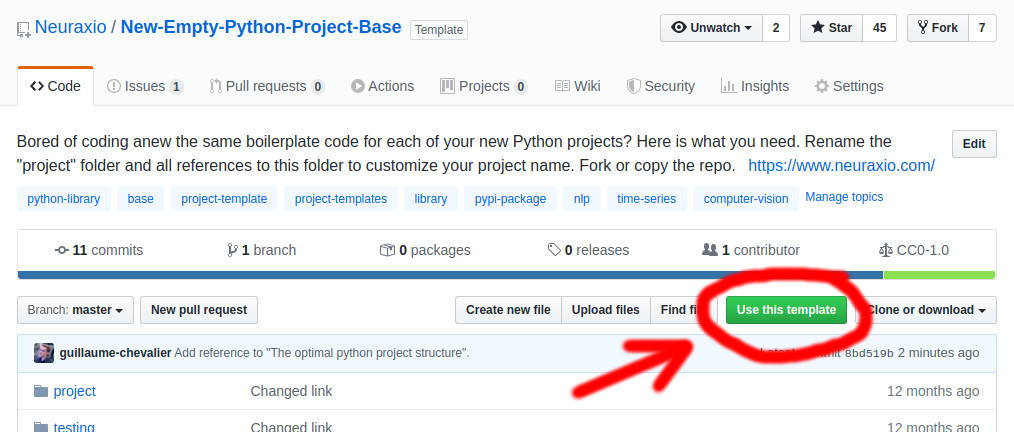
You can now automatically create a new project based on this template by clicking here on Use this template, or by clicking on the button above in the repo, as depicted in the image below. If you don't use GitHub, you may as well simply clone this repository.
Adapting it for your own project

  1. Rename the project/ folder (and all references to this folder in other files) to customize your project name that is currently named project as per the folder's name.
  2. You can run tests by running pytest in the root, or by running python3 setup.py test. Code coverage is enabled with pytest-cov.
  3. Edit the setup.py of your project to make it truly yours. Remove my email and info from here and put your own info. You may as well delete the full setup.py file instead of adapting it if you don't intend to publish your project on pip nor on conda as a package.
  4. Start coding in your now-renamed project folder and add some more tests under the testing/ folder!

If building a package: Deploying your new package to PyPI

Upload your project as a package on PyPI, the Python Package Index, to make it available on pip! (optional)

To do that, read my short step by step guide on How to deploy a new package (or version of package) to PyPI.

If building a REST API app (e.g.: SaaS): Structuring your software architecture's layers

I have recorded here my tips and tricks, what to look for, and how to structure your application for it to be clean in terms of software architecture: https://youtu.be/K4QN27IKr0g?t=1211

Understanding how this template works

The article The optimal python project structure by Luke Tonin does a good job at explaining how a template like the present one works. The present template is a bit more complete and complex than in the article, thought, as it already includes a test suite (including a starter test example), and a thorough setup.py file for your project to be properly packaged.

There is also my video on software architecture that can help, in which I do the overview of a full project based on this template, in terms of theoretical software architecture rather than practical how-to use the template.

License

CC0

To the extent possible under law, Guillaume Chevalier and Neuraxio Inc. have waived all copyright and related or neighboring rights to this work.

Citations that link to this repository will be appreciated, but are not required.

About

The Perfect Python Project Template. Bored of coding anew the same thing for your new Python projects? Here is what you need. Click below on the "use this template" green button to start using it instantly. Rename the "project" folder and all references to this folder to customize your project name.

www.neuraxio.com/

Topics

basecomputer-visionlibrarynlpproject-templateproject-templatespypi-packagepython-librarytime-series

Resources

Readme
CC0-1.0 license
Activity
Custom properties

Stars

79 stars

Watchers

3 watching

Forks

15 forks
Report repository

Releases

Packages

Used by

Contributors

Languages

You are visitor 01402503 — GeezerVison does not store the pages you look up.
Best viewed with Netscape Navigator 4.7 or Internet Explorer 6 at 800×600. No cookies required.