

Popoto.js is a JavaScript library built with D3.js designed to create interactive and customizable visual query builder for Neo4j graph databases.
The graph queries are translated into Cypher and run on the database. Popoto also helps to display and customize the results.
An application is composed of various components, each one can be included independently anywhere in a web application. It just needs to be bound to a container ID in an HTML page and the content will be generated automatically.
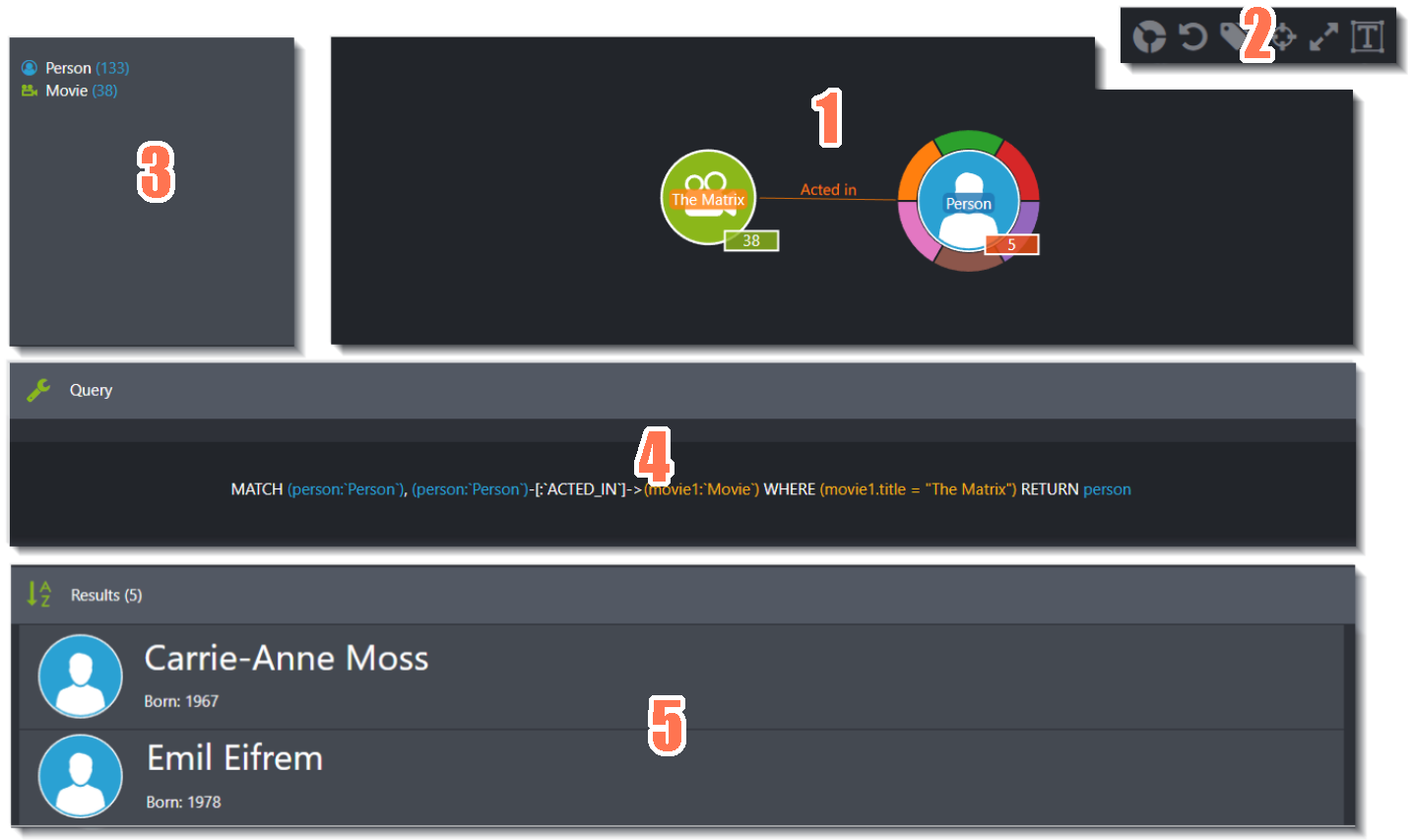
A common example application contains the following components:
 |
Graph component is an interactive interface designed to build queries for non technical users, the graph is made of selectable nodes connected to each other by links. |
 |
Toolbar is a list of actions available in the graph container. |
 |
Taxonomy container contains the list of searchable labels in the database. |
 |
Query viewers container shows different representation of the corresponding query defined in the Graph component. |
 |
Result container displays the results matching the graph query. |
For NPM, npm install popoto For Yarn, yarn add popoto.
Otherwise, download the latest release.
You can also load directly from unpkg or jsDelivr
Example:
<!-- Add default CSS reference -->
<link rel="stylesheet" href="https://unpkg.com/popoto/dist/popoto.min.css">
<!-- Or -->
<link rel="stylesheet" href="https://cdn.jsdelivr.net/npm/popoto/dist/popoto.min.css">
<!-- Add Popoto script reference, will default to popoto.min.js -->
<script src="https://unpkg.com/popoto"></script>
<!-- Or -->
<script src="https://cdn.jsdelivr.net/npm/popoto/dist/popoto.min.js"></script>
For source version:
<!-- Add Popoto script reference -->
<script src="https://unpkg.com/popoto/dist/popoto.js"></script>
<!-- Or -->
<script src="https://cdn.jsdelivr.net/npm/popoto/dist/popoto.js"></script>
- Edit the "index.html" file, by default this application is based on Neo4j movie graph example.
- Create your driver instance following Neo4j developer guide: https://neo4j.com/developer/javascript/
const driver = neo4j.driver(
    "neo4j://dff437fa.databases.neo4j.io", // Unencrypted
    //"neo4j+s://dff437fa.databases.neo4j.io", //Encrypted with Full Certificate
    neo4j.auth.basic("popoto", "popotopassword"),
    //{disableLosslessIntegers: true} // Enabling native numbers
);
- Change the value of
popoto.runner.DRIVER = driverto your running server driver instance. - If needed you can change the default session creation to add parameters:
popoto.runner.createSession = function () {
    return runner.DRIVER.session({defaultAccessMode: "READ"})
};
- Update the list of labels defined in "popoto.provider.node.Provider" definition. All node labels to display in the graph should be added in this list.
- Add any other customization you need in this file. See Nhogs/popoto-examples for detailed configuration examples.
- Open index.html file in your preferred web browser to see the result.
- Click on a node to display and select a value, click on relationship arcs around nodes to navigate in relations uses right click to remove a value and ctrl+click to negate a node. See all Basic actions for details
See an explained example page source in Getting started.