GV

GeezerVison

The World Wide Web, restored to 800 pixels of glory.

Home|About|Gaming cabinet|Archives|How it works|Starter sites

On this site

  • Sign in
  • ActionsCI/CD and automation
  • CodespacesCloud development environments
  • All Features
  • Documentation
  • Training
  • Certifications
  • Build with Copilot
  • Customize Copilot
  • Integrations
  • Trending repos
  • GitHub Sponsors
  • Developer articles
  • Enterprises

This view

  • Original page
  • New address

GeezerVison is showing github.com — GitHub - NoBey/linux-dash-zh: 一个漂亮, 简单的基于web的linux服务器监控面板

BranchesTags
Open more actions menu


Latest commit


History

727 Commits
727 Commits

Folders and files

NameName
Last commit message
Last commit date
css
css
 
 
img
img
 
 
js
js
 
 
server
server
 
 
templates
templates
 
 
.DS_Store
.DS_Store
 
 
.editorconfig
.editorconfig
 
 
.gitignore
.gitignore
 
 
LICENSE.md
LICENSE.md
 
 
README.md
README.md
 
 
composer.json
composer.json
 
 
demo.html
demo.html
 
 
favicon.ico
favicon.ico
 
 
index.html
index.html
 
 
install.sh
install.sh
 
 
linux-dash.png
linux-dash.png
 
 
package.json
package.json
 
 
python-server.py
python-server.py


Repository files navigation

linux-dash 的汉化版

原地址: https://github.com/afaqurk/linux-dash


v2.0
适用于linux系统的简单且开销较低的Web仪表板

演示  |  文档
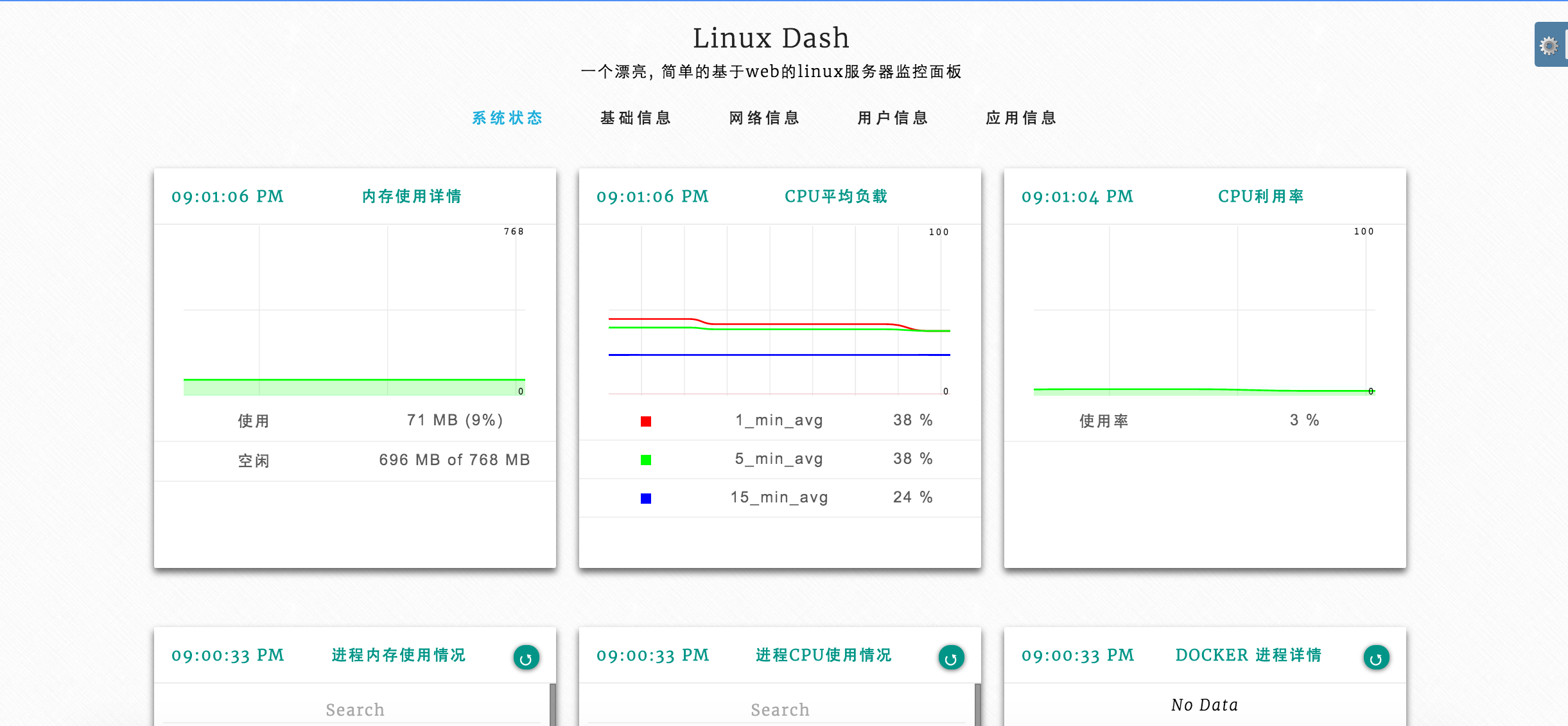
Linux Dash中文版的截图

Linux Dash的截图

特色

  • 小巧 ----- 仅占用硬盘400KB (不计.git)!
  • 纯朴 ----- 简约、美观的仪表板
  • 简易 ----- 嵌入式安装
  • 多元 ----- 从Node.js、Go、Python、PHP中选择堆栈

安装

第1步

## 1. 克隆仓库
git clone --depth 1 https://github.com/NoBey/linux-dash-zh.git

## 2. 转到克隆的目录
cd linux-dash-zh/server

或者,如果您希望手动下载:

## 1. 下载.zip
curl -LOk https://github.com/NoBey/linux-dash-zh/archive/master.zip && unzip master.zip

## 2. 转到下载并解压缩的目录
cd linux-dash-zh-master/server

第2步

请参阅有关首选服务器使用linux-dash-zh的说明 (已全部纳入):

  • Node.js(推荐)
  • Go
  • Python
  • PHP

如果使用Node.js

## 安装依赖
npm install --production

## 启动linux-dash(默认情况下在80端口上;可能需要sudo)
## 您可以使用环境变量`LINUX_DASH_SERVER_PORT`来更改它(例如`LINUX_DASH_SERVER_PORT=8080 node server`)。
## 或在下面的命令中提供--port标志
node index.js

或者你可以使用自动化安装脚本,它会提示你可能缺少的软件包并尝试安装(若无法安装则什么也不做):

cd /path/to/install
bash -c "$(wget -qO- https://github.com/NoBey/linux-dash-zh/raw/master/install.sh)"

如果使用Go

## 启动服务器(默认情况下在80端口上;可能需要sudo)
go run index.go

要构建二进制文件,请运行go build && ./server -h。有关二进制用法选项,请参见@tehbilly的此处注释

如果使用Python

# 启动服务器(默认情况下在80端口上;可能需要sudo)。
python ../python-server.py

如果使用PHP

  1. 确保已启用exec、shell_exec和escapeshellarg函数
  2. 将您的Web服务器指向linux-dash-zh目录
  3. 重新启动您的Web服务器(Apache、nginx等)
  • 对于设置PHP+Apache,请遵循Digital Ocean tutorial。
  • 有关设置nginx的帮助,请参阅@sergeifilippov的这个gist。

支持

issues

安全

强烈建议通过您选择的安全措施来保护所有linux-dash-zh的安装。

Linux Dash中文版没有任何安全性并不提供身份验证功能。

About

一个漂亮, 简单的基于web的linux服务器监控面板

linuxdash.nobey.cn

Resources

Readme
MIT license
Activity

Stars

73 stars

Watchers

3 watching

Forks

16 forks
Report repository

Releases

Packages

Contributors

Languages

You are visitor 01402792 — GeezerVison does not store the pages you look up.
Best viewed with Netscape Navigator 4.7 or Internet Explorer 6 at 800×600. No cookies required.