
Our training pipeline runs entirely on HDF5 files (Isaac Lab + MimicGen output). Open-source MyHDF5 was a good starting point for raw inspection but didn't fit robotics workflows, so we forked it into rebelHDF5 and added the features we actually needed to iterate on dataset quality.

Main view: tools and opened files on the far left, the HDF5 group/demo tree,
and the selected dataset plotted (here, obs/joint_states of a real SO-101
pick-and-place demo: the shoulder-pan joint over the 818-step episode). The same
chrome wraps every other tool below.
The viewer, Video Converter and Data Processing screenshots use a real SO-101 recording from the public Hugging Face dataset hwanghwijun/real-world-so101-cam123-hdf5 (
target_SO_ARM101_red_demo_2_3_4_cam123.hdf5). The Pose Trace, Cloth Distribution and Databricks screenshots show our Isaac Lab garment datasets.
-
Pose Trace. A 3D viewer that renders the EEF trajectory as a continuous path alongside the garment keypoints over time, so failed grasps, drift, or misaligned trajectories are spotted at a glance instead of from raw arrays. A second tab plots the supporting metrics — EEF-to-keypoint distances, garment fold-form distances, and EEF-vs-keypoint heights over the episode.
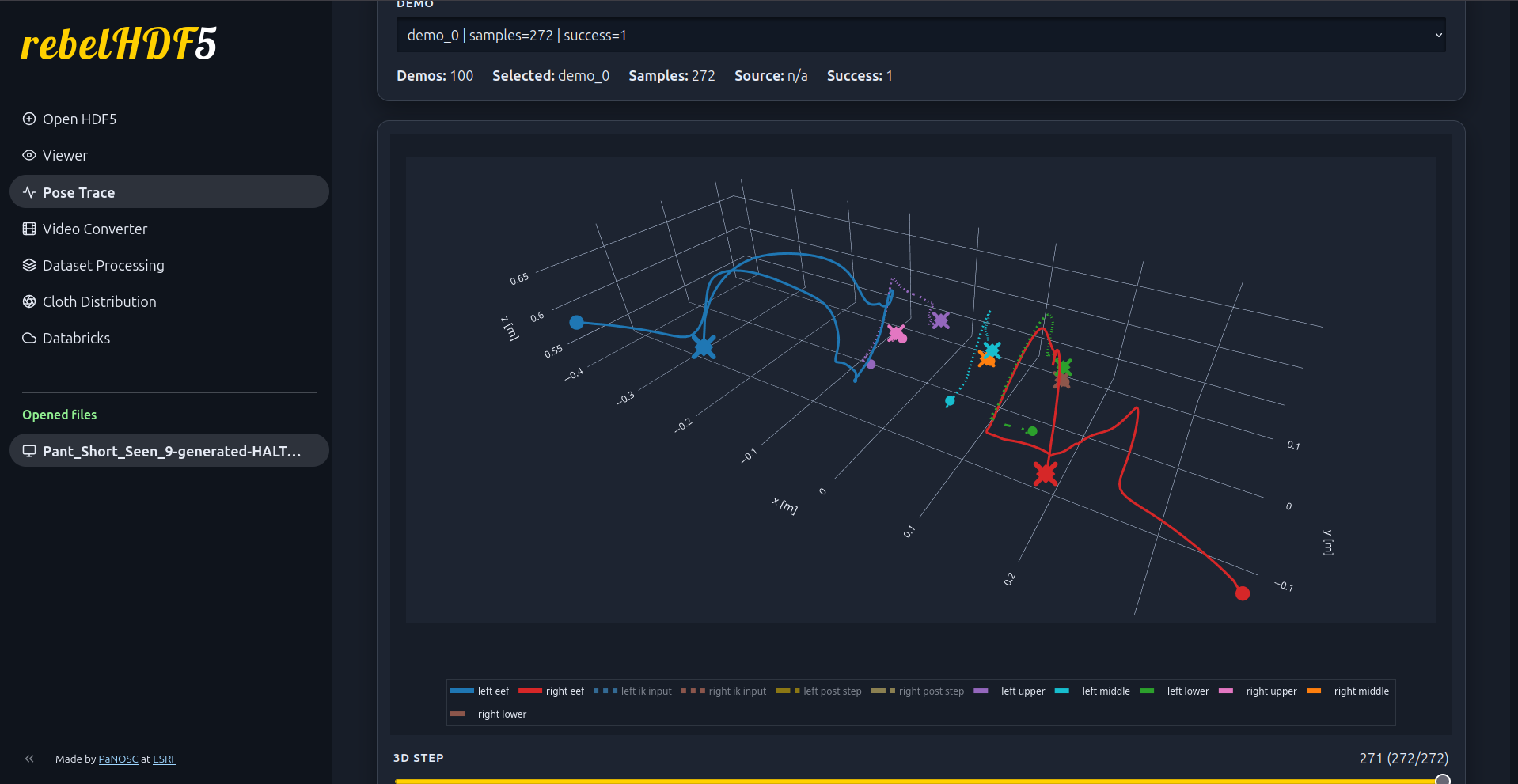
3D Pose Trace: left-arm (blue) and right-arm (red) EEF paths plotted with the six garment keypoints over time. The bottom slider scrubs through the episode step-by-step.
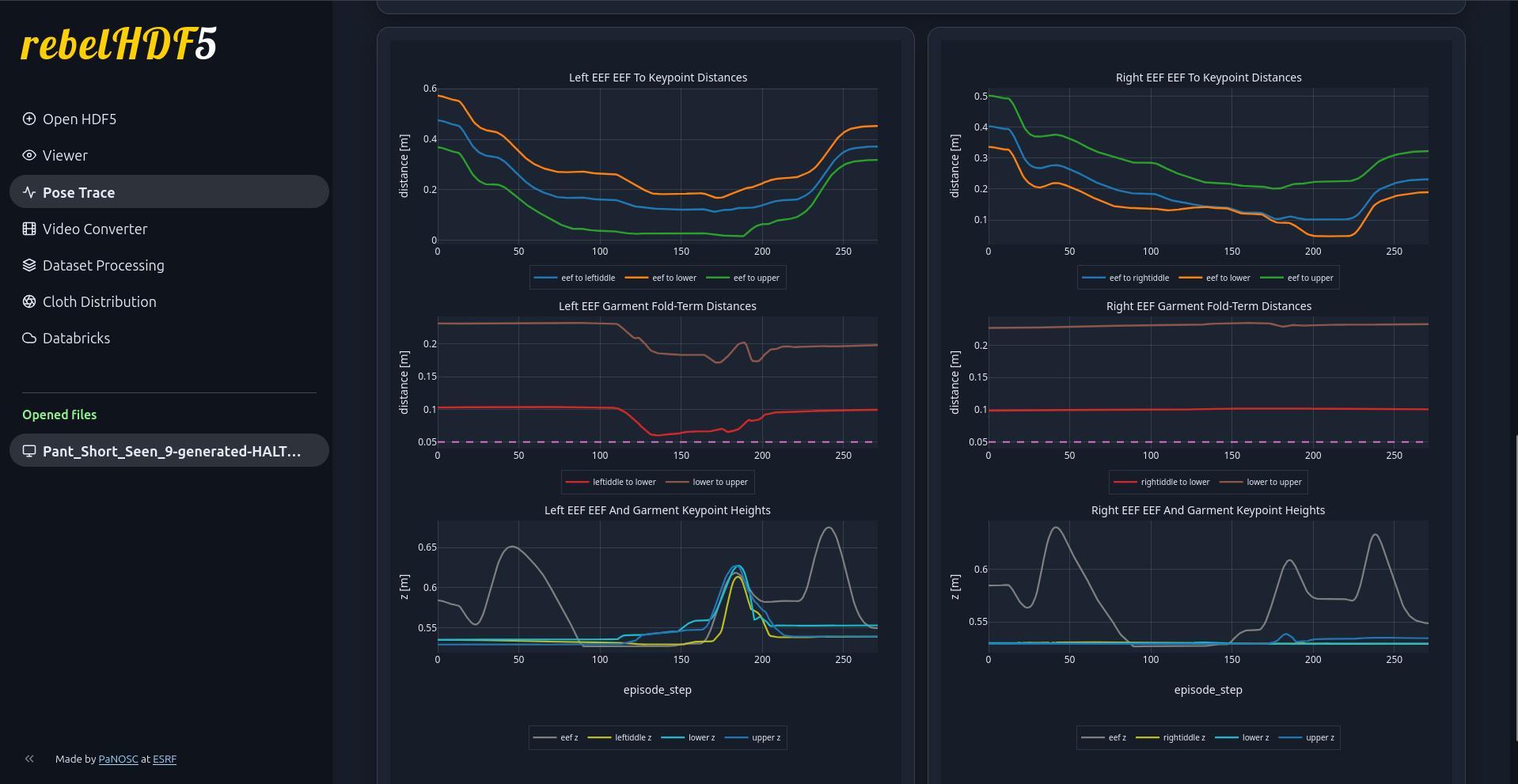
Pose Trace analytics tab: per-step EEF-to-keypoint distances (top), garment fold-form distances (middle), and EEF-vs-keypoint heights (bottom), broken out for the left and right arms.
-
Video Converter. Extracts the camera streams from an HDF5 episode and produces an MP4 directly in the browser — no external scripts, click-to-preview qualitative review of any sample.

Video Converter: the side camera (
obs/camera3_rgb) of a real SO-101 episode, placing a red cube inside the target square, played back inline at 30 FPS, with a Save Video button to export an MP4. -
Data Processing. In-browser cut / merge / append operations on episodes, with key-level selection so you can keep only the parts of an episode you want. Bad rollouts get pruned, multiple generation runs are merged, new batches are appended — all without leaving the viewer.
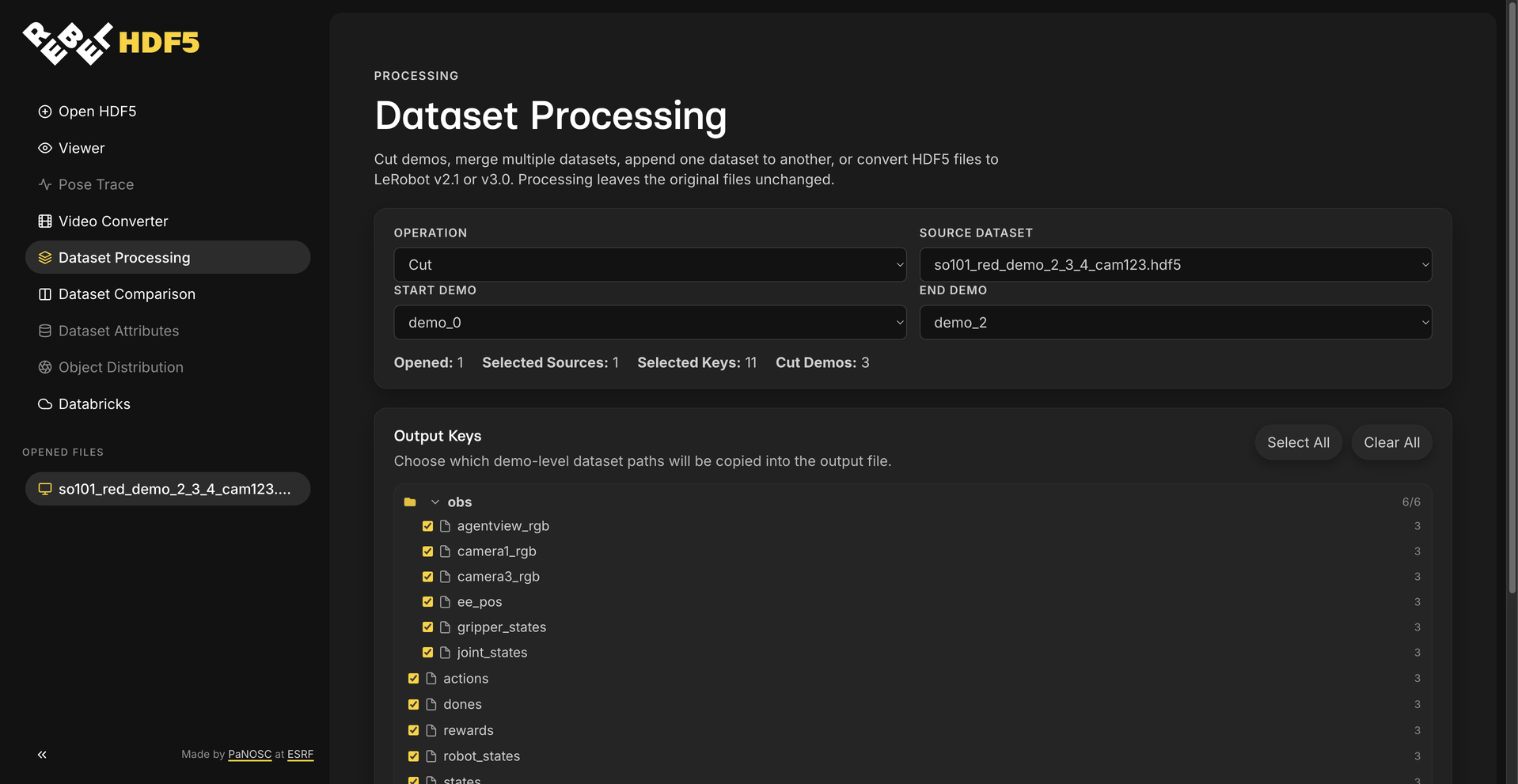
Data Processing: Cut operation across an episode range (
demo_0–demo_2) with key-level selection — pick exactly which dataset paths (e.g. one camera stream such asobs/camera3_rgb, orobs/joint_states) survive into the output file. -
Cloth Distribution Analysis. Scatter of init poses (success vs failed overlaid on the teleop set) plus failure-rate heatmaps over the (pos_x, pos_y) and (rot_x, rot_y) init space. This is what closes the loop with the Halton sampler — failure-prone regions become directly visible and can be re-sampled. Clicking any generated demo on the scatter draws an arrow back to the source teleop demo MimicGen pulled from, so failure clusters can be traced to specific source demonstrations.

Init-pose scatter: every generated demo plotted on the (init_pose_x, init_pose_y) plane, color-coded as success (green), failed (red), or teleop source (blue), so coverage and failure clustering are visible at a glance.

Click-to-trace: selecting a generated demo on the scatter draws arrows to the source teleop demo(s) MimicGen pulled from, with a tooltip listing the source path — so a failure cluster can be tied back to specific source demonstrations.
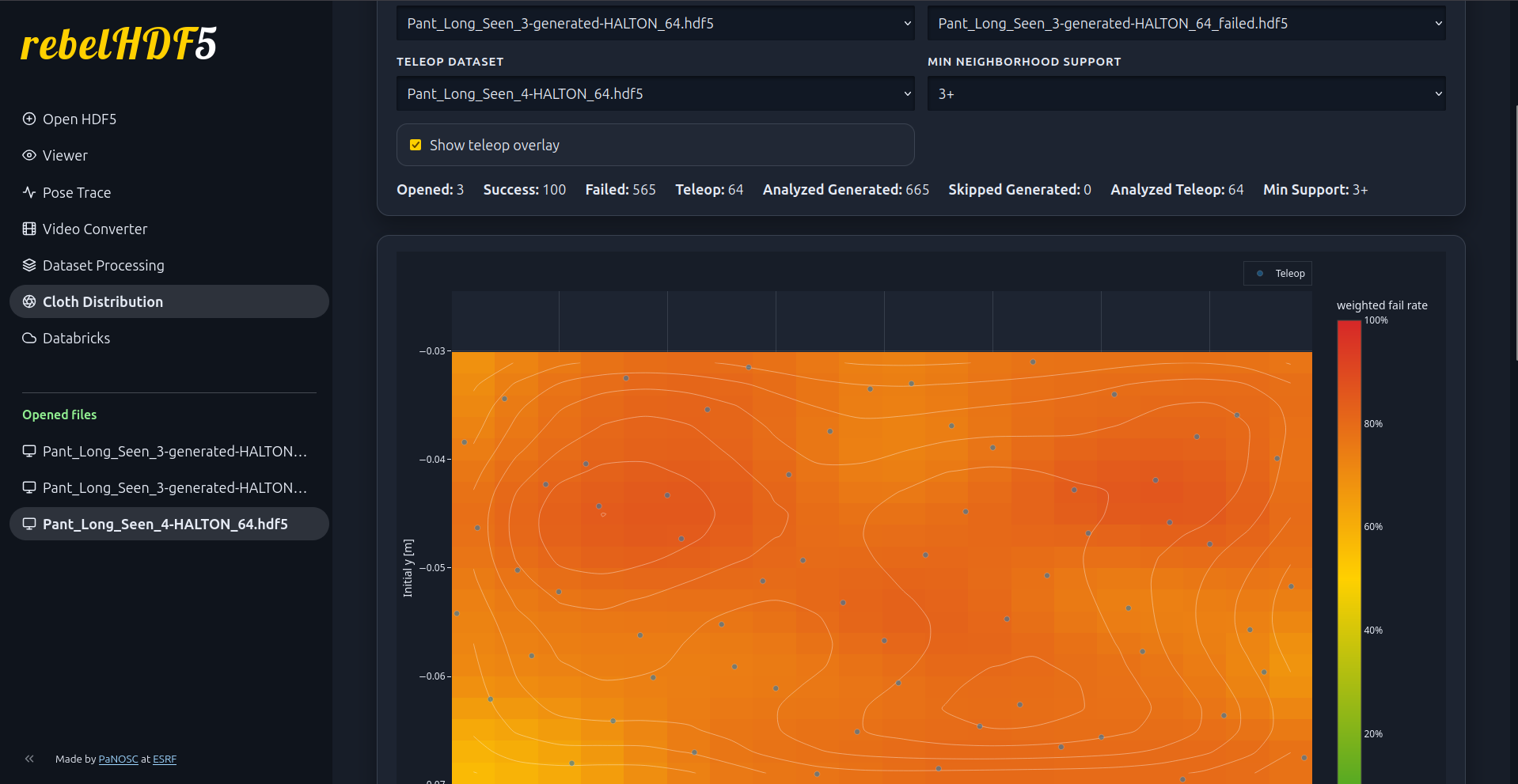
Failure-rate heatmap over the init-position space (pos_x, pos_y), aggregated from generated demos via nearest-neighbor pooling. Hotter cells = higher failure rate — directly drives where to oversample next.

Same heatmap projection over the init-rotation space (rot_x, rot_y), exposing orientation regimes the policy struggles with independently of position.
-
Databricks integration. Single interface for uploading/downloading datasets, managing secrets, and triggering pipelines, so local iteration and cloud runs share one workflow.
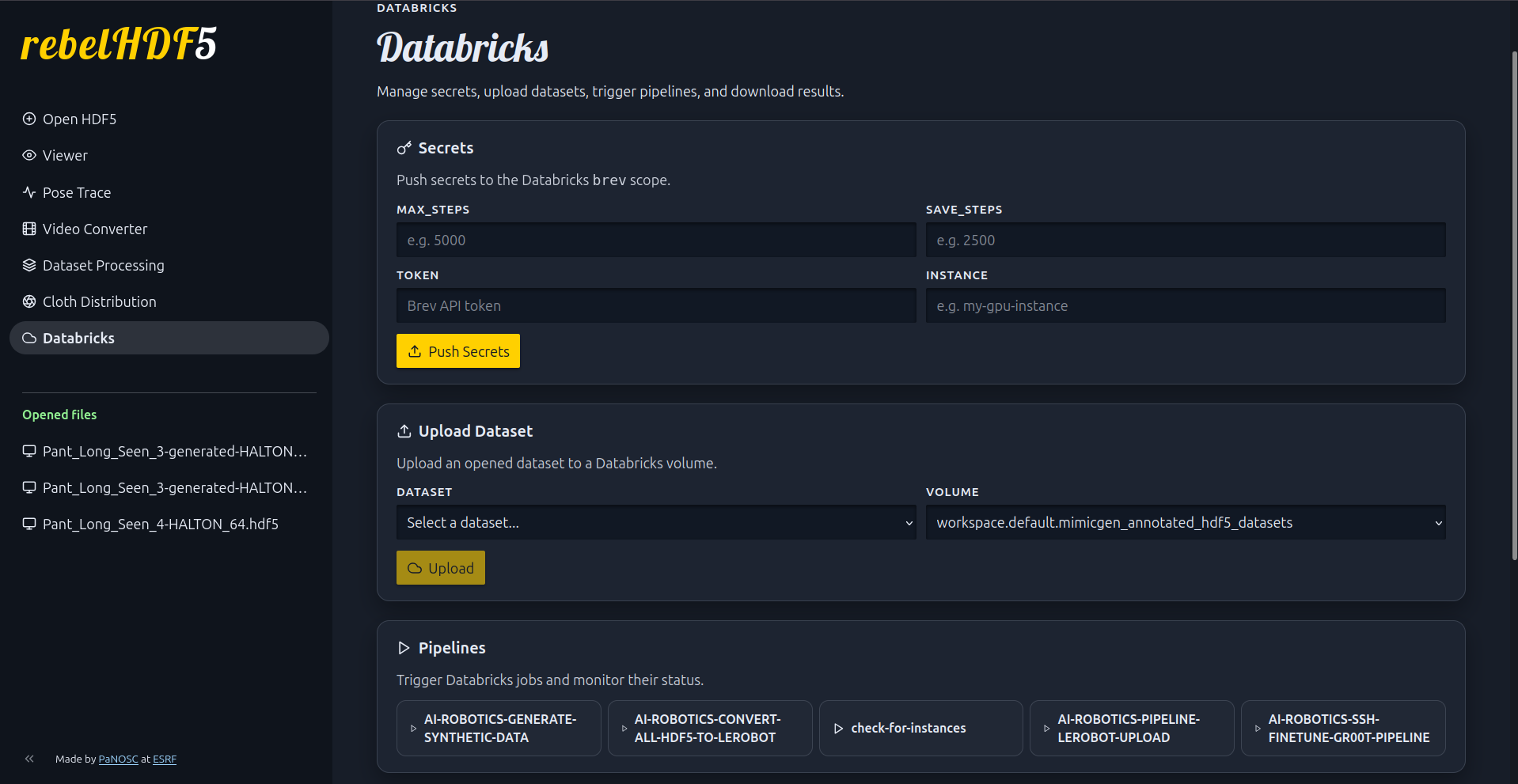
Screenshot 1 (Databricks page, top): the secrets and job-control section, where API tokens, the Databricks workspace URL, and rollout-step settings are pushed as scoped secrets; the same page also uploads the opened HDF5 file and triggers named jobs such as synthetic-data generation, HDF5→LeRobot conversion, and training.
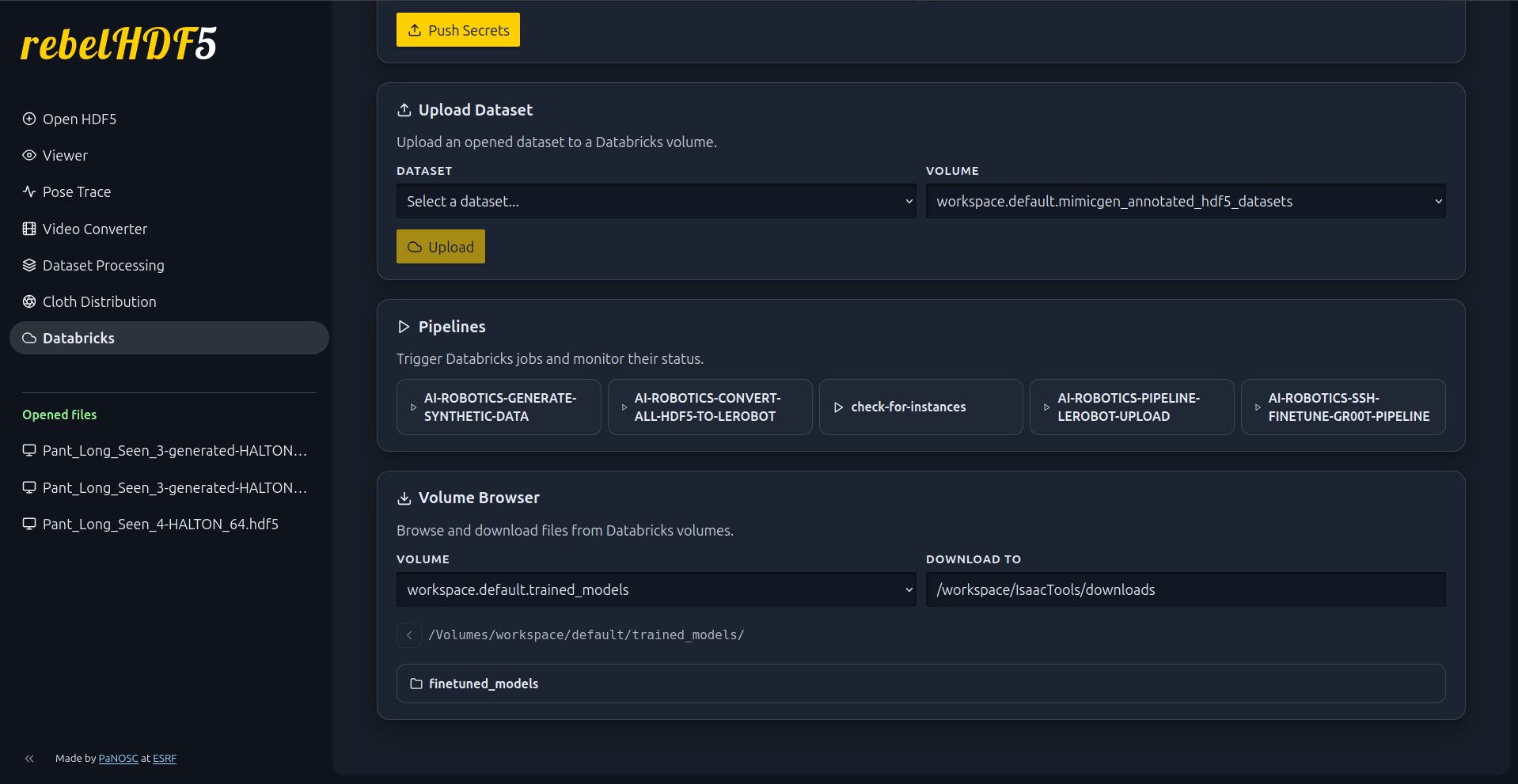
Screenshot 2 (Databricks page, bottom): the Volume Browser, which lets you inspect arbitrary Databricks volume paths such as
trained_models/and pull selected files back to a configurable local download directory with one click.


Net effect: HDF5s stopped being opaque archives and became interactive dataset assets, which is what made the synthetic pipeline above tractable to debug at scale.
Run the Electron desktop shell locally:
corepack pnpm desktop
This builds the Vite app, serves dist/ from an internal localhost server, and
starts scripts/backend_server.py from the Electron main process. Closing the
desktop app stops the Python backend.
If dist/ is already built and you only want to launch the desktop shell:
corepack pnpm desktop:run
data/
├── attrs/
│   ├── schema_version# version of the database schema
│   ├── fps# camera fps
│   ├── env_args# JSON-encoded environment metadata
│   ├── num_episodes# number of total episodes
│   ├── total_samples# number of total samples
│   ├── description# human format description
│   ├── obs/sample_phase# post_step for measured observations
│   └── articulations# articulation-specific schema metadata
│       └── articulation_name# replaced by the actual articulation name, e.g. robot
│           ├── joint_number# total number of joints in this articulation
│           ├── joints/units# units for actions/joints, e.g. radians
│           ├── joints/joint_indices# [[joint_name, column_index], ...] for actions/joints and obs/articulations/<name>/joint_position
│           ├── pose/frame# coordinate frame for actions/pose, e.g. env, world, robot
│           ├── pose/format# semantic format, e.g. xyz_quat_gripper
│           ├── pose/pose_order# full pose column order, e.g. ["x", "y", "z", "qw", "qx", "qy", "qz"]
│           └── pose/component_slices# EEF pose/gripper column slices in actions/pose; ranges are half-open [start, stop)
│
├── demo_<N>/
│   ├── attrs/
│   │   ├── num_samples# number of total samples
│   │   ├── success# True if episode success, False otherwise
│   │   └── seed# random seed used for env
│   ├── actions/
│   │   ├── pose# (T, A_pose) EEF pose + gripper actions; schema metadata lives in data.attrs/articulations/<name>/pose/*
│   │   └── joints# (T, total_joints) joint-space actions; schema metadata lives in data.attrs/articulations/<name>/joints/*
│   │
│   ├── initial_state/
│   │   ├── articulations/
│   │   │   └── articulation_name/
│   │   │       ├── joint_position# (1, J)
│   │   │       ├── joint_velocity# (1, J)
│   │   │       ├── root_pose# (1, 7)
│   │   │       └── root_velocity# (1, 6)
│   │   │
│   │   └── rigid_objects/
│   │       └── object_name/
│   │           ├── initial_pose
│   │           └── scale
│   │
│   ├── obs/# measured observations; attrs: sample_phase
│   │   ├── articulations/
│   │   │   └── articulation_name/
│   │   │       ├── joint_position# (T, J)
│   │   │       ├── joint_velocity# (T, J)
│   │   │       ├── root_pose# (T, 7)
│   │   │       └── root_velocity# (T, 6)
│   │   │
│   │   ├── eef_pose/
│   │   │   └── end_effector_name/
│   │   │       └── pose# (T, 4, 4)
│   │   │
│   │   ├── object_pose/
│   │   │   └── object_name/
│   │   │       └── pose# (T, 4, 4)
│   │   │
│   │   ├── cameras/
│   │   │   └── camera_name# (T, H, W, C)
│   │   │
│   │   ├── sensors/
│   │   │   └── sensor_name/
│   │   │       └── field_name
│   │   │
│   │   └── datagen_info/# MimicGen-compatible; demo-specific attrs: sample_phase, aligned_to
│   │       ├── eef_pose/
│   │       │   └── end_effector_name# (T, 4, 4)
│   │       ├── target_eef_pose/
│   │       │   └── end_effector_name# (T, 4, 4)
│   │       ├── object_pose/
│   │       │   └── object_name# (T, 4, 4)
│   │       └── subtask_term_signals/
│   │           └── signal_name# (T, 1)
│   │
│   └── reference_demo_indices/# (num_subtasks,) source demo index MimicGen selected for each subtask
│       └── articulation_name
This project is based on work originally developed by the European Synchrotron Radiation Facility.
Original project:
- Copyright (c) 2022 European Synchrotron Radiation Facility
- Licensed under the MIT License
Modifications and extensions in this repository include additional features such as:
- Pose trajectory visualization
- HDF5 to video conversion tools
- Dataset processing utilities (merge, split, append)
- Cloth distribution analysis tools
All original code is used in accordance with the terms of the MIT License. A copy of the original license is included in this repository
Developed at RebelDot.
- Alexandru Luci ([email protected]) — main developer
Released under the MIT License, the same license as the upstream project it is based on.