
PDF scientific paper translation and bilingual comparison.
- 📊 Preserve formulas, charts, table of contents, and annotations (preview).
- 🌐 Support multiple languages, and diverse translation services.
- 🤖 Provides commandline tool, interactive user interface, and Docker
Feel free to provide feedback in GitHub Issues or Telegram Group.
For details on how to contribute, please consult the Contribution Guide.
- [Mar. 3, 2025] Experimental support for the new backend BabelDOC WebUI added as an experimental option (by @awwaawwa)
- [Feb. 22 2025] Better release CI and well-packaged windows-amd64 exe (by @awwaawwa)
- [Dec. 24 2024] The translator now supports local models on Xinference (by @imClumsyPanda)
- [Dec. 19 2024] Non-PDF/A documents are now supported using
-cp(by @reycn) - [Dec. 13 2024] Additional support for backend by (by @YadominJinta)
- [Dec. 10 2024] The translator now supports OpenAI models on Azure (by @yidasanqian)

You can try our application out using either of the following demos:
- Public free service online without installation (recommended).
- Immersive Translate - BabelDOC 1000 free pages per month. (recommended)
- Demo hosted on HuggingFace
- Demo hosted on ModelScope without installation.
Note that the computing resources of the demo are limited, so please avoid abusing them.
For different use cases, we provide distinct methods to use our program:
1. UV install
-
Python installed (3.10 <= version <= 3.12)
-
Install our package:
pip install uv
uv tool install --python 3.12 pdf2zh
-
Execute translation, files generated in current working directory:
pdf2zh document.pdf
2. Windows exe
-
Download pdf2zh-version-win64.zip from release page
-
Unzip and double-click
pdf2zh.exeto run.
3. Graphic user interface
1. Python installed (3.10 <= version <= 3.12) 2. Install our package:pip install pdf2zh
-
Start using in browser:
pdf2zh -i
-
If your browswer has not been started automatically, goto
http://localhost:7860/
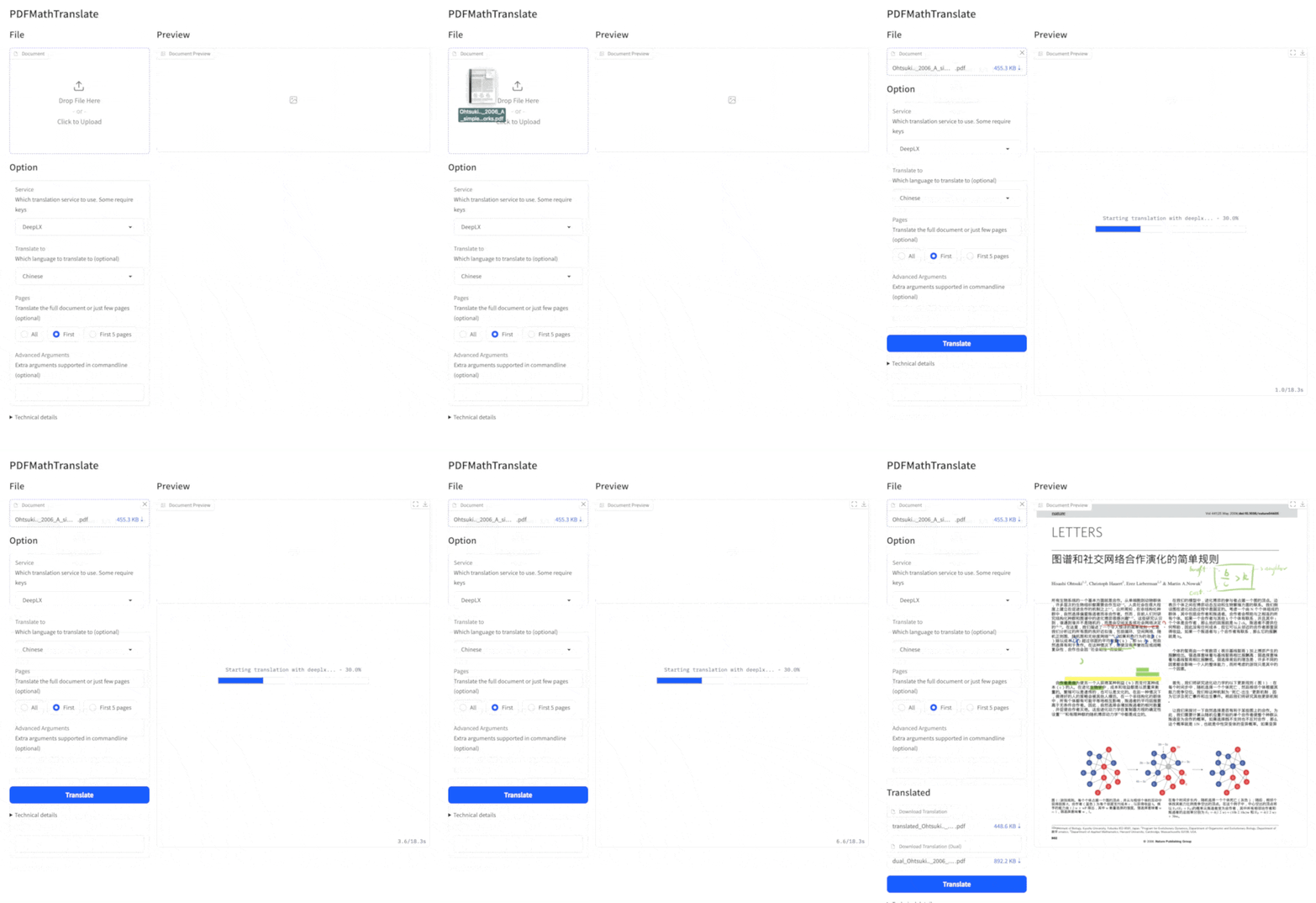

See documentation for GUI for more details.
4. Docker
-
Pull and run:
docker pull byaidu/pdf2zh
docker run -d -p 7860:7860 byaidu/pdf2zh
-
Open in browser:
http://localhost:7860/
For docker deployment on cloud service:
5. Zotero Plugin
See Zotero PDF2zh for more details.
6. Commandline
-
Python installed (3.10 <= version <= 3.12)
-
Install our package:
pip install pdf2zh
-
Execute translation, files generated in current working directory:
pdf2zh document.pdf
Tip
-
If you're using Windows and cannot open the file after downloading, please install vc_redist.x64.exe and try again.
-
If you cannot access Docker Hub, please try the image on GitHub Container Registry.
docker pull ghcr.io/byaidu/pdfmathtranslate
docker run -d -p 7860:7860 ghcr.io/byaidu/pdfmathtranslate
The present program needs an AI model(wybxc/DocLayout-YOLO-DocStructBench-onnx) before working and some users are not able to download due to network issues. If you have a problem with downloading this model, we provide a workaround using the following environment variable:
set HF_ENDPOINT=https://hf-mirror.comFor PowerShell user:
$env:HF_ENDPOINT = https://hf-mirror.comIf the solution does not work to you / you encountered other issues, please refer to frequently asked questions.
Execute the translation command in the command line to generate the translated document example-mono.pdf and the bilingual document example-dual.pdf in the current working directory. Use Google as the default translation service. More support translation services can find HERE.

In the following table, we list all advanced options for reference:
| Option | Function | Example |
|---|---|---|
| files | Local files | pdf2zh ~/local.pdf |
| links | Online files | pdf2zh http://arxiv.org/paper.pdf |
-i |
Enter GUI | pdf2zh -i |
-p |
Partial document translation | pdf2zh example.pdf -p 1 |
-li |
Source language | pdf2zh example.pdf -li en |
-lo |
Target language | pdf2zh example.pdf -lo zh |
-s |
Translation service | pdf2zh example.pdf -s deepl |
-t |
Multi-threads | pdf2zh example.pdf -t 1 |
-o |
Output dir | pdf2zh example.pdf -o output |
-f, -c |
Exceptions | pdf2zh example.pdf -f "(MS.*)" |
-cp |
Compatibility Mode | pdf2zh example.pdf --compatible |
--skip-subset-fonts |
Skip font subset | pdf2zh example.pdf --skip-subset-fonts |
--ignore-cache |
Ignore translate cache | pdf2zh example.pdf --ignore-cache |
--share |
Public link | pdf2zh -i --share |
--authorized |
Authorization | pdf2zh -i --authorized users.txt [auth.html] |
--prompt |
Custom Prompt | pdf2zh --prompt [prompt.txt] |
--onnx |
[Use Custom DocLayout-YOLO ONNX model] | pdf2zh --onnx [onnx/model/path] |
--serverport |
[Use Custom WebUI port] | pdf2zh --serverport 7860 |
--dir |
[batch translate] | pdf2zh --dir /path/to/translate/ |
--config |
configuration file | pdf2zh --config /path/to/config/config.json |
--serverport |
[custom gradio server port] | pdf2zh --serverport 7860 |
--babeldoc |
Use Experimental backend BabelDOC to translate | pdf2zh --babeldoc -s openai example.pdf |
For detailed explanations, please refer to our document about Advanced Usage for a full list of each option.
The current pdf2zh API is temporarily deprecated. The API will be provided again after pdf2zh 2.0 is released. For users who need programmatic access, please use the babeldoc.high_level.async_translate function of BabelDOC.
This API being temporarily deprecated means: the relevant code will not be removed for now, but no technical support will be provided, and no bug fixes will be made.
-
Parse layout with DocLayNet based models, PaddleX, PaperMage, SAM2
-
Fix page rotation, table of contents, format of lists
-
Fix pixel formula in old papers
-
Async retry except KeyboardInterrupt
-
Knuth–Plass algorithm for western languages
-
Support non-PDF/A files
-
Immersive Translation sponsors monthly Pro membership redemption codes for active contributors to this project, see details at: CONTRIBUTOR_REWARD.md
-
New backend: BabelDOC
-
Document merging: PyMuPDF
-
Document parsing: Pdfminer.six
-
Document extraction: MinerU
-
Document Preview: Gradio PDF
-
Multi-threaded translation: MathTranslate
-
Layout parsing: DocLayout-YOLO
-
Document standard: PDF Explained, PDF Cheat Sheets
-
Multilingual Font: Go Noto Universal