GeezerVisonThe World Wide Web, restored to 800 pixels of glory. |
| Home|About|Gaming cabinet|Archives|How it works|Starter sites |
GeezerVison is showing github.com — Create your first webservice Create your first webservice
Demis Bellot edited this page
This page has moved to docs.servicestack.net
ServiceStack can be hosted in a few ways: console application, windows service, ASP.NET Web Form or MVC in IIS, etc. For this tutorial, an empty ASP.NET Web Application (non MVC) is assumed. To install ServiceStack into your application, you have two options to get the binaries:
Only current option for manual download is to download source and build yourself. After you've added the binaries, you need to register ServiceStack in If you want to host ServiceStack at root path ( <!-- For IIS 6.0/Mono --> <system.web> <httpHandlers> <add path="*" type="ServiceStack.HttpHandlerFactory, ServiceStack" verb="*"/> </httpHandlers> </system.web> <!-- For IIS 7.0+ --> <system.webServer> <validation validateIntegratedModeConfiguration="false" /> <handlers> <add path="*" name="ServiceStack.Factory" preCondition="integratedMode" type="ServiceStack.HttpHandlerFactory, ServiceStack" verb="*" resourceType="Unspecified" allowPathInfo="true" /> </handlers> </system.webServer>
If Each service in ServiceStack consists of three parts:
That's the core philosophy in ServiceStack. Each service has a strongly-typed, code-first (normal POCOs) request DTO and response DTO. You can read a detailed explanation what advantages exist if you're using DTOs in the ReadMe or in [Why should I use ServiceStack?] (https://github.com/ServiceStack/ServiceStack/wiki/Why-Servicestack).
[Route("/hello")]
[Route("/hello/{Name}")]
public class Hello
{
    public string Name { get; set; }
}
public class HelloResponse
{
    public string Result { get; set; }
}
public class HelloService : Service { public object Any(Hello request) { return new HelloResponse { Result = "Hello, " + request.Name }; } } The final step is to configure setup to tell ServiceStack where to find your web services. To do that, add this code to your public class Global : System.Web.HttpApplication { public class AppHost : AppHostBase { //Tell ServiceStack the name of your application and where to find your services public AppHost() : base("Hello Web Services", typeof(HelloService).Assembly) { } public override void Configure(Funq.Container container) { //register any dependencies your services use, e.g: //container.Register<ICacheClient>(new MemoryCacheClient()); } } //Initialize your application singleton protected void Application_Start(object sender, EventArgs e) { new AppHost().Init(); } } Done! You now have a working application :) As you can see, you have created an If you are using MVC4 then you need to comment line in global.asax.cs to disable WebApi Now that you have a working Web Service lets see what ServiceStack does for you out of the box: If everything is configured correctly you can go to
Let's access the HelloWorld service you created in your browser, so write the following URL in your address bar:
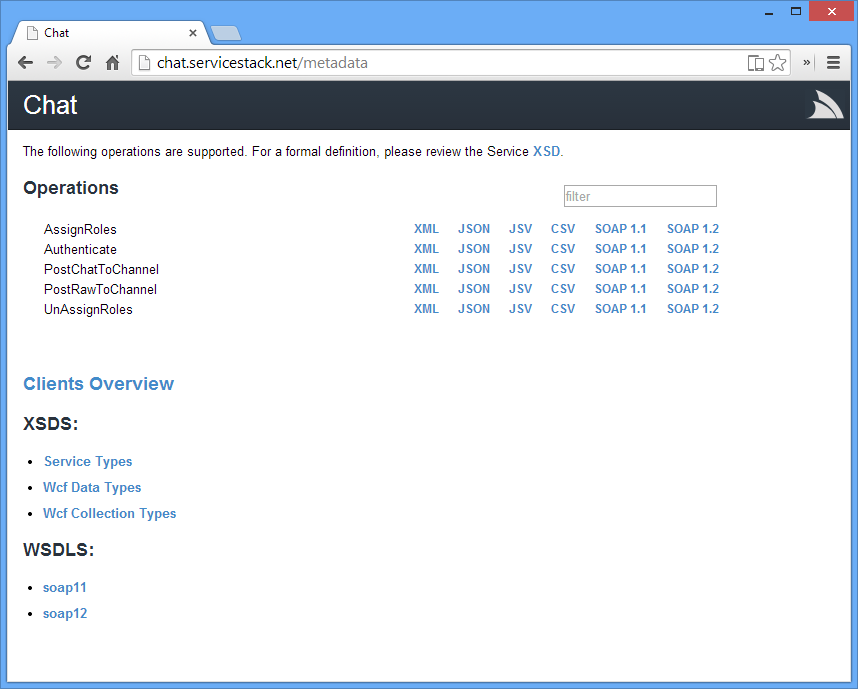
As you can see after clicking on this link, ServiceStack also contains a HTML response format, which makes the XML/Json (...) output human-readable. To change the return format to Json, simply add If you happen to generate requests from the wsdls with a tool like soapUI you may end up with an incorrectly generated request like this: <soap:Envelope xmlns:soap="http://www.w3.org/2003/05/soap-envelope" xmlns:typ="http://schemas.servicestack.net/types"> <soap:Header/> <soap:Body> <typ:Hello/> </soap:Body> </soap:Envelope> You can resolve this issue by adding the following line to your AssemblyInfo file [assembly: ContractNamespace("http://schemas.servicestack.net/types", ClrNamespace = "<YOUR NAMESPACE>")] Rebuild and regenerate the request from the updated wsdl. You should get a correct request this time. <soap:Envelope xmlns:soap="http://www.w3.org/2003/05/soap-envelope" xmlns:typ="http://schemas.servicestack.net/types"> <soap:Header/> <soap:Body> <typ:Hello> <!--Optional:--> <typ:Name>?</typ:Name> </typ:Hello> </soap:Body> </soap:Envelope> The EmailContacts solution is a new guidance available that walks through the recommended setup and physical layout structure of typical medium-sized ServiceStack projects, including complete documentation of how to create the solution from scratch, whilst explaining all the ServiceStack features it makes use of along the way.
Clone this wiki locally |
| You are visitor 01402792 — GeezerVison does not store the pages you look up. Best viewed with Netscape Navigator 4.7 or Internet Explorer 6 at 800×600. No cookies required. |