GeezerVisonThe World Wide Web, restored to 800 pixels of glory. |
| Home|About|Gaming cabinet|Archives|How it works|Starter sites |
GeezerVison is showing github.com — Messaging Messaging
Demis Bellot edited this page
This page has moved to docs.servicestack.netServiceStack provides a high-level Messaging API exposing a number of essential messaging features in order to publish and receive messages as well as registering and processing handlers for different message types. A class diagram of the core interfaces is below: There are currently 4 supported MQ Server options: Like other ServiceStack providers, all MQ Servers are interchangeable, visible in the shared MQ Server tests below: One of the benefits of using ServiceStack is its integrated support for hosting MQ Servers allowing your Services to be invoked via a MQ Broker. There are a number of reasons why you'd want to use a MQ as an alternative to HTTP including:
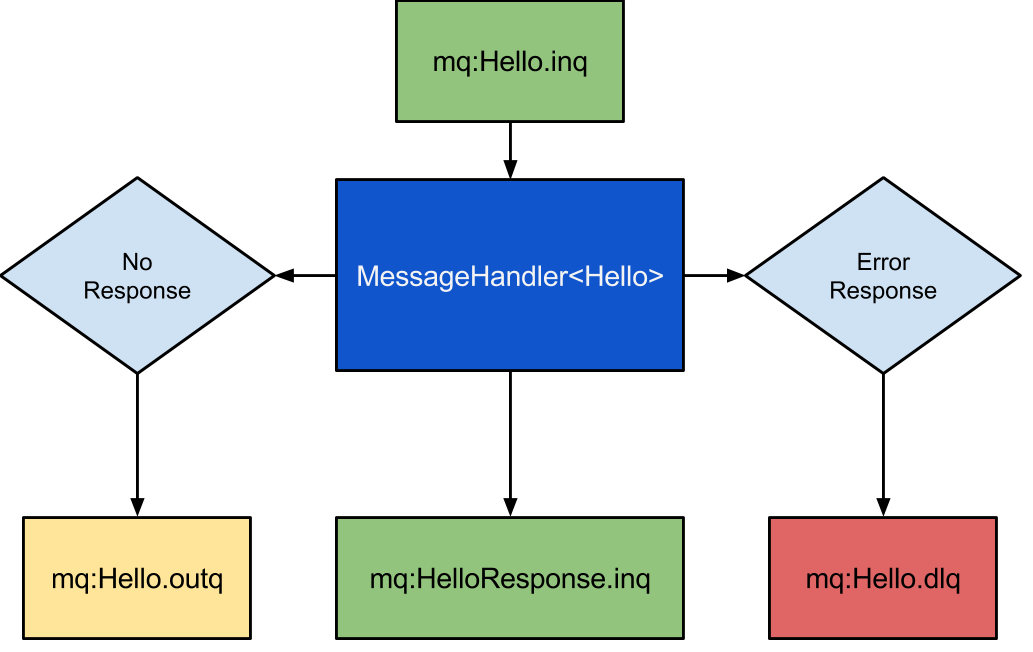
More details of these and other advantages can be found in the definitive Enterprise Integration Patterns. Likewise the HTTP Service Clients implement the Messaging API void Publish<T>(T requestDto); void Publish<T>(IMessage<T> message); When publishing a By promoting clean (endpoint-ignorant and dependency-free) Service and DTO classes, your web services are instantly re-usable from non-http contexts like MQ Services. Within MQ Services, Request DTO's get wrapped and sent within the IMessage body, which looks like: The Server Architecture shows where MQ Hosts (in green) fits within the context of ServiceStack's Request Pipeline. Effectively MQ Services are treated as "internal Services" bypassing HTTP Web Services Content Negotiation and Global Request/Response Filters: MQ Services also have their own distinct appHost.GlobalRequestFilters.Add(ValidationFilters.RequestFilter); appHost.GlobalMessageRequestFilters.Add(ValidationFilters.RequestFilter); By default, MQ Servers will send a response message after it's processed each message, what the response is and which Queue (or HTTP url) the response is published to is dependent on the outcome of the message handler, i.e:
When a handler returns a We can use this behavior to block until a message gets processed with: IMessage<Hello> msgCopy = mqClient.Get<Hello>(QueueNames<Hello>.Out); mqClient.Ack(msgCopy); msgCopy.GetBody().Name //= World Also shown in this example is an explicit Ack (which should be done for each message you receive) to tell the MQ Broker that you've taken responsibility of the message so it can safely remove it off the queue. Often message handlers will just return a POCO response after it processes a message, e.g: mqServer.RegisterHandler<Hello>(m => new HelloResponse { Result = "Hello, {0}!".Fmt(m.GetBody().Name) }); Whenever there's a response, then instead of the .outq the response message is sent to
the .inq of the response message type, which for a mqClient.Publish(new Hello { Name = "World" }); var responseMsg = mqClient.Get<HelloResponse>(QueueNames<HelloResponse>.In); mqClient.Ack(responseMsg); responseMsg.GetBody().Result //= Hello, World!
Whilst for the most part you'll only need to publish POCO messages, you can also alter the
default behavior by providing a customized const string replyToMq = mqClient.GetTempQueueName(); mqClient.Publish(new Message<Hello>(new Hello { Name = "World" }) { ReplyTo = replyToMq }); IMessage<HelloResponse> responseMsg = mqClient.Get<HelloResponse>(replyToMq); mqClient.Ack(responseMsg); responseMsg.GetBody().Result //= Hello, World! A nice feature unique in ServiceStack is that the ReplyTo address can even be a HTTP Uri, in which case ServiceStack will attempt to POST the raw response at that address. This works nicely with ServiceStack Services which excel at accepting serialized DTO's. By default Mq Servers lets you specify whether or not you want messages that cause an exception to be retried by specifying a RetryCount of 1 (default), or if you don't want any messages re-tried, specify a value of 0, e.g: var mqServer = new RabbitMqServer { RetryCount = 1 }; To illustrate how this works we'll keep a counter of how many times a message handler is invoked, then throw an exception to force an error condition, e.g: var called = 0; mqServer.RegisterHandler<Hello>(m => { called++; throw new ArgumentException("Name"); }); Now when we publish a message the response instead gets published to the messages .dlq,
after it's first transparently retried. We can verify this behavior by checking mqClient.Publish(new Hello { Name = "World" }); IMessage<Hello> dlqMsg = mqClient.Get<Hello>(QueueNames<Hello>.Dlq); mqClient.Ack(dlqMsg); Assert.That(called, Is.EqualTo(2)); DLQ Messages retains the original message in their body as well as the last exception
serialized in the dlqMsg.GetBody().Name //= World dlqMsg.Error.ErrorCode //= typeof(ArgumentException).Name dlqMsg.Error.Message //= Name Since the body of the original message is left in-tact, you're able to retry failed messages by removing them from the dead-letter-queue then re-publishing the original message, e.g: IMessage<Hello> dlqMsg = mqClient.Get<Hello>(QueueNames<Hello>.Dlq); mqClient.Publish(dlqMsg.GetBody()); mqClient.Ack(dlqMsg); This is useful for recovering failed messages after identifying and fixing bugs that were previously causing exceptions, where you can replay and re-process DLQ messages and continue processing them as normal. Using the var client = new JsonServiceClient(BaseUrl); client.SendOneWay(new RequestDto { ... }); //POST's to /json/oneway/RequestDto Where if there is an MQ Server is registered in the AppHost it will instead publish the Request DTO to the registered MQ Server who then pulls it from the MQ Broker and executes the message in a background thread like a normal MQ Message. If no MQ Server is registered then the Request is executed in the HTTP Handler like a normal HTTP Request. Service Clients and MQ Clients are also interoperable where all MQ Clients implement the Service Clients IOneWayClient client = GetClient(); client.SendOneWay(new RequestDto { ... }); As MQ Requests aren't executed within the Context of a HTTP Request they don't have access to any HTTP Info like HTTP Cookies, Headers, FormData, etc. This also means the Users Session isn't typically available as it's based on the ss-id Session Ids in Cookies. As ServiceStack also lets you specify a Users Session ids using HTTP Headers (with var req = new BasicRequest { Verb = HttpMethods.Post }; req.Headers["X-ss-id"] = sessionId; Alternatively we can inject the Session itself. As a Users Session is just a //i.e. urn:iauthsession:{sessionId} var sessionKey = SessionFeature.GetSessionKey(sessionId); var usersSession = HostContext.TryResolve<ICacheClient>() .Get<IAuthUserSession>(sessionKey); And inject to use this Session with: req.Items[Keywords.Session] = usersSession; We can then Execute the MQ Service with this custom Request Context with: return this.ExecuteMessage(m, req);
We'll walk-through a minimal example using this approach to make authenticated Requests and access the Users Session in a Service that's accessible via both HTTP and MQ transports. To start we'll configure an Authentication-enabled ServiceStack MQ and HTTP Self-Hosted Application: public class AppHost : AppSelfHostBase { public override void Configure(Container container) { //Enable Authentication Plugins.Add(new AuthFeature(() => new AuthUserSession(), new IAuthProvider[] { // Enable Username/Password Authentication new CredentialsAuthProvider(AppSettings), })); //Use an InMemory Repository to persist User Authenticaiton Info container.Register<IUserAuthRepository>(c => new InMemoryAuthRepository()); //Create a new User on Startup var authRepo = container.Resolve<IUserAuthRepository>(); authRepo.CreateUserAuth(new UserAuth { Id = 1, UserName = "mythz", FirstName = "John", LastName = "Doe", DisplayName = "John Doe", }, "p@55word"); //Register to use a Rabbit MQ Server container.Register<IMessageService>(c => new RabbitMqServer()); var mqServer = container.Resolve<IMessageService>(); mqServer.RegisterHandler<AuthOnly>(m => { var req = new BasicRequest { Verb = HttpMethods.Post }; req.Headers["X-ss-id"] = m.GetBody().SessionId; var response = ExecuteMessage(m, req); return response; }); //Start the Rabbit MQ Server listening for incoming MQ Requests mqServer.Start(); } } and now add the Service Implementation: public class AuthOnly : IReturn<AuthOnlyResponse> { public string Name { get; set; } public string SessionId { get; set; } } public class AuthOnlyResponse { public string Result { get; set; } } public class AuthOnlyService : Service { [Authenticate] //Only allow Authenticated Requests public object Any(AuthOnly request) { // Get the User Session for this Request var session = base.SessionAs<AuthUserSession>(); return new AuthOnlyResponse { Result = "Hello, {0}! Your UserName is {1}" .Fmt(request.Name, session.UserAuthName) }; } } With the ServiceStack Host and Service implemented, we can start listening to both HTTP and Rabbit MQ Requests by starting the AppHost: new AppHost().Start("http://localhost:1337/"); Then on the Client we can authenticate using UserName/Password credentials using the HTTP Service Client, e.g: var client = new JsonServiceClient("http://localhost:1337/"); var response = client.Post(new Authenticate { UserName = "mythz", Password = "p@55word", RememberMe = true, }); var sessionId = response.SessionId; The above Request establishes an authenticated Session with the To make Authenticated Requests via MQ we can pass the returned var mqFactory = RabbitMqMessageFactory(); using (var mqClient = mqFactory.CreateMessageQueueClient()) { mqClient.Publish(new AuthOnly { Name = "RabbitMQ Request", SessionId = sessionId, }); //Block until the Response is Received: var responseMsg = mqClient.Get<AuthOnlyResponse>(QueueNames<AuthOnlyResponse>.In); mqClient.Ack(responseMsg); //Acknowledge the message was received //"Hello, RabbitMQ Request! Your UserName is mythz" Console.WriteLine(responseMsg.GetBody().Result); } This works since we're extracting the SessionId and injecting into a Custom Request Context used by the MQ Service: mqServer.RegisterHandler<AuthOnly>(m => { var req = new BasicRequest { Verb = HttpMethods.Post }; req.Headers["X-ss-id"] = m.GetBody().SessionId; var response = ExecuteMessage(m, req); return response; }); One important difference worth re-iterating is that Filter Attribute declared on the Service class are top-level filters executed during Global Request filters which are only executed for HTTP Requests: [Authenticate] //Top-level Filter Attribute - only executed for HTTP Requests public class MqAuthOnlyService : Service { public object Any(AuthOnly request) { var session = base.SessionAs<AuthUserSession>(); return new AuthOnlyResponse { Result = "Hello, {0}! Your UserName is {1}" .Fmt(request.Name, session.UserAuthName) }; } } This will allow you to separate behavior for external HTTP Requests from internal MQ Requests. To validate both HTTP and MQ Requests, place the public class AuthOnlyService : Service { [Authenticate] //Authenticate both HTTP and MQ Requests public object Any(AuthOnly request) { var session = base.SessionAs<AuthUserSession>(); return new AuthOnlyResponse { Result = "Hello, {0}! Your UserName is {1}" .Fmt(request.Name, session.UserAuthName) }; } }
Clone this wiki locally |
| You are visitor 01402792 — GeezerVison does not store the pages you look up. Best viewed with Netscape Navigator 4.7 or Internet Explorer 6 at 800×600. No cookies required. |