GeezerVisonThe World Wide Web, restored to 800 pixels of glory. |
| Home|About|Gaming cabinet|Archives|How it works|Starter sites |
GeezerVison is showing github.com — Swift Add ServiceStack Reference Swift Add ServiceStack Reference
Demis Bellot edited this page
This page has moved to docs.servicestack.net
ServiceStack's Add ServiceStack Reference feature lets iOS/OSX developers generate an native typed Swift 2.0 API for your ServiceStack Services directly from within XCode using the new ServiceStack XCode Plugin - providing a simpler, cleaner and more versatile alternative to WCF's Add Service Reference feature that reduces the burden and effort required for consuming ServiceStack Services whilst benefiting from Swift's strong-typing feedback:
The ServiceStack XCode Plugin can be installed by dragging it to the XCode Plugins directory:
Once installed, developers can easily add a reference to a remote ServiceStack instance and update its typed DTO's using the new Menu options in XCode's Main Menu:
Use the Add ServiceStack Reference Menu option to bring up the Add Reference XCode UI Sheet, which just like the Popup Window in VS.NET just needs the Url for your remote ServiceStack instance and the name of the file the generated Swift DTO's should be saved to:
After clicking Add Reference, 2 files will be added to your XCode project yielding an instant typed API:
You can also customize how the Swift types are generated by uncommenting the desired option with the behavior you want, then click the Update ServiceStack Reference Main Menu item to fetch the latest DTO's with the updated options as seen below:
The above defaults are also overridable on the ServiceStack Server by modifying the default config on the var typesConfig = this.GetPlugin<NativeTypesFeature>().MetadataTypesConfig; typesConfig.AddResponseStatus = true; More Swift-specific configuration is available on the SwiftGenerator.DefaultImports.Add("UIKit"); The header comments in the generated DTO's allows for further customization of how the DTO's are generated which can then be updated with any custom Options provided using the Update ServiceStack Reference Menu Item in XCode. Options that are preceded by a Swift single line comment /* Options: Date: 2015-02-22 13:52:26 Version: 1 BaseUrl: http://techstacks.io //BaseClass: //AddModelExtensions: True //AddServiceStackTypes: True //IncludeTypes: //ExcludeTypes: //ExcludeGenericBaseTypes: True //AddResponseStatus: False //AddImplicitVersion: //InitializeCollections: True //DefaultImports: Foundation */ To override a value, remove the We'll go through and cover each of the above options to see how they affect the generated DTO's: Specify a base class that's inherited by all Swift DTO's, e.g. to enable Key-Value Observing (KVO) in the generated DTO models have all types inherit from Will change all DTO types to inherit from public class UserInfo : NSObject { ... } Remove the the code-generated type extensions required to support typed JSON serialization of the Swift types and leave only the clean Swift DTO Type definitions. Don't generate the types for built-in ServiceStack classes and Services like Is used as a Whitelist that can be used to specify only the types you would like to have code-generated: Will only generate public class GetTechnology { ... } public class GetTechnologyResponse { ... } Is used as a Blacklist where you can specify which types you would like to exclude from being generated: Will exclude Work around a regression added in Swift 1.2 where the Swift compiler segfaults trying to compile Extensions to Types with a Generic Base Class. You can omit the problematic Generic Base Types from being generated with: ExcludeGenericBaseTypes: TrueAny types that were omitted from the generated DTO's will be emitted in comments, using the format: //Excluded: {TypeName}Automatically add a Will add a public class GetAllTechnologiesResponse { ... public var responseStatus:ResponseStatus } Lets you specify the Version number to be automatically populated in all Request DTO's sent from the client: Will add an initialized public class GetAllTechnologies : IReturn { ... public var version:Int = 1 } This lets you know what Version of the Service Contract that existing clients are using making it easy to implement ServiceStack's recommended versioning strategy. Whether enumerables should be initialized with an empty collection (default) or changed to use an Optional type: Changes Collection Definitions to be declared as Optional Types instead of being initialized with an empty collection: public class ResponseStatus { public var errors:[ResponseError]? } Add additional import statements to the generated DTO's: Will import the import UIKit; import Foundation; The same ideal, high-level API available in .NET's ServiceClients have been translated into idiomatic Swift as seen with its public protocol ServiceClient { func get(request:T) throws -> T.Return func get(request:T) throws -> Void func get(request:T, query:[String:String]) throws -> T.Return func get(relativeUrl:String) throws -> T func getAsync(request:T) -> Promise<T.Return> func getAsync(request:T) -> Promise<Void> func getAsync(request:T, query:[String:String]) -> Promise<T.Return> func getAsync(relativeUrl:String) -> Promise<T> func post(request:T) throws -> T.Return func post(request:T) throws -> Void func post(relativeUrl:String, request:Request?) throws -> Response func postAsync(request:T) -> Promise<T.Return> func postAsync(request:T) -> Promise<Void> func postAsync(relativeUrl:String, request:Request?) -> Promise<Response> func put(request:T) throws -> T.Return func put(request:T) throws -> Void func put(relativeUrl:String, request:Request?) throws -> Response func putAsync(request:T) -> Promise<T.Return> func putAsync(request:T) -> Promise<Void> func putAsync(relativeUrl:String, request:Request?) -> Promise<Response> func delete(request:T) throws -> T.Return func delete(request:T) throws -> Void func delete(request:T, query:[String:String]) throws -> T.Return func delete(relativeUrl:String) throws -> T func deleteAsync(request:T) -> Promise<T.Return> func deleteAsync(request:T) -> Promise<Void> func deleteAsync(request:T, query:[String:String]) -> Promise<T.Return> func deleteAsync(relativeUrl:String) -> Promise<T> func patch(request:T) throws -> T.Return func patch(request:T) throws -> Void func patch(relativeUrl:String, request:Request?) throws -> Response func patchAsync(request:T) -> Promise<T.Return> func patchAsync(request:T) -> Promise<Void> func patchAsync(relativeUrl:String, request:Request?) -> Promise<Response> func send(request:T) throws -> T.Return func send(request:T) throws -> Void func send(intoResponse:T, request:NSMutableURLRequest) throws -> T func sendAsync(intoResponse:T, request:NSMutableURLRequest) -> Promise<T> func getData(url:String) throws -> NSData func getDataAsync(url:String) -> Promise<NSData> }
The minor differences are primarily due to differences in Swift which instead of throwing Exceptions uses error codes and If you've ever had to make HTTP requests using Objective-C's
To illustrate its usage we'll go through some client code to consume TechStacks Services after adding a ServiceStack Reference to var client = JsonServiceClient(baseUrl: "http://techstacks.io") var response = client.get(AppOverview()) Essentially usage is the same as it is in .NET ServiceClients - where it just needs the Whilst the sync API's are easy to use their usage should be limited in background threads so they're not blocking the Apps UI whilst waiting for responses. Most of the time when calling services from the Main UI thread you'll want to use the non-blocking async API's, which for the same API looks like: client.getAsync(AppOverview()) .then { $0.topTechnologies.count //= 100 //... } Swift 2.0 also lets you continue marking it up with explicit Type Information and optional syntax as preferred, e.g: client.getAsync(AppOverview()) .then({ (r:AppOverviewResponse) in r.topTechnologies.count //= 100 //... }) Which is very similar to how we'd make async
As Swift doesn't provide To illustrate exception handling we'll connect to ServiceStack's Test Services and call the Handling a Single C# Exception: var client = JsonServiceClient(baseUrl: "http://test.servicestack.net") var request = ThrowType() request.type = "NotFound" request.message = "custom message" do { let response = client.post(request) } catch var error as NSError { error.code //= 404 //Convert into typed ResponseStatus var status:ResponseStatus = error.convertUserInfo() status.message //= not here status.stackTrace //= Server Stack Trace } Handling a Validation Exception with multiple field validation errors: let client = JsonServiceClient(baseUrl: "http://test.servicestack.net") let request = ThrowValidation() request.email = "invalidemail" do { let response = try client.post(request) } catch let responseError as NSError { let status:ResponseStatus = responseError.convertUserInfo()! status.errors.count //= 3 let field1 = status.errors[0] field1.errorCode! //= InclusiveBetween field1.fieldName! //= Age field1.message! //= 'Age' must be between 1 and 120. You entered 0. } To handle errors in Async API's we just add a callback on let request = ThrowValidation() request.email = "invalidemail" client.postAsync(request) .error { responseError in let status:ResponseStatus = responseError.convertUserInfo()! status.errors.count //= 3 //... } Just like in .NET, we can also attach Global or instance error handlers to be able to generically handle all Service Client errors with a custom handler, e.g: client.onError = {(e:NSError) in ... } JsonServiceClient.Global.onError = {(e:NSError) in ... } The new public class HelloByGet : IReturn, IGet { public typealias Return = HelloResponse public var name:String? } public class HelloByPut : IReturn, IPut { public typealias Return = HelloResponse public var name:String? } let response = try client.send(HelloByGet()) //GET client.sendAsync(HelloByPut()) //PUT .then { } As Swift doesn't support Attributes any exported .NET Attributes are emitted in comments on the Request DTO they apply to, e.g: // @Route("/technology/{Slug}")
public class GetTechnology : IReturn { ... }This also means that the Custom Routes aren't used when making Service Requests and instead just uses ServiceStack's built-in pre-defined routes. But when preferred var response:GetTechnologyResponse? = client.get("/technology/servicestack")
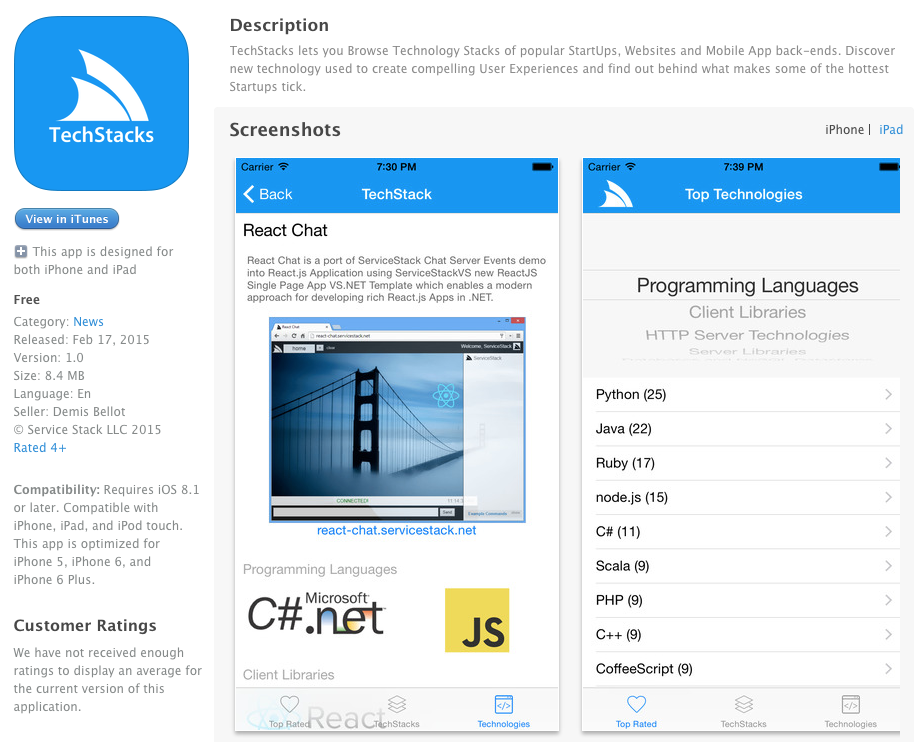
Other options that can be configured on JsonServiceClient include: client.onError = {(e:NSError) in ... } client.timeout = ... client.cachePolicy = NSURLRequestCachePolicy.ReloadIgnoringLocalCacheData client.requestFilter = {(req:NSMutableURLRequest) in ... } client.responseFilter = {(res:NSURLResponse) in ... } //static Global configuration JsonServiceClient.Global.onError = {(e:NSError) in ... } JsonServiceClient.Global.requestFilter = {(req:NSMutableURLRequest) in ... } JsonServiceClient.Global.responseFilter = {(res:NSURLResponse) in ... } To illustrate the ease-of-use and utility of ServiceStack's new Swift support you can checkout the TechStacks native iOS App for http://techstacks.io that has been recently published and is now available to download for free on the AppStore:
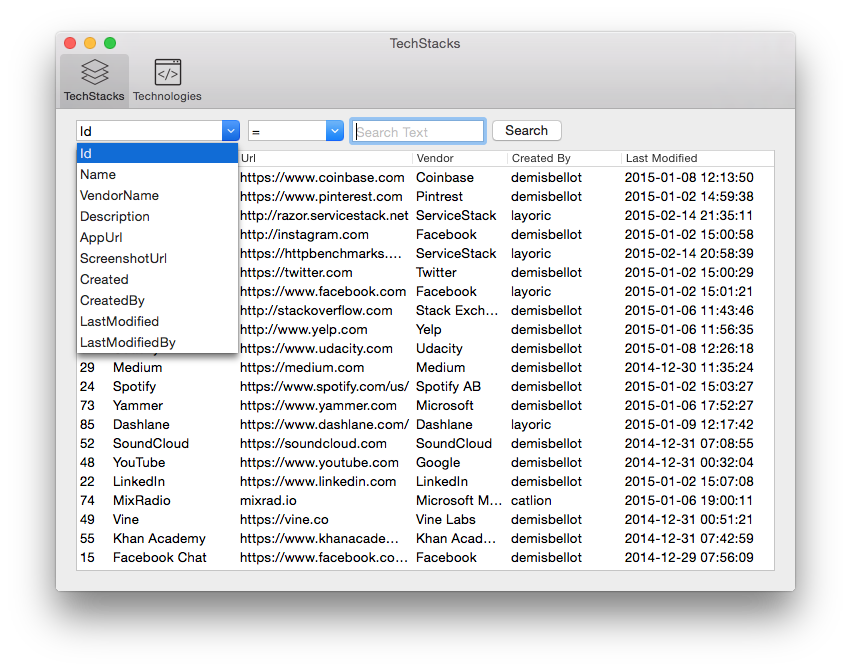
The complete source code for the TechStacks App is available on GitHub - providing a good example on how easy it is to take advantage of ServiceStack's Swift support to quickly build a rich and responsive Services-heavy native iOS App. All remote Service Calls used by the App are encapsulated into a single AppData.swift class and only uses JsonServiceClient's non-blocking Async API's to ensure a Responsive UI is maintained throughout the App. If you've ever had to implement As keeping UI's updated with Async API callbacks can get unwieldy, we wanted to go through how we're taking advantage of NSObject's KVO support in Service Responses to simplify maintaining dynamic UI's. Firstly to enable KVO in your Swift DTO's we'll want to have each DTO inherit from and click the Update ServiceStack Reference Menu Option to fetch the updated DTO's. Then to enable Key-Value Observing just mark the response DTO variables with the public dynamic var allTiers:[Option] = [] public dynamic var overview:AppOverviewResponse = AppOverviewResponse() public dynamic var topTechnologies:[TechnologyInfo] = [] public dynamic var allTechnologies:[Technology] = [] public dynamic var allTechnologyStacks:[TechnologyStack] = [] Which is all that's needed to allow properties to be observed as they'll automatically issue change notifications when they're populated in the Service response async callbacks, e.g: func loadOverview() -> Promise<AppOverviewResponse> { return client.getAsync(AppOverview()) .then { r in self.overview = r self.allTiers = r.allTiers self.topTechnologies = r.topTechnologies return r } } func loadAllTechnologies() -> Promise<GetAllTechnologiesResponse> { return client.getAsync(GetAllTechnologies()) .then { r in self.allTechnologies = r.results return r } } func loadAllTechStacks() -> Promise<GetAllTechnologyStacksResponse> { return client.getAsync(GetAllTechnologyStacks()) .then { r in self.allTechnologyStacks = r.results return r } } In your ViewController have the datasources for your custom views binded to the desired data (which will initially be empty): func pickerView(pickerView: UIPickerView, numberOfRowsInComponent component: Int) -> Int { return appData.allTiers.count } ... func tableView(tableView: UITableView, numberOfRowsInSection section: Int) -> Int { return appData.topTechnologies.count } Then in override func viewDidLoad() { ... self.appData.observe(self, properties: ["topTechnologies", "allTiers"]) self.appData.loadOverview() } deinit { self.appData.unobserve(self) } In the example code above we're using some custom KVO helpers to keep the code required to a minimum. With the observable bindings in place, the change notifications of your observed properties can be handled by overriding override func observeValueForKeyPath(keyPath:String, ofObject object:AnyObject, change:[NSObject:AnyObject], context: UnsafeMutablePointer<Void>) { switch keyPath { case "allTiers": self.technologyPicker.reloadAllComponents() case "topTechnologies": self.tblView.reloadData() default: break } } Now that everything's configured, the observables provide an alternative to manually updating UI elements within async callbacks, instead you can now fire-and-forget your async API's and rely on the pre-configured bindings to automatically update the appropriate UI Controls when their bounded properties are updated, e.g: self.appData.loadOverview() //Ignore response and use configured KVO Bindings In addition to greatly simplifying Web Service Requests, var imageCache:[String:UIImage] = [:] public func loadImageAsync(url:String) -> Promise<UIImage?> { if let image = imageCache[url] { return Promise<UIImage?> { (complete, reject) in complete(image) } } return client.getDataAsync(url) .then { (data:NSData) -> UIImage? in if let image = UIImage(data:data) { self.imageCache[url] = image return image } return nil } } As Most of the API's used in TechStacks iOS App are standard typed Web Services calls. There is also a TechStacks OSX Desktop available which showcases how easy it is to call ServiceStack's dynamic AutoQuery Services and how much auto-querying functionality they can provide for free. E.g. The TechStacks Desktop app is essentially powered with these 2 AutoQuery Services: [Query(QueryTerm.Or)] //change from filtering (default) to combinatory semantics public class FindTechStacks : QueryBase<TechnologyStack> {} [Query(QueryTerm.Or)] public class FindTechnologies : QueryBase<Technology> {} Basically just a Request DTO telling AutoQuery what Table we want to Query and that we want to change the default Search behavior to have OR semantics. We don't need to specify which properties we can query as the implicit conventions automatically infer it from the table being queried. The TechStacks Desktop UI is then built around these 2 AutoQuery Services allowing querying against each field and utilizing a subset of the implicit conventions supported:
Like the TechStacks iOS App all Service Calls are maintained in a single AppData.swift class and uses KVO bindings to update its UI which is populated from these 2 services below: func searchTechStacks(query:String, field:String? = nil, operand:String? = nil) -> Promise<QueryResponse<TechnologyStack>> { self.search = query let queryString = query.count > 0 && field != nil && operand != nil ? [createAutoQueryParam(field!, operand!): query] : ["NameContains":query, "DescriptionContains":query] let request = FindTechStacks<TechnologyStack>() return client.getAsync(request, query:queryString) .then { (r:QueryResponse<TechnologyStack>) -> QueryResponse<TechnologyStack> in self.filteredTechStacks = r.results return r } } func searchTechnologies(query:String, field:String? = nil, operand:String? = nil) -> Promise<QueryResponse<Technology>> { self.search = query let queryString = query.count > 0 && field != nil && operand != nil ? [createAutoQueryParam(field!, operand!): query] : ["NameContains":query, "DescriptionContains":query] let request = FindTechnologies<Technology>() return client.getAsync(request, query:queryString) .then { (r:QueryResponse<Technology>) -> QueryResponse<Technology> in self.filteredTechnologies = r.results return r } } func createAutoQueryParam(field:String, _ operand:String) -> String { let template = autoQueryOperandsMap[operand]! let mergedField = template.replace("%", withString:field) return mergedField } Essentially employing the same strategy for both AutoQuery Services where it builds a query String parameter to send with the request. For incomplete queries, the default search queries both With Swift support our goal was to ensure a high-fidelity, idiomatic translation within the constraints of Swift language and built-in libraries, where the .NET Server DTO's are translated into clean Swift POSO's (Plain Old Swift Objects :) having their .NET built-in types mapped to their equivalent Swift data type. To see what this ended up looking like, we'll peel back behind the covers and look at a couple of the Generated Swift Test Models to see how they're translated in Swift: public class AllTypes { required public init(){} public var id:Int? public var nullableId:Int? public var byte:Int8? public var short:Int16? public var int:Int? public var long:Int64? public var uShort:UInt16? public var uInt:UInt32? public var uLong:UInt64? public var float:Float? public var double:Double? public var decimal:Double? public var string:String? public var dateTime:NSDate? public var timeSpan:NSTimeInterval? public var dateTimeOffset:NSDate? public var guid:String? public var char:Character? public var nullableDateTime:NSDate? public var nullableTimeSpan:NSTimeInterval? public var stringList:[String] = [] public var stringArray:[String] = [] public var stringMap:[String:String] = [:] public var intStringMap:[Int:String] = [:] public var subType:SubType? } public class AllCollectionTypes { required public init(){} public var intArray:[Int] = [] public var intList:[Int] = [] public var stringArray:[String] = [] public var stringList:[String] = [] public var pocoArray:[Poco] = [] public var pocoList:[Poco] = [] public var pocoLookup:[String:[Poco]] = [:] public var pocoLookupMap:[String:[String:Poco]] = [:] } public enum EnumType : Int { case Value1 case Value2 } As seen above, properties are essentially mapped to their optimal Swift equivalent. As DTO's can be partially complete all properties are As we were already using code-gen to generate the Swift types we could extend it without impacting the Developer UX has been expanded to also include what's essentially an explicit Reflection API for each type with API's to support serializing to and from JSON. Thanks to Swift's rich support for extending types we were able to leverage its Type extensions so the implementation details could remain disconnected from the clean Swift type definitions allowing improved readability when inspecting the remote DTO schema's. We can look at extension AllCollectionTypes : JsonSerializable { public static var typeName:String { return "AllCollectionTypes" } public static var metadata = Metadata.create([ Type<AllCollectionTypes>.arrayProperty("intArray", get: { $0.intArray }, set: { $0.intArray = $1 }), Type<AllCollectionTypes>.arrayProperty("intList", get: { $0.intList }, set: { $0.intList = $1 }), Type<AllCollectionTypes>.arrayProperty("stringArray", get: { $0.stringArray }, set: { $0.stringArray = $1 }), Type<AllCollectionTypes>.arrayProperty("stringList", get: { $0.stringList }, set: { $0.stringList = $1 }), Type<AllCollectionTypes>.arrayProperty("pocoArray", get: { $0.pocoArray }, set: { $0.pocoArray = $1 }), Type<AllCollectionTypes>.arrayProperty("pocoList", get: { $0.pocoList }, set: { $0.pocoList = $1 }), Type<AllCollectionTypes>.objectProperty("pocoLookup", get: { $0.pocoLookup }, set: { $0.pocoLookup = $1 }), Type<AllCollectionTypes>.objectProperty("pocoLookupMap", get: { $0.pocoLookupMap }, set: { $0.pocoLookupMap = $1 }), ]) } Due to the semantic differences and limitations in Swift there are some limitations of what's not supported. Luckily these limitations are mostly highly-discouraged bad practices which is another reason not to use them. Specifically what's not supported: When emitting code we'll generate a comment when ignoring these properties, e.g: //emptyInterface:IEmptyInterface ignored. Swift doesn't support interface properties As Swift doesn't support extension inheritance, when using inheritance in DTO's any Base types must be marked abstract. Required as there are no namespaces in Swift (Also required for F# and TypeScript). ServiceStack only requires Request DTO's to be unique, but our recommendation is for all DTO names to be unique. As Swift doesn't allow extending generic Arrays with public protocols, the
Clone this wiki locally |
| You are visitor 01402775 — GeezerVison does not store the pages you look up. Best viewed with Netscape Navigator 4.7 or Internet Explorer 6 at 800×600. No cookies required. |