
Self-hosted error tracking, logs, sessions, performance, anti-exploit and analytics for Roblox games.
One Go binary. SQLite. Your server.
Website · Docs · Quick start · SDK · Security · Configuration · License
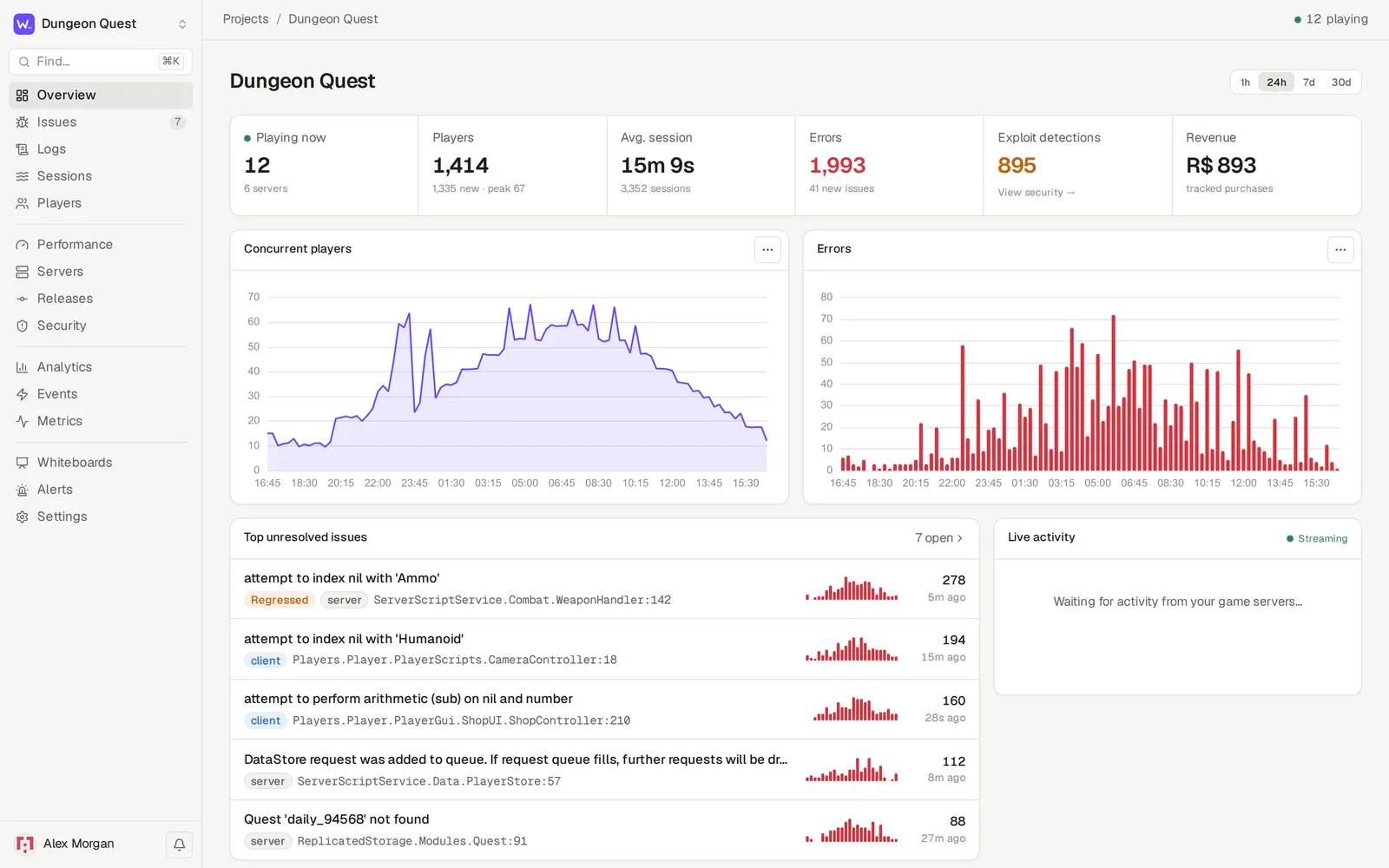
Roblox gives you very little visibility into what your live servers are doing. Workshell gives you the Sentry-style setup that other platforms take for granted. Drop in a Luau module and you see every error with a real stack trace, every player session from join to leave, server health, slow operations, and players trying to exploit you. It all runs on a machine you control.
|
|
|


A whiteboard: a chart with a pinned note, the regressed issue, theories on stickies, and a slow player.join trace drawn as a node graph with span durations.
More screenshots
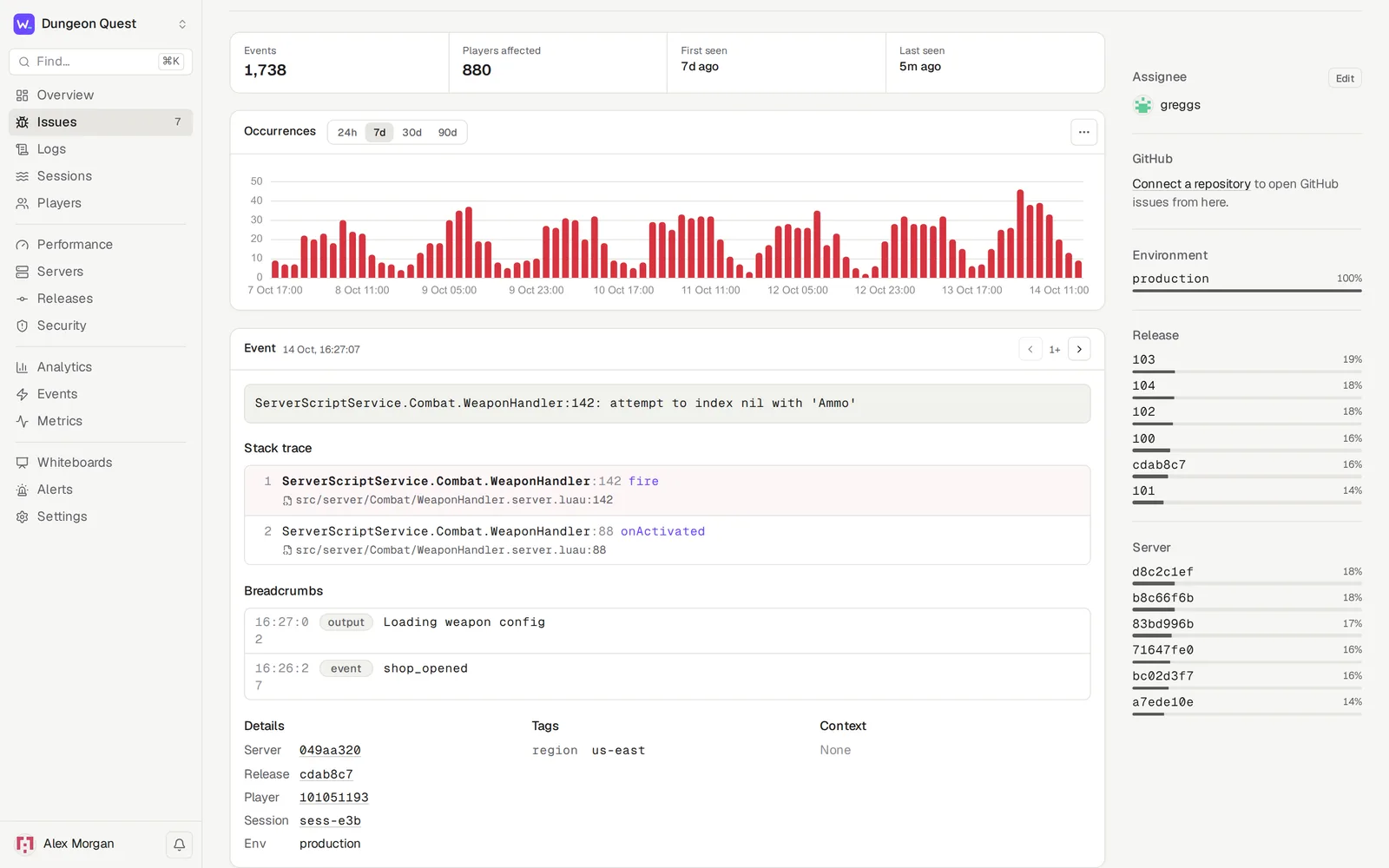
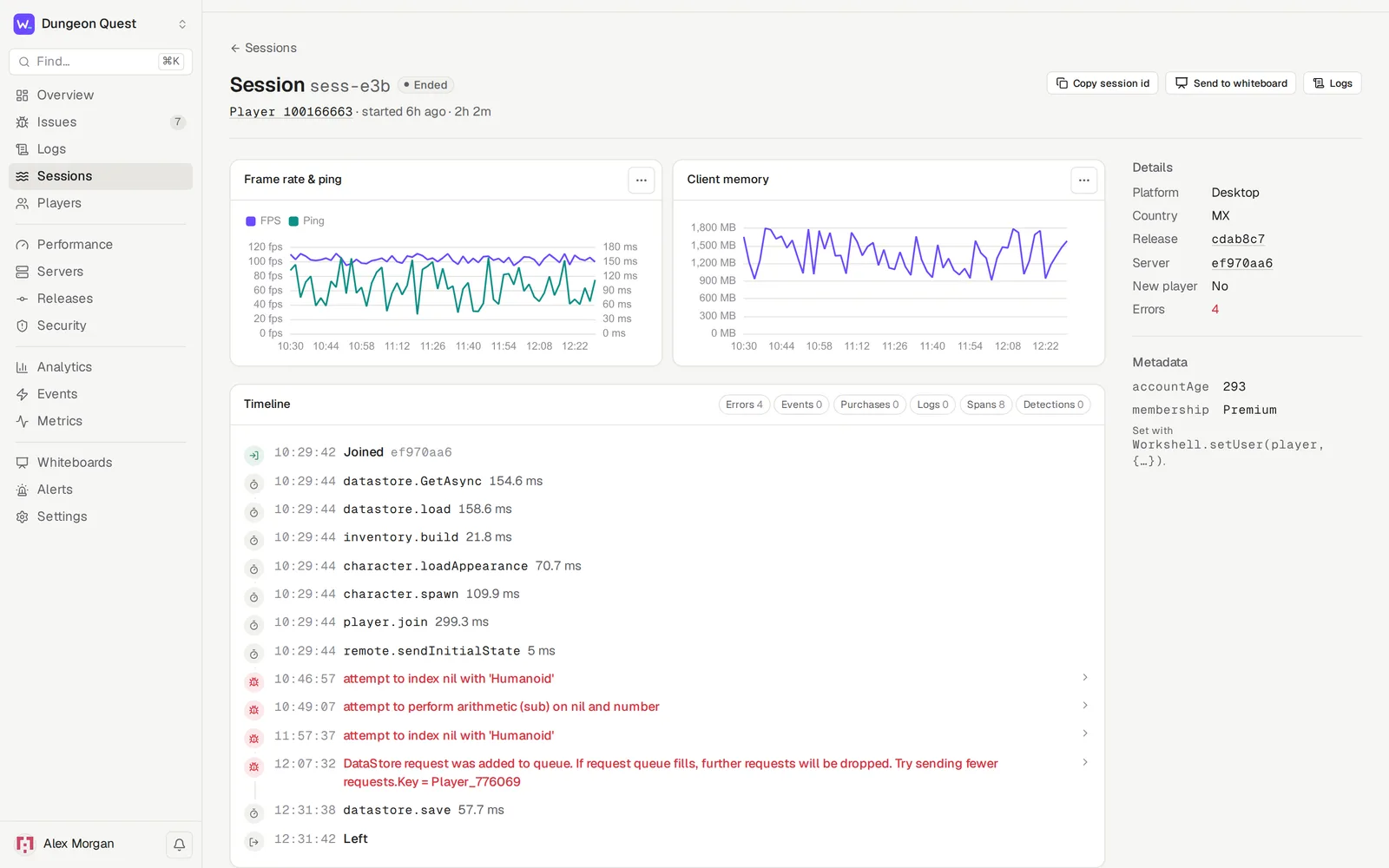
| Issue | Session |
|---|---|
 |
 |
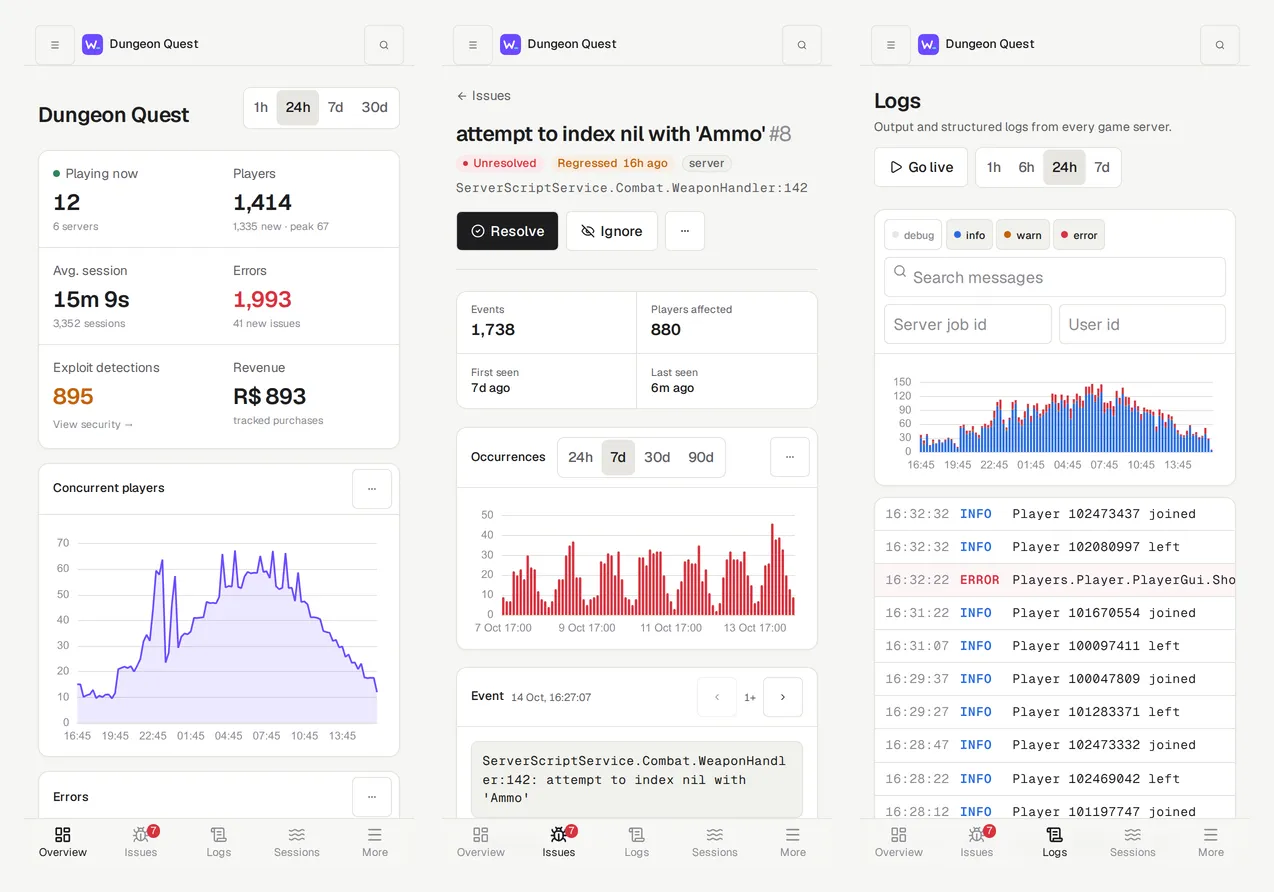
The dashboard is an installable PWA that works on phones. It comes in light and dark themes, plus Catppuccin, Rosé Pine, Nord and Gruvbox.
Prebuilt binary (Linux and macOS; Windows builds are on the releases page)
curl -fsSL https://raw.githubusercontent.com/Shellworks-Development/workshell/master/install.sh | sh
workshell         # serves on :8080 and stores data in ./data
The script downloads the latest release for your platform, checks it against the release's SHA256SUMS, and installs it to /usr/local/bin or ~/.local/bin. The same binary is the server and the workshell release CLI.
Docker
git clone https://github.com/Shellworks-Development/workshell && cd workshell
# set WORKSHELL_PUBLIC_URL in docker-compose.yml, then:
docker compose up -d
From source (Go 1.26+, Node 22+, pnpm)
make build        # builds the dashboard into a single binary at bin/workshell
./bin/workshell   # serves on :8080 and stores data in ./data
Open http://localhost:8080, create the admin account, then create a project. You can also open it from your phone at http://<your-LAN-IP>:8080.
Important
Roblox game servers can't reach localhost. A live game needs Workshell on a public URL, ideally HTTPS behind a reverse proxy such as Caddy, nginx or a Cloudflare Tunnel. For a quick test, cloudflared tunnel --url http://localhost:8080 works.
Want to look around first? make sim KEY=wsk_... sends about a week of simulated traffic. make sim-live KEY=wsk_... streams live traffic from mock game servers. For a fast backfill, raise the project's ingest limit under Settings → Security first.
- Download
Workshell.rbxmxfrom your project's Settings → SDK setup (orWorkshell.rbxmfrom the latest release) and put it in ReplicatedStorage, or syncsdk/with Rojo or Wally. - Turn on Game Settings → Security → Allow HTTP Requests.
- Start it from a server Script:
local Workshell = require(game.ReplicatedStorage.Workshell)

Workshell.init({
	url = "https://workshell.example.com",
	key = "wsk_...",               -- or HttpService:GetSecret("workshell_key")
	signingSecret = "wss_...",     -- optional; see Security
})
- Optionally,
requireit from a LocalScript too. That adds client errors, device type and client FPS, ping and memory.
With no further code, Workshell captures uncaught server and client errors, server output, player sessions (country, platform, account metadata), server health and client performance every 30 seconds, game pass purchases, and a final flush on shutdown.
SDK reference
-- Logs
Workshell.info("Round started", { map = "Desert" })
Workshell.warn("DataStore budget low", { budget = 3 }, player)

-- Errors
Workshell.captureError(err, { player = player, tags = { store = "PlayerData" }, context = { attempt = 3 } })
local ok, result = Workshell.try(loadData, player)        -- pcall that reports failures
Workshell.setContext("round", { map = "Desert" })          -- attached to every error
Workshell.addBreadcrumb("Opened shop", "ui")

-- Sessions & analytics
Workshell.setUser(player, { level = 12, guild = "Red" })   -- session metadata
Workshell.track("level_up", { level = 5 }, player)
Workshell.trackPurchase(player, receipt.CurrencySpent, { productId = receipt.ProductId })

-- Performance: spans, with nested children forming a trace
local data = Workshell.trace("datastore.load", function() return store:GetAsync(key) end, player)
local join = Workshell.startSpan("player.join", { player = player })
local load = join:child("datastore.load")
load:setAttribute("store", "PlayerData"); load:finish()
join:finish()

-- Security
Workshell.flag(player, "speed", { speed = 90, max = 32 }, { severity = "high", action = "kicked" })
Workshell.protect(remotes.BuyItem, function(player, itemId) ... end, {
	rate = 5,                                               -- calls/second per player
	validate = function(player, itemId) return typeof(itemId) == "string" end,
})

-- Metrics
Workshell.increment("shop.opened")
Workshell.gauge("matchmaking.queue", #queue)
Clients can call track, captureError, try and addBreadcrumb. Client data goes through a rate-limited RemoteEvent and is marked $client = true. Clients can't send $-prefixed events such as $purchase, and detections can only come from the server.
Install the binary in CI (the install script above works on Linux and macOS runners), then run workshell release before rojo build:
WORKSHELL_URL=https://workshell.example.com WORKSHELL_KEY=wsk_... \
  workshell release -project default.project.json -out src/shared/WorkshellRelease.json
It records the git commit, branch, message and author. It writes WorkshellRelease.json, which Rojo syncs as a ModuleScript and the SDK picks up, so every error and session is tagged with the commit. Then it uploads a Rojo sourcemap. After that, a frame like ServerScriptService.Combat.Weapon:42 shows as src/server/Combat/Weapon.server.luau:42, linked to GitHub at that exact commit when a repository is connected.
Exploiters can reach Workshell only through your game's clients, and they will try. Workshell assumes it.
Found a vulnerability? Please report it privately; see SECURITY.md.
- Signed requests. With a signing secret, each batch is signed with HMAC-SHA256 over a timestamp and the body. With "require signed requests" on, a leaked ingest key alone can't forge or replay data.
- Flood limits. Client data is capped per player, and floods are dropped and recorded as
client_flooddetections. A flagged player's client-only errors are quarantined so they can't bury real issues. Server logs are capped per server, and each project has an ingest rate limit. - Safe rendering. All user-supplied text renders as text, never HTML. A strict Content-Security-Policy forbids inline and third-party scripts. Control and bidi characters are stripped at ingest, and alerts can't ping
@everyone. - Secrets at rest. Webhook URLs, GitHub tokens and signing secrets are encrypted with AES-256-GCM.
- Accounts and changes. Login throttling, an audit log of sensitive changes, and HttpOnly/SameSite session cookies.
| Variable | Default | |
|---|---|---|
WORKSHELL_ADDR |
:8080 |
Listen address |
WORKSHELL_DATA_DIR |
./data |
SQLite database and generated secret key. Back this up. |
WORKSHELL_PUBLIC_URL |
Public URL, used in setup snippets and alert links | |
WORKSHELL_SECRET_KEY |
generated | 32-byte hex or base64 key that encrypts stored secrets |
WORKSHELL_REDIS_URL |
e.g. redis://localhost:6379/0: a durable ingest queue that survives restarts, and live updates shared between instances. The database is still one SQLite file. |
|
WORKSHELL_CLICKHOUSE_URL |
Optional ClickHouse HTTP(S) endpoint, e.g. http://localhost:8123; unset keeps telemetry in SQLite |
|
WORKSHELL_CLICKHOUSE_DATABASE |
default |
Existing database dedicated to this Workshell instance |
WORKSHELL_CLICKHOUSE_USER, _PASSWORD |
default, empty |
ClickHouse credentials (sent in HTTP headers) |
WORKSHELL_CLICKHOUSE_MIGRATE |
false |
Explicitly permit moving existing SQLite telemetry during startup |
WORKSHELL_SECURE_COOKIES |
false |
Set to true when served over HTTPS |
WORKSHELL_TRUST_PROXY |
false |
Trust X-Forwarded-* headers from a reverse proxy |
WORKSHELL_MAX_INGEST_BYTES |
8388608 |
Maximum decompressed ingest request size |
WORKSHELL_SESSION_DAYS |
30 |
Dashboard login lifetime |
WORKSHELL_OIDC_ISSUER, _CLIENT_ID, _CLIENT_SECRET, _NAME |
Sign in with an OpenID Connect provider (Google, Entra, Okta, Authentik, Keycloak) | |
WORKSHELL_CF_ACCESS_TEAM, WORKSHELL_CF_ACCESS_AUD |
Sign in people who already passed Cloudflare Access | |
WORKSHELL_SSO_ALLOWED_DOMAINS |
Comma-separated email domains that can create an account through SSO; others need an admin to add them | |
WORKSHELL_PASSWORD_LOGIN |
true |
Set to false to require single sign-on |
Single sign-on setup, including the Cloudflare Access bypass your game servers need, is in the SSO docs.
To connect GitHub (Settings → Integrations), use a fine-grained personal access token limited to your game's repository with Issues: Read and write (GitHub adds Metadata: Read-only automatically). Workshell needs no other permission.
Retention is set per project. By default logs, traces and health data are kept for 14 days, and errors, events, sessions and detections for 90 days. Whiteboard snapshots are kept until you delete them.
By default, Workshell stores everything in one SQLite database with a single writer. The optional ClickHouse backend below offloads five telemetry datasets. Redis makes the ingest queue durable; it does not make the database scale horizontally. Measured on one machine (an 8-core Ryzen 7 5700X), with 100 simulated game servers sending 1.1 million items over 9 minutes while six dashboard pages were polled throughout:
- Ingest kept up the whole time; everything was written within 2 seconds of the last send, and nothing errored.
- Issues, logs and sessions answered in about 11 ms or less (p95). The overview answered in about 230 ms, server health in about 360 ms, and the performance page, which scans a day of traces, in about 760 ms (all p95).
Expect the analytics-style pages (performance, server health) to slow down as a project's history grows into tens of millions of rows. Load-test with your own traffic before relying on it for a large game.
Set WORKSHELL_CLICKHOUSE_URL to move logs, heartbeats, custom metrics, spans, and client performance samples to ClickHouse. Their dashboard queries, timelines, retention, and player erasure use the same backend. Accounts, projects, issues, error samples, sessions, custom events, and detections remain in SQLite. This reduces indexed telemetry writes and history scans in SQLite; it does not make the application horizontally scalable. Capacity with ClickHouse has not yet been benchmarked.
WORKSHELL_CLICKHOUSE_URL=http://localhost:8123 \
WORKSHELL_CLICKHOUSE_DATABASE=workshell \
WORKSHELL_CLICKHOUSE_USER=workshell \
WORKSHELL_CLICKHOUSE_PASSWORD=your-password \
./bin/workshell
Create the database first. Use a dedicated database per Workshell data directory and a user with CREATE TABLE, SELECT, INSERT, and ALTER DELETE permissions on it. Use HTTPS for remote connections. The optional Compose override in docker-compose.clickhouse.yml starts a local ClickHouse service:
# Set WORKSHELL_CLICKHOUSE_PASSWORD in your environment or Compose .env first.
docker compose -f docker-compose.yml -f docker-compose.clickhouse.yml up -d
For an existing installation, stop the server, back up the data directory, and set WORKSHELL_CLICKHOUSE_MIGRATE=true for the first ClickHouse startup. Startup copies history in bounded batches and removes each SQLite batch only after ClickHouse accepts it. Interrupted migrations resume on the next startup with the same settings. Remove the migration flag after completion. Keep the ClickHouse configuration thereafter: removing it is refused to prevent hiding history. Returning to SQLite requires exporting and restoring that history; there is no automatic reverse migration. Back up both databases together.
Ingest commits normalized telemetry to a durable SQLite outbox with the application changes. A background sender batches delivery; history can lag live updates by a second or longer during backlog recovery. Failed delivery stays in the outbox across restarts, and stable row IDs prevent duplicate query results after retries. At approximately 10,000 queued batches, ingestion returns 503 with Retry-After so SDKs can back off. Monitor SQLite disk space and delivery errors during outages. Retention and erasure drain pending writes before deleting history and fail if ClickHouse is unavailable, allowing a later retry.
Profile settings also let local-password users change their account email after confirming their current password. Other sessions are signed out. Linked SSO accounts keep their email managed by the identity provider; this flow does not send verification emails.
make dev        # server on :8080
make dev-web    # dashboard with hot reload on :5173, reachable on your LAN for phone testing
make test       # Go tests, dashboard type check, SDK tests (needs `luau`)
To run the ClickHouse integration tests locally, use a disposable instance whose default user can create/drop test databases:
WORKSHELL_TEST_CLICKHOUSE_URL=http://localhost:8123 \
WORKSHELL_TEST_CLICKHOUSE_PASSWORD=your-test-password \
go test ./internal/server -run TestClickHouse -v
CI runs these tests against ClickHouse 25.8 alongside the default SQLite tests.
Repository layout and ingest protocol
| Path | |
|---|---|
cmd/workshell |
The server and the workshell release CLI |
cmd/workshell-sim |
Traffic simulator, with mock game servers, players, cheaters and traces |
internal/server |
Ingest, grouping, collaboration, sessions, releases, performance, security, alerts, whiteboards |
internal/pipeline |
Ingest queue and live broker (in-memory or Redis) |
internal/secure |
Encryption and HMAC |
internal/db |
Schema and migrations |
web/ |
Vue 3 + Vite + Tailwind dashboard (PWA), embedded into the binary |
sdk/ |
The Luau SDK; sdk/test runs it against Roblox API mocks |
POST /api/v1/ingest with X-Workshell-Key, plus X-Workshell-Timestamp and X-Workshell-Signature: v1=<hex hmac> when signing, returns 202. Item types are error, log, event, session_start, session_update, session_end, heartbeat, metric, span, detection, client_perf and server_close; the fields are in internal/server/ingest.go. The server ignores unknown types, so older servers accept newer SDKs.
PolyForm Shield 1.0.0. You can use, modify and self-host Workshell for anything, including commercially, except to offer a product that competes with Workshell.
Required Notice: Copyright 2026 Shellworks Development