The most famous python library which is utilized for data analysis is called Pandas. Pandas render extremely optimized performance with back-end source code which is written totally in C or Python. Also, using pandas you can easily familiar with your data by cleaning, transforming, and analyzing it.
In Pandas, the data is usually utilized to support statistical analysis in SciPy, plotting functions from Matplotlib, and machine learning algorithms in Scikit-learn.
Pandas have two core data structure components, and all operations are based on those two objects. Organizing data in a particular way is known as a data structure. Here are the two pandas data structures:
- Series
- DataFrame
001_Python_Pandas_DataFrame_from_Dictionary
002_Python_Pandas_DataFrame_from_List
003_Python_Pandas_DataFrame_head()_and_tail()
004_Python_Pandas_DataFrame_drop_columns
005_Python_Pandas_DataFrame_drop_duplicates
006_Python_Pandas_DataFrame_drop_columns_with_NA
007_Python_Pandas_DataFrame_rename_columns
008_Python_Pandas_DataFrame_to_Python_dictionary
009_Python_Pandas_DataFrame_set_index
010_Python_Pandas_DataFrame_reset_index
These are online read-only versions.
You can ⭐ star this tutorial. Starring is free for you, but it tells me and other people that it was helpful and you like this tutorial.
Go here if you aren't here already and click the "⭐ Star" button in the top right corner. You will be asked to create a GitHub account if you don't already have one.
-
Go here if you aren't here already.
-
Click the big green "Clone or download" button in the top right of the page, then click "Download ZIP".
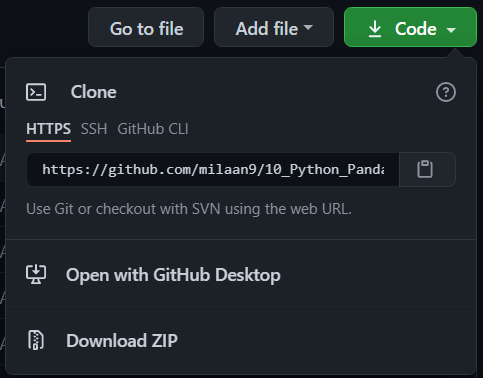
-
Extract the ZIP and open it. Unfortunately I don't have any more specific instructions because how exactly this is done depends on which operating system you run.
-
Launch ipython notebook from the folder which contains the notebooks. Open each one of them
Cell > All Output > Clear

This will clear all the outputs and now you can understand each statement and learn interactively.
If you have git and you know how to use it, you can also clone the repository instead of downloading a zip and extracting it. An advantage with doing it this way is that you don't need to download the whole tutorial again to get the latest version of it, all you need to do is to pull with git and run ipython notebook again.
I'm Dr. Milaan Parmar and I have written this tutorial. If you think you can add/correct/edit and enhance this tutorial you are most welcome🙏
See github's contributors page for details.
If you have trouble with this tutorial please tell me about it by Create an issue on GitHub. and I'll make this tutorial better. This is probably the best choice if you had trouble following the tutorial, and something in it should be explained better. You will be asked to create a GitHub account if you don't already have one.
If you like this tutorial, please give it a ⭐ star.
You may use this tutorial freely at your own risk. See LICENSE.