GV

GeezerVison

The World Wide Web, restored to 800 pixels of glory.

Home|About|Gaming cabinet|Archives|How it works|Starter sites

On this site

  • Sign in
  • ActionsCI/CD and automation
  • CodespacesCloud development environments
  • All Features
  • Documentation
  • Training
  • Certifications
  • Build with Copilot
  • Customize Copilot
  • Integrations
  • Trending repos
  • GitHub Sponsors
  • Developer articles
  • Enterprises

This view

  • Original page
  • New address

GeezerVison is showing github.com — GitHub - TestSmirk/MicrosoftEduA1CreateUsers: 批量创建微软教育A1用户

BranchesTags
Open more actions menu

Latest commit


History

5 Commits
5 Commits

Folders and files

NameName
Last commit message
Last commit date
.idea
.idea
 
 
img
img
 
 
CreateUser.py
CreateUser.py
 
 
README.md
README.md
 
 
ajaxsessionkey
ajaxsessionkey
 
 
cookie
cookie
 
 
facultys.txt
facultys.txt
 
 
payload.json
payload.json


Repository files navigation

MicrosoftEduA1CreateUsers

批量创建微软教育A1用户

  • 下载代码到你的任意目录下 pip install requests python2

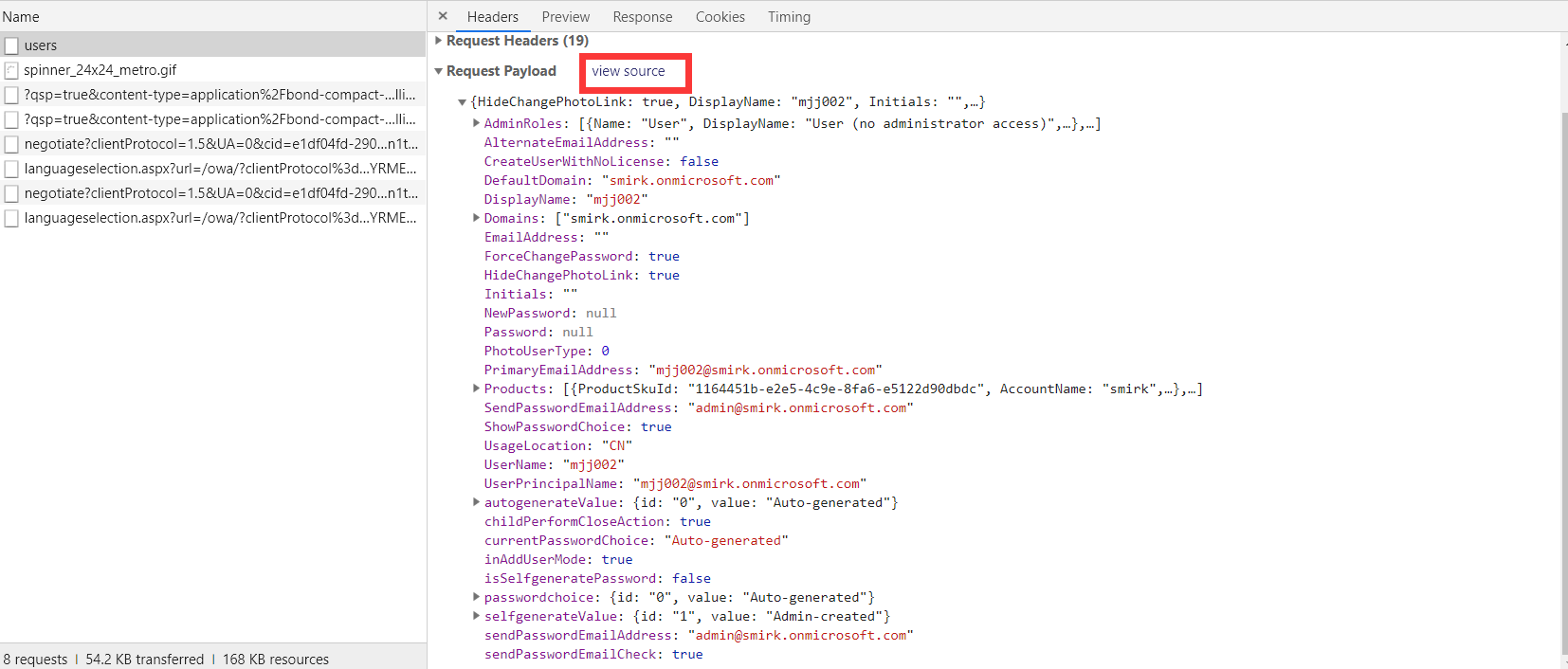
  • 首先打开F12 我一般是ctri + shift+c 打开的 选中 network

https://github.com/TestSmirk/MicrosoftEduA1CreateUsers/blob/master/img/001.png

  • 然后创建一个用户用户名 默认mjj002

  • 然后选中user这个选项

  • 找到 Request Headers的ajaxsessionkey,cookie 两个字段 然后分别扔到对应的文件里.

  • 找到 Requyest Payload 点击viewsource 复制整个json(很长)到payload.json文件里

  • 如果创建的用户名不是mjj002 需要修改 CreateUser.py的第7行 FITST_USER_NAME 为刚刚创建的用户名.

运行 python CreateUser.py

默认是从 0000001 开始创建 下一个用户名字是上一个用户的密码.

About

批量创建微软教育A1用户

Resources

Readme
Activity

Stars

15 stars

Watchers

1 watching

Forks

16 forks
Report repository

Releases

Packages

Contributors

Languages

You are visitor 01402792 — GeezerVison does not store the pages you look up.
Best viewed with Netscape Navigator 4.7 or Internet Explorer 6 at 800×600. No cookies required.