
A unified Git change-management and commit workflow for VS Code — multi-changelist grouping, a hand-built commit panel, a hand-rendered commit graph, Shelf, and line-level commits, with architectural seams reserved for future AI-driven Git agents.

English · 简体中文
6 views · 102 commands · 11 settings · 403 unit tests

- Multi-Changelist Changes view: group edits into named lists, mark one as the active commit target, create / rename / delete / move lists, persisted in
workspaceState(restored across restarts); status colors reuse thegitDecoration.*theme tokens. - Multi-root repository switching: in multi-root workspaces with several Git repositories, the Graph toolbar's repository name becomes a clickable switcher (Git Graph-style) plus a
Select Repository…command; one switch updates the active repository across all views (Graph / Branches / Commit / Stash / Shelf / Worktrees / badge), with changelists, branch favorites, grouping preferences, shelves, and recent messages remembered per repository, and the last active repository restored across restarts. - Commit panel: a hand-built commit view with real-time Conventional Commits validation, Amend / Sign-off / skip hooks, and Commit / Commit & Push; the checkbox selection is the authoritative commit scope, and recent messages are reusable.
- Log commit graph (hand-rendered DAG): colored swimlanes, branch/merge edges, HEAD/branch/tag badges, virtualized incremental loading; 7 composable filters (author / path / grep / regex / merge-mode / date / clear); per-commit actions (Reset, new branch·tag, Cherry-Pick, Revert, list containing branches).
- Branches management: favorites / local / remote / tags grouped into four sections with ahead·behind·upstream tracking; prefix folder grouping (flat ⇄ tree toggle) that collapses
/-shared branches under their common prefix, showing only the suffix; create / checkout / delete / rename / merge / rebase / compare / favorite; multi-select batch delete, copy ref, and favorite (with an honest merged/unmerged split confirmation). - Stash & Shelf: full stash operations (including keep-index / clear / create branch from stash); a standalone Shelf (patch-based, independent of stash, with 3-way merge Unshelve).
- Worktrees: full-lifecycle management — create (new branch / checkout / detached), open in a new window, lock / unlock, move, remove, and prune stale entries.
- Line-level & hunk commits: in-editor "Commit this Hunk" CodeLens, partial stage / unstage, stage at cursor, and hunk-to-changelist attribution.
- Remote & conflicts: Pull / Push / Fetch plus Push… / Update… / Merge… dialogs (force-with-lease / rebase / squash, etc.) and a hand-built 3-way Merge Editor with conflict-resolution fallbacks.
- History editing: Cherry-Pick, Revert, Reset, interactive Rebase, Undo / Drop / Fixup / Reword.
- More: inline Blame annotations, patch export / apply, Reflog, 3-way diff overview, Discard, and Diff (HEAD ↔ Working).
- Consumes the stable
RepositoryAPI exported by the built-invscode.gitextension as its Git foundation, rather than rebuilding a Git state machine. - Controlled CLI channel: capabilities the stable API does not cover (cherry-pick / revert / reset / branch rename / hunk staging / stash listing / graph topology / shelf, etc.) run through
GitRepositoryService.execGit, reusing the same Git binary (api.git.path). - Hand-rendered views carry the full change-management UI (webviews live under
adapter/webview/); pure logic is distilled intoengine/(zerovscodedependency, unit-testable). - AI seams: 5 interfaces (
ILlmProvider/ICommitMessageProvider/IPreCommitInspector/IChangelistGrouper/IConflictResolver) are reserved (design inspired by JetBrains'CheckinHandlercommit lifecycle), currently shipped as Null implementations; the full implementation is deferred to M5. As pre-M5 groundwork, a Claude Code executable path setting (hyperGit.claudeCode.executablePath) and a~/.claude/settings.jsonshortcut are already configurable — see Claude Code configuration; plushyperGit.agent.*preferences (base branch + Commit / Create PR / Review agent instructions) — see Agentic Git preferences.

Interactive diagram · Mermaid source (asset provenance: diagram index)
- Manual (recommended for now): download
hyper-git-agentic-git-x.x.x.vsixfrom Releases → runExtensions: Install from VSIXin the Command Palette. - VS Code Marketplace: search for
Hyper Git - Agentic Git. - Open VSX: search for
Hyper Git - Agentic Git(covers Cursor / Windsurf / VSCodium and other Open VSX-based editors). - Requirements: VS Code ≥ 1.85.0 with the built-in Git extension enabled (
vscode.git, bundled by default). Local Git repositories only — virtual / Web workspaces are not supported.
- Button-UI wiring for the commit panel's Co-authored-by / Author override (
--author) / undo-latest-commit (the enginetraileris ready; only the webview interaction is missing). - Partial multi-file selection UX and line-level split chunks (splitting a commit by selected lines).
- Directory / folder diff (virtual documents) and Submodules management.
- The M5 AI agent (all 5 seams are pre-wired with Null implementations; not started in this release).
See the Engineering Plan, the Implementation Status overview, and the Knowledge Map for details.
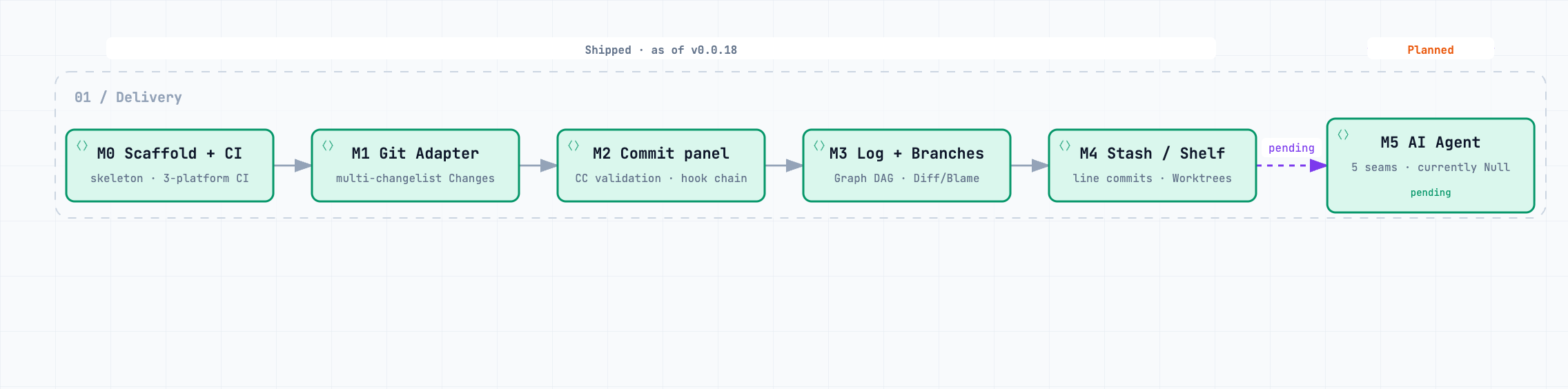
Interactive diagram · Mermaid source · Full delivery ledger: Implementation Status
pnpm install                  # install dependencies
pnpm run compile              # type-check + lint + build
pnpm run watch                # watch build (press F5 to launch the Extension Host debugger)
pnpm run test:unit            # unit tests (pure engine logic, Vitest, 403 cases)
pnpm run test:integration     # integration tests (@vscode/test-electron)
pnpm run package              # production build
pnpm exec vsce package        # package the .vsix
Packaging and publishing with vsce (@vscode/vsce is a devDependency; pnpm exec uses the locked project version — pnpm 12's dlx hard-fails on its unapproved native build scripts):
pnpm exec vsce package
# hyper-git-agentic-git-x.x.x.vsix generated
pnpm exec vsce publish
# ThreeFish-AI.hyper-git-agentic-git-x.x.x published to VS Code Marketplace
- Layering:
engine/(pure logic) →adapter/(the sole layer touching the vscode API, including the hand-renderedadapter/webview/UI);agent/is injected intoengine/via interfaces and never depends on the UI;shared/protocol.tsis the single source of truth for the Webview ↔ Host contract. - Release: a
v*tag triggers CI to produce a GitHub Release (with the.vsixattached; the body is drawn fromdocs/releases/) and publish the same VSIX to both the VS Code Marketplace (gated by theENABLE_MARKETPLACE_PUBLISHvariable) and Open VSX (gated byENABLE_OVSX_PUBLISH);rctags go to the pre-release channel. - Package management and scripts standardize on
pnpm(per the AGENTS.md engineering conventions). Version history is tracked in the Changelog. See the documentation hub for the full docs.