Take an FPGA design from HDL to a running board without leaving VS Code, using the open-source YosysHQ OSS CAD Suite.
HDL → Synthesize (Yosys) → Place & Route (nextpnr) → Pack (gowin_pack) → Program (openFPGALoader)

| Board | Sipeed Tang Nano 20K (Gowin GW2AR-LV18QN88C8/I7) |
| OS | Linux x64 (the only platform it is tested on) |
| HDL | Verilog and SystemVerilog (VHDL is not supported yet) |
| Toolchain | OSS CAD Suite; tested with release 2026-08-28 |
| VS Code | 1.85 or newer |
-
Project Settings panel. Create a project and edit it later from one page: name, board, top module, source files, pins and toolchain. Start from a blink example, from board pins you pick (the top module is generated), or from your own HDL (its ports are read with yosys).
-
Pin mapping with checks. Map each port to a board pin, chosen from a list grouped by peripheral (LEDs, buttons, UART, HDMI, …). Pins used twice, unknown pins and direction mismatches are flagged, and Save is blocked until conflicts are fixed. The
.cstis generated from the mapping; if Save would change an existing.cst, you see a diff first.
-
One-click build. Synthesize, place and route, and pack, one stage at a time or all with Build. Only stages whose inputs changed are re-run. Output streams to the OpenFPGA Deck output channel, with a utilisation and Fmax summary after place and route; full logs go to
build/logs/.
-
Errors in the Problems panel. Synthesis, place-and-route and packing errors point at the HDL line or at the
.cstline of the port involved.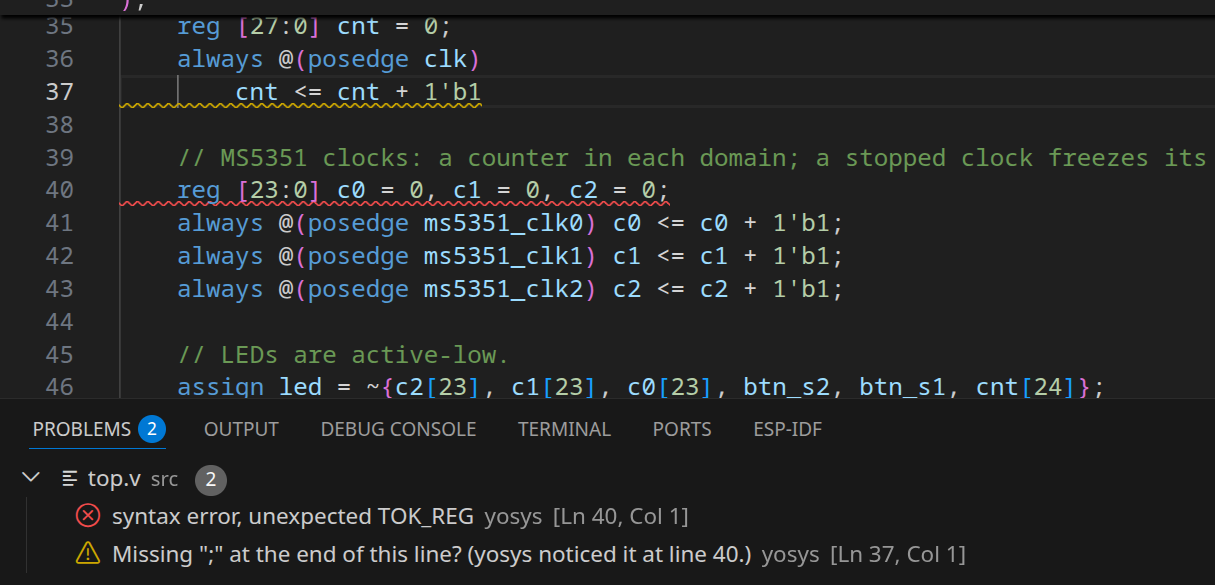
-
Programming. Load the bitstream into SRAM (lost at power-off) or flash (kept). Before a flash write, the extension offers to back up the current flash contents to
build/backup/. Write File to Board writes any.fsbitstream or.binimage, for example to restore a backup. -
Toolchain management. Finds an existing OSS CAD Suite, or downloads a release from the official GitHub repository and checks its integrity. Releases are kept side by side; switch between them or check for a newer one from the panel.


-
Install OpenFPGA Deck from the Extensions view (search "OpenFPGA Deck").
-
USB access to the board. openFPGALoader needs permission to open the Tang Nano 20K's USB programmer. Install its udev rules once and add yourself to the
plugdevgroup:sudo groupadd --system plugdev # "already exists" is fine sudo curl -fsSL -o /etc/udev/rules.d/99-openfpgaloader.rules \ https://raw.githubusercontent.com/trabucayre/openFPGALoader/master/99-openfpgaloader.rules sudo udevadm control --reload-rules && sudo udevadm trigger sudo usermod -a -G plugdev $USER
Log out and back in, then unplug and replug the board. Details: openFPGALoader install guide.
-
Toolchain. Nothing to do if the OSS CAD Suite is already on your
PATHor in a common location. Otherwise the Project Settings panel offers Download latest (about 700 MB to download, 2.5 GB unpacked; nothing is installed system-wide).
-
Open an empty folder (File → Open Folder…) and trust it when VS Code asks. The extension only runs in trusted folders.
-
Create the project. A notification asks "This folder is empty. Initialize an OpenFPGA Deck project?". Click Initialize. If you dismissed it, press
Ctrl+Shift+Pand run OpenFPGA Deck: Initialize Project. -
Fill in the panel. Keep the board, choose Blink example, click Create project. This writes
fpga.yaml,src/top.vandconstraints/top.cst.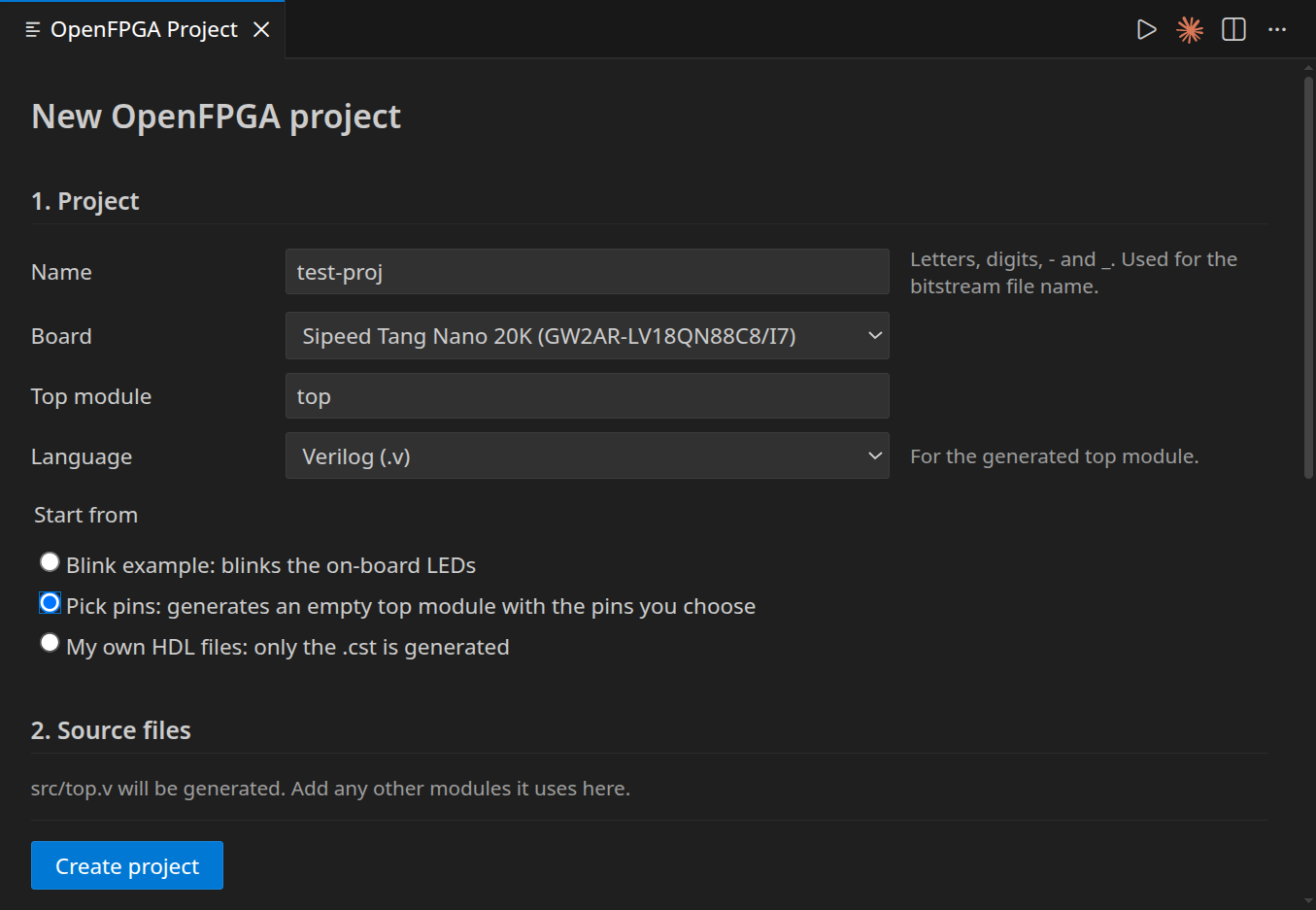
-
Toolchain. If section 4 of the panel says no toolchain was found, click Download latest and wait for it to finish.
-
Build. Click the lightning icon in the status bar (or run OpenFPGA Deck: Build). The output panel shows each stage and ends with Bitstream ready.
-
Program. Plug in the board, click the rocket icon (Build and Program) and choose SRAM. The six on-board LEDs blink.

The status bar items appear only in a folder with an fpga.yaml: the
toolchain version, a gear for Project Settings, Build, Build and Program,
Detect Board, and a menu with the other actions. All actions are also in the
Command Palette under OpenFPGA Deck:.
A project is described by fpga.yaml, which the panel writes for you:
name: blink
board: tang-nano-20k
top: top
sources:
  - src/top.v
constraints:
  - constraints/top.cst
Build output goes to build/; OpenFPGA Deck: Clean deletes it but keeps
flash backups in build/backup/.
| Setting | Default | Purpose |
|---|---|---|
openfpga.toolchain.path |
empty (auto-detect) | Path to an OSS CAD Suite install. |
openfpga.toolchain.installDir |
~/fpga-toolchain |
Where downloaded releases are kept. |
openfpga.toolchain.keepDownloads |
on | Keep the downloaded archives to reinstall offline. |
These settings can only be set in user settings, not per workspace, so a cloned repository cannot point the extension at another executable.
- One board (Tang Nano 20K) and one platform (Linux x64).
- Tested on hardware: LEDs, buttons, UART, WS2812, the MS5351 clocks and HDMI video. The other pin groups (LCD, SD card, audio, BL616 SPI, config flash, header GPIO) come from the schematic and are untested.
- No VHDL.
- Incremental builds do not track
`included files; run Clean after changing one. - When several boards are attached, the first one is used.
- v0.3: a board pin diagram showing what is connected to each header pin, and a chip-level IO planner for custom hardware.
- v0.4: your own board files.
- Later: simulation, a serial monitor, more boards and FPGA families, more platforms. See ROADMAP.md.

No telemetry and no analytics. The only network requests are the toolchain
download (from github.com/YosysHQ/oss-cad-suite-build, over HTTPS,
integrity-checked) and the GitHub release API. Tools are run with argument
lists, never through a shell. Details and how to report a vulnerability:
SECURITY.md.
Built on YosysHQ (Yosys, nextpnr),
Project Apicula (gowin_pack, Gowin
device data) and openFPGALoader.
Tang Nano 20K pin data comes from Sipeed's schematic (rev 3923),
cross-checked against Sipeed's examples and
litex-boards.
Apache-2.0. Forks and republished builds must keep the attribution in NOTICE.