GV

GeezerVison

The World Wide Web, restored to 800 pixels of glory.

Home|About|Gaming cabinet|Archives|How it works|Starter sites

On this site

  • Sign in
  • ActionsCI/CD and automation
  • CodespacesCloud development environments
  • All Features
  • Documentation
  • Training
  • Certifications
  • Build with Copilot
  • Customize Copilot
  • Integrations
  • Trending repos
  • GitHub Sponsors
  • Developer articles
  • Enterprises

This view

  • Original page
  • New address

GeezerVison is showing github.com — GitHub - aleti-pavan/terraform-aws-wordpress: This is Terraform configuration to install and configure wordpress on AWS. March, 2019

BranchesTags
Open more actions menu

Latest commit


History

21 Commits
21 Commits

Folders and files

NameName
Last commit message
Last commit date
files
files
 
 
.gitignore
.gitignore
 
 
README.md
README.md
 
 
ec2-database.tf
ec2-database.tf
 
 
output.tf
output.tf
 
 
providers.tf
providers.tf
 
 
security.tf
security.tf
 
 
terraform.tfvars
terraform.tfvars
 
 
vars.tf
vars.tf
 
 
vpc.tf
vpc.tf


Repository files navigation

What's this:

This is to set up wordpress using AWS infrastructure. We are using terraform to provision infrastructure. Code uses and creates following aws services.

  1. VPC and it's components
  2. Subnets, Route Tables, Internet Gateway, Nat Gateway.
  3. EC2 instance
  4. EIP for NAT Gateway
  5. RDS mysql instance.
  6. Security Groups to access both EC2 and MYSQL

Note:

You may get charged by aws for using services

Pre-requisite:

  1. You need to have Ssh keys generated and should be put into ~/.ssh/ , if your machine is windows then feel free to use diff path and update the same in the ssh_key variable in the vars.tf

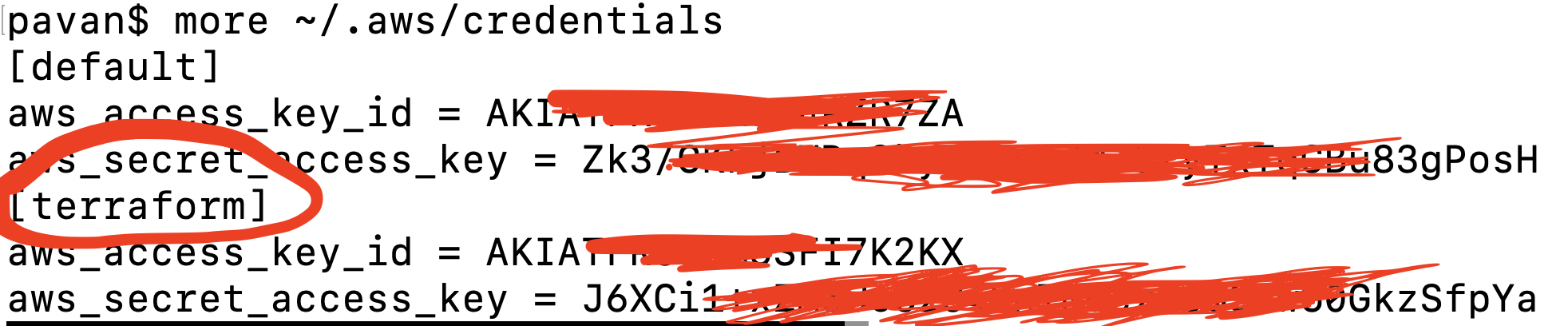
  2. create an IAM user and create security credentials(AccessKey, SecretKey) and update in the ~/.aws/credentials file like below terraform-aws-profile

Note : if you have default profile, just erase the profile attribute in provider.tf

Usage:

provisioning:

  1. git clone https://github.com/aleti-pavan/terraform-aws-wordpress.git
  2. cd terraform-aws-wordpress
  3. terraform init
  4. terraform plan
  5. terraform apply -auto-approve

Destroying the Infra:

  1. cd terraform-aws-wordpress (Be in the repo directory)
  2. terraform destroy -auto-approve

Change: (latest detail from top)

Code has been changed on 11th April, 2020. Code is now compatible with below versions.

Versions:

Terraform v0.12.24

  • provider.aws v2.12.0
  • provider.template v2.1.2

(Old) Code slightly changed on 31st May, 2019. I have added providers.tf with versions required for each provider

About

This is Terraform configuration to install and configure wordpress on AWS. March, 2019

Resources

Readme
Activity

Stars

53 stars

Watchers

4 watching

Forks

87 forks
Report repository

Releases

Packages

Contributors

Languages

You are visitor 01402792 — GeezerVison does not store the pages you look up.
Best viewed with Netscape Navigator 4.7 or Internet Explorer 6 at 800×600. No cookies required.