A Python package to operate with Feishu/Lark bitable
pip install bitable
from bitable import Table

table = Table(BASE_ID, AUTH_TOKEN, 'TABLE_NAME')
# you may also use table_id: Table(BASE_ID, AUTH_TOKEN, table_id=TABLE_ID)

# select records
records = table.select() # select all records
records = table.select({'field_name1': 'value1', 'field_name2': 'value2'}) # select with conditions
records = table.select(Greater('FieldValue', 90))
records = table.select(Or(Greater('FieldValue', 90), And({'FieldSingle': 'A'}, Contain('FieldText', 'text_value')))) # select with complex conditions

# insert records
table.insert({'field_name1': 'value1', 'field_name2': 'value2'}) # insert a record
table.insert([{'field_name1': 'value1', 'field_name2': 'value2'}, {'field_name1': 'value3', 'field_name2': 'value4'}]) # insert multiple records

# update records
table.update({'FieldMultiple': ['B', 'A'], 'FieldDate':'2024-12-21'}, where={'FieldText': 'text_value'}) # update records with where conditions
result = table.select({'FieldText': 'HelloTestUpdate'})[0]
result['FieldText'] = 'new_value'
table.update(result) # update records with record object

# delete records
self.table.delete(where={'FieldText': 'HelloDelete'}) # with where condition
result = table.select({'FieldText': 'HelloTestUpdate'})[0]
self.table.delete(results) # with selected object
from bitable import Table

table = Table(BASE_ID, BASE_TOKEN, 'TABLE_NAME')
BASE_ID can be found at the bitable's URL after 'base/'

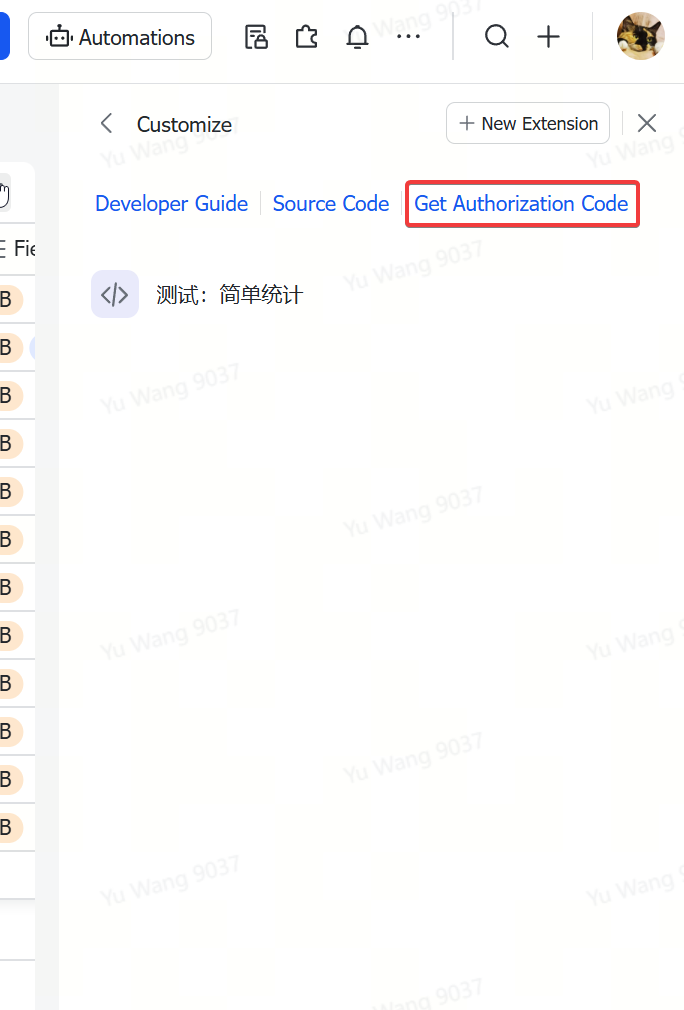
AUTH_TOKEN can be found following these steps:
-
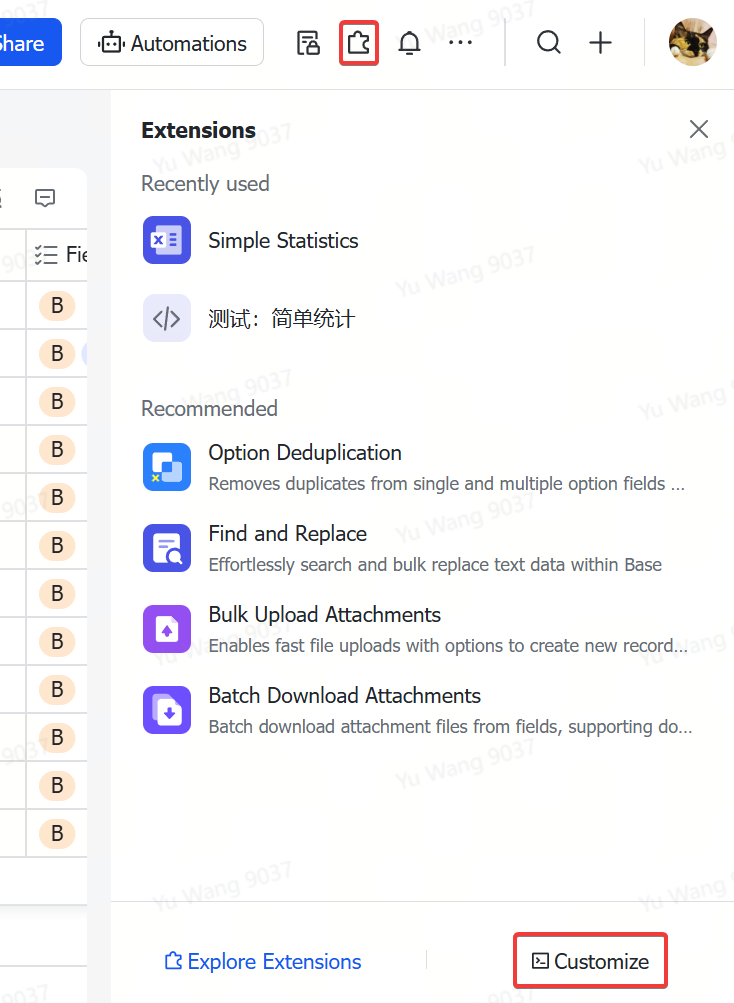
click the "Base extensions" icon on the top right:
-
click "Customize" on the bottom right
-
click "Get Authorization Code"


select all records with just select():
records = table.select()
every record is a dict of field name => value. With '_id' key for the record id additionally.
simple conditions like x==y can be passed in as a dict:
records = table.select({'field_name1': 'value1', 'field_name2': 'value2'})
use operators to construct complex conditions:
records = table.select(Greater('FieldValue', 90))
records = table.select(Or(Greater('FieldValue', 90), And({'FieldSingle': 'A'}, Contain('FieldText', 'text_value'))))
list of operators:
- Equal: "==" operator
- Not: "!=" operator
- Contain: if a string field contains a substring, or a multiple-select field contains an element
- NotContain
- Empty
- NotEmpty
- Greater: ">" operator
- GreaterEqual ">=" operator
- Less
- LessEqual
for date fields, use 'YYYY-mm-dd' format, or one of the following:
Today(), Yesterday(), Tomorrow(), CurrentWeek(), LastWeek(), CurrentMonth(), LastMonth(), Past7Days(), Next7Days(), Past30Days(), Next30Days()
insert a record with insert():
table.insert({'field_name1': 'value1', 'field_name2': 'value2'})
insert multiple records with a list:
table.insert([{'field_name1': 'value1', 'field_name2': 'value2'}, {'field_name1': 'value3', 'field_name2': 'value4'}])
if record is a record dict selected from the table, you can change its content, and update it with update():
(in fact, it uses '_id' key to locate the record)
table.update(record)
you can also update records with where conditions:
table.update({'field_name1': 'new_value1', 'field_name2':'new_value2'}, where={'condition_field_name': 'text_value'})
delete a record selected from the table with delete():
(similar to update(), it uses '_id' key to locate which record to delete)
table.delete(record)
batch delete records with where conditions:
table.delete(where={'field_name': 'field_value'})