English · Français · Deutsch · Español · Nederlands · Polski · Português
RTSP bridge, web viewer and NVR for Reolink cameras that speak the proprietary Baichuan protocol, and for any other camera that serves RTSP.
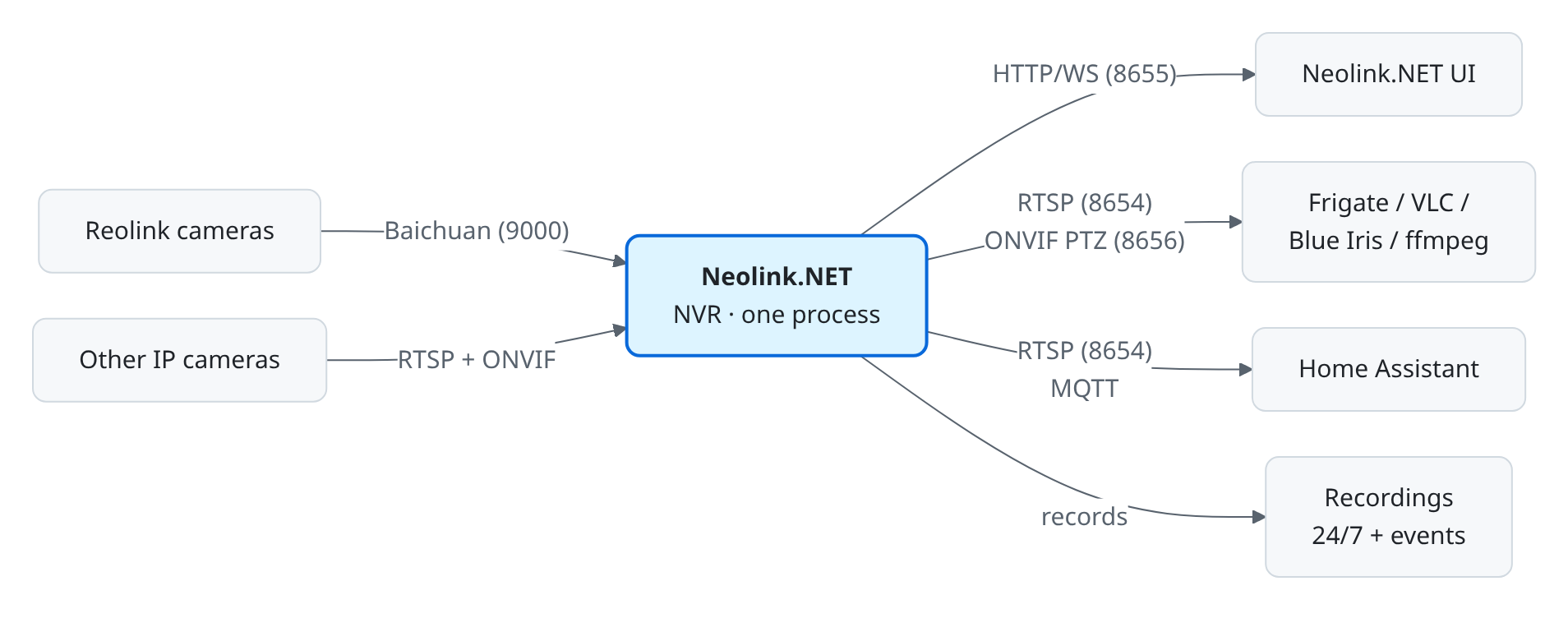
Neolink.NET is built for Reolink IP cameras that talk the proprietary "Baichuan" protocol on TCP port 9000 instead of standard RTSP/ONVIF (B800/D800, B400/D400, E1, Lumus, 510A, Duo, TrackMix, Argus Solar, Solar Floodlight, and many others). Other IP cameras sit beside them: Neolink.NET pulls their RTSP streams and reads their settings and detections over ONVIF (non-Reolink cameras).
Your NVR software (Frigate, Blue Iris, Home Assistant, Shinobi, VLC, ffmpeg, …) connects to Neolink.NET, which logs into the camera, demuxes its media stream, and re-serves it as standards-compliant RTSP. On top of that, Neolink.NET ships a built-in browser UI: a multi-camera wall with live low-latency video, no plugins, no transcoding and no GStreamer. It also has a native MQTT integration for Home Assistant: each camera appears in HA automatically (via MQTT Discovery) with motion/person/vehicle/animal sensors, controls, and availability, driven by the camera's own detections.
It is also an NVR in its own right: it records detection events and continuous 24/7 footage to your own disks, and plays them back from an events page and a synced multi-camera timeline with export. Retention, tiered storage and footage encryption are built in, so no other recording software is needed.
The cameras are unmodified and no Reolink NVR is required.

 Events page: deep-linkable review, filters, 1–16× playback |
 Timeline: synced scrubbing, event marks, export |
 Monitor: server health, camera uptime, fill forecasts |
 Recording setup: events, 24/7, lifecycle, per camera |
 Camera settings: staged changes, applied only when you say so |
All screenshots show synthetic demo footage.
Camera coverage. Reolink's range is large and its firmwares differ. Neolink.NET is developed and tested on the handful of cameras I own. Other models should work, but I cannot promise it until someone with that hardware reports back. An issue with logs helps, and a pull request validated on your hardware helps most.
docker run --rm -p 8655:8655 ghcr.io/borexola/neolink.net:latest --demo
Open http://localhost:8655 and you're looking at the real product with a fake
world behind it: four synthetic cameras with live moving video, detections
firing every minute or two, a seeded event history, 24/7 recordings scrubbing
on the timeline. No real footage anywhere, nothing saved: the demo world
lives in a temp folder, resets itself every six hours, and vanishes with the
container. The same showroom runs on bare metal too: neolink.net --demo
(needs ffmpeg on PATH).
- Click the badge (or Settings → Add-ons → Add-on Store → ⋮ → Repositories →
add
https://github.com/borexola/neolink.net), then install Neolink.NET. - Add your cameras in the add-on's Configuration tab (name, IP, account).
- Start it and click OPEN WEB UI.
With the Mosquitto broker add-on installed, cameras appear as Home Assistant devices with no further setup. UDP-only battery cameras need the Neolink.NET (host network) add-on from the same store instead. More in the add-on guide.
📖 Full guide: docs/docker-install.md: image
tags, docker compose, Unraid template, upgrading, building the image yourself.
mkdir -p config
docker run -d --name neolink --restart unless-stopped \
    -p 8654:8654 -p 8655:8655 \
    -e TZ=Europe/London \
    -v "$PWD/config:/config" \
    ghcr.io/borexola/neolink.net:latest
First start writes a commented starter config into config/ and opens the
web UI at http://localhost:8655. Add your cameras under Server settings
(the gear icon) with the same login you use in the Reolink app, restart, and
streams serve at rtsp://localhost:8654/<camera-name>. Images are multi-arch
(amd64 + arm64: x86 servers, Raspberry Pi 4/5, ARM NAS); pin a version tag
like :1.0.1 in production.
Host networking (
--network host) is required for UDP-only battery cameras and RTSP over UDP transport; everything else works with plain port mapping.
- Windows, no Docker: one MSI installs the desktop app (beta) and, if you tick Local server (Windows service), the full server too. Step-by-step guide.
- Unraid: template and notes.
- From source: needs the .NET 10 SDK. Build and run it.
- RTSP bridge: H.264/H.265 and AAC are repackaged, never re-encoded, and one camera connection feeds any number of clients.
- Web UI built in: a multi-camera wall with sub-second live video, audio and opt-in two-way talk, with no plugins and no transcoding.
- Camera settings and controls read from the camera itself: PTZ, zoom, lights, siren, privacy mode, picture settings and more.
- A full NVR: detection-event clips and continuous 24/7 recording, an events page, a synced multi-camera timeline with export, retention, tiered storage and encryption at rest.
- Home Assistant over MQTT: a device per camera appears automatically, with detection sensors, controls and battery state.
- Non-Reolink cameras: any camera that serves RTSP, with settings and detections over ONVIF.
- Frigate: steady RTSP for detect and record, PTZ buttons, click-to-move and autotracking (beta).
- Battery cameras (beta): auto-detected and sleep-friendly, UDP-only Argus models included.
- AI event descriptions and AI search (beta): a vision LLM describes each event and rates its threat level.
- Alerts: email for critical conditions, plus per-user browser alerts.
- Windows desktop app (beta): the camera wall in its own window, with real Windows notifications.
- Light on the server: detection runs on the camera, so there is no GPU and no per-frame work. It runs on a Raspberry Pi.
- Seven languages: English, French, German, Spanish, Dutch, Polish and Portuguese.
The full list is in docs/features.md.
| URL | Content |
|---|---|
rtsp://host:8654/driveway |
main stream (alias) |
rtsp://host:8654/driveway/mainStream |
main stream (high resolution) |
rtsp://host:8654/driveway/subStream |
sub stream (low resolution) |
http://host:8655/ |
web UI |
The Opus audio variant, the HTTP and WebSocket API, the ONVIF audio backchannel and WebRTC in Home Assistant are in docs/streams.md.
Install
- Docker: image tags, compose, Unraid, upgrading
- Home Assistant add-on
- Windows and the desktop app (beta)
- From source
Configure
- Configuration reference: every option, web UI sign-in, finding cameras, dual-lens cameras, detection zones
- Non-Reolink cameras: generic RTSP, with settings over ONVIF
- Recording (NVR): event and 24/7 recording, retention, tiered storage, encryption
- Battery cameras (beta), UDP-only models included
- Behind a reverse proxy
- Email notifications
Use
Integrate
- Home Assistant (MQTT)
- Frigate: streams, PTZ buttons, and click-to-move and autotracking (beta)
Reference
Neolink.NET is a personal project. I built it for my own use because the existing options did not fully meet my needs, and I publish it in the hope that it is useful to others in the same situation.
It is developed and validated on the cameras I personally own, a small slice of Reolink's range. Firmware behavior varies meaningfully between models (see the camera coverage note at the top), and I cannot buy every camera to test against; reports with logs, and especially pull requests validated on hardware I do not have, are the most effective way to get a model-specific problem fixed.
It is provided "as is", without warranty of any kind: no guarantee of correctness, reliability, security, or fitness for a particular purpose, and no commitment to support, maintenance, or timely fixes. Evaluate it against your own requirements before depending on it, particularly where security footage or around-the-clock monitoring matters. Issues and pull requests are welcome and handled on a best-effort basis. The license contains the formal warranty and liability disclaimers.
If Neolink.NET saves you or your business time, sponsorship funds the hours and the hardware that keep it moving. Buying cameras I do not own is the single biggest unlock for supporting more models, and it is the reason most model-specific gaps stay open. Sponsor Neolink.NET.
Inspired by, and a pure C#/.NET reimplementation of, the original Neolink project by @thirtythreeforty, whose reverse engineering of the Baichuan protocol made all of this possible, and its actively maintained fork QuantumEntangledAndy/neolink, the reference for AES/FullAes and modern camera behavior. Neolink.NET began as a port and remains deeply indebted to both.
This project is a derivative port and is licensed under the GNU Affero General Public License v3.0, the same license as the original. Neolink.NET is not affiliated with or endorsed by Reolink.