
Live demo: try it in your browser. Drop in your own file or run the bundled sample with one click. The real package runs in the page with Pyodide, so files never leave your browser.
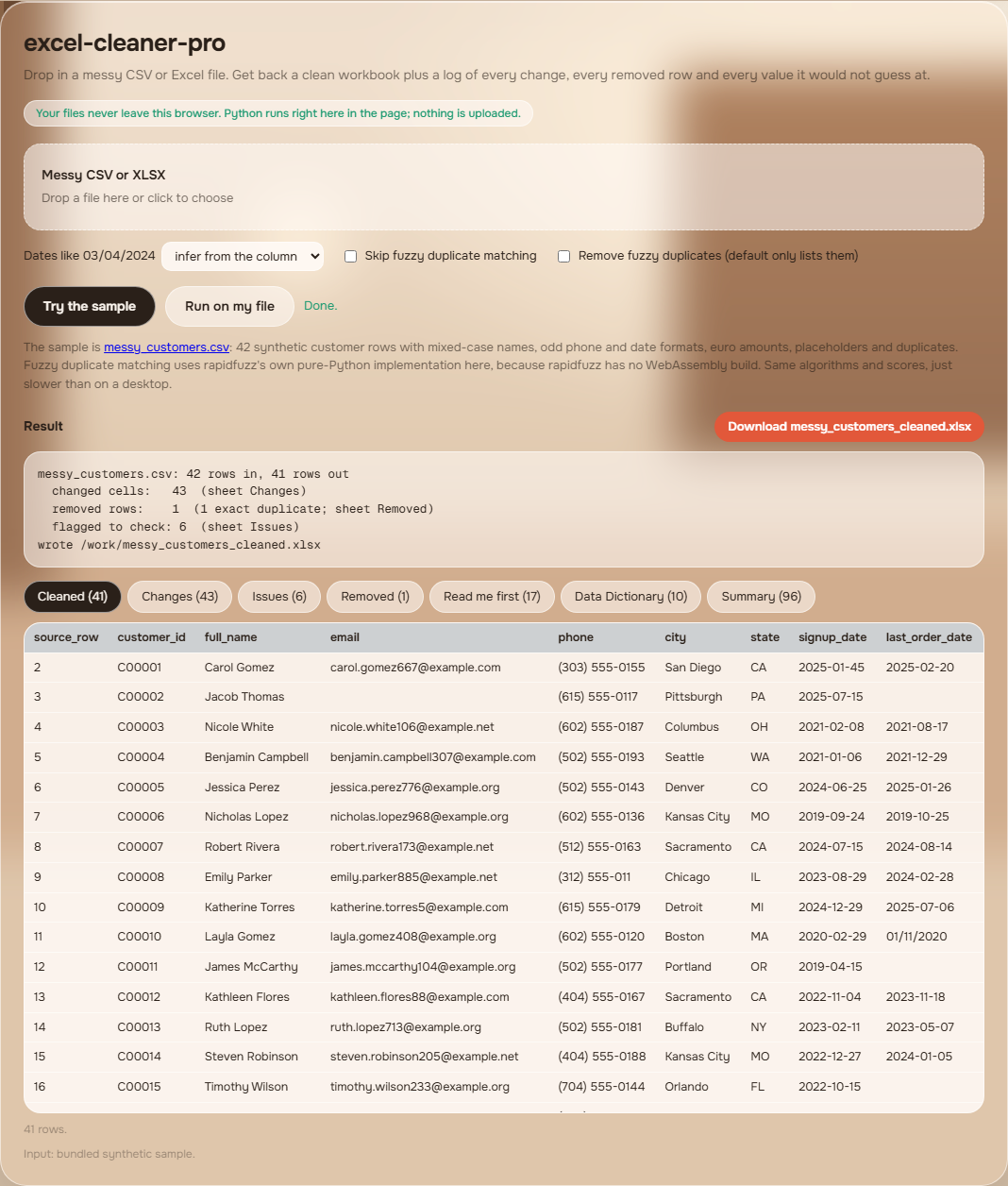
Turns a messy CSV or Excel file into a clean workbook, and shows every change it made.
On a generated file of 5,297 rows with 6,238 damaged cells (seed 42, default settings, no config file):
| Check | Result |
|---|---|
| Fixable errors fixed correctly (whitespace, case, phone, date, currency, state, placeholder) | 5,615 of 5,627 |
| Values that cannot be fixed safely, flagged and left as typed | 611 of 611 |
| Exact duplicate rows removed | 150 of 150 |
| Fuzzy duplicate rows listed for a person to review | 122 of 122, plus 5 rows that were not duplicates |
| Rows removed that were not exact duplicates or empty | 0 |
Input rows not accounted for in Cleaned or Removed |
0 |
| Control totals balance on every numeric column | yes |
| Speed, 5,297 rows, fuzzy matching on | 1,614 rows per second |
The 12 misses are all surnames typed in ALL CAPS whose capitals cannot be rebuilt by rule
(MACDONALD came back as Macdonald, not MacDonald). Each one is in the Changes sheet.
With the opt-in --fuzzy-remove, 121 of the 122 fuzzy duplicates were removed, 1 was listed for
review, and no real customer row was removed (also 0 on five other seeds).
These figures describe generated data. Precision and recall per error type, five more seeds, and a
21,000 row speed run are in BENCHMARK.md, which is written by
benchmark/run_benchmark.py, not by hand. On a client file the checks that carry over are the ones
printed in the workbook itself: row reconciliation, control totals, and the full change log.

Rows from samples/messy_customers.csv and what the tool did with them (samples/cleaned_customers.xlsx):
| Row | Before | After | Where it is logged |
|---|---|---|---|
| 23 | SOFIA KING |
Sofia King |
Changes, rule name_case |
| 23 | none (phone) |
empty | Changes, rule placeholder |
| 28 | 1-617-555-0116 |
(617) 555-0116 |
Changes, rule phone_format |
| 39 | 01 November 2020 |
2020-11-01 |
Changes, rule date_iso |
| 39 | €5.631,97 |
5631.97 |
Changes, rule number_parse |
| 14 | New York |
NY |
Changes, rule state_code |
| 11 | 01/11/2020 |
unchanged | Issues, ambiguous_date: January 11 or November 1 |
| 27 | justin.kim718@example |
unchanged | Issues, invalid_email |
| 36 | Mary t. James, same email as row 30 |
row kept | Issues, possible_duplicate of row 30, score 98 |
| 31 | identical copy of row 15 | row removed | Removed, exact duplicate of row 15 |
Needs Python 3.11 or newer.
python -m venv .venv
.venv\Scripts\python -m pip install .
.venv\Scripts\excel-cleaner samples\messy_customers.csv -o samples\cleaned_customers.xlsx
On macOS or Linux use .venv/bin/ in place of .venv\Scripts\.
From Python:
from excel_cleaner_pro import clean_file

result = clean_file("customers.xlsx", "customers_cleaned.xlsx")
print(result.rows_in, result.rows_out, len(result.changes), len(result.issues))
examples/use_as_library.py goes further: custom settings, reading
the change log and review list from the result, and cleaning rows already in memory with
clean_tables. It runs on the sample file and is checked by the test suite.
A small local web app runs the same library: upload a CSV or XLSX file, see the cleaned rows with
changed cells highlighted (and the same rows as typed), the change log, the review list, the
removed rows, and download the cleaned workbook. It runs on your machine; usage stats are
switched off in .streamlit/config.toml.
.venv\Scripts\python -m pip install ".[app]"
.venv\Scripts\streamlit run app\streamlit_app.py
The page opens at http://localhost:8501. Try it with samples\messy_customers.csv.
- Reads the file and reports what it hides. CSV (comma, semicolon, tab or pipe) or every sheet of an XLSX file. The input file is never written to. Before any cleaning, the reader reports: the encoding and delimiter it assumed, title rows above the header, merged cells, hidden sheets, rows and columns, and formulas with no stored value. None of these is repaired by guess.
- Finds the header row. The first row that is at least half filled with text. Rows above it go
to
Removedwith the reasonabove header row.--header-row Nsets it by hand. - Basic text cleanup. Trims whitespace, joins split accent characters (Unicode NFC), turns
placeholder text (
N/A,-,null) into empty cells, sets aside empty rows. - Works out each column's type from your config, then the header, then the values:
text, id, name, email, phone, date, number, currency or state. A column needs no "date" in its
header to be read as dates ("Last Order" works): at least 80% of its filled cells must look
like dates and at least 60% must be real, readable dates. Real Excel date cells count. Values
with no year (
12/5), ZIPs (02134), invoice numbers (2024-001), phones and amounts never count, so those columns are not touched. - Applies that type's rule to each cell. A value is changed only when there is one reading of
it. Anything else goes to
Issuesand stays as typed. - Duplicates. Exact duplicate rows are removed. Near matches on the key columns (name plus
email by default, scored with
rapidfuzz) are listed inIssueswith the row they resemble and are not removed.--fuzzy-removeremoves matches scoring 95 or more, and fills blanks in the kept row from the removed row, logging each fill. - Checks its own work. Rows read must equal rows cleaned plus rows removed. Each numeric
column's total is tracked through removal and must balance. Rules you declare (unique key,
required column, allowed values, range, pattern) are run and reported on a
Validationsheet.
What "one reading" means in practice:
03/04/2024could be March 4 or April 3. If other dates in the column can only be month-first (3/15/2024) and none can only be day-first, it is read month-first and logged under its own rule name,date_iso_inferred_order, so you can filter for it. If the column gives no proof, or mixed proof, the date is flagged and left alone.--date-order flagturns the inference off.1,500is 1500 in a US file and 1.5 in a European one. In a column that mixes both styles it is flagged, not converted.Kentukyis flagged with the suggestion "closest match: Kentucky (KY)". It is not changed.- Two rows named James Smith with emails
james.smith12@andjames.smith47@are different people. Differing digits block a fuzzy match. - A ZIP column holding
2134has probably lost a leading zero in Excel. It is flagged, not padded, because a lost zero and a wrong value look the same.
Settings live in one small TOML file. Write out the defaults, edit, pass it back:
.venv\Scripts\excel-cleaner --write-config my_config.toml
.venv\Scripts\excel-cleaner samples\messy_customers.csv -o out.xlsx --config my_config.toml
You can switch any rule off, force a column's type, choose the phone format, set the date order, pick the fuzzy key columns, move the thresholds, and declare validation rules.
One XLSX file:
| Sheet | What is in it |
|---|---|
Read me first |
Plain-language counts, what each sheet is, and how to check the work. |
Cleaned |
The cleaned data. The first column, source_row, points back to the row in the original file. A workbook with several sheets gets one Cleaned - <name> sheet each. |
Changes |
One line per edit: sheet, row, column, before, after, rule, note. |
Removed |
Every dropped row in full, with the reason, the row it duplicated and the match score. |
Issues |
Everything flagged but not changed: invalid emails and phones, ambiguous dates and numbers, unknown states, possible duplicates, merged cells, formulas with no value, IDs that Excel has already damaged, text in the wrong encoding. |
Validation |
Only when rules are declared: each rule, pass or fail, and the failing rows. |
Data Dictionary |
One line per column: type and how it was decided, filled and missing counts, distinct values, min, max, examples, rules applied. |
Summary |
Row reconciliation, control totals per numeric column, changes by rule, flags by type, placeholder text blanked per column, notes about the file, and the run record: input file SHA-256, tool version, encoding assumed, and every setting used. |
For scripts and pipelines, --report-json report.json also writes the counts as JSON: cells
changed by rule and by column, issues by type, removed rows by reason, column types, control
totals and validation results, for the whole run and per sheet. From Python, build_report(result)
returns the same dictionary.
US-centric (US and Canada phones, US states, dot-decimal default for numbers). Fuzzy matching is
quadratic, so it slows down on large files: 53 seconds for 21,000 rows in the benchmark run, 5
seconds with --no-fuzzy. Formulas are read as their last calculated value. Merged cells and
multi-row headers are reported, not restructured. Full list: LIMITATIONS.md.
CI runs ruff, mypy on src/ and the tests with a coverage report on Python 3.11 and 3.13.
.venv\Scripts\python -m pip install -e ".[dev,app]"
.venv\Scripts\python -m pytest --cov
.venv\Scripts\python -m ruff check .
.venv\Scripts\python -m mypy
.venv\Scripts\python benchmark\run_benchmark.py
MIT. See LICENSE.
- pdf-to-excel: Invoice PDFs into one Excel sheet, with a confidence score on every field. 3,600 of 3,600 fields correct. (live demo)
- transaction-categorizer: Sorts bank and card transactions into categories and builds the monthly summary. (live demo)
- data-merger: Combines customer lists with different columns into one record per customer. 0 false merges on 28,512 rows. (live demo)