
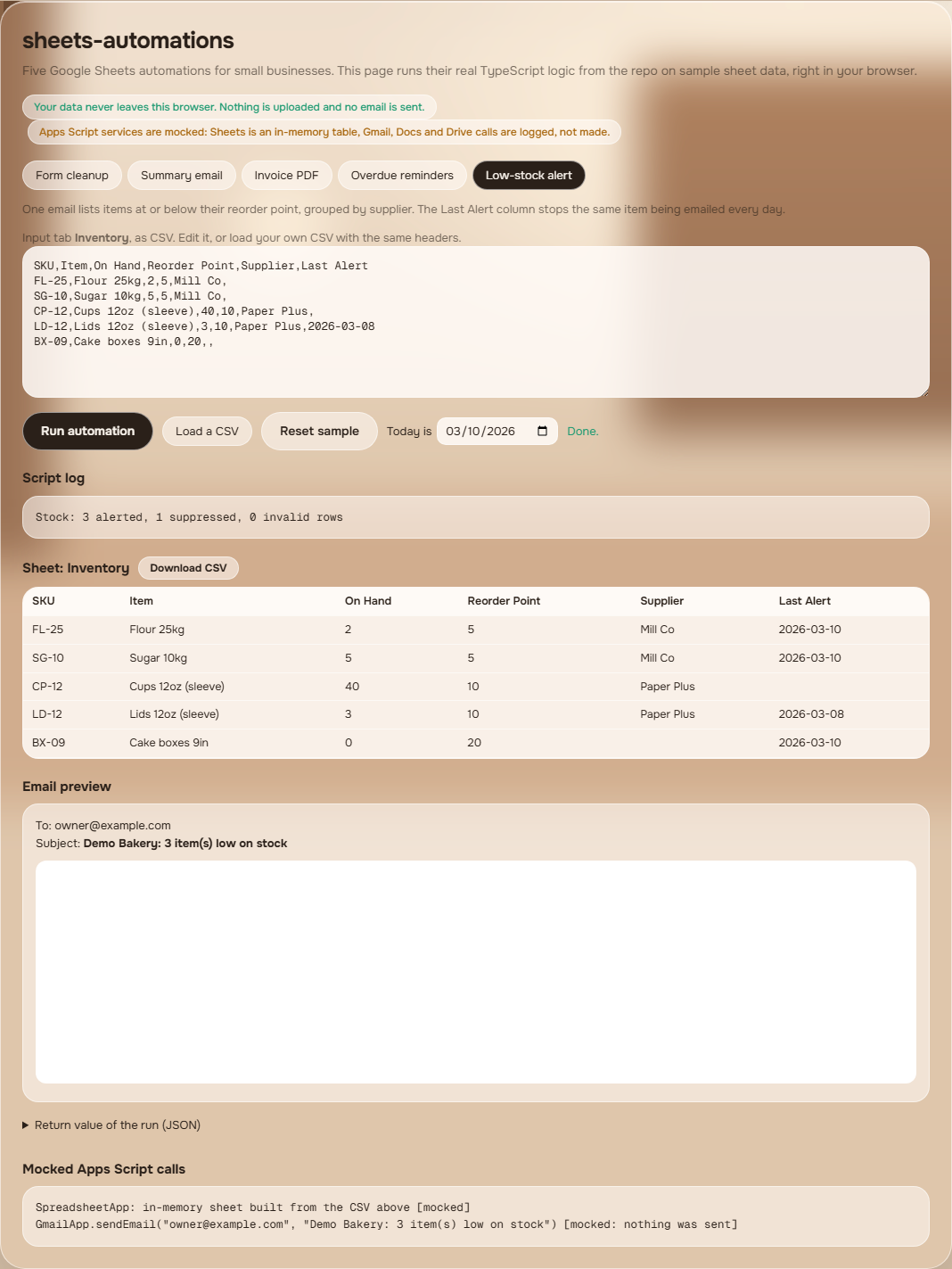
Live demo: try it in your browser. Run the five automations on sample sheet data, or paste your own CSV. The real TypeScript logic runs in the page; Apps Script services (Sheets, Gmail, Docs, Drive) are mocked and labelled, so nothing is sent.
Five Google Apps Script automations that small businesses ask for, written in TypeScript and deployed with clasp. The business rules live in plain functions with no Apps Script dependency, so they are unit-tested in Node with fakes for SpreadsheetApp, GmailApp and the Docs/Drive calls.
| # | Automation | What it does |
|---|---|---|
| 1 | Form cleanup | Moves new Google Form rows into a Master sheet: trims names, formats US phones, lowercases emails, skips duplicates, sends bad rows to Rejected with a reason |
| 2 | Summary email | Emails yesterday's totals (daily) or the previous 7 days (weekly) from a Sales tab: orders, revenue, average, status split, top 3 items |
| 3 | Invoice PDF | Select a row, click a menu item. Fills a Google Docs template, saves a PDF, writes the link and Invoiced status back to the row |
| 4 | Overdue reminders | Emails overdue, unpaid invoices. Respects an opt-out column, spaces reminders out, stops after a limit, caps each run, keeps a send log |
| 5 | Low-stock alert | One email per run listing items at or below their reorder point, grouped by supplier. A Last Alert column stops daily repeats |
Screenshots are the real automation code run against the sample data in samples/. They show the sheet layout each automation expects, then the sheet and email after it runs.
 |
 |
 |
 |
 |
samples/sample-workbook.xlsx has one tab per input sheet with the exact headers each script needs. Matching CSVs are in the same folder. Import the workbook into Google Sheets (File, Import) and you can try every automation. Header names are matched without regard to case or surrounding spaces. Column order does not matter.
| Tab | Required columns |
|---|---|
Form Responses 1 |
Timestamp, Name, Email, Phone, Message |
Sales |
Date, Item, Amount, Status (Customer is optional) |
Invoices |
Invoice #, Date, Client, Description, Qty, Unit Price, Tax %, Status, PDF Link (Client Email optional) |
Invoices Due |
Client, Email, Invoice #, Amount, Due Date, Paid, Opt Out, Last Reminded |
Inventory |
SKU, Item, On Hand, Reorder Point, Supplier, Last Alert |
Master, Rejected and Send Log are created on first run.
You need Node 20 or newer and a Google account that owns the sheet.
-
Clone this repo and run
npm install, thennpm run build. This writesdist/Code.jsanddist/appsscript.json. -
Create or open the Google Sheet. Add the tabs above (or import the sample workbook).
-
In the sheet, choose Extensions, Apps Script. Note the Script ID under Project Settings.
-
Install clasp (
npm install -g @google/clasp), runclasp login, then copy.clasp.json.exampleto.clasp.jsonand paste the Script ID. -
Run
clasp push. Reload the sheet. An Automations menu appears. -
In Project Settings, Script Properties, add the ones you need:
Property Used by Default BUSINESS_NAMEall emails My BusinessNOTIFY_EMAILsummary, stock alert the script owner INVOICE_TEMPLATE_IDinvoices none, required TZ_OFFSET_MINUTESall date logic 0(UTC)REMINDER_MIN_DAYSreminders 7REMINDER_MAXreminders 3REMINDER_MAX_PER_RUNreminders 50STOCK_REPEAT_DAYSstock alert 7 -
Run
installTriggersonce from the editor and approve the permissions. It sets: form cleanup hourly, summary daily at 7, stock check daily at 8, reminders daily at 9. Edit that function to change times.
Make a Google Doc with these placeholders anywhere in the text, then put its ID (the long string in its URL) in INVOICE_TEMPLATE_ID:
{{invoice_number}} {{date}} {{client}} {{client_email}} {{description}} {{qty}} {{unit_price}} {{subtotal}} {{tax_percent}} {{tax}} {{total}}
Use Preview overdue reminders (no email) first. It shows how many would be sent and skipped and writes nothing.
src/core/       pure functions: parsing, dedupe, totals, who gets a reminder
src/services/   one function per automation, takes an Env (sheets, mail, docs, props, clock)
src/gas/main.ts the only file that touches Apps Script globals; builds the Env, adds the menu and triggers
tests/          Vitest, with in-memory fakes for a spreadsheet, Gmail, Docs/Drive and script properties
scripts/build.mjs  bundles main.ts into dist/Code.js with esbuild and adds top-level function stubs
Design choices:
- Money is integer cents so
19.99 x 3never becomes59.970000000000006. - "Today" is injected, so date logic is tested without touching the real clock.
- Safe to re-run. Form cleanup remembers the last row it handled and dedupes against
Master. Reminders read the send log. Stock alerts stampLast Alertonly after the email goes out, so a failed send retries on the next run. - Failed sends are logged, do not count toward the reminder limit, and do not stop the rest of the run.
npm run typecheck   # tsc --noEmit, strict
npm run lint        # eslint, typescript-eslint strict-type-checked
npm test            # vitest with coverage
npm run build       # dist/Code.js
npm run samples     # regenerate samples/ (screenshots are rendered from the same run)
The suite has 61 tests. Coverage on src/core and src/services is 99.6% of statements and 92.5% of branches. src/gas/main.ts is the thin glue layer and is not covered by unit tests.
See LIMITATIONS.md. The main one: this repo was never deployed to a live Google account, so src/gas/main.ts has been type-checked and bundled but not run against real Google services.
MIT, Chase Builds.
- appointment-booking-api: Online booking that never double-books and gets time zones right. (live demo)
- small-business-county-study: How small businesses are doing in 31 Eastern Kentucky counties, from free Census data. (live demo)
- web-data-extractor: Public web pages to a checked spreadsheet, only where the site allows it.