Practical exercises for the course "Hands-on Biomedical Data - Resources and Analysis Tools"
Make sure you read instructions in detail. Especially getting the Setup right.
You can run the practicals on:
- Your personal computer(ideal case)
- Day 1: Basic R programming and visualizations
- Day 2: Introduction in differential expression analysis
- Day 3: A more complex example
- Day 4: Interaction effects
- Day 5: Assignment - analyze a dataset of your choosing
- Save one R script for each day to not mix exercises and R sessions from different days.
- Save the R scripts as
day1.R,day2.R,day3.R,day4.R, andday5.R. - While you can execute commands from your script in any order, make sure your finally submitted script runs through from top to bottom if started from an empty environment!
- Submit all files through Blackboard (see deadlines there).
For the evaluation, you will get points based on the exercises indicated like this:
Exercise X:- The evaluation is based on a protocol that you will prepare.
- In this protocol your should address all exercises. Each exercise counts for 1 point unless otherwise stated.
- Usually exercises are just one or two plots. If you are asked to respond to questions, max. 2-3 sentences per exercise should be sufficient.
- Submission:
- You should ideally submit Markdown (see Markdown instructions](markdown.md)) files to create the protocol. This contains code and plots together and makes it very easy to track and evaluate your progress.
- Alternatively, you can copy/paste your plots and write your answers in Word (or Powerpoint), which you then convert and submit as a PDF file. In this case, you also have to submit R Scripts which document your code.
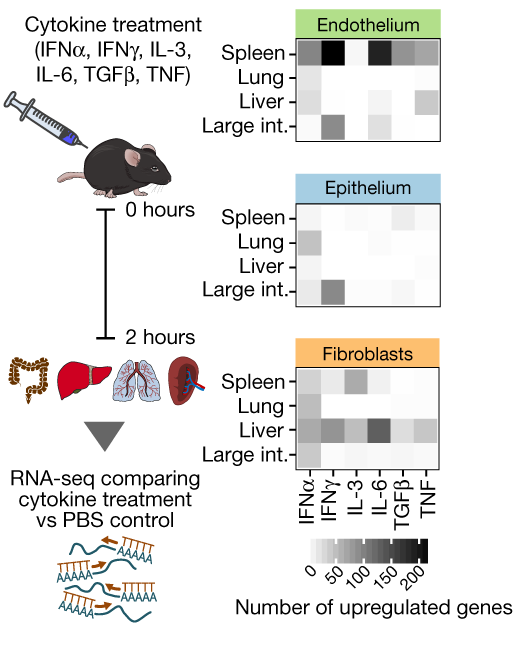
In this part of the practical, we will study transcriptomics data of structural cells in mice upon cytokine stimulation from Krausgruber & Fortelny et al., Nature, 2020.
- Quality control using sample correlations and dimensionality reduction
- Data normalization
- Differential expression
- Model diagnostics and quality control
- Plotting of results
- Interpretation of top genes
- Gene set enrichment analysis
- Most commands should be explained in this practical.
- If you do not understand certain functions, type the question mark plus the function name in R, e.g.: "?median".
- If you need additional commands, Google/ChatGPT is your friend. Make sure that you understand the code that you submit!
- Also consult this list of function names, which contains key functions relevant for this course.
- Don't forget to raise you hand if lost!
