
Short eye exercises every few minutes, a real break every hour, and quiet when you need focus.
Free and open source. Lives in the tray. No account, works offline, optional anonymous usage stats and crash reports.
Website · Download · How it works · FAQ · Changelog · Roadmap
Long screen sessions dry and tire your eyes. Ocy is a free, open-source eye break reminder for Windows 10 and 11 that helps with eye strain the gentle way. About every 25 minutes a small card shows one illustrated eye exercise for fifteen seconds. Every hour it asks for a real five-minute screen break. Between breaks it stays out of the way, in the tray. It is one 12 MB file that uses about 3.7 MB of memory while it waits.

- It shows the break where you are looking. Short breaks and the long-break warning appear on the monitor you are working on. The other monitors get a soft coloured frame, so the reminder never pops up on a screen you can't see.
- It waits for a natural moment. When a break is due, Ocy waits up to a minute for a short pause in your typing or mouse use, so it never interrupts mid-sentence. Breaks never steal focus or add a taskbar button.
- It knows when to stay quiet. Presentations and fullscreen videos put breaks on hold until you are done. In games, a break comes as a small card in a calm moment, never mid-fight, and Not during this game keeps any game silent.
- A glass of water, now and then. Some long breaks suggest a few calm sips. No tracking, and you can turn it off.
- Time away counts as rest. Step away from the keyboard, lock the PC or put it to sleep, and Ocy counts it as a break. You won't come back to a "time for a break!" message.
- Hand-drawn exercises, gently animated. Twelve original exercises drawn in a few frames each, like a flip book. If Windows animations are turned off, they hold still.
- Gentle first, firm when you want it. A warning a minute before each long break lets you start it, postpone it a few times or skip it. Turn on strict mode and long breaks keep to the schedule.
- Three presets, one glance. Settings opens on Gentle, Balanced or Focused, with a timeline of the next two hours and today's taken and skipped breaks. Every value stays adjustable.
- In your language. The app and the website are available in 40 languages.
- At home in Windows. Light and dark themes follow your Windows setting, and the sprout tray icon matches your taskbar. Screen readers such as Narrator can read it through Windows UI Automation.
- Light on your PC. About 3.7 MB of memory at idle, about 5–6 MB during a break, and it checks in about six times a minute. The next break card is prepared ahead and painted in about 10–20 ms.
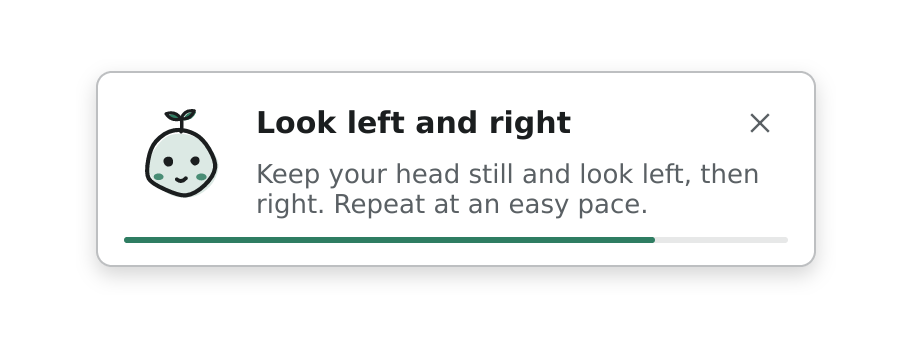
Short break, on the monitor you are using |
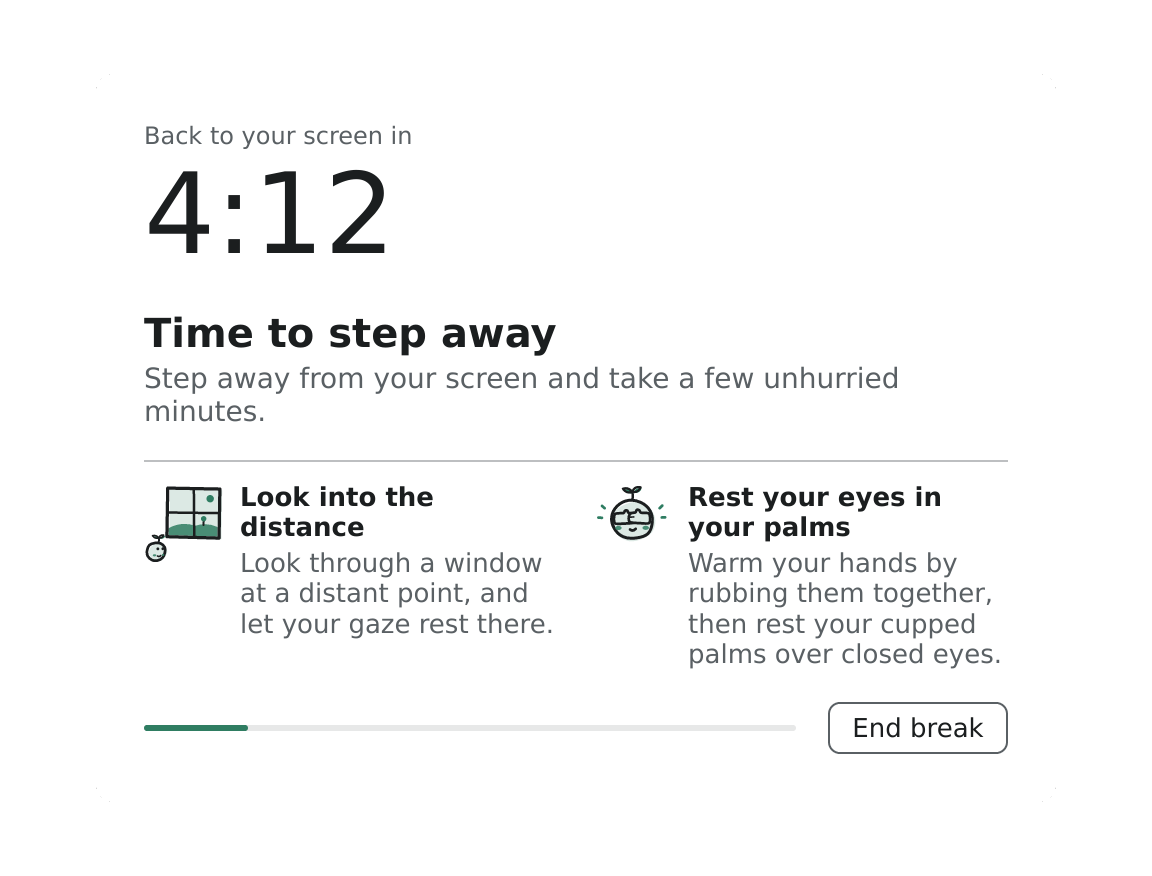
Long break, every hour |
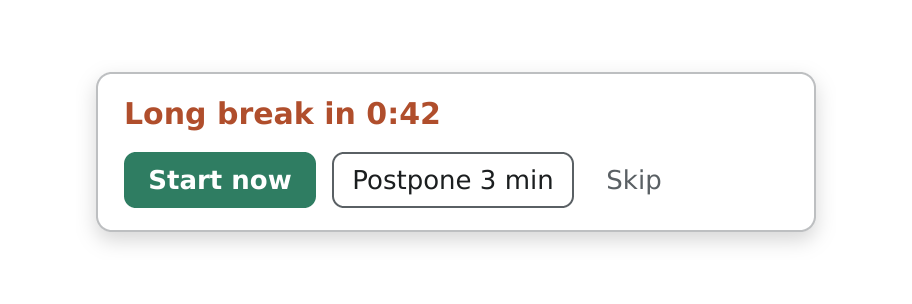
A heads-up before the long break |
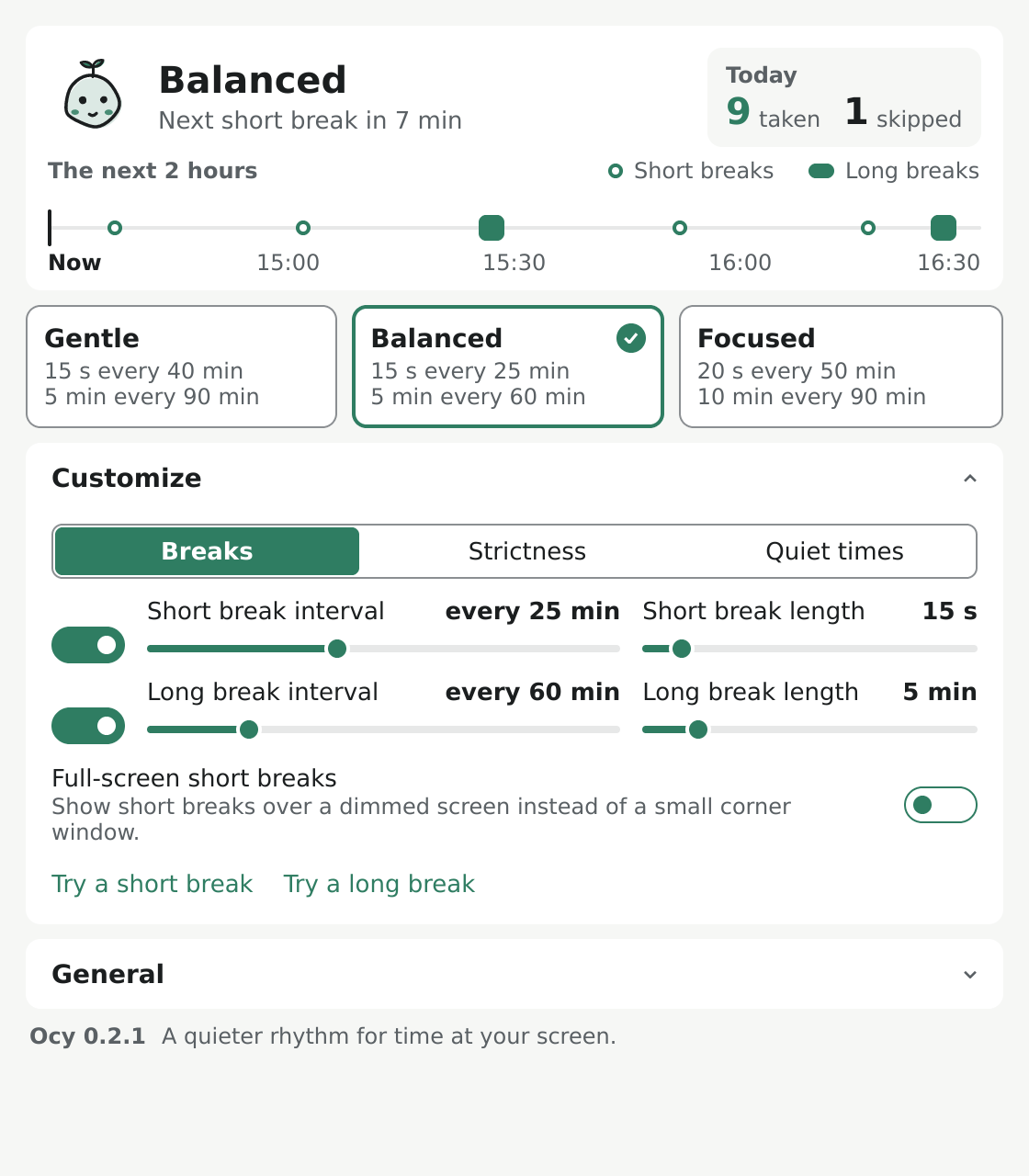
Settings apply as you change them |
Windows 10 or 11 (64-bit):
- Download
Ocy-<version>-win-x64.zipfrom the latest release. It holdsOcy.exe(about 12 MB) plusLICENSE.txt,README.txtandTHIRD-PARTY-NOTICES.txt. - Unzip it anywhere, for example
Documents\Ocy, and runOcy.exe. Nothing to install. - Ocy appears in the tray as a small green sprout. Click it for settings; right-click to pause, take a short break now or quit.
The app isn't code-signed yet, so Windows SmartScreen may warn on the first run: choose More info → Run anyway. To start Ocy when you sign in, turn on Start with system in Settings.
Where your data lives: settings and stats are stored in %APPDATA%\Ocy. Upgrading from 0.1.x keeps them.
Uninstall: quit Ocy from the tray and delete its folder, plus %APPDATA%\Ocy if you also want to remove your
settings.
macOS and Linux: planned, using the same core. See the roadmap.
| Eyes | Eyes | Body |
|---|---|---|
| Blink slowly | Shift near to far | Stretch your arms |
| Look left and right | Look into the distance | Loosen your shoulders |
| Look up and down | Trace a figure eight | Stand and walk |
| Roll your eyes gently | Close your eyes tightly | Rest your eyes in your palms |
All text and art are original. Each exercise is described in a sentence or two, so you can follow it without looking at the screen.
| Default | Range | |
|---|---|---|
| Short break | every 25 min, for 15 s | every 2–60 min, 5–120 s |
| Long break | every 60 min, for 5 min | every 15–240 min, 1–30 min |
| Warning before a long break | 60 s | 0–300 s |
| Postpone | 3 min, up to 3 times | 1–30 min, 0–10 times |
| You count as away after | 2 min without input | 30 s – 30 min |
- The clock counts active screen time, not wall-clock time. Idle time, a locked screen and sleep don't count towards your next break.
- An absence at least as long as a break counts as that break. A long absence counts as a long break.
- With Pause in fullscreen on (the default), breaks that fall due during a presentation or a fullscreen video wait until you leave it.
- Games get gentle breaks by default: the small card, never the dimmed screen, only after a few seconds without keyboard, mouse or controller input. Choose Hold breaks in games in Settings to hold them instead.
- When a break is due, Ocy waits up to 60 s for a natural moment: a short pause in your typing or mouse use.
- From the tray you can pause for 1 hour, for 3 hours or until you resume, take a short break now or take a long break now. The pause menu shows your choice and the time left, for example "Paused until 15:40 · 1 h 15 min left".
- Optional anonymous usage stats: off until you say yes; one short summary a day of break counts and settings; nothing personal, no IP address stored.
- Optional crash reports: if Ocy closes unexpectedly, it asks before sending anything, shows you the exact report first, and removes anything personal. Choose Ask each time, Always send or Never send in Settings → General.
- The two choices are separate, and both can be changed any time.
- Release builds no longer contain build-machine paths, and the Microsoft Store package includes symbol files for readable crash locations.
Full details: CHANGELOG.md and the privacy page.
No account and no ads. Ocy works fully offline and keeps its files on your PC. The only thing it can send is an anonymous daily summary of its own break counts and settings, and only if you turn on usage stats in Settings. If Ocy ever closes unexpectedly, it can also send a crash report (the error, Ocy's version and your system version, nothing personal), but only if you say yes: it asks first, and you can choose Always or Never in Settings. Full details: ocy.damt.xyz/privacy.
Yes. If you used EyeLeo, which hasn't been updated in years, Ocy covers the same daily routine: short eye exercises, regular long breaks and quiet during fullscreen work. It also shows breaks on the monitor you are using, counts time away as rest, and runs on Windows today, with macOS and Linux planned. Ocy is an independent project, and its code, exercises and art are all original.
It follows the same idea: look away from the screen often and rest your eyes. By default short breaks come every 25 minutes for 15 seconds. If you prefer the 20-20-20 rule, set short breaks to every 20 minutes for 20 seconds in Settings.
Is it free? Yes. Ocy is free and open source under AGPL-3.0, with no paid tier and no ads.
Does it need the internet? No. Ocy works fully offline. If you turn on the optional anonymous usage stats, it sends one small summary a day when you're online.
Does it slow my PC down? No. About 3.7 MB of memory while it waits, about 5–6 MB during a break, and it checks in about six times a minute. The whole app is one 12 MB file.
Can I use a screen reader? Yes. Ocy supports Windows UI Automation, so Narrator can read it.
Will it interrupt my game, video call or presentation? Presentations and fullscreen videos hold breaks until you are done. In games, breaks come as a small card in a calm moment, never mid-fight, and Not during this game keeps any game silent. Detecting calls in windowed apps is on the roadmap.
Can I make it stricter or gentler? Yes. Change how often breaks come and how long they last, or turn off postponing and skipping with strict mode.
Is this medical advice? No. Ocy is a habit tool. If your eyes hurt or your vision changes, see an eye-care professional.
The app and the website are available in 40 languages. The app follows your Windows language, or you can pick one in Settings. Each website language has its own address, for example Deutsch or 日本語.
macOS and Linux are next. See ROADMAP.md.
Requirements: Rust 1.95 (pinned in rust/rust-toolchain.toml, so rustup picks it up).
git clone https://github.com/danielmevit/ocy.git
cd ocy/rust
cargo build -p ocy-app --release
cargo test --workspace
# cross-compiling from Linux or WSL:
cargo xwin build --target x86_64-pc-windows-msvc
The C# 0.1.x source (src/, Ocy.slnx) stays in the repo for reference.
Issues and ideas are welcome. Before a larger change, open an issue so we can agree on the approach. The build must stay at 0 warnings, and new behaviour needs tests. Project conventions are in AGENTS.md and docs/.
Ocy is designed, directed and maintained by damt.xyz with extensive use of generative AI tools, from start to finish: most of the application code and tests, the documentation, the translations, the website, the store listing and other marketing materials, and ongoing maintenance.
This applies only to how Ocy is made and marketed. At runtime Ocy uses no AI model.
Throughout, a real person steers the work and decides what is released.
GNU Affero General Public License v3.0. Ocy is built with Slint under its GPL-3.0
option. Third-party licences ship in THIRD-PARTY-NOTICES.txt; see also docs/rust/LICENSES.md.
Copyright © 2026 Daniel Mitev (Daniel Mevit). Made by damt.xyz.