

A modern, open-source .NET MAUI application built with .NET 10, Clean Architecture, and SOLID principles.
👉 Download Meow on Google Play Store

- About The Project
- Key Features
- Architecture & SOLID Principles
- Technology Stack
- Supported Platforms
- Getting Started
- Design Tool
- Team & Contributors
- How to Contribute
- License
Meow is a production-ready, open-source multi-platform application designed for cat lovers. Built from the ground up targeting .NET 10 and .NET MAUI, it demonstrates how to architect a modern, enterprise-grade mobile application using 100% native .NET MAUI controls (with zero third-party UI dependencies).
The application connects to TheCatAPI to deliver an infinite stream of cute feline photos, complete breed encyclopedias, and personal favorite collections with an offline-first caching strategy.
-
🗳️ Vote & Discover:
- Infinite feed of random high-definition cat pictures.
- Interactive double-tap and tap-to-favorite gesture interactions.
- Custom native heart confetti animation burst when expressing love for a kitten.
- Separate "Love It" and "Nope It" discovery navigation buttons.
- Instant floating badge indicating current favorite status.
-
📖 Breeds Encyclopedia:
- Comprehensive catalog of domestic cat breeds with origin, description, and personality temperament tags.
- Dynamic Paw-Print Rating System: Custom-engineered vector rating control powered by
Microsoft.Maui.Graphicsthat visibly fills paw prints for core traits (Affection Level, Adaptability, Child Friendly, and Dog Friendly). - High-resolution gallery per breed with graceful empty-state handling for breeds without current photos.
-
⭐ Offline-First Favorites:
- Saved favorites collection powered by local SQLite caching.
- Automatic synchronization and fallback resilience when offline.
- High-performance, 60 FPS smooth scrolling CollectionView.
-
🎨 Tailored UI/UX & Theming:
- Native Dark Mode and Light Mode adaptive themes.
- Responsive AppShell tab navigation.
- Clean vector iconography and typography.
The solution strictly adheres to Clean Architecture (Uncle Bob) to enforce decoupling between business rules, data access, and presentation frameworks:
Meow/
├── Meow.Domain/          # Enterprise Business Rules (Pure Entities, no dependencies)
├── Meow.Core/            # Application Business Rules (Use Cases & Repository Interfaces)
├── Meow.Infrastructure/  # Data Access (TheCatAPI Service, SQLite Repositories, Offline Sync)
├── Meow/                 # Presentation Layer (XAML, ViewModels, Custom Controls, AppShell)
└── Meow.Tests/           # Unit Tests (158 Tests covering Domain, Core, ViewModels, Graphics)
Meow.Domain- Contains core domain entities:
Cat,Breed,UserFavorite,Category. - Zero external dependencies; pure C# and .NET 10.
- Contains core domain entities:
Meow.Core- Application use cases:
GetVotingCatsUseCase,GetBreedsUseCase,GetCatsByBreedUseCase,ManageFavoritesUseCase,CacheMaintenanceUseCase. - Repository interfaces and contracts (
ICatApiService,ICatCacheRepository,IBreedCacheRepository,IFavoriteRepository).
- Application use cases:
Meow.Infrastructure- Implementation of external concerns: HTTP API Client (
CatApiService), SQLite database tables, and offline caching logic (CatCacheRepository,FavoriteRepository). - Implements
IConnectivityProviderandIDatabasePathProvider.
- Implementation of external concerns: HTTP API Client (
Meow(Presentation & UI)- .NET MAUI UI with MVVM pattern powered by
CommunityToolkit.Mvvm. - AppShell structure, custom controls (
RatingView,RatingCanvas), and adaptive theme dictionaries (Colors.xaml,Global.xaml).
- .NET MAUI UI with MVVM pattern powered by
Meow.Tests- 158 automated unit tests built with xUnit v3, FluentAssertions, Moq, and Microsoft.Testing.Platform.
| Principle | Implementation in Meow |
|---|---|
| S - Single Responsibility | Every Use Case executes a single business operation (e.g. ManageFavoritesUseCase only orchestrates favoriting logic). |
| O - Open / Closed | Repositories and caching strategies are easily extensible via interfaces without altering use case consumers. |
| L - Liskov Substitution | Platform abstractions (like database paths or network connectivity) can be substituted seamlessly between test mocks and mobile targets. |
| I - Interface Segregation | Fine-grained contracts (IFavoriteRepository, ICatCacheRepository, IBreedCacheRepository) ensure classes only implement what they use. |
| D - Dependency Inversion | High-level Use Cases depend strictly on domain abstractions; concrete SQLite and HTTP clients are injected at startup via Microsoft.Extensions.DependencyInjection. |
- Framework: .NET 10 & .NET MAUI
- Language: C# 14
- Architecture: Clean Architecture + SOLID + MVVM
- State & MVVM: CommunityToolkit.Mvvm
- Graphics Engine:
Microsoft.Maui.Graphics(Custom hardware-accelerated 2D vector drawing) - Local Persistence: sqlite-net-pcl + SQLitePCLRaw
- Testing: xUnit v3, Microsoft.Testing.Platform, FluentAssertions, Moq
- API: TheCatAPI
- CI/CD: GitHub Actions (Multi-platform automated build & Clean Architecture test quality gate)
| Platform | Support | Architecture |
|---|---|---|
| Android | ✔️ Supported | API 21+ (Android 5.0 through Android 15+) |
| iOS | ✔️ Supported | iOS 15.0+ |
| macOS (Mac Catalyst) | ✔️ Supported | macOS 12.0+ (Apple Silicon & Intel) |
| Windows | ✔️ Supported | Windows 10 (Build 17763) & Windows 11 |
- .NET 10 SDK (Version 10.0.100 or higher)
- .NET MAUI Workloads:
dotnet workload install maui # Or install specific platform workloads: dotnet workload install maui-android maui-ios maui-maccatalyst maui-windows - Visual Studio 2026 / Visual Studio Code with the .NET MAUI Extension.
The app requires an API key from TheCatAPI:
-
Go to https://thecatapi.com/ and click
GET YOUR API KEY.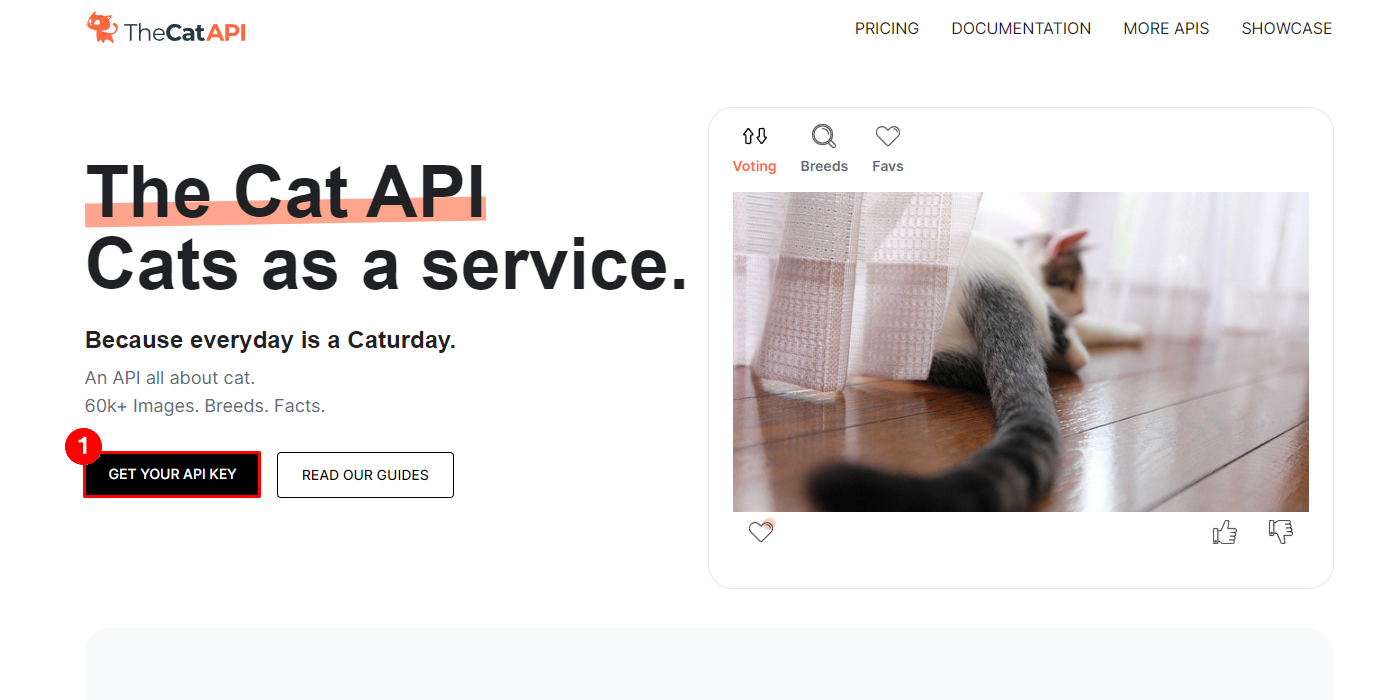
-
Select the
FREEtier and clickGET FREE ACCESS.
-
Provide your email, choose
A PERSONAL PROJECT, and submit. Your API key will be delivered to your inbox.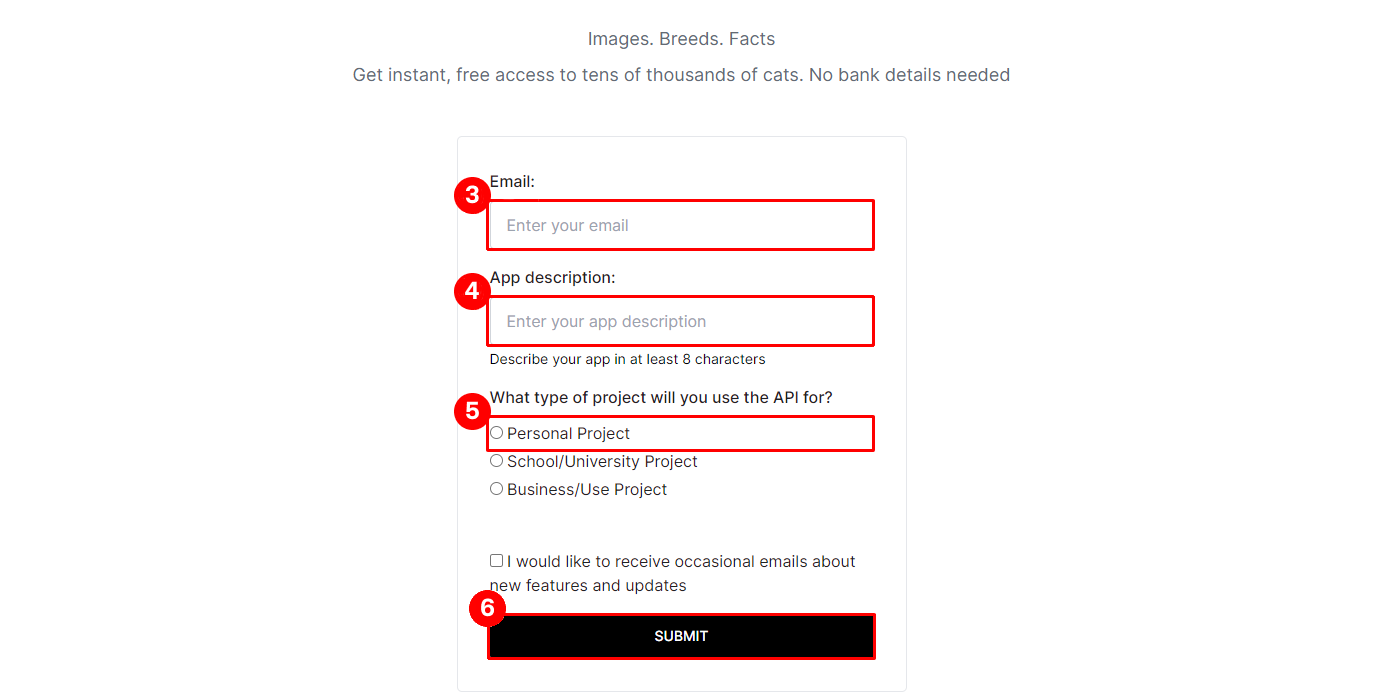


Open Meow.Infrastructure/Api/ApiConstants.cs and paste your API key:
namespace Meow.Infrastructure.Api;

public static class ApiConstants
{
    public const string BaseUrl = "https://api.thecatapi.com/v1/";
    public const string ApiKey = "YOUR_API_KEY_HERE";
}
To run the application on Android:
dotnet build Meow/Meow.csproj -t:Run -f net10.0-android
To run on Windows:
dotnet build Meow/Meow.csproj -t:Run -f net10.0-windows10.0.19041.0
To run on macOS (Mac Catalyst):
dotnet build Meow/Meow.csproj -t:Run -f net10.0-maccatalyst
Execute the comprehensive test suite (158 tests) across Domain, Core, ViewModels, and Controls:
dotnet test Meow.Tests/Meow.Tests.csproj -c ReleaseThe UI and UX of Meow were conceived and designed in Figma:

|
Daniel Monettelli Creator, UI/UX Designer & Lead Engineer |
Bryan Oroxón Special Collaborator & Software Developer |
A huge thank you to everyone who has contributed to making Meow better!
Contributions make the open-source community an amazing place to learn, inspire, and create. Any contributions you make are greatly appreciated!
- Fork the Repository on GitHub.
- Clone your fork:
git clone https://github.com/<your-username>/dotnetmaui-meow-app-oss.git
- Create a Feature Branch:
git checkout -b feature/amazing-feature
- Make your changes and adhere to Clean Architecture & SOLID conventions.
- Verify all tests pass:
dotnet test Meow.Tests/Meow.Tests.csproj -c Release - Commit your changes:
git commit -m "feat: Add amazing feature" - Push to your branch:
git push origin feature/amazing-feature
- Open a Pull Request against the
mainbranch.
This project is licensed under the MIT License - see the LICENSE file for details.
Copyright (c) Daniel Monettelli
Made with ❤️ for cats and the .NET MAUI community.