Pure AngularJS based tree menu directive.
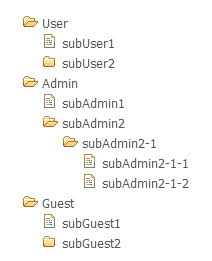
Copy the script and css into your project and add a script and link tag to your page.
<script type="text/javascript" src="/angular.treeview.js"></script>
<link rel="stylesheet" type="text/css" href="css/angular.treeview.css">
Add a dependency to your application module.
angular.module('myApp', ['angularTreeview']);
Add a tree to your application. See Usage.
Attributes of angular treeview are below.
- angular-treeview: the treeview directive.
- tree-id : each tree's unique id.
- tree-model : the tree model on $scope.
- node-id : each node's id.
- node-label : each node's label.
- node-children: each node's children.
Here is a simple example.
<div
    data-angular-treeview="true"
	data-tree-id="abc"
	data-tree-model="treedata"
	data-node-id="id"
	data-node-label="label"
	data-node-children="children" >
</div>
Example model:
$scope.treedata =
[
	{ "label" : "User", "id" : "role1", "children" : [
		{ "label" : "subUser1", "id" : "role11", "children" : [] },
		{ "label" : "subUser2", "id" : "role12", "children" : [
			{ "label" : "subUser2-1", "id" : "role121", "children" : [
				{ "label" : "subUser2-1-1", "id" : "role1211", "children" : [] },
				{ "label" : "subUser2-1-2", "id" : "role1212", "children" : [] }
			]}
		]}
	]},
	{ "label" : "Admin", "id" : "role2", "children" : [] },
	{ "label" : "Guest", "id" : "role3", "children" : [] }
];
If tree node is selected, then that selected tree node is saved to $scope."TREE ID".currentNode. By using $watch, the controller can recognize the tree selection.
$scope.$watch( 'abc.currentNode', function( newObj, oldObj ) {
    if( $scope.abc && angular.isObject($scope.abc.currentNode) ) {
        console.log( 'Node Selected!!' );
        console.log( $scope.abc.currentNode );
    }
}, false);
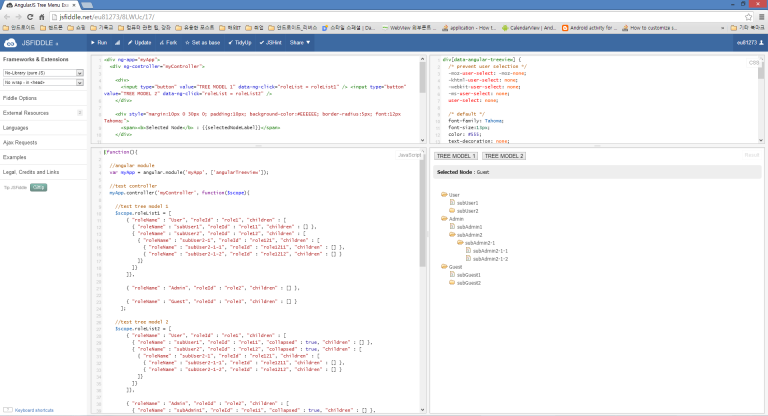
jsFiddle - http://jsfiddle.net/eu81273/8LWUc/
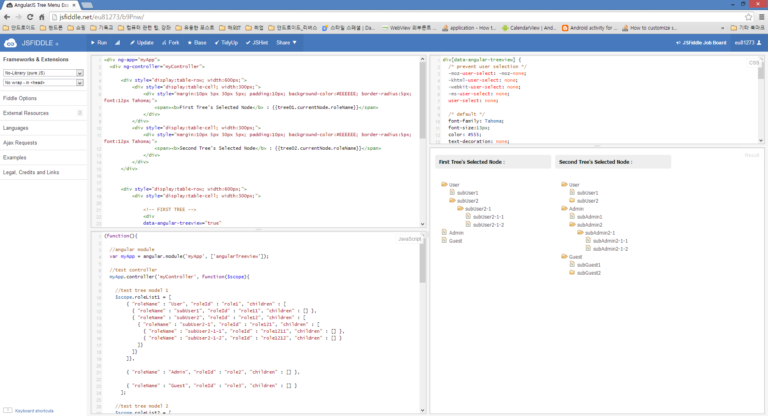
jsFiddle - http://jsfiddle.net/eu81273/b9Pnw/
Same with AngularJS. Safari, Chrome, Firefox, Opera, IE8, IE9 and mobile browsers (Android, Chrome Mobile, iOS Safari).
- Fixed the bug that 'null' string appears before each 'div' generated. (Thanks to Iaac)
- support multiple treeview. (Thanks to Axel Pesme)
- prevented memory leaks.
- removed unnecessary codes.
- removed some jQuery dependency. (Issue #2)
The MIT License.
Copyright ⓒ 2013 AHN JAE-HA.
See LICENSE