
Simpliest way to ask runtime permissions on Android, choose your way :
No need to override Activity or FragmentonPermissionResult(code, permissions, result)using this library, you just have to executue RuntimePermission's methods
This will not cut your code flow
dependencies {
    implementation 'com.github.florent37:runtime-permission:(lastest version)'
}
RuntimePermission can automatically check all of your needed permissions
For example, if you add to your AndroidManifest.xml :

You can use askPermission without specifying any permission
For example, in Kotlin:
askPermission(){
   //all of your permissions have been accepted by the user
}.onDeclined { e ->
   //at least one permission have been declined by the user
}
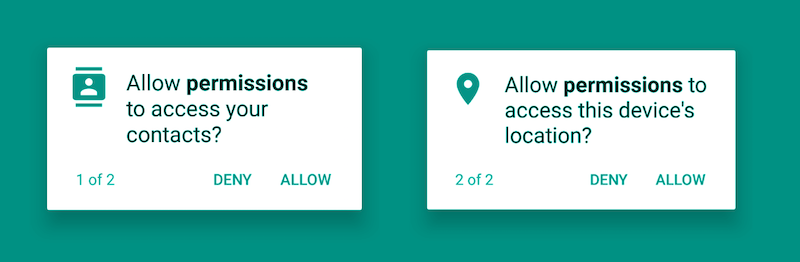
Will automatically ask for CONTACTS and LOCALISATION permissions
You just have to call askPermission with the list of wanted permissions
In Kotlin:
askPermission(Manifest.permission.READ_CONTACTS, Manifest.permission.ACCESS_FINE_LOCATION){
   //all of your permissions have been accepted by the user
}.onDeclined { e ->
   //at least one permission have been declined by the user
}
Will ask for CONTACTS and LOCALISATION permissions
yourScope.launch {
    try {
        val result = askPermission(Manifest.permission.READ_CONTACTS, Manifest.permission.ACCESS_FINE_LOCATION)
        //all permissions already granted or just granted
        //your action
        resultView.setText("Accepted :${result.accepted.toString()}")

    } catch (e: PermissionException) {
        if (e.hasDenied()) {
            appendText(resultView, "Denied :")
            //the list of denied permissions
            e.denied.forEach { permission ->
                appendText(resultView, permission)
            }
            //but you can ask them again, eg:

            AlertDialog.Builder(this@RuntimePermissionMainActivityKotlinCoroutine)
                    .setMessage("Please accept our permissions")
                    .setPositiveButton("yes") { dialog, which ->
                        e.askAgain()
                    }
                    .setNegativeButton("no") { dialog, which ->
                        dialog.dismiss()
                    }
                    .show();
        }

        if (e.hasForeverDenied()) {
            appendText(resultView, "ForeverDenied")
            //the list of forever denied permissions, user has check 'never ask again'
            e.foreverDenied.forEach { permission ->
                appendText(resultView, permission)
            }
            //you need to open setting manually if you really need it
            e.goToSettings();
        }
    }
}
implementation 'com.github.florent37:runtime-permission-kotlin:(last version)'askPermission(Manifest.permission.READ_CONTACTS, Manifest.permission.ACCESS_FINE_LOCATION){ //all permissions already granted or just granted your action }.onDeclined { e -> if (e.hasDenied()) { appendText(resultView, "Denied :") //the list of denied permissions e.denied.forEach { appendText(resultView, it) } AlertDialog.Builder(this@RuntimePermissionMainActivityKotlin) .setMessage("Please accept our permissions") .setPositiveButton("yes") { dialog, which -> e.askAgain(); } //ask again .setNegativeButton("no") { dialog, which -> dialog.dismiss(); } .show(); } if(e.hasForeverDenied()) { appendText(resultView, "ForeverDenied :") //the list of forever denied permissions, user has check 'never ask again' e.foreverDenied.forEach { appendText(resultView, it) } // you need to open setting manually if you really need it e.goToSettings(); } }
implementation 'com.github.florent37:runtime-permission-kotlin:(last version)'new RxPermissions(this).request(Manifest.permission.READ_CONTACTS, Manifest.permission.ACCESS_FINE_LOCATION)) .subscribe(result -> { //all permissions already granted or just granted your action }, throwable -> { final PermissionResult result = ((RxPermissions.Error) throwable).getResult(); if(result.hasDenied()) { appendText(resultView, "Denied :"); //the list of denied permissions for (String permission : result.getDenied()) { appendText(resultView, permission); } //permission denied, but you can ask again, eg: new AlertDialog.Builder(RuntimePermissionMainActivityRx.this) .setMessage("Please accept our permissions") .setPositiveButton("yes", (dialog, which) -> { result.askAgain(); }) // ask again .setNegativeButton("no", (dialog, which) -> { dialog.dismiss(); }) .show(); } if(result.hasForeverDenied()) { appendText(resultView, "ForeverDenied :"); //the list of forever denied permissions, user has check 'never ask again' for (String permission : result.getForeverDenied()) { appendText(resultView, permission); } // you need to open setting manually if you really need it result.goToSettings(); } });
implementation 'com.github.florent37:runtime-permission-rx:(last version)'askPermission(this) .request(Manifest.permission.READ_CONTACTS, Manifest.permission.ACCESS_FINE_LOCATION) .onAccepted((result) -> { //all permissions already granted or just granted your action }) .onDenied((result) -> { appendText(resultView, "Denied :"); //the list of denied permissions for (String permission : result.getDenied()) { appendText(resultView, permission); } //permission denied, but you can ask again, eg: new AlertDialog.Builder(RuntimePermissionMainActivityJava8.this) .setMessage("Please accept our permissions") .setPositiveButton("yes", (dialog, which) -> { result.askAgain(); }) // ask again .setNegativeButton("no", (dialog, which) -> { dialog.dismiss(); }) .show(); }) .onForeverDenied((result) -> { appendText(resultView, "ForeverDenied :"); //the list of forever denied permissions, user has check 'never ask again' for (String permission : result.getForeverDenied()) { appendText(resultView, permission); } // you need to open setting manually if you really need it result.goToSettings(); }) .ask();
implementation 'com.github.florent37:runtime-permission:(last version)'askPermission(this, Manifest.permission.READ_CONTACTS, Manifest.permission.ACCESS_FINE_LOCATION) .ask(new PermissionListener() { @Override public void onAccepted(RuntimePermission runtimePermission, List<String> accepted) { //all permissions already granted or just granted your action } @Override public void onDenied(RuntimePermission runtimePermission, List<String> denied, List<String> foreverDenied) { if(permissionResult.hasDenied()) { appendText(resultView, "Denied :"); //the list of denied permissions for (String permission : denied) { appendText(resultView, permission); } //permission denied, but you can ask again, eg: new AlertDialog.Builder(RuntimePermissionMainActivityJava7.this) .setMessage("Please accept our permissions") .setPositiveButton("yes", (dialog, which) -> { permissionResult.askAgain(); }) // ask again .setNegativeButton("no", (dialog, which) -> { dialog.dismiss(); }) .show(); } if(permissionResult.hasForeverDenied()) { appendText(resultView, "ForeverDenied :"); //the list of forever denied permissions, user has check 'never ask again' for (String permission : foreverDenied) { appendText(resultView, permission); } // you need to open setting manually if you really need it permissionResult.goToSettings(); } } });
We welcome your contributions to this project.
The best way to submit a patch is to send us a pull request.
To report a specific problem or feature request, open a new issue on Github.
Manifest permission detection has been forked from https://github.com/sensorberg-dev/permission-bitte, thanks Sensorberg GmbH
Author: Florent Champigny
Blog : http://www.tutos-android-france.com/
Fiches Plateau Moto : https://www.fiches-plateau-moto.fr/


Copyright 2018 florent37, Inc.

Licensed under the Apache License, Version 2.0 (the "License");
you may not use this file except in compliance with the License.
You may obtain a copy of the License at

   http://www.apache.org/licenses/LICENSE-2.0

Unless required by applicable law or agreed to in writing, software
distributed under the License is distributed on an "AS IS" BASIS,
WITHOUT WARRANTIES OR CONDITIONS OF ANY KIND, either express or implied.
See the License for the specific language governing permissions and
limitations under the License.