License · Model and Voice Asset Notice
By DaVoice.io
Welcome to Davoice WakeWord / Keywords Detection – Wake words and keyword detection solution designed by DaVoice.io.
This is a "wake word" package for React Native. A wake word is a keyword that activates your device, like "Hey Siri" or "OK Google". "Wake Word" is also known as "keyword detection", "Phrase Recognition", "Phrase Spotting", “Voice triggered”, “hotword”, “trigger word”
It also provide Complete Voice-to-Voice AI Agent, with Wake Word, Speaker Identification, Speech-to-Text and Text-to-Speech all running on-device
Another active project of React-Native on-device full Voice-to-Voice AI Agent is in https://github.com/frymanofer/ReactNative_DaVoice
Wake-Word AKA phrase spotting AKA Hot Word AKA Trigger Word is the first step into a voice interaction. It works best with Speaker Identification/Isolation
-
New 14 Oct 2025:
Full on-device Voice2Voice AI Agent - See new folder example_v2v_local_agent/
-
New 14 Oct 2025:
Full Voice2Voice comunications - See new folder example_v2v_local_agent/
-
New 2 June 2025:
Fix IOS build failure.
issue - could not build IOS app when the Podfile was set to static linking.
solution - fixed in react-native-wakeword npm package version "1.1.12". -
New npm install: Now you can integrate Davoice without any additional integrations by using "npm install react-native-wakeword" make sure you install version >= 1.0.25. Wake word npm package:: https://www.npmjs.com/package/react-native-wakeword
-
New Car Parking Example: Checkout our new Voice Activated Car Parking example, with voice control both in Foreground and Background: example_car_parking/.
- Easy to deploy with React Native: Check out our example: "rn_example/DetectingKeyWords.js". With a few simple lines of code, you have your own keyword detecting enabled app.
- Cross-Platform Support: Integrate Davoice KeywordsDetection into React-Native Framework. Both iOS and Android are supported.
- Low Latency: Experience near-instantaneous keyword detection.
- High Accuracy: We have succesfully reached over 99% accurary for all our models. Here is on of our customer's benchmarks:
- Real-World Benchmarks: At DaVoice, we believe in real benchmarks done by customers on actual use cases rather than static tests. We actively encourage our customers to share their real-world experiences and results.
Both studies on one page: wake word benchmark on davoice.io.
Provided by: Tyler Troy, CTO & Co-Founder, LookDeep Health Context: Tyler .
🔵 Criterion I — False Positives (hospital relevance)
Provided by Tyler Troy, Co-Founder at LookDeep Health
Tyler Troy at LookDeep Health reported benchmark below as part of selecting a "phrase detection" vendor.
- In hospital settings, false alerts waste valuable time and can compromise patient care.
- ✅ DaVoice: "ZERO FALSE POSITIVES" within a month duration of testing.
- Porcupine (Picovoice): Several false alerts triggered daily observed under a similar setup.
- OpenWakeWord was not tested for false positives because its true positive rate was too low.
Definition used by the customer: a “false positive” is a wake event when no wake phrase was spoken, counted over the monitored period.
Table 1: A comparison of model performance on custom keywords
MODEL         DETECTION RATE
===========================
DaVoice                    0.992481 ✅
Porcupine (Picovoice)      0.924812
OpenWakeWords              0.686567
- Source: Customer-reported results received on Dec 20, 2024.
- OS: [Linux Python].
- Models/versions: [hey_look_deep_model_28_08122024.py2].
- Thresholds/params: [0.99].
- Note: Results reflect this customer’s setup. Your results may vary.
Benchmark on "Python wake word", vs top competitors:
- Benmark used recordings with 1326 TP files.
- Second best was on of the industry top players who detected 1160 TP
- Third detected TP 831 out of 1326
MODEL         DETECTION RATE
===========================
DaVoice        0.992458
Top Player     0.874811
Third          0.626697
- React-Native Android: React Native Wrapper for Android.
- React-Native iOS: React Native Wrapper for iOS.
In order to generate your custom wake word you will need to:
-
Create wake word mode: Contact us at [email protected] with a list of your desired "custom wake words".
We will send you corresponding models typically your wake word phrase .onnx for example:
A wake word *"hey sky" will correspond to hey_sky.onnx.
-
Add wake words to Android: Simply copy the new onnx files to:
android/app/src/main/assets/*.onnx
-
Add Wake word to IOS Copy new models somewhere under ios/YourProjectName.
You can create a folder ios/YourProjectName/models/ and copy there there.
Now add each onnx file to xcode making sure you opt-in “copy if needed”.
-
In React/JS code add the new onnx files to your configuration
Change:
    // Create an array of instance configurations

    const instanceConfigs:instanceConfig[] = [

      { id: 'need_help_now', modelName: 'need_help_now.onnx', threshold: 0.9999, bufferCnt: 3 , sticky: false },

    ];

    To:

    // Create an array of instance configurations

    const instanceConfigs:instanceConfig[] = [

      { id: 'my_wake_word', modelName: 'my_wake_word.onnx', threshold: 0.9999, bufferCnt: 3 , sticky: false },

    ];

    For example if your generated custom wake word" is "hey sky":

    // Create an array of instance configurations

    const instanceConfigs:instanceConfig[] = [

      { id: 'hey sky', modelName: 'hey_sky.onnx', threshold: 0.9999, bufferCnt: 3 , sticky: false },

    ];
- Last step - Rebuild your project
For any questions, requirements, or more support for React-Native, please contact us at [email protected].
npm install react-native-wakeword
Wake word npm package From :: https://www.npmjs.com/package/react-native-wakeword
Please add the following to android/build.gradle
allprojects {

    repositories {

        // react-native-wakeword added

	    maven { url "${project(":react-native-wakeword").projectDir}/libs" }

        maven { url("${project(':react-native-wakeword').projectDir}/libs") }

        maven {

            url("${project(':react-native-wakeword').projectDir}/libs")

        }

        // End react-native-wakeword added

        ... your other lines...
See example_npm for a specific example of using the code.
To run the demo:
- Install Git LFS (the wake word and speaker models,
*.dm/*.onnx, are stored with LFS), then clone the repository and pull the models:Without Git LFS the model files are small pointer files and the app cannot load them.git lfs install git clone https://github.com/frymanofer/ReactNative_WakeWordDetection cd ReactNative_WakeWordDetection git lfs pull - npm install
Run 'npm install'
-
Navigate to the example directory:
cd example_npm -
For Android:
npx react-native run-androidDepending on your system, you may be required to press "a" for Android.
Note: If you don't have an Android environment setup (Gradle, Android device or Emulator, Java, etc.) and need help, please contact us at [email protected].
-
For iOS:
npx react-native run-iosDepending on your system, you may be required to press "i" for iOS.
You may need to:
cd ios && pod cache clean --all && pod deintegrate && pod install --repo-update
Than open Xcode and run in Xcode Note: If you don't have an iOS environment setup (Xcode, CocoaPods, iOS device or Emulator, etc.) and need help, please contact us at [email protected].
-
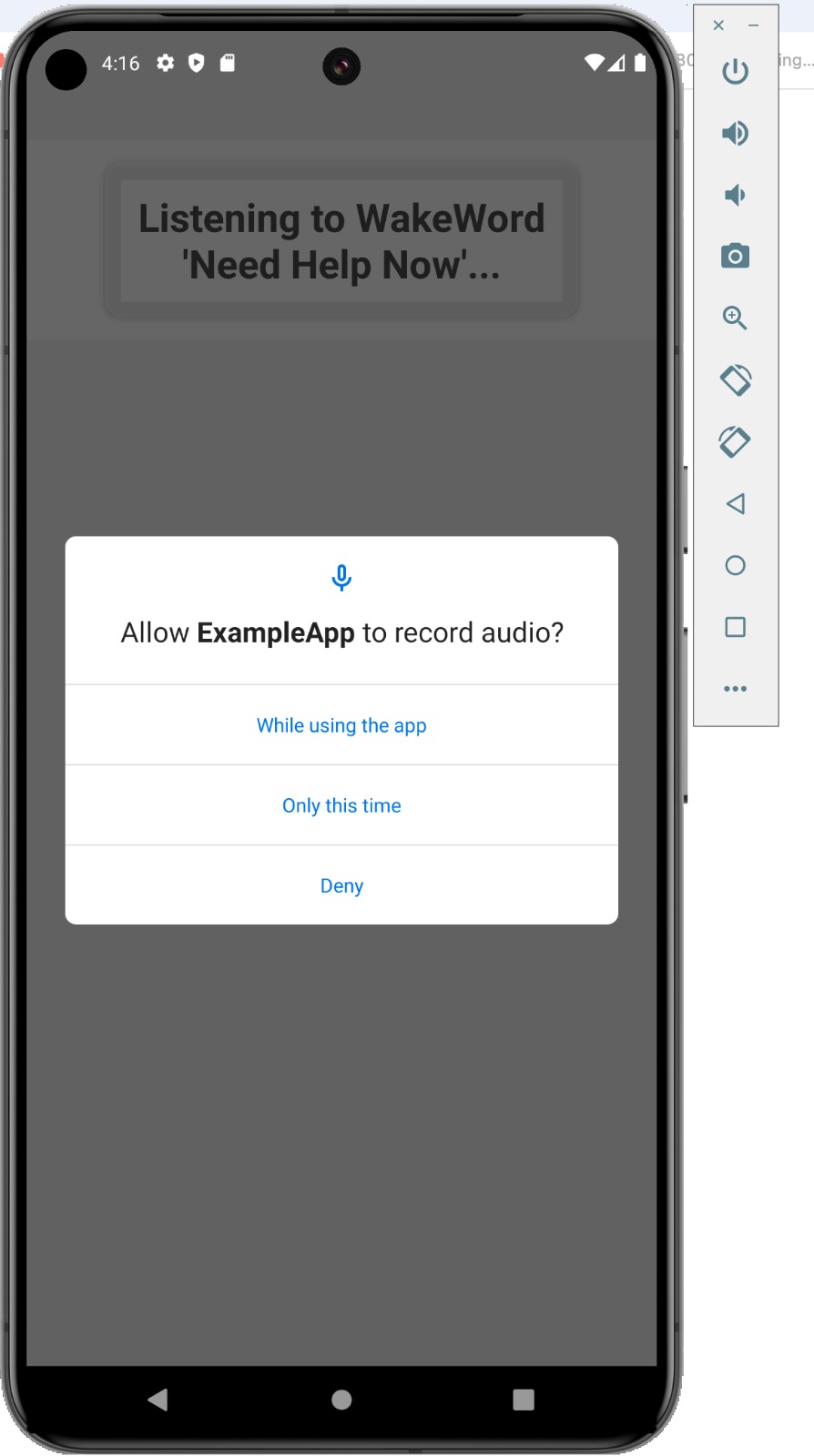
Make sure you allow Audio Permission The app need to ask Audio permission, make sure you allow it as it is necessary for wake word detection.
-
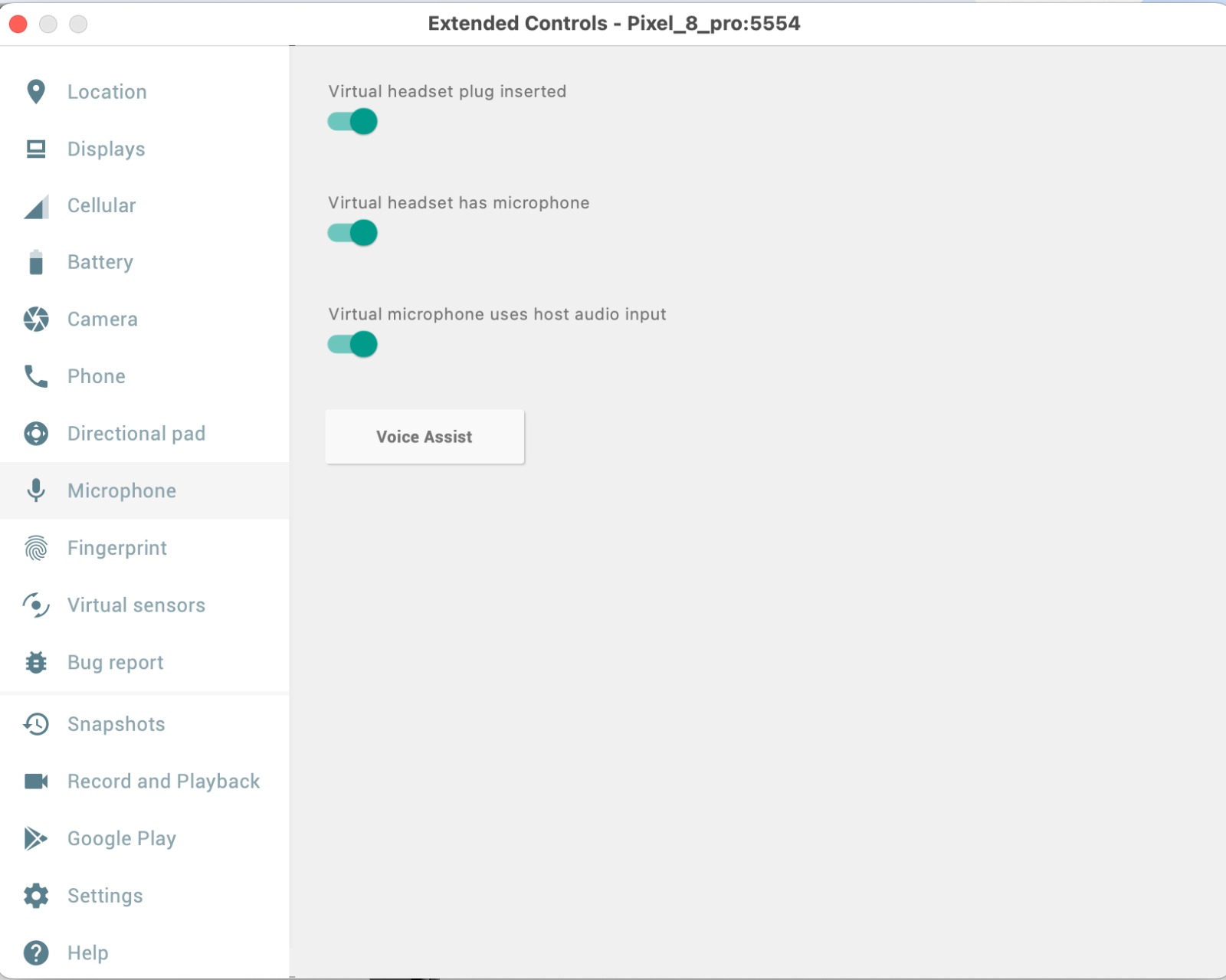
If You are using Android Emulator - make sure you enable Microphone as below: The settings screen showing virtual microphone configuration in the Android emulator.
-
Listening for Wake Word: The app is actively listening for the wake word "Need Help Now."

-
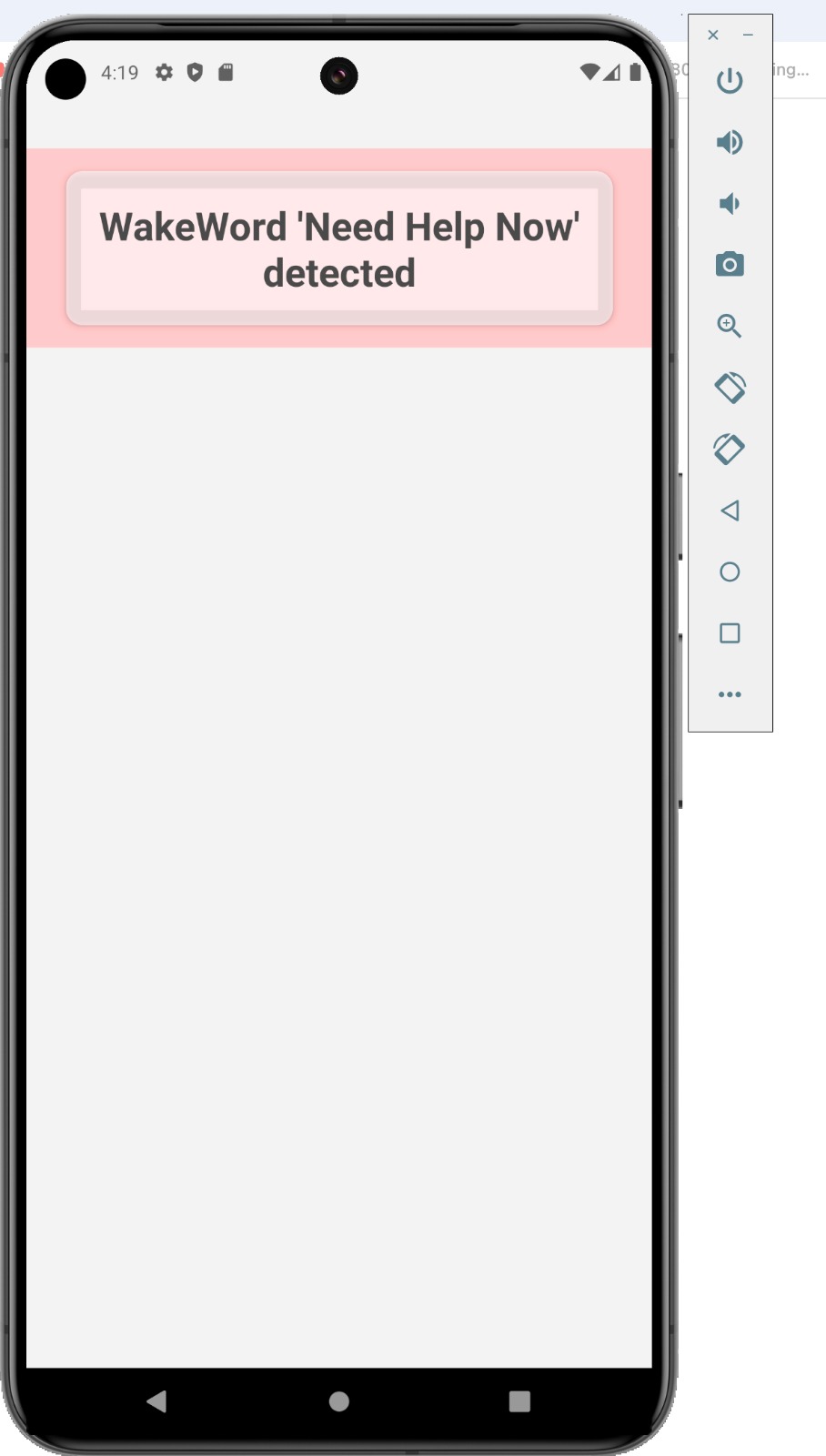
Wake Word Detected: The app has detected the wake word "Need Help Now."


For simple installation go to example_npm and build the react native example based on package.json
For example working in the background on both IOS and Android go to example or example_car_parking and build the react native app based on package.json
Below is an example, however. the best thing is to look at the update code in one of the example folders
Here is "wake word" detection example using npm install react-native-wakeword:
import RNFS from 'react-native-fs';
import React, { useEffect, useState } from 'react';
import { check, request, PERMISSIONS, RESULTS } from 'react-native-permissions';

import type {PropsWithChildren} from 'react';
import {
  SafeAreaView,
  ScrollView,
  StatusBar,
  StyleSheet,
  Text,
  Platform,
  useColorScheme,
  View,
} from 'react-native';

import {
  Colors,
  DebugInstructions,
  Header,
  LearnMoreLinks,
  ReloadInstructions,
} from 'react-native/Libraries/NewAppScreen';

import LinearGradient from 'react-native-linear-gradient';

// Two ways to use react-native-wakeword via hooks
// suitable for react users.
// React - Use this for hooks:
// import useModel from 'react-native-wakeword';

//  or direct for simple js.
// Direct with JS:
// import KeyWordRNBridge from 'react-native-wakeword';
import { KeyWordRNBridgeInstance } from 'react-native-wakeword';
import removeAllRNBridgeListeners from 'react-native-wakeword';
import { createKeyWordRNBridgeInstance } from 'react-native-wakeword';

var calledOnce = false;

interface instanceConfig {
  id: string;
  modelName: string;
  threshold: number;
  bufferCnt: number;
  sticky: boolean;
  msBetweenCallbacks:number;
}
  // Create an array of instance configurations
  const instanceConfigs:instanceConfig[] = [
    { id: 'multi_model_instance', modelName: 'hey_lookdeep.onnx', threshold: 0.99, bufferCnt: 4 , sticky: false, msBetweenCallbacks: 1000 },
    { id: 'multi_model_instance', modelName: 'coca_cola_model_28_05052025.onnx', threshold: 0.99, bufferCnt: 4 , sticky: false, msBetweenCallbacks: 1000 },
  ];

import { AppState } from 'react-native';

// Helper function to format the ONNX file name
const formatWakeWord = (fileName) => {
  return fileName
    .replace(/(_model.*|_\d+.*)\.onnx$/, '')  // Remove _model... or _<digits>... before .onnx
    .replace(/_/g, ' ')  // Use global flag to replace all underscores
    .replace('.onnx', '')
    .replace(/\b\w/g, (char) => char.toUpperCase()); // Capitalize each word
};

const AudioPermissionComponent = async () => {
  const permission = Platform.OS === 'ios' ? PERMISSIONS.IOS.MICROPHONE : PERMISSIONS.ANDROID.RECORD_AUDIO;
  await request(permission);
  const status = await check(permission);
  if (status !== RESULTS.GRANTED) {
      await request(permission);
  }
  if (Platform.OS === 'ios' )
  {

  }
  else {
    // Bug FOREGROUND_SERVICE does not exist
    const foregroundServicePermission = await request('android.permission.FOREGROUND_SERVICE');
    if (foregroundServicePermission === RESULTS.GRANTED) {
      console.log("Permissions granted", "Microphone and foreground service permissions granted.");
        // Start your service or perform other actions
    } else {
      console.log("Permission denied", "Foreground service microphone permission is required.");
    }
  }
}


type SectionProps = PropsWithChildren<{
  title: string;
}>;

function Section({children, title}: SectionProps): React.JSX.Element {
  const isDarkMode = useColorScheme() === 'dark';

  return (
    <View style={styles.sectionContainer}>
      <Text
        style={[
          styles.sectionTitle,
          {
            color: isDarkMode ? Colors.white : Colors.black,
          },
        ]}>
        {title}
      </Text>
      <Text
        style={[
          styles.sectionDescription,
          {
            color: isDarkMode ? Colors.light : Colors.dark,
          },
        ]}>
        {children}
      </Text>
    </View>
  );
}

type DetectionCallback = (event: any) => void;


// ** OLD **
// Function to add a new instance dynamically
//async function addInstance(conf: instanceConfig)
async function addInstance(
  conf: instanceConfig): Promise<KeyWordRNBridgeInstance> {
  const id = conf.id;
  const instance = await createKeyWordRNBridgeInstance(id, false);

  if (!instance) {
      console.error(`Failed to create instance ${id}`);
  }
  console.log(`Instance ${id} created ${instance}`);
  await instance.createInstance(conf.modelName, conf.threshold, conf.bufferCnt);
  console.log(`Instance ${id} createInstance() called`);
  return instance;
}

// ** NEW MULTI EFFICIENT MODELS **
// Function to add a new instance dynamically
// async function addInstance(conf: instanceConfig)
async function addInstanceMulti(
  conf: instanceConfig): Promise<KeyWordRNBridgeInstance> {
  const id = conf.id;
  const instance = await createKeyWordRNBridgeInstance(id, false);

  if (!instance) {
      console.error(`Failed to create instance ${id}`);
  }
  console.log(`Instance ${id} created ${instance}`);
  // Group configs under the same instance ID (you can customize how to group them)

  const modelNames = instanceConfigs.map(conf => conf.modelName);
  const thresholds = instanceConfigs.map(conf => conf.threshold);
  const bufferCnts = instanceConfigs.map(conf => conf.bufferCnt);
  const msBetweenCallbacks = instanceConfigs.map(conf => conf.msBetweenCallbacks);

  await instance.createInstanceMulti(modelNames, thresholds, bufferCnts, msBetweenCallbacks);

//  await instance.createInstance(conf.modelName, conf.threshold, conf.bufferCnt);
  console.log(`Instance ${id} createInstance() called`);
  return instance;
}


async function set_callback(instance: KeyWordRNBridgeInstance, callback: (phrase: string) => void) {
  const eventListener = instance.onKeywordDetectionEvent((phrase: string) => {
    phrase = formatWakeWord(phrase);
    console.log(`Instance ${instance.instanceId} detected: ${phrase} with phrase`, phrase);
    // callback(phrase); Does not work on IOS
    callback(phrase);
  });
  console.log("eventListener == ", eventListener);
  return eventListener;
}

// Function to remove the event listener
function removeEventListener(eventListener: any) {
  if (eventListener && typeof eventListener.remove === 'function') {
    eventListener.remove();
  }
  else {
    console.error("event listener.remove does not exist!!!!");
  }
}


function App(): React.JSX.Element {
  const isDarkMode = useColorScheme() === 'dark';
  const [isFlashing, setIsFlashing] = useState(false);
  const wakeWords = instanceConfigs
  .map((config) => formatWakeWord(config.modelName))
  .join(", ");
// If you use useModel
//  console.log("useModel == ", useModel)
//  const { stopListening, startListening, loadModel, setKeywordDetectionLicense} = useModel();
  let myInstance: KeyWordRNBridgeInstance;
  let eventListener: any;
  console.log("App.tsx");
  console.log("App.tsx");
  console.log("App.tsx");

  const backgroundStyle = {
    backgroundColor: isDarkMode ? Colors.darker : Colors.lighter,
  };

  const [isPermissionGranted, setIsPermissionGranted] = useState(false); // Track permission status
  useEffect(() => {
    const handleAppStateChange = async (nextAppState) => {
      if (nextAppState === 'active') {
        try {
          await AudioPermissionComponent();
          setIsPermissionGranted(true);
        } catch (error) {
          console.error("Error requesting permissions:", error);
        }
      }
    };

    const eventListener = AppState.addEventListener("change", handleAppStateChange);

    // If the app is *already* active on mount:
    if (AppState.currentState === 'active') {
      handleAppStateChange('active');
    }

    return () => {
      eventListener.remove();
    };
  }, []);

  // State to handle the display message
  const [message, setMessage] = useState(`Listening to WakeWords '${wakeWords}'...`);

  useEffect(() => {

    const keywordCallback = async (keywordIndex: any) => {
      // Stop detection
      await myInstance.stopKeywordDetection();
      // remove the listener and callback
      removeEventListener(eventListener);

      console.log ("detected keyword: ", keywordIndex);
      setMessage(`WakeWord '${keywordIndex}' DETECTED`);
      setIsFlashing(true);  // Start flashing effect (Line 122)


      const timeout = setTimeout(async () => {
        // Stop when done:
        console.log('5 seconds have passed!');
        setMessage(`Listening to WakeWord '${wakeWords}'...`);
        setIsFlashing(false);  // Start flashing effect (Line 122)
        // Perform your action here
        // Stop detection
        eventListener = await set_callback(myInstance, keywordCallback);
        await myInstance.startKeywordDetection(instanceConfigs[0].threshold);
        // remove the listener and callback
      }, 5000);
    }

    const initializeKeywordDetection = async () => {
      try {
        try {
          console.log('Adding element:', instanceConfigs[0]);
          myInstance = await addInstanceMulti(instanceConfigs[0]);
        } catch (error) {
            console.error("Error loading model:", error);
            return;
        }
        eventListener = await set_callback(myInstance, keywordCallback);
        const isLicensed = await myInstance.setKeywordDetectionLicense(
          "MTc1MjUyNjgwMDAwMA==-RbOr3R66OPByzZxLe7vgM6JDlrrejrgRzbo41+g8qrM=");
       await myInstance.startKeywordDetection(instanceConfigs[0].threshold);
        if (!isLicensed) {
          console.error("No License!!! - setKeywordDetectionLicense returned", isLicensed);
        }
        /* Using use_model.tsx:
        await setKeywordDetectionLicense(
          "MTczNDIxMzYwMDAwMA==-tNV5HJ3NTRQCs5IpOe0imza+2PgPCJLRdzBJmMoJvok=");

        await loadModel(instanceConfigs, keywordCallback);
  */
        vosk = new Vosk();

      } catch (error) {
        console.error('Error during keyword detection initialization:', error);
      }
    };

    if (!calledOnce) {
      calledOnce = true;
      console.log("Calling initializeKeywordDetection();");
      initializeKeywordDetection();
      console.log("After calling AudioPermissionComponent();");
    }

    // Call your native bridge function
  //KeyWordRNBridge.initKeywordDetection("bla", 0.9999, 2);
  //loadModel();
}, [isPermissionGranted]);  // Empty dependency array ensures it runs once when the component mounts


return (
  <LinearGradient
    colors={isDarkMode ? ['#232526', '#414345'] : ['#e0eafc', '#cfdef3']}
    style={styles.linearGradient}>
    <StatusBar
      barStyle={isDarkMode ? 'light-content' : 'dark-content'}
      backgroundColor={backgroundStyle.backgroundColor}
    />
    <ScrollView
      contentInsetAdjustmentBehavior="automatic"
      style={backgroundStyle}>
      <View
      style={[styles.container,
      { backgroundColor:
        isFlashing ? (isDarkMode ? '#ff4d4d' : '#ffcccc') : isDarkMode ? Colors.black : Colors.white }]}>
        <Text style={styles.title}>{message}</Text>
      </View>
    </ScrollView>
    </LinearGradient>
);
}

const styles = StyleSheet.create({
container: {
  flex: 1,
  justifyContent: 'center',
  alignItems: 'center',
  padding: 16,
  marginTop: 32,
},
linearGradient: {
  flex: 1,
},
title: {
  fontSize: 28,
  fontWeight: 'bold',
  color: '#4a4a4a',
  textAlign: 'center',
  paddingHorizontal: 20,
  backgroundColor: '#ffffff99',
  borderRadius: 12,
  paddingVertical: 20,
  marginHorizontal: 10,
  elevation: 4, // Android shadow
  shadowColor: '#000', // iOS shadow
  shadowOffset: { width: 0, height: 2 },
  shadowOpacity: 0.2,
  shadowRadius: 3,
},
});

export default App;
Our customers have benchmarked our technology against leading solutions, including Picovoice Porcupine, Snowboy, Pocketsphinx, Sensory, and others. In several tests, our performance was comparable to Picovoice Porcupine, occasionally surpassing it, however both technologies consistently outperformed all others in specific benchmarks. For detailed references or specific benchmark results, please contact us at [email protected]. Published results: wake word benchmark, two independent customer studies.
This example in the Git repository enables Android functionality in both the foreground and background, and iOS functionality in the foreground. However, we have developed an advanced SDK that allows the microphone to be activated from a complete shutdown state on Android and from the background state on iOS. If you require this capability for your app, please reach out to us at [email protected].
The example below, built in React Native, demonstrates this approach. The function backgroundMicEmptyListener() creates a minimal listener with negligible CPU impact, only processing the function call and return.
Apple restricts background microphone access for privacy and battery efficiency. However, certain applications, such as security apps, car controlling apps, apps for the blind or visually impaired may require this functionality.
Below is an example for one of the workarounds we have done in order to activate microphone with an empty listener. This approach avoids unnecessary battery usage until real audio capture is needed, at which point you can swap the placeholder listener with the actual microphone callback.
The example below, built in React Native, demonstrates this approach. The function backgroundMicEmptyListener() creates a minimal listener with negligible CPU impact, only processing the function call and return.
const handleAppStateChange = (nextAppState) => {
  console.log("handleAppStateChange(): ", nextAppState);

  if (nextAppState === 'background') {
    console.log("nextAppState === 'background'");
    BackgroundJob.start(backgroundMicEmptyListener, backgroundOptions)
      .then(() => {
        console.log('Background job started successfully');
      })
      .catch((err) => {
        console.error('Error starting background job:', err);
      });
  }
}
DaVoice.io Voice commands / Wake words / Voice to Intent / keyword detection npm for Android and IOS. "Wake word detection github" "Wake Word" "keyword detection" "Phrase Recognition" "Phrase Spotting" “Voice triggered” “hotword” “trigger word” "react-native wake word", "Wake word detection github", "Wake word generator", "Custom wake word", "voice commands", "wake word", "wakeword", "wake words", "keyword detection", "keyword spotting", "speech to intent", "voice to intent", "phrase spotting", "react native wake word", "Davoice.io wake word", "Davoice wake word", "Davoice react native wake word", "Davoice react-native wake word", "wake", "word", "Voice Commands Recognition", "lightweight Voice Commands Recognition", "customized lightweight Voice Commands Recognition", "rn wake word"
- React Native wake word detection guide
- React Native voice AI agent tutorial (on-device LLM)
- What is a wake word? DaVoice on-device wake word detection
- Wake word benchmark: two independent customer studies, DaVoice vs. commercial engines and openWakeWord
- Complete guide to on-device wake word detection
- Custom wake words without collecting training data
- Automotive wake word in production
- On-device voice-to-voice AI agent SDK: wake word, speech to text, a local LLM with tool calling and text to speech, with no per-token API fees
- Free online text to speech: free and unlimited, with no sign-up, no login and no subscription. Natural AI voices in 11 languages, voice cloning, MP3 and WAV download, generated in your browser
- Pricing: free license for proof-of-concept, academic and non-commercial projects
- Wake word npm package: https://www.npmjs.com/package/react-native-wakeword
Here are wakeword detection GitHub links per platform:
- For Python: https://github.com/frymanofer/Python_WakeWordDetection
- Web / JS / Angular / React: https://github.com/frymanofer/Web_WakeWordDetection/tree/main
- For React Native: ReactNative_WakeWordDetection
- For Flutter: [https://github.com/frymanofer/Flutter_WakeWordDetection]
- For Android: Android_Native_Wake_Word
- For iOS framework:
- With React Native bridge: KeyWordDetectionIOSFramework
- Sole Framework: KeyWordDetection