| Software | Version |
|---|---|
| Node | v24.4.0 |
| pnpm | v10.13.x+ |
The documentation has been moved into a Docusaurus!
To reach it navigate to the docusaurus folder and you should see each article in their respective folders there.
To run this locally.
cd docusaurus
pnpm install
pnpm start
this will build a local server on localhost:3000
If you want to create a new build, you can
pnpm build
pnpm run serve
This will show you what it looks like hosted!
The repository will evolve to follow a structured Docusaurus versioning model.
Each documentation release will have its own frozen copy of markdown files and static assets, preserving the exact state users saw at that version’s release.
Planned Directory Layout
docusaurus/
├── docs/                        (editable documentation for the next release)
│
├── versioned_docs/              (frozen documentation for past releases)
│   ├── version-5.0/
│   ├── version-5.1/
│   └── ...
│
├── static/
│   └── versioned/               (version-specific static assets)
│       ├── 5.0/
│       │   ├── img/
│       │   ├── autoImg/
│       │   └── demos/
│       └── 5.1/
│           ├── img/
│           ├── autoImg/
│           └── demos/
│
├── versioned_sidebars/          (sidebars for each version)
│   ├── version-5.0-sidebars.json
│   ├── version-5.1-sidebars.json
│   └── ...
│
├── versions.json                (records all frozen versions)
├── docusaurus.config.js         (site configuration)
└── sidebars.js                  (current version sidebar)
/docs/→ This is the editable, “work-in-progress” documentation for the next release./versioned_docs/→ Each subfolder here (likeversion-5.0/,version-5.1/) is a frozen snapshot of what the docs looked like at that version’s release./static/versioned/→ Holds images and demos specific to each version, so nothing breaks when older docs are viewed./versioned_sidebars/→ Stores sidebar navigation for each version to match its structure.versions.json→ Keeps track of which versions exist and appear in the dropdown menu.- The goal is to make each documentation version self-contained, i.e. if you open version 5.0, you see exactly what users saw when 5.0 was released.
Once versioning is enabled, the process will use:
npx docusaurus docs:version <version>
This will:
- Copy
/docs/into/versioned_docs/version-<version>/ - Duplicate static assets under
/static/versioned/<version>/ - Update
versions.jsonand generate a sidebar file for the release - Keep
/docs/editable for upcoming changes
Older versions will remain permanently accessible, while the “Current” version under /docs/ represents work in progress for the next release.
This structure is not yet active but will guide how documentation versions are managed once multi-version support is introduced.
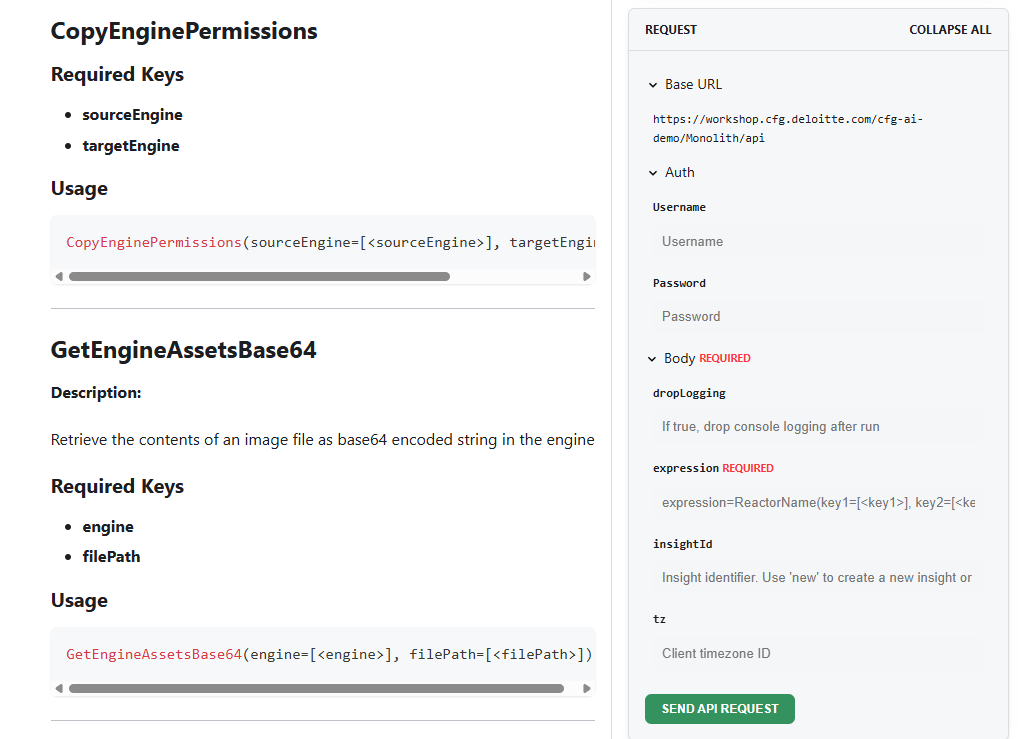
This project includes a Dockerfile and docker-compose.yml to build and run the application and its dependencies in a containerized environment. This is useful for testing the "Try Me" feature for Reactors which requires a backend service.
If you want to run the already-published documentation image from Quay, use the steps below.
-
Create a
.envfile in your current directory. Example:APP_NAME=AI EU MONOLITH_API_URL=http://localhost:8080/ai.eui SUPPORT_EMAIL=[email protected]
-
Pull the latest image:
sudo docker pull quay.io/semoss/documentation:latest
-
Run the container:
sudo docker run --rm -p 3000:3000 --env-file .env quay.io/semoss/documentation:latest
The documentation app will be available at http://localhost:3000.
Note: if your Docker setup does not require sudo (for example, Docker Desktop on Windows/macOS), run the same commands without sudo.
Example deployment artifacts are available in this repository:
- Kubernetes manifest:
k8s/documentation-app-example.yaml - Helm chart:
helm/semoss-documentation/
The manifest and Helm chart use the same environment variables shown above:
APP_NAMEMONOLITH_API_URLSUPPORT_EMAIL
Apply the raw manifest:
kubectl apply -f k8s/documentation-app-example.yaml
Install with Helm:
helm install semoss-documentation helm/semoss-documentation
Upgrade with Helm:
helm upgrade semoss-documentation helm/semoss-documentation
For Windows users, it is recommended to use WSL (Windows Subsystem for Linux) to run Docker.
-
Install WSL: Follow the official Microsoft guide to install WSL. A distribution like Ubuntu is recommended.
-
Install Docker Engine on WSL: Once you have a Linux distribution running in WSL, open its terminal and follow the official guide to install Docker Engine. The
docker-compose-pluginis included in this installation, which provides thedocker composecommand. -
Start the Docker Daemon: Before running Docker commands, you may need to start the Docker service within WSL:
sudo service docker start
-
Build the Docker image for the frontend:
From the
docusaurusdirectory, run the following command to build the image. Thedocker-compose.ymlfile expects the image to be tagged assemoss-doc:latest.docker build -t semoss-doc:latest . -
Run the services using Docker Compose:
This will start the frontend, backend, and an nginx reverse proxy. The
-dflag runs the containers in detached mode.docker-compose up -d
The
nginxservice acts as a reverse proxy to route requests to the appropriate service: thefrontenddocumentation site or thebackendSEMOSS service. This setup serves both applications under the same origin, which resolves potential Cross-Origin Resource Sharing (CORS) issues between them.The website will be available at
http://localhost:8080. -
Run try me Reactors
Go to any reactor http://localhost:3000/documentation/developer/Reactors/engine
-
Stopping the services:
To stop and remove the containers, run:
docker-compose down
