-
python版本支持
- 2.7.10 - 2.7.15
-
依赖库
- 依赖若快 若快注册地址:http://www.ruokuai.com/client/index?6726 推荐用若快,打码兔平台已经关闭
- 项目依赖包 requirements.txt
- 安装方法-Windows: pip install -i https://pypi.tuna.tsinghua.edu.cn/simple -r requirements.txt
- 安装方法-Linux:
- root用户(避免多python环境产生问题): python2 -m pip install -i https://pypi.tuna.tsinghua.edu.cn/simple -r requirements.txt
- 非root用户(避免安装和运行时使用了不同环境): sudo python2 -m pip install -i https://pypi.tuna.tsinghua.edu.cn/simple -r requirements.txt
-
项目使用说明
- 需要配置邮箱,可以配置可以不配置,配置邮箱的格式在yaml里面可以看到ex
- 提交订单验证码哪里依赖打码兔,所以如果是订票遇到验证码的时候,没有打码兔是过不了的,不推荐手动,手动太慢
- 配置yaml文件的时候,需注意空格和遵循yaml语法格式
-
项目开始
- 服务器启动:
- 修改config/ticket_config.yaml文件,按照提示更改自己想要的信息
- 运行根目录sudo python run.py,即可开始
- 由于新增对时功能,请务必用sudo,sudo,sudo 执行,否则会报权限错误,windows打开ide或者cmd请用管理员身份执行python run.py,不需要加sudo
- 如果你的服务器安装了docker,那么就可以docker启动
- 1、docker build -t dockerticket .
- 2、
docker run dockerticket python run.py & - 3、
本来是可以直接Dockerfile启动的,不知道为毛启动不了,如果有大佬看到问题所在,欢迎提出 - 4、docker run -d --name 12306-ticket dockerticket
- 服务器启动:
-
目录对应说明
- agency - cdn代理
- config - 项目配置
- damatuCode - 打码兔接口
- init - 项目主运行目录
- myException - 异常
- myUrllib - urllib库
-
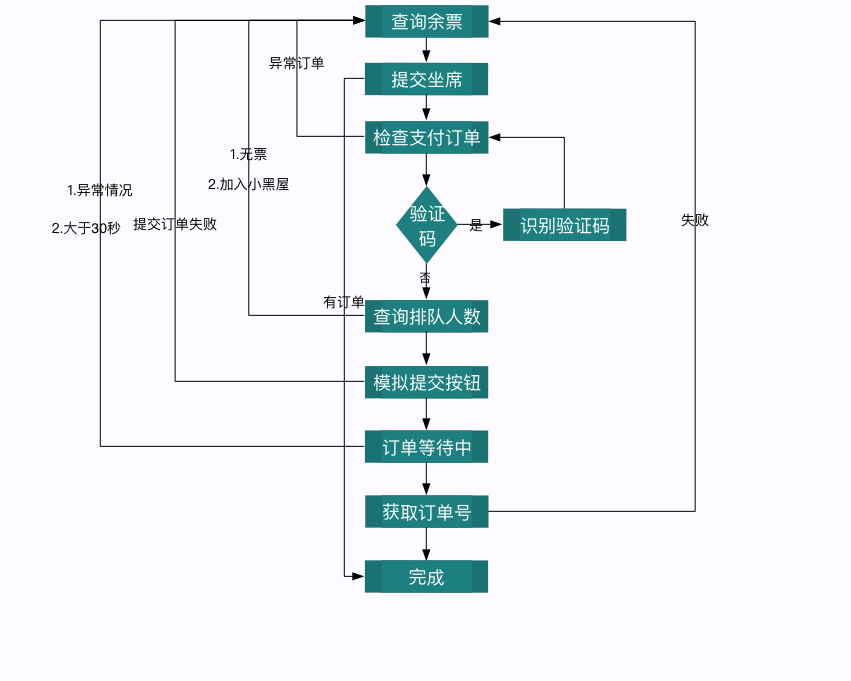
思路图
-
项目声明:
- 本软件只供学习交流使用,务作为商业用途,交流群号:286271084(已满), 2群:649992274(已满),请加3群(未满), 群号:632501142、4群(未满), 群号:606340519
- 请不要重复加群,一个群就可以了,把机会留给更多人
- 进群先看公告!!!进群先看公告!!!进群先看公告!!! 重要的事情说三遍
- 能为你抢到一张回家的票,是我最大的心愿
-
成功log,如果是购票失败的,请带上失败的log给我,我尽力帮你调,也可加群一起交流,程序只是加速买票的过程,并不一定能买到票
正在第355次查询 乘车日期: 2018-02-12 车次G4741,G2365,G1371,G1377,G1329 查询无票 代理设置 无 总耗时429ms 车次: G4741 始发车站: 上海 终点站: 邵阳 二等座:有 正在尝试提交订票... 尝试提交订单... 出票成功 排队成功, 当前余票还剩余: 359 张 正在使用自动识别验证码功能 验证码通过,正在提交订单 提交订单成功! 排队等待时间预计还剩 -12 ms 排队等待时间预计还剩 -6 ms 排队等待时间预计还剩 -7 ms 排队等待时间预计还剩 -4 ms 排队等待时间预计还剩 -4 ms 恭喜您订票成功,订单号为:EB52743573, 请立即打开浏览器登录12306,访问‘未完成订单’,在30分钟内完成支付! -
使用帮助:
-
测试邮箱是否可用 邮箱配置问题看issues
-
学生票issues 学生票修改
-
依赖安装不对的问题(ImportError)requirements.txt问题
-
若快豆子疑问 点我
-
测试下单接口是否可用,有两个下单接口,随便用哪个都ok
-
如果下载验证码过期或者下载失败的问题,应该是12306封ip的策略,多重试几次,12306现在封服务器(阿里云和腾讯云)ip比较严重,尽量不要放在服务器里面
-
-
感谢一下小伙伴对本项目提供的帮助
- @ [email protected]
- @才
- 以及所有为此项目提供pr的同学
-


