A free Morse code trainer that runs entirely in your browser — real CW audio, a brass telegraph key on your keyboard, and a signal tree that lights up as you master each character.
Open it → · Learn in 7 days · 60-second challenge · Send a secret message
▶ Watch the one-minute intro, with sound. The app screens in it are the live site, keyed for real.
Most Morse code sites are a translator with an alphabet chart bolted on. MorseForge is a trainer: you learn the code in the order it is actually structured, you hear it as real CW tones, and you send it back with your own keyboard.
No account. No ads. No server — your progress never leaves your device. Consent-based analytics: Google Analytics runs only if you accept it.

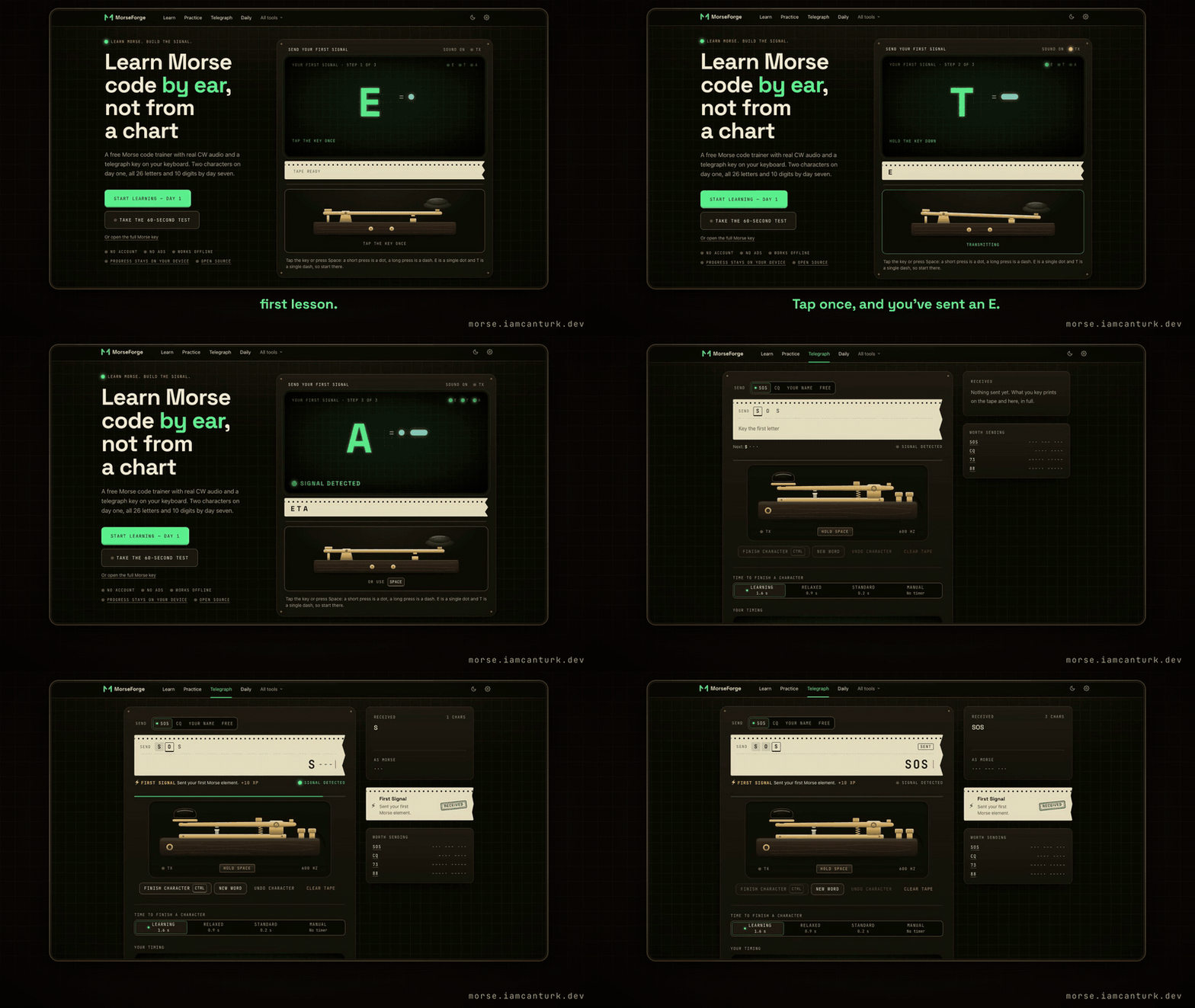
The landing page is the first lesson. Tap the key once and it reads back what you sent.
The interface is a retro telegraph office: a walnut desk, brass, ebonite and phosphor-green CRT glass in the dark theme, and a telegram form in the light one. It is a design system rather than a skin — see the palette and the reasoning below.
| First signal | The landing page has a working key. Send E, then T, then A, and you have sent Morse before you have read a word |
| Learn in 7 days | Seven stages — E T first, the digits last — each one seen, heard, sent, then drilled with everything before it |
| The tree | The real binary structure of Morse, drawn as a circuit board. Pick a node to hear it and drill it |
| 60-second challenge | Seeded, so a link carries the same prompts in the same order. Scores on one link are comparable |
| Daily challenge | Eight lines a day, generated from the date. It says up front which characters and speed, and the share gives nothing away |
| Telegraph | A brass straight key, or iambic paddles on [ and ], decoded live. A few words answer back |
| Secret message | Write a message, get a link that plays it in Morse. The message lives only in the URL fragment |
| Practice | Listening, sending and recognition, in three teaching orders, scored per skill |
| Copy practice | Whole lines — code groups, words, on-air phrases, callsigns — graded character by character |
| Signal Defender | Codes fall as dots and dashes. You type what each one spells |
| Morse Runner | Gates show a letter. You key its code from memory |
| Progress | What to do next, level, both streaks, every skill per character, badges |
| Settings | Signal (sound, lamp or both), pitch, speed, Farnsworth, key patience, key bindings, motion — and a backup of everything you have stored |
| Translator | Text ↔ Morse, with audio and a signal lamp |
| Alphabet | Every character, with ITU-R M.1677-1 marks and the common non-ITU ones kept apart, plus a page per character |
| Numbers · speed · how to learn | Reference pages that answer the question first, then show the working |
| Words | 22 words and phrases, each playable and explained |
 |
 |
| The lesson. One character, three ways: see it, hear it, send it. | The telegraph, after keying SOS by hand. |
 |
 |
| Listening by lamp: the same timing, as light. | One setting: Sound, Lamp or Both. |

The share card the telegraph draws. Every card is made in your browser, on a canvas.

The Signal Tree, at real Morse timing. Every character sits at the address its own code spells out.
No signup, nothing to install, and it works on a phone.
- Tap the key on the front page — one tap sends E, and it tells you so. That is the first lesson done.
- Take day one — two characters: see them, hear them, send them.
- Take the 60-second challenge — and send the link to someone. They get the same prompts, and your score to beat.
The first signal. The landing page is an instrument, not an ad for one. The key on it is the same engine as the telegraph. Space keys it while it is on screen and scrolls the page when it is not, and a correct code commits the instant it is complete, because making a beginner wait out a gap to find out they were right is the wrong first impression; a wrong one is judged as soon as it can no longer be right. It is plain DOM code with no React above the fold, so it works before the rest of the page has loaded. When you finish E, T and A the lesson opens at stage 1, "Hear it", because you have already seen and sent those two.
The seven-day lesson. One stage per day of the plan, and the same seven stages on the plan page, in the lesson, in the header's Continue link and in the achievements: E T, then I A N M, S U R W, D K G O, H V F L P J, B X C Y Z Q, and the digits last. Each stage is see, hear, send, then a drill over everything learned so far. A wrong key is judged the moment it cannot be right, so a slip never waits out a gap. Come back and it resumes at the first character you have not met, and finish the course and it stops re-teaching you Q.
A challenge you can compare. The link carries seed, pool and the settings
(?seed=k7f3&pool=14&time=60&wpm=20&beat=340), so everyone who opens it gets
the same prompts in the same order from the same fourteen letters. Before the
seed existed, each player drew from their own unlocked letters and "beat 340"
compared two different games. The beat value is a claim made by the link, and
the page says so: anyone can edit a URL, and there is no server to check it. A
result under 40% does not open the share sheet. It offers the next lesson stage
instead, and says that not being there yet is normal.
A daily result that gives nothing away. One square per line — green, amber or red — a percentage and the streak, plus the date's number, so the people you send it to can play the same lines and compare without having been spoiled. It rounds down: a run with a miss never reads 100%. Before you start, the daily says which characters it uses and at what speed, and how many of them you have learned, so the first one is not a surprise.
The secret message. /message/ turns up to 80 characters into a link of the
form /message/#m=<base64url>&wpm=20. The recipient gets a telegram with the code
on a paper tape and a play button; nothing autoplays, and the tape lights in step
with the tone so it works with the sound off. The text is only ever in the
fragment, which is never sent to a server. See
below for why that matters.
The telegraph. The brass key is an inline SVG whose lever moves by a transform. Pick a target — SOS, CQ, your own name, or free keying — and the target is printed on the tape so the page is never blank. Some words answer back with a rubber stamp and a line about what they mean. They are not listed here. Anything you finish can be shared as a telegram card, or as a link that plays it. Esc drops a half-keyed character without sending it.
Games that cannot be won by looking. In Signal Defender a falling signal is only its code — dots and dashes — and the letter shows when you hit it. In Morse Runner a gate shows only the letter, and you key its code from memory. A wrong send reveals the nearest gate's code as a hint, and passing on a hint scores nothing. The runner judges a send the moment it is complete or can no longer match a gate, so two quick sends are two characters, not one. Both bank XP at the practice rate and record a personal best.
Practice that keeps your place. After a miss the answer field keeps focus and the correction is read out ("You said Q. It was E, dot."), so you can type the next answer without finding the field again. The next tone waits about 700 ms, so it does not start underneath a screen reader still speaking, and that wait is not counted against a timed run. A pool of two or three letters never strictly alternates: the same prompt may come twice, never three times.
Silent if you need it. One setting, Signal, decides how every Morse signal on the site reaches you: as a tone, as a lamp, or both. In Lamp mode the listening screens in practice, copy, the daily, the lesson and the players flash a lamp with the same timing and play nothing, and the work still counts as listening for mastery. It is not a mute switch with a warning attached.
Progress, in one place. The progress page opens on Next on the wire: the one thing worth doing now, with the reason. Below it are the level, the practice streak and the daily streak (they count different things, so they are two plates), your accuracy in each of the three skills, and the badges. Badges earned during a lesson, a game or a message appear inside that screen, not as a global toast.
A backup you can read. Settings holds one export and import for all four stores — progress, settings, stats and the daily record — with a preview of what a file contains before anything is written. A section is written only if it validates as itself, and the result says which sections were restored, which were rejected and which could not be saved. Erasing everything keeps your theme and your choice about the usage counter.
Offline. An installable PWA. The service worker's cache version is a hash of every precached file and of the worker itself, so a returning visitor gets the new build instead of whichever one they first loaded. The install prompt is offered after a lesson stage or a daily run, and in Settings, never on arrival.
Findable by people and by assistants. Every letter and digit has its own page,
from A to
9; the alphabet page
keeps the marks ITU-R M.1677-1 defines apart from the common ones it does not,
and says which is which. /llms.txt indexes the site, /llms-full.txt is its
whole text in one file, and the alphabet, the seven-day plan, every word and
every note are also served as Markdown at the same URL plus .md.
A few decisions that are load-bearing, and would look arbitrary without the reasoning.
Characters are taught by code length, not alphabetically. Morse is a prefix tree — a dot branches left, a dash branches right — so the seven-day plan walks one layer per day. That is why day one is E and T, and why Q and Z come last. The two widest layers are split in half so a stage fits in a sitting, and the digits get a stage of their own.
Three skills are tracked separately. Recognising a printed .-, hearing it
at speed, and keying it are different abilities that improve at different rates.
A character only reaches Mastered with evidence in all three, so two hundred
perfect recognitions alone will never master it.
Speed is shown in characters a minute, not words. The app measures how many characters you answered correctly, not how fast you key in words per minute, and calling that WPM would claim a measurement nobody made. So results show characters a minute, and the two speed badges say "50 characters a minute" and "125" rather than a WPM they could not verify. Playback speed is real WPM, because there the app controls the clock.
A game only credits a skill the player actually used. Signal Defender originally printed the letter beside its falling code, so a hit counted as hearing a character that the player had read off the screen. Now the code falls alone and a hit is a genuine recognition. Morse Runner likewise credits sending only for gates passed from memory. The rule is the same in both: if the screen did the work, the game does not take the credit.
Listening has to work without sound. An audit found that with sound off a listening task simply did nothing: no tone, nothing to watch, and the daily would not even start. A setting that says "everything here works in silence" was not true. Signal replaces the mute switch with a choice (Sound, Lamp or Both), one timeline drives the tone and the lamp so they stay in step, and Lamp listening counts toward mastery like any other. An older saved setting with the sound switched off migrates to Lamp rather than to silence. The rest of that audit's findings were treated the same way, as behaviour to design for and not as a checklist: focus stays in the answer field after a miss; a sticky bar can never hide the element you are working on, because every page shares one scroll offset; a code drawn as dots and dashes also has a spoken twin ("dot dash") for screen readers; and targets are at least 44 px under a finger.
Farnsworth timing is on by default. Characters play at full speed with the gaps stretched. Slowing the characters themselves teaches people to count individual beeps, and that habit becomes a hard ceiling around 10 WPM.
How patient the key is has nothing to do with WPM. At 15 WPM a character
ends after 240 ms of silence — correct for a competent operator, hopeless for a
beginner who means to send S and, three seconds of hesitation later, has sent
E E E. Keying patience is its own setting, defaulting to 1.6 seconds, with a
manual mode that removes the clock entirely.
The secret message never reaches a server. It lives in the URL fragment,
which browsers do not put in a request, strip from Referer, and which the
cache ignores. Link-preview bots in chat apps fetch without it. The page also
loads no analytics beacon, no Google Analytics and no consent bar, and the usage
counter's events carry an event name and no URL or text. The one place the message does persist is your browser history,
and the page says that too. Text from a link is rendered as text, never as HTML,
and a 5 MB fragment is rejected before any decoding is attempted.
One shared store per key, across tabs. Every screen reads and writes the same
store instance for a key, and a store compares the raw string in localStorage
with the one it last parsed before each update. A second tab that wrote in the
meantime is therefore picked up before the next write, rather than overwritten
by it. The failure this prevents is quiet: 600 XP in one tab and 100 in another,
and whichever saved last wins. Everything that counts as having practised goes
through bankActivity, so XP, the streak and the badges agree with each other.
Only transform and opacity animate. A key faded its background-colour and
box-shadow, a power meter animated width, and a toggle used transition-all.
Animating a layout property runs layout on every frame; box-shadow is among the
most expensive things to animate at all. Now the key has no transition at all,
which is also more correct — a key is down or up, and easing blurs the boundary
a learner is timing against. Reduced motion is honoured from the operating system
and from Settings, in either direction.
The pages people find in a search ship no framework. The 7-day plan, the notes and the word index ship no script files at all, only the layout's inline scripts for the theme, the menus and the progress chip, about 6 KB gzipped. Word, character and reference pages add a small audio player and come to about 14 KB in total. React stays where it earns its keep — the lesson, the telegraph, practice, the games — and those screens land at roughly 90 to 140 KB gzipped. The two players share one implementation of the timing so they cannot drift apart.
Assistants get Markdown, not a stripped-down web page. The alphabet, the
seven-day plan, every word and every note are served twice: as HTML for people,
and at the same URL with .md appended as the source it was rendered from,
linked with rel="alternate". /llms-full.txt is the complete text of the site
in one file, generated from the same alphabet, curriculum and word notes the app
runs on, so it cannot describe a product that does not exist. A model answering
a question about Morse code should not have to fetch twenty pages and strip
navigation out of each one; that stripping is where quotes get mangled.
ITU marks and common marks are kept apart. The standard defines the letters,
the digits and 13 punctuation marks. Five more marks are in everyday use and are
not in it. Mixing them in one table says the standard defines something it does
not, so the alphabet page, the Markdown copies and llms-full.txt all keep two
tables and say which is which.
Every page is prerendered to real HTML. GPTBot, ClaudeBot and PerplexityBot
do not execute JavaScript. A client-rendered app is invisible to them, so the
whole site is static and only the interactive parts hydrate. Titles,
descriptions, headings, introductions and FAQs come from one page registry
(src/config/pages.ts) and one FAQ file, which also produce the JSON-LD, the
sitemap and llms.txt, so the visible words and the structured data cannot
disagree. Sitemap dates come from git, never from the build clock.
The daily challenge has no server behind it. The UTC date is the seed, so every browser runs the same generator and gets the same eight lines, the same speed and the same pass mark. It works offline, it cannot go down, and there is nothing to pay for. The streak counts attempts rather than passes, because showing up is the only thing a streak is any good at encouraging.
A dropped character costs one mark, not the rest of the line. Copy practice
compares what was sent against what you typed by aligning them first, so missing
the second letter of HELLO is scored as one miss rather than as four wrong
answers. Grading it position by position would tell a learner they got 20% of a
line they had almost entirely right.
Nothing is written twice. The alphabet is one object. The tree, the
curriculum, the lesson, the word pages, the translator, the character pages,
llms.txt, the share cards and even the logo derive from it, so a reference page
cannot disagree with the trainer. The logo is an M written in two strokes: M is dash-dash,
so each half of the letter is one dash, and the gap between them is exactly one
unit wide, the gap between the elements of a letter. A test decodes the drawn
strokes back into --, and the wordmark is the display face traced to outlines,
so it needs no font. Contributors cannot hand-type a code into a page either: tests scan the
copy files for one and fail.
src/
├── engine/        Framework-agnostic core, fully unit-tested
│   ├── timingEngine.ts    PARIS WPM + ARRL Farnsworth
│   ├── morseEncoder.ts    Text → Morse
│   ├── morseDecoder.ts    Morse → text, plus a live decoder for the key
│   ├── audioEngine.ts     Web Audio CW tone, envelope-shaped
│   ├── spokenCode.ts      ".-" as "dot dash", for screen readers
│   └── keyEngine.ts       Straight key: short/long press, gap detection
│
├── data/          Single sources of truth
│   ├── morseAlphabet.ts   ITU-R M.1677-1, plus the marks it does not define
│   ├── tree.ts            Derived from the alphabet, never hand-authored
│   ├── curriculum.ts      The 7-day plan
│   ├── lessonStages.ts    The one list of "stage N", used everywhere
│   ├── characters.ts      One page per character
│   ├── words.ts · faq.ts · format.ts · markdown.ts
│
├── config/        Identity and copy, as data
│   ├── site.ts            Name, URL, author, citations
│   ├── pages.ts           The page registry: every route and its copy
│   ├── facts.ts           Every figure a sentence quotes, computed
│   └── landing.ts         The landing page's copy
│
├── seo/           Schema, head tags, Markdown alternates, sitemap, audit helpers
├── game/          mastery · spacedRepetition · session · challengeLink ·
│                  dailyShare · messageLink · nextAction · easterEggs ·
│                  defender · runner · achievements
├── storage/       Versioned, validated localStorage: one shared store per key,
│                  settings.ts (incl. Signal), activity.ts (bankActivity) and
│                  backup.ts (export/import/reset)
├── analytics/     A closed set of event names, and a test that all are sent
│
├── components/    Astro and React
│   ├── PageShell.astro    The one frame every page but the landing uses
│   ├── ui/                Segmented, OptionGroup, Readout, Lamp, Screen, siteNav,
│   │                      transmitter (tone + lamp from one timeline), SignalLamp
│   ├── brand/             The Split M and the wordmark, as geometry
│   ├── Landing/           The first-signal hero, the network, the tool grid
│   ├── Lesson/ Practice/ Copy/ Daily/ Challenge/ Decode/
│   ├── MorseKey/          The brass key and the telegraph
│   ├── Message/           The secret-message desk
│   ├── Games/ SignalTree/ Stats/ Settings/ Share/ Studio/
│   └── Reference/ Alphabet/ MorsePlayer/ Translator/    Zero or low JS
│
├── layouts/       BaseLayout: head, theme, motion, install prompt
├── styles/        global.css (tokens, surfaces) and palette.ts (the same, as data)
├── pages/         Astro routes, including the .md and .txt endpoints
├── content/       The notes (Markdown)
└── pwa/           Build-time manifest + service worker generation

scripts/           check-build · check-links · check-seo · check-reachable ·
                   make-brand · make-demo · lastmod · deploy
deploy/            The nginx vhost, and the server's notes
Stack: Astro 7 (static output) · React 19 islands · Tailwind 4 · TypeScript strict · Vitest · Web Audio API
No backend and no database. Analytics are consent-based: Google Analytics 4 loads only after a visitor accepts it in a bar at the foot of the page (Consent Mode v2, ad signals always denied, and revocable in Settings, which also deletes its cookies). Independently of that answer, Cloudflare's cookieless Web Analytics counts page views, and a small first-party counter of event names runs until you switch it off in Settings. What each one sees is spelled out on the privacy page.
git clone https://github.com/iamcanturk/morseforge.git
cd morseforge
npm install
npm run dev
Requires Node 22.12 or newer, which is Astro 7's own floor.
| Command | Does |
|---|---|
npm run dev |
Dev server on :4321 |
npm run build |
Static build to dist/, plus manifest and service worker |
npm run verify |
Format check, type check, reachability, tests — run this before committing |
npm run verify:all |
verify, then a build, then the checks on the built output |
npm test |
Vitest |
npm run check:build |
Assertions on dist/: prerendered text, links, SEO, Markdown copies |
npm run check:links |
Every internal link in dist/ must resolve |
npm run brand |
Regenerate the favicon, icons and social cards from the palette and the logo |
npm run demo |
Regenerate docs/demo.gif (needs ImageMagick) |
npm run deploy |
Verify, build, rsync to the server, assert the site responds |
2,176 tests in 105 files, covering the parts where being wrong is silent:
- Timing — sending PARIS once takes exactly
60/WPMseconds, checked at 5/12/20/35 WPM and under Farnsworth. Every speed readout depends on it. - Codec — every character round-trips through encode and decode.
- Key — an OS auto-repeat keydown mid-hold yields one dash, not a burst of dots, and a blur mid-hold stops the tone instead of leaving it stuck.
- Storage — a hand-edited export claiming more correct answers than attempts is clamped rather than shown as 16,000% accuracy. Two tabs over one storage never turn 600 XP into 100.
- Content — no day of the plan can suggest a practice word containing a letter it has not taught yet, and factual claims made in prose on the public pages are asserted against the alphabet.
- No typed Morse — the copy files and the reference components are scanned for a run of dots and dashes in a string, and fail on one.
- Copy grading — a dropped character costs one mark, not every character after it: the two lines are aligned by edit distance before they are compared.
- Links and seeds — one challenge link gives one prompt sequence, and hostile input (markup in a seed, a 5 MB message fragment, invalid UTF-8) parses to a safe default instead of throwing.
- Keyboard — binding the key to Space must not stop every button and link
on the page being activated by Space, which is what a
windowlistener with an unconditionalpreventDefaultdoes. - Signal — a saved setting from before the Signal setting existed migrates without losing the player's choice: sound off becomes Lamp, and every stored combination keeps "tones are audible" and "Signal" in agreement.
- Prompts and timing — a pool of two letters never strictly alternates and never repeats more than twice; the 700 ms pause between listening prompts is held out of a timed run's clock rather than credited back afterwards.
- Key commits — the rule "commit when the code spells a target or can no longer become one" is tested for the hero, the lesson and the runner, so a wrong dash is judged at once and a quick correction is not penalised.
- Games — playable, not just correct. Whole runs are simulated against a player who can only deal with one prompt at a time, because a version that could answer several at once made an impossible game look survivable and hid a real balance bug. A competent player must last; a passive one must lose.
- Palette — every text colour clears 4.5:1 against every surface in both themes, and the CSS and the TypeScript copy of the palette must agree.
- Analytics wiring — every event declared in the closed
EventNameunion must actually be fired from somewhere. A declared-but-unsent event is invisible: TypeScript is happy, every test passes, and the only symptom is a number that stays at zero, which looks exactly like nobody using the feature. - Consent — Google Analytics is loaded by an inline script, so the loader is
run in a sandbox against the pure decision and cookie functions it mirrors.
The build check fails if any page's static HTML loads gtag.js, if the consent
bar goes missing, or if
/message/carries any GA code at all. - Links — every internal reference in the built output must resolve: 9,778 of them across 88 pages in this build, checked against what the build actually produced.
- SEO — on the built output: one visible H1, title and description within their limits, a self canonical, JSON-LD that parses, noindex pages kept out of the sitemap, every Markdown alternate resolving, every crawler allowed.
- Reachability —
npm run verifyfails on a module undersrc/data,src/game,src/engine,src/storageorsrc/analyticsthat no page can reach. Three features once shipped fully tested and completely unreachable; coverage is exactly the wrong instrument for catching that.
Static files on CloudPanel behind Cloudflare. The
nginx vhost is version-controlled in deploy/ —
the default static template caches sw.js for ten years, which would pin every
returning visitor to whichever build they first loaded. The server notes,
including what this release does and does not need changed, are in
deploy/README.md.
Contributions are genuinely wanted, and there are specific things that would help more than others.
If you are a licensed operator, the thing I am least sure of is whether the on-air conventions are right — the Q-codes, the prosigns, what an actual exchange sounds like. I am not licensed. Being told where this is wrong is the single most valuable thing anyone can do here, and an issue saying "the RST phrasing is off" is a real contribution.
If you learn Morse and it does not work for you, say so and say where. The place people quit is the most important information this project can get, and it is invisible from the inside — nothing here reports back, by design.
If you write code, the ideas that would move this furthest:
- Translations — the plumbing is in (docs/TRANSLATING.md), and no language has shipped yet. Say which language before you start, so two people do not translate the same thing.
- Paddle keying, from people who use paddles. Iambic A and B, dot/dah memory and USB paddle adapters landed in #43, and the timing is tested, but it has not yet been used on air by an operator who keys with paddles every day. Tell me where it feels wrong.
- Screen-reader testing. The markup has been audited and the obvious failures are fixed, but it has never been driven by someone who uses one daily. That gap does not close by reading the code.
- Something small? Open an issue describing what you want to work on and I will scope it with you. There is no stale backlog here — anything that could be fixed in an afternoon has been, so a curated list of easy tasks would be a list of things nobody needed.
Read CONTRIBUTING.md first — it is short. The rule worth
knowing up front: npm run verify has to pass, and a pre-push hook enforces it,
so a broken build cannot reach the repo.
- Star the repo. It is the cheapest signal that this is worth someone's time, and it is most of how anyone finds it.
- Link to it from a club page, a wiki, a forum answer.
- Tell someone learning Morse. Word of mouth beats everything else here, because there is no advertising budget and no growth loop.
Built and maintained by Can Türk — I build things on the web, mostly the kind that work without an account.
If MorseForge is useful to you, a ⭐ or a link back to morse.iamcanturk.dev genuinely helps — and if you build something with it, I would like to see it.
Available for work: iamcanturk.dev.
Morse codes and timing follow ITU-R M.1677-1, the ITU recommendation defining International Morse code. Farnsworth timing follows the ARRL standard. The Koch ordering follows Ludwig Koch's original method.
Built with Astro, React and Tailwind CSS. Fonts are Space Grotesk and JetBrains Mono, self-hosted.
MIT © Can Türk — use it, fork it, ship it. Attribution is appreciated but not required.