GV

GeezerVison

The World Wide Web, restored to 800 pixels of glory.

Home|About|Gaming cabinet|Archives|How it works|Starter sites

On this site

  • Sign in
  • ActionsCI/CD and automation
  • CodespacesCloud development environments
  • All Features
  • Documentation
  • Training
  • Certifications
  • Build with Copilot
  • Customize Copilot
  • Integrations
  • Trending repos
  • GitHub Sponsors
  • Developer articles
  • Enterprises

This view

  • Original page
  • New address

GeezerVison is showing github.com — GitHub - imohweb/Deploy-AzResources-Script

BranchesTags
Open more actions menu

Latest commit


History

23 Commits
23 Commits

Folders and files

NameName
Last commit message
Last commit date
src
src
 
 
.gitignore
.gitignore
 
 
LICENSE
LICENSE
 
 
README.md
README.md
 
 
deploy-resources-to-azure-script.sh


Repository files navigation

Deploy Resources to Azure Using Script

Azure CLI Logo
This repository gives you a single script named deploy-resources-to-azure-script.sh. When you run the script on your terminal it automates the deployment of the following resources to Azure:

  1. Azure Resource Group,
  2. Azure Virtual Machines,
  3. Azure Storage Account,
  4. Azure Storage Containers
  5. Enable static website hosting on the Azure Storage account
  6. Upload website content to the storage Container from the local PC
  7. Create an App Service Plan
  8. Deploy Web App
  9. Deploy an app from GitHub to Azure App Service
  10. and many more

The script is constantly updated to keep users abreast with the updated version of Azure CLI commands.

Prerequisites for Using this Script

  1. You must have an active Subscription on Azure. If you do not have one, sign up here for the free trial account.
  2. Download the Azure CLI 2.40 MSI installer here and run it on your Local PC.
  3. Run the az login command to sign into your account on Azure
  4. Run the az command to confirm that you have successfully Installed the CLI
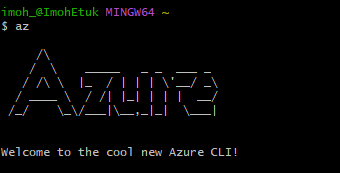
  5. Run the az version command to check the Azure CLI Version you have just installed

6. To create Resources directly on a particular subscription if you have many subscriptions on your Azure account,
run the **az account set --subscription $MySubscription** command.

About

No description, website, or topics provided.

Resources

Readme
MIT license
Activity

Stars

0 stars

Watchers

1 watching

Forks

0 forks
Report repository

Releases

Packages

Contributors

Languages

You are visitor 01402503 — GeezerVison does not store the pages you look up.
Best viewed with Netscape Navigator 4.7 or Internet Explorer 6 at 800×600. No cookies required.