This project is a Java port of the Python project SVG pinout generator with some small improvements:
- pin size is augmented if the pin name length is more than 8 characters
- power color for V+, Vdd...
- GND pin is black with a white text
- new pin type: ANALOG
- several new options
A chip package file is a CSV file that has the following structure:
- first line: Chip name, Output file name, Package, Logo file name
- pin lines: Pin name, Type, Direction (IN, OUT, BIDIR, or nothing)
The pin lines equals the number of the pins defined in package file.
In addition to porting the code to Java, I just wanted to see how perform the Java version in comparison with the Python version using Graal VM. I also compared the native executable with the Python and Java versions.
- Graal VM or Liberica Native Image Kit variant, version >= 25
- The environment variable
GRAALVM_HOMEdefined - Maven version >= 3.6.3
- dependencies versions checking:
mvn versions:display-dependency-updates - plugins version checking:
mvn versions:display-plugin-updates
To create the executable jar please run mvn -U clean package
To compile to a native executable:
$ mvn -U clean package -P native-simple -DskipTests
With GraalVM an optimized version may be build with
mvn -U clean package -P native -DskipTests if a default.iprof file exists;
this file may be created with the graal-instrument profile.
There is also defined in pom.xml a native-liberica profile as options differ from Graal.
To generate the file reachability-metadata.json one should use
$ ${GRAALVM_HOME}/bin/java \
  -agentlib:native-image-agent=config-output-dir=src/main/resources/META-INF/native-image/svgpinout/svgpinout/ \
  -jar target/svgpinout.jar <pinout csv file>
Please also read GraalVM Native Image Agent — reachability metadata: how to run it, where files go
To run the executable jar:
$ java -jar target/svgpinout-jar-with-dependencies.jar <options> <csv file>
or the native binary:
$ target/svgpinout <options> <csv file>
The following options are supported:
- -o | --outdir
<outdir>= SVG file output directory (otherwise the current folder will be used) - -l | --logodir
<logodir>= alternate logos directory (if a new chip requires it) - -n | --nologo = no logo embedded in the SVG file (useful for comparison with the Python version that does not insert the logo)
- -p | --packages
<alternate packages.csv file>= if you have a new package, you may describe it in a file - -d | --display = display embedded packages.csv content
- -b | --loop = run forever in loop (useful to see if there are memory leaks)
- -r | --repeat <# of times> (should be > 0)
- -s | --statistics = display some statistics after finishing the program execution
- -h | --help = display help
The version 2 adds the following new ooptions:
- -c | --cache = cache logo file (for loop, repeats or folder processing)
- -x | --execution
<mode>where mode is one ofpar,futorseri.e. paralellized, using CompletableFuture or serial (default)
To display more debug messages, add the option -Dorg.slf4j.simpleLogger.defaultLogLevel=debug.
Other options for SLF4J simple:
-Dorg.slf4j.simpleLogger.showDateTime=true-Dorg.slf4j.simpleLogger.dateTimeFormat="H:m"-Dorg.slf4j.simpleLogger.levelInBrackets=trueMore parameters at SimpleLogger.
The -b option enable running the application in a loop; using startup options
-Dcom.sun.management.jmxremote -Dcom.sun.management.jmxremote.port=5550
-Dcom.sun.management.jmxremote.rmi.port=5550
-Dcom.sun.management.jmxremote.ssl=false
-Dcom.sun.management.jmxremote.authenticate=false -Djava.rmi.server.hostname=127.0.0.1
one could use jconsole in order to display memory consumption etc...
Comparing Python (3.12.3), Java and native (on an Ubuntu 24.04 Linux system) was done on a folder containing 300 fake CSV chip files and using the script benchmark.sh
- the result is
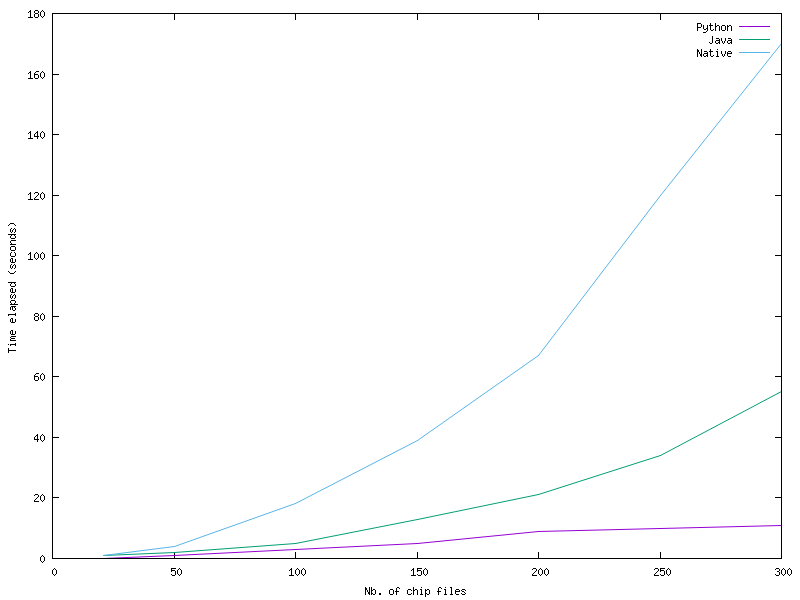 Surprisingly, the Python version is the fastest and the native the slowest!
But please note that the Python code does not insert the logo in the SVG file while Java/native perform that.

However, running a v2 optimized code (that uses caches for images and a parallel
execution) provides completely different result and Java shows all its supremacy - here is
the result:  The execution was performed using the
-c -x fut options.
Comparing only the Java jar and native versions (by running the application up to 1500 times on the same file) using the plot-java_native.sh script one may notice that native version is faster for about 500 loops - after, the pure Java version is faster!
The script plot-java_native.sh compares the Java and native executions
by running a conversion several times over the same input file, the results are:

After a certain threshold, the Java version seems faster - probably because internally it performs some dynamically optimizations.