GV

GeezerVison

The World Wide Web, restored to 800 pixels of glory.

Home|About|Gaming cabinet|Archives|How it works|Starter sites

On this site

  • Sign in
  • ActionsCI/CD and automation
  • CodespacesCloud development environments
  • All Features
  • Documentation
  • Training
  • Certifications
  • Build with Copilot
  • Customize Copilot
  • Integrations
  • Trending repos
  • GitHub Sponsors
  • Developer articles
  • Enterprises

This view

  • Original page
  • New address

GeezerVison is showing github.com — GitHub - jonike/hkTools: Tools for matchmove, layout and animation related tasks in Autodesk Maya.

BranchesTags
Open more actions menu

Latest commit


History

31 Commits
31 Commits

Folders and files

NameName
Last commit message
Last commit date
doc
doc
 
 
scripts
scripts
 
 
LICENSE
LICENSE
 
 
README.md
README.md
 
 
hkTools.mhk
hkTools.mhk
 
 
hkTools.py
hkTools.py
 
 
install.mel
install.mel


Repository files navigation

hkTools

What does it do

  • Tools for matchmove, layout and animation related tasks in Autodesk Maya.

Installation

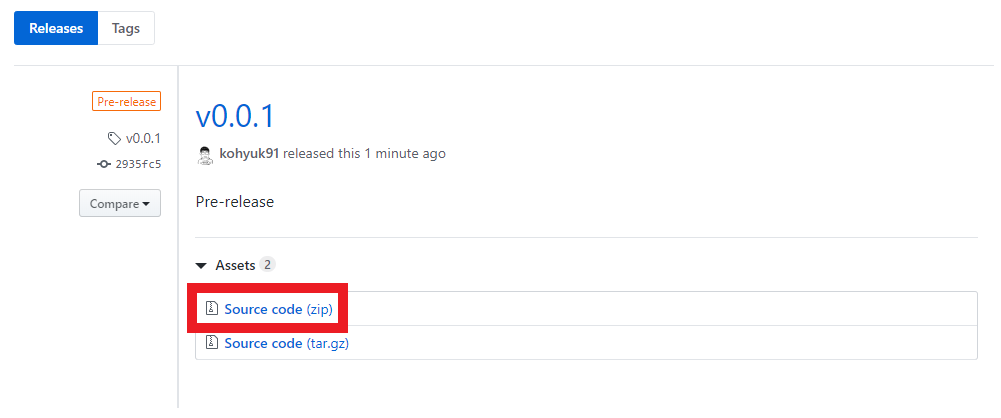
  1. Download and unzip the hkTools-#.#.#.zip file from GitHub releases.
    doc/download_release.png

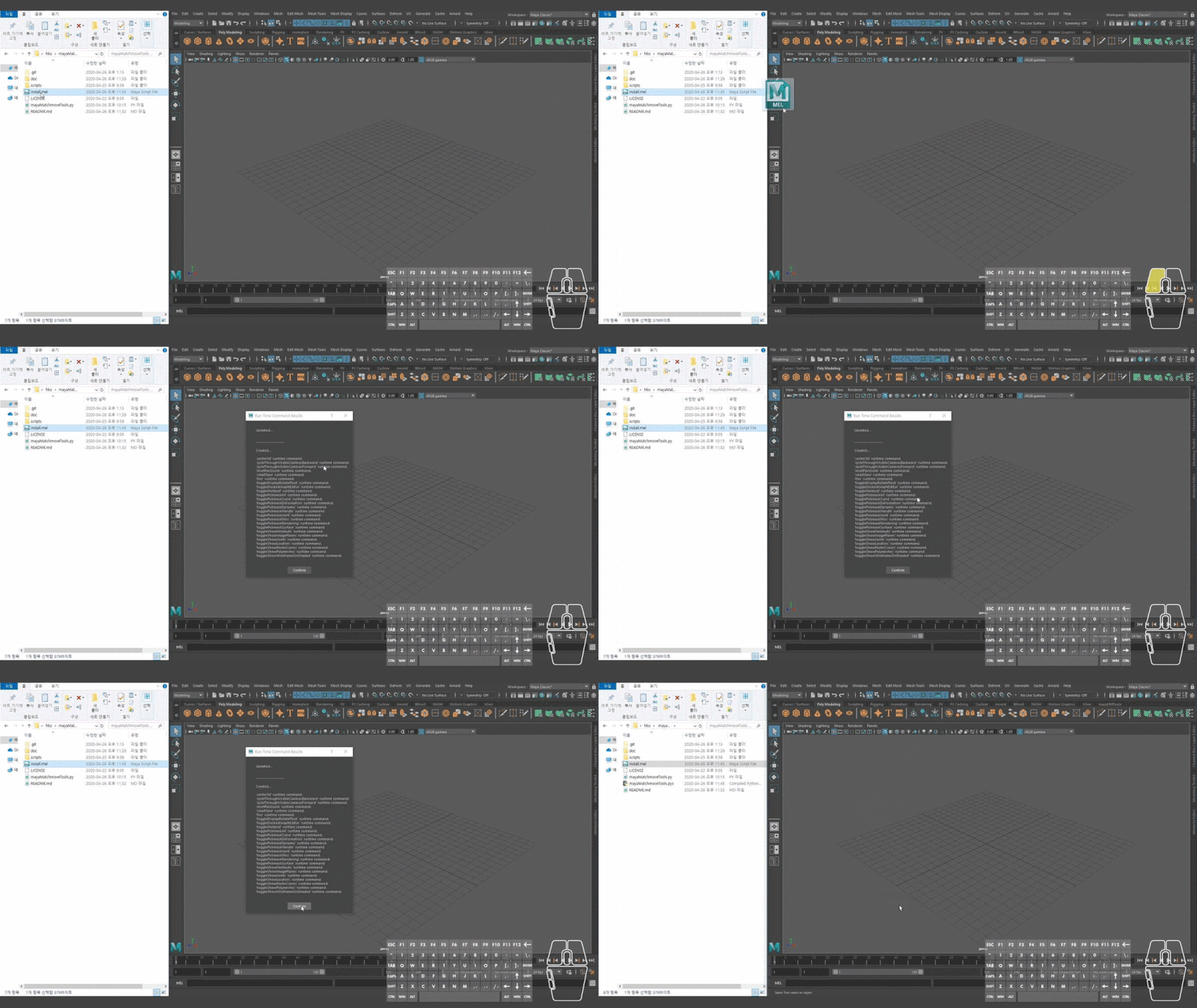
  2. Dead-Simple Installation. Just drag and drop the install.mel file onto the Maya viewport. That's it!
    doc/install.gif

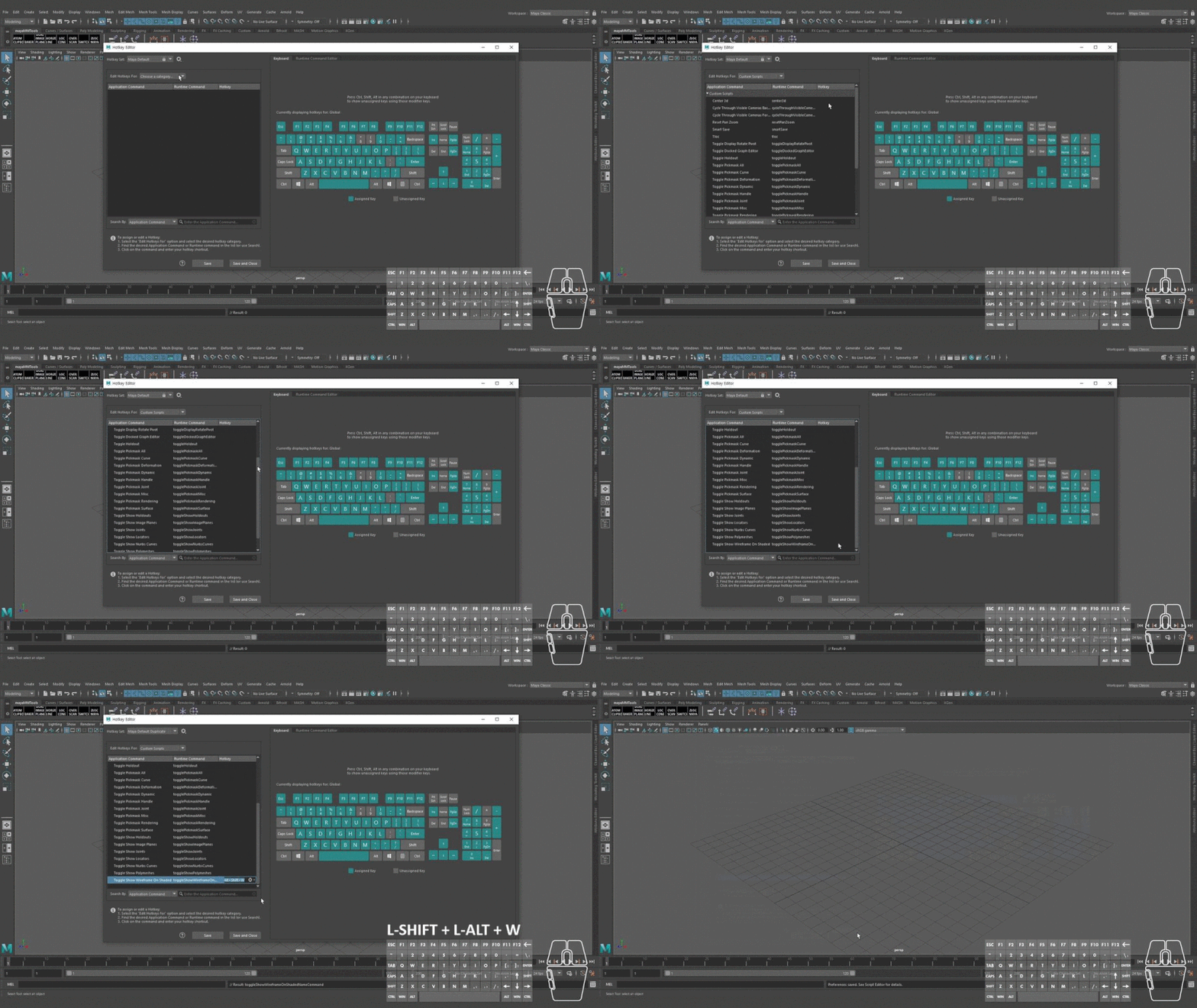
  • Creates Run Time Commands that you can assign hotkeys to.
    doc/hotkeyEditor_runTimeCommand.gif

    1. Edit Hotkeys For: Custom Scripts
    2. Assign a Hotkey for each command
  • Creates hkTools Shelf.

    doc/hkToolsShelf.png

Tool List

Matchmove & Layout & Animation(Run Time Command)

  1. Center3D
    • Center the selected transform(s) onto the camera view in Maya. Just like in 3DEqualizer.

    doc/center3d_compare_120f.gif

    • scripts/runTimeCommand/center3d.py
      • Default Hotkey: Alt + Shift + C
    • https://github.com/kohyuk91/center3d
  2. Cycle Through Visible Cameras Forward & Backward
    • If there is only one visible camera in the scene, jump between persp camera and the one visible camera.

      doc/cycleThroughVisibleCameras_onlyOneVisibleCamera.gif

    • If there are more than two visible cameras in the scene, cycle through all visible cameras.

      doc/cycleThroughVisibleCameras_twoOrMoreVisibleCameras.gif

    • scripts/runTimeCommand/cycleThroughVisibleCamerasForward.py
      • Default Hotkey: Alt + Shift + E
    • scripts/runTimeCommand/cycleThroughVisibleCamerasBackward.py
      • Default Hotkey: Alt + Shift + Q
  3. Reset Pan Zoom
    • scripts/runTimeCommand/resetPanZoom.py
      • Default Hotkey: Alt + Shift + R
  4. TLOC
    • "T"riangulate + "Loc"ator. TLOC helps you to triangulate points with ease.
    • scripts/runTimeCommand/tloc.py
      • Default Hotkey: Alt + Shift + X
    • https://github.com/kohyuk91/tloc
  5. Toggle Holdout
    • Toggles Hold-Out in shape node's Render Stats.
      • If nothing is selected toggle Hold-Out for all objects in scene.
      • If objects are selected toggle Hold-Out for only selected objects.
    • scripts/runTimeCommand/toggleHoldout.py
      • Default Hotkey: `

Matchmove & Layout & Animation(Shelf)

  1. Switch Hotkey Set
    • Cycle through hotkey sets. No need to open the Hotkey Editor.
    • scripts/shelf/_HotKey.py
  2. Bake Cam
    • Bakes the camera to world space by reparenting to world.
    • scripts/shelf/bakeCam.py
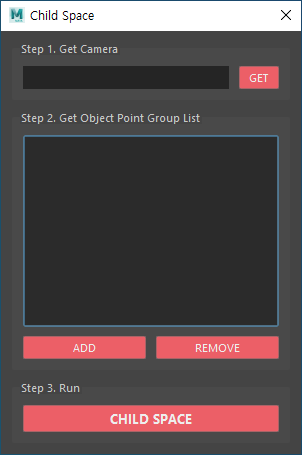
  3. Child Space
    • Display object point group's rotation and position curves in child space(instead of global space).
    • In child space we are able to scale the object point group without any shifting in screen space for the entire time range.(Just like scaling object point groups in 3DEqualizer.)
    • Interface

      doc/childSpace.png

    • scripts/shelf/childSpace.py
  4. Dual Image
    • scripts/shelf/dualImage.py
  5. Horizon Line
    • Creates an artificial horizon line for the active cam.
    • scripts/shelf/horizonLine.py
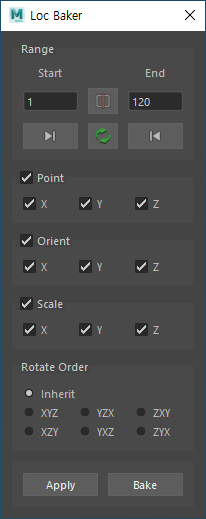
  6. Loc Baker
    • Bakes selected(or multiple) transform node's translation, rotation and scale to a locator.
    • Interface

      doc/locBaker.png

    • scripts/shelf/locBaker.py
  7. Loc Cone
    • Creates a cone for each selected locator(transform node).
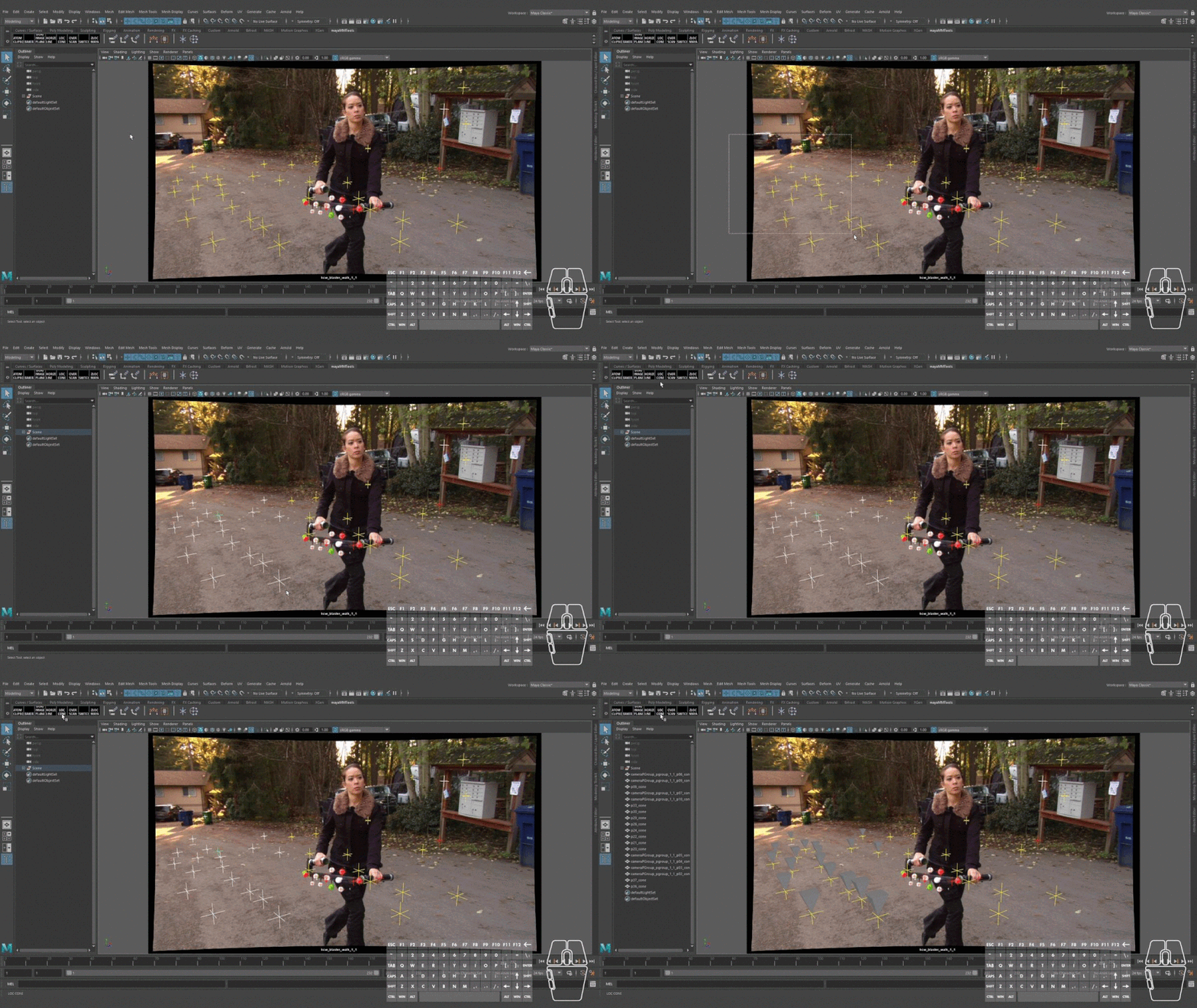
    doc/locCone.gif

    • scripts/shelf/locCone.py
  8. Overscan
    • scripts/shelf/overScan.py
  9. Quick ATOM
    • Quick ATOM script uses Maya's ATOM (Animation Transfer Object Model). Just tweaked it a little bit to use it in a copy & paste fashion.
    • Video Overview


      Kila rig by antCGI(https://www.antcgi.com/)

    • scripts/shelf/quickAtom.py
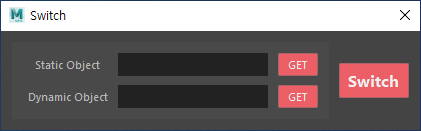
  10. Switch
    • Switches motion between a Static Object and a Dynamic Object.
    • Video Overview


    • Interface

      doc/switch.png

    • scripts/shelf/switch.py
  11. YMin
    • Moves selected(or multiple) object's pivot to XZ center and Y minimum of bounding box.
    • scripts/shelf/yMin.py
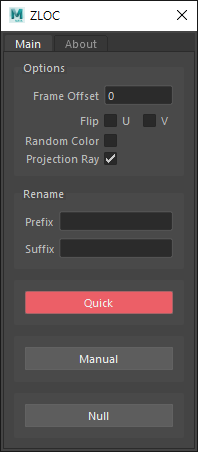
  12. ZLOC
    • ZLOC is a 2.5D tracker system built for Science-D-Visions 3DEqualizer and Autodesk Maya. (Based on SynthPipe by Martin Kulig)
    • Interface

      doc/zloc_maya.png

    • scripts/shelf/zloc_maya.py
    • https://github.com/kohyuk91/zloc

Miscellaneous(Run Time Command)

  1. Smart Save
    • Save next avaible version following _v# naming convention.
    • Similar to "Save New Comp Version" in Foundry Nuke.
    • scripts/runTimeCommand/smartSave.py
      • Default Default Hotkey: Alt + Shift + S
  2. Toggle Show
  3. Toggle Docked Window
    • scripts/runTimeCommand/toggleDockedGraphEditor.py

      doc/toggleDockedWindow.gif

      • Default Default Hotkey: Alt + 2
    • scripts/runTimeCommand/toggleDockedOutliner.mel
      • Default Default Hotkey: Alt + 1
  4. Toggle Pickmask

    doc/togglePickmask.gif

    • scripts/runTimeCommand/togglePickmaskHandle.py
    • scripts/runTimeCommand/togglePickmaskJoint.py
    • scripts/runTimeCommand/togglePickmaskCurve.py
    • scripts/runTimeCommand/togglePickmaskSurface.py
    • scripts/runTimeCommand/togglePickmaskDeformation.py
    • scripts/runTimeCommand/togglePickmaskDynamic.py
    • scripts/runTimeCommand/togglePickmaskRendering.py
    • scripts/runTimeCommand/togglePickmaskMisc.py
    • scripts/runTimeCommand/togglePickmaskAll.py
  5. Toggle Pivot
    • scripts/runTimeCommand/toggleDisplayRotatePivot.py
      • Default Default Hotkey: *

About

Tools for matchmove, layout and animation related tasks in Autodesk Maya.

Resources

Readme
BSD-3-Clause license
Activity

Stars

5 stars

Watchers

2 watching

Forks

3 forks
Report repository

Releases

Packages

Contributors

Languages

You are visitor 01402520 — GeezerVison does not store the pages you look up.
Best viewed with Netscape Navigator 4.7 or Internet Explorer 6 at 800×600. No cookies required.