This script allows you to automate the update of the IP block list on the Synology NAS from a list of IP's (custom user or external list).
This script was tested with Synology DSM 6 (6.2.4) and 7 (7.0, 7.1 and 7.2)
AutoBlockIPList [-h] [-f [IN_FILE ...]] [-u [IN_URL ...]]
                       [-e EXPIRE_IN_DAY] [--remove-expired] [-b BACKUP_TO]
                       [--clear-db] [--dry-run] [-v] [--version]

optional arguments:

-h, --help            show this help message and exit

-f [IN_FILE ...], --in-file [IN_FILE ...]
                    Local list file separated by a space (eg.
                    /home/user/list.txt custom.txt)

-u [IN_URL ...], --in-url [IN_URL ...]
                    External list url separated by a space (eg
                    https://example.com/list.txt
                    https://example.com/all.txt)

-e EXPIRE_IN_DAY, --expire-in-day EXPIRE_IN_DAY
                    Expire time in day. Default 0: no expiration

--remove-expired      Remove expired entry

-b BACKUP_TO, --backup-to BACKUP_TO
                    Folder to store a backup of the database

--clear-db            Clear ALL deny entry in database before filling

--dry-run             Perform a run without any modifications

-v, --verbose         Increase output verbosity

--version             show program's version number and exit
Download latest release and unzip contents.
From command line though SSH:
wget https://github.com/kichetof/AutoBlockIPList/releases/latest/download/AutoBlockIPList.zip
7z x AutoBlockIPList.zip
In DSM, install package python3.
Connect to your NAS though SSH and execute following commands:
sudo python3 -m ensurepip
Go to AutoBlockIPList folder and run
sudo python3 -m pip install -r requirements.txt
Before to run this script in your schedule tasks, perform some single run in SSH.
First one with --backup-to and --dry-run to get a backup of your database.
Next with --in-file or --in-url and --dry-run.
- Connect to your NAS though SSH
- execute script like:
sudo python3 /volume1/scripts/AutoBlockIPList.py -v --dry-run --backup-to . --in-file /volume1/homes/user/custom.txt
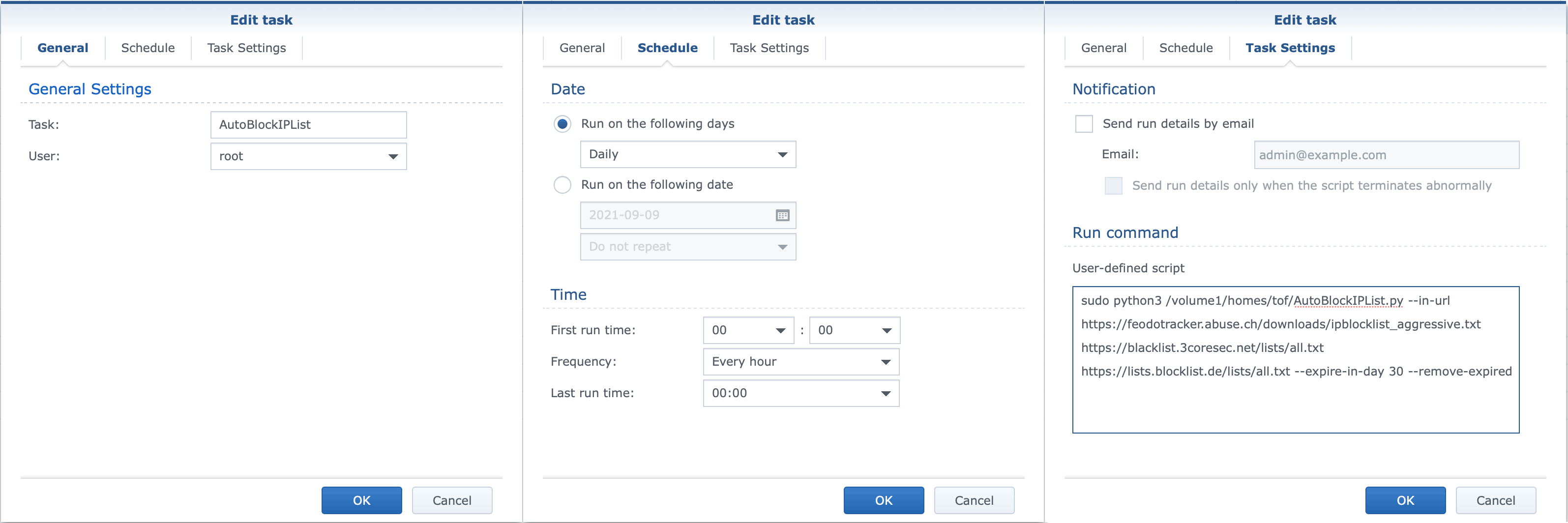
- Go to Control Panel -> Task scheduler
- Setting up the task as "root" user


Enjoy 😎