大家使用vim的时候为了方便会加入各种各样的插件,但每次都需要从github、vim-scripts上找,于是乎为了大家方便找了一些常用的vim插件及其配置供大家使用。使用vundles管理插件,一键式安装。
- git
- vim版本:7.3+ 可通过 **vim version** 查看
- npm
    - jshint
    - csslint
- cscope
一行shell搞定安装
bash -c "$( curl https://raw.githubusercontent.com/lmule/vim/master/install.sh )"
- 界面上有多个窗口时,上、下、左、右四个方向键盘会在横向、纵向放大、缩小
- 界面上有多个窗口时,Ctrl-j、Ctrl-k、Ctrl-h、Ctrl-l会在多窗口间切换(顺序参照vim默认的j、k、h、l)
- 在命令模式下,输入:Vb file 会在竖直方向打开另外一个文件
- 在命令模式下,输入:Vd file 会在竖直方向打开另外一个文件进行diff
- 如果不习惯作者的快捷键,可以在HOME目录下新建.vimrc.local自定义快捷键
- Emmet.vim
- https://github.com/vim-scripts/Emmet.vim
- 前身是Zen Coding,通过简写html、js、css标签就可以生成代码。
- 常用快捷键(注意有逗号)
- Ctrl-y, 生成代码
- neocomplcache.vim
- https://github.com/Shougo/neocomplcache.vim
- 自动补全
- 常用快捷键
- Ctrl-n 选择提示层中的下一项
- Ctrl-p 选择提示层中的上一项
- Ctrl-e 取消弹出提示层
- bufexplorer
- https://github.com/jlanzarotta/bufexplorer
- 显示已经打开的buffer列表
- 常用快捷键
- F3 显示已经打开的buffer列表
- nerdtree
- https://github.com/scrooloose/nerdtree
- 打开目录树
- 常用快捷键
- F2 打开目录树
- syntastic
- vim-snipmate && vim-snippets
- https://github.com/garbas/vim-snipmate
- https://github.com/honza/vim-snippets
- 快速补齐代码片段,比如输入if,按会补齐大括号
- 常用快捷键
- TAB 自动补齐
- comments.vim
- https://github.com/vim-scripts/comments.vim
- 注释代码片段
- 常用快捷键
- Ctrl-c 注释代码片段
- Ctrl-x 取消注释代码片段
- MatchTagAlways
- DoxygenToolkit
- https://github.com/vim-scripts/DoxygenToolkit.vim
- 可以给类、方法等做注释
- 常用快捷键
- ,za 可以注释类,包含作者、时间等
- ,zd 可以注释方法,包含参数、返回值等
- vim-var_dump
- https://github.com/lmule/vim-var_dump
- 打印当前光标所在的变量,目前只适用于php、js
- 常用快捷键
- Ctrl-d 打印当前变量
- unite
- https://github.com/Shougo/unite.vim
- 可以在一个项目中快速浏览文件
- 常用快捷键
- ,e 在当前项目中查找光标所在单词
- ,g 在当前项目中grep
- ,f 在当前项目中模糊查找文件
- ,u 从当前打开的文件或者最近打开的文件列表中查找文件名
- ,l 从当前打开的文件中可以模糊grep
-
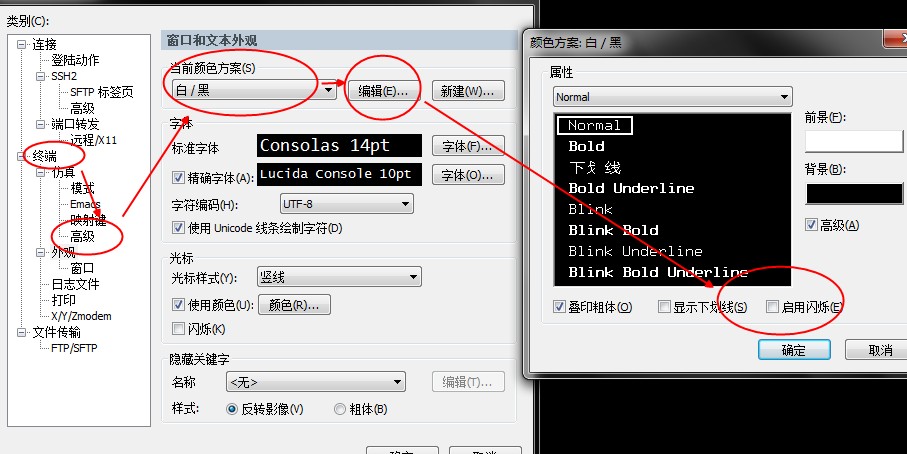
有的securecrt颜色方案配置可能会导致屏幕闪烁,看下颜色方案的配置“启用闪烁”是否打钩
-
MatchTagAlways unavailable: requires python.如果出现这个,是因为vim安装的时候没有python扩展,可以通过
vim --version | grep "python"验证,如果python前面的是'-',那么需要编译的时候需要带python扩展
