GeezerVisonThe World Wide Web, restored to 800 pixels of glory. |
| Home|About|Gaming cabinet|Archives|How it works|Starter sites |
GeezerVison is showing github.com — JavaScript Language Service in Visual Studio JavaScript Language Service in Visual Studio
Orta edited this page
Visual Studio 2017 provides a powerful JavaScript editing experience right out of the box. Powered by a TypeScript based language service, Visual Studio delivers richer IntelliSense, support for modern JavaScript features, and improved productivity features such as Go to Definition, refactoring, and more.
For more information about the general IntelliSense functionality of Visual Studio, see Using IntelliSense.
JavaScript IntelliSense in Visual Studio 2017 will now display a lot more information on parameter and member lists. This new information is provided by the TypeScript language service, which uses static analysis behind the scenes to better understand your code. TypeScript uses several sources to build up this information.
In JavaScript, most of the time there is no explicit type information available. Luckily, it is usually fairly easy to deduce a type given the surrounding code context. This process is called type inference. For a variable or property, the type is typically the type of the value used to initialize it or the most recent value assignment. var nextItem = 10; nextItem; // here we know nextItem is a number nextItem = "box"; nextItem; // now we know nextItem is a string For a function, the return type can be inferred from the return statements. For function parameters, there is currently no inference, but there are ways to work around this using JSDoc or TypeScript Additionally, there is special inference for the following:
function Foo(param1) { this.prop = param1; } Foo.prototype.getIt = function () { return this.prop; }; // Foo will appear as a class, and instances will have a 'prop' property and a 'getIt' method. exports.Foo = Foo; // This file will appear as an external module with a 'Foo' export. // Note that assigning a value to "module.exports" is also supported. Where type inference does not provide the desired type information (or to support documentation), type information may be provided explicitly via JSDoc annotations. For example, to give a partially declared object a specific type, you can use the /** * @type {{a: boolean, b: boolean, c: number}} */ var x = {a: true}; x.b = false; x. // <- "x" is shown as having properties a, b, and c of the types specified As mentioned, function parameters are never inferred. However, using the JSDoc /** * @param {string} param1 - The first argument to this function */ function Foo(param1) { this.prop = param1; // "param1" (and thus "this.prop") are now of type "string". } See this doc for the JsDoc annotations currently supported. Because JavaScript and TypeScript are now based on the same language service, they are able to interact in a richer way. For example, JavaScript IntelliSense can be provided for values declared in a Below, we show a simple example of a TypeScript definition file providing such type information (via an interface) to a JavaScript file in the same project (using a JsDoc tag). TypeScript declarations used in JavaScript 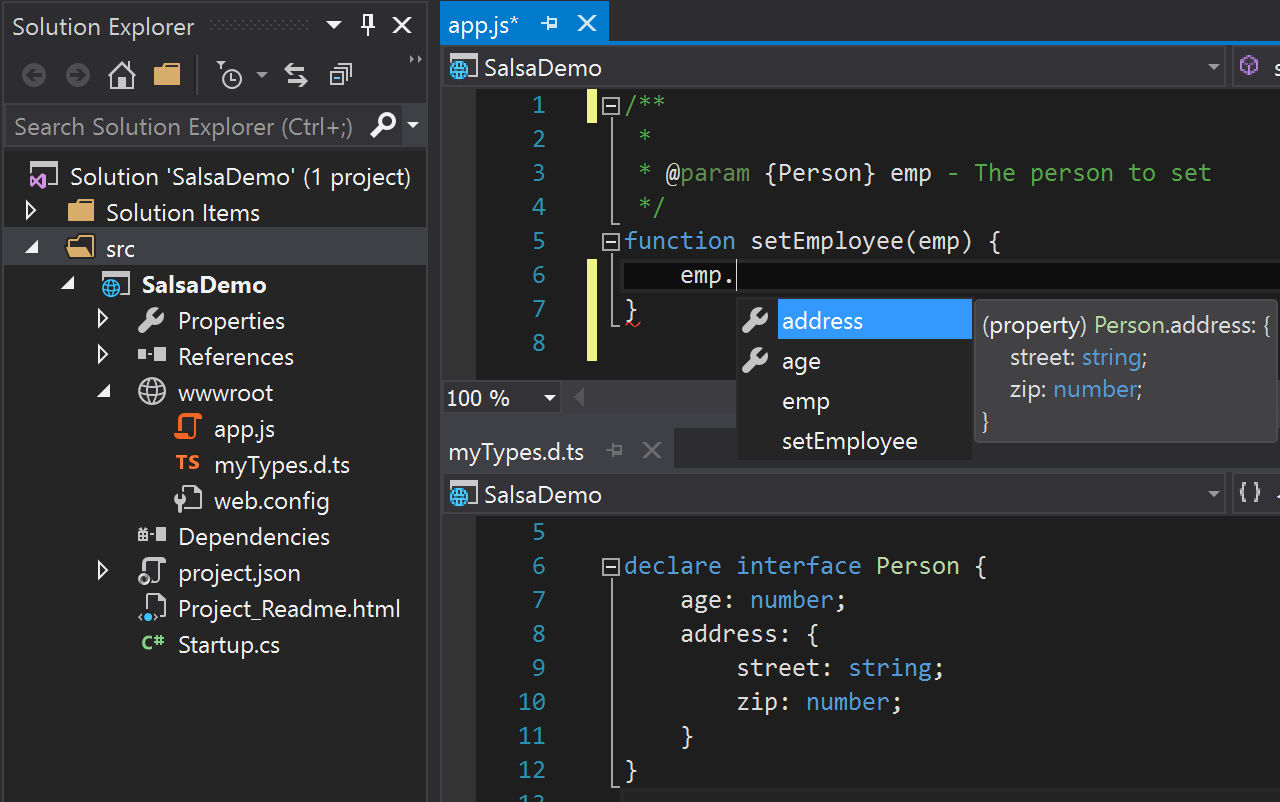
In the TypeScript world, most popular JavaScript libraries have their APIs described by By default, the Salsa language service will try to detect which JavaScript libraries are in use and automatically download and reference the corresponding
Currently auto-detection works for dependencies downloaded from npm (by reading the If you do not wish to use auto-acquisition, disable it by adding a configuration file as outlined below. You can still place definition files for use directly within your project manually. ES6, or ECMAScript 2015, is the next version of JavaScript. It brings new syntax to the language such as classes, arrow functions, One of the key features TypeScript provides is the ability to use ES6 features, and emit code that can execute in JavaScript runtimes that don't yet understand those newer features. This is commonly known as "transpiling". Because JavaScript uses the same language service, it too can take advantage of ES6+ to ES5 transpilation. Before this can be set up, some understanding of the configuration options is required. TypeScript is configured via a The required settings for the tsconfig file are outlined below:
In order to convert JavaScript files to CommonJS modules in an {
"compilerOptions": {
"module": "commonjs",
"allowJs": true,
"outDir": "out"
},
"exclude": [
"node_modules",
"wwwroot",
"out"
],
"compileOnSave": true,
"typingOptions": {
"enableAutoDiscovery": true
}
}With the above settings in place, if a source file ( import {Subscription} from 'rxjs/Subscription'; class Foo { sayHi(name) { return `Hi ${name}, welcome to Salsa!`; } } export let sqr = x => x * x; export default Subscription; Then a file would be emitted to "use strict"; var Subscription_1 = require('rxjs/Subscription'); var Foo = (function () { function Foo() { } Foo.prototype.sayHi = function (name) { return "Hi " + name + ", welcome to Salsa!"; }; return Foo; }()); exports.sqr = function (x) { return x * x; }; Object.defineProperty(exports, "__esModule", { value: true }); exports.default = Subscription_1.Subscription; //# sourceMappingURL=app.js.map JavaScript in Visual Studio 2017 has rich support for the JSX syntax. JSX is a syntax set that allows HTML tags within JavaScript files. The illustration below shows a React component defined in the 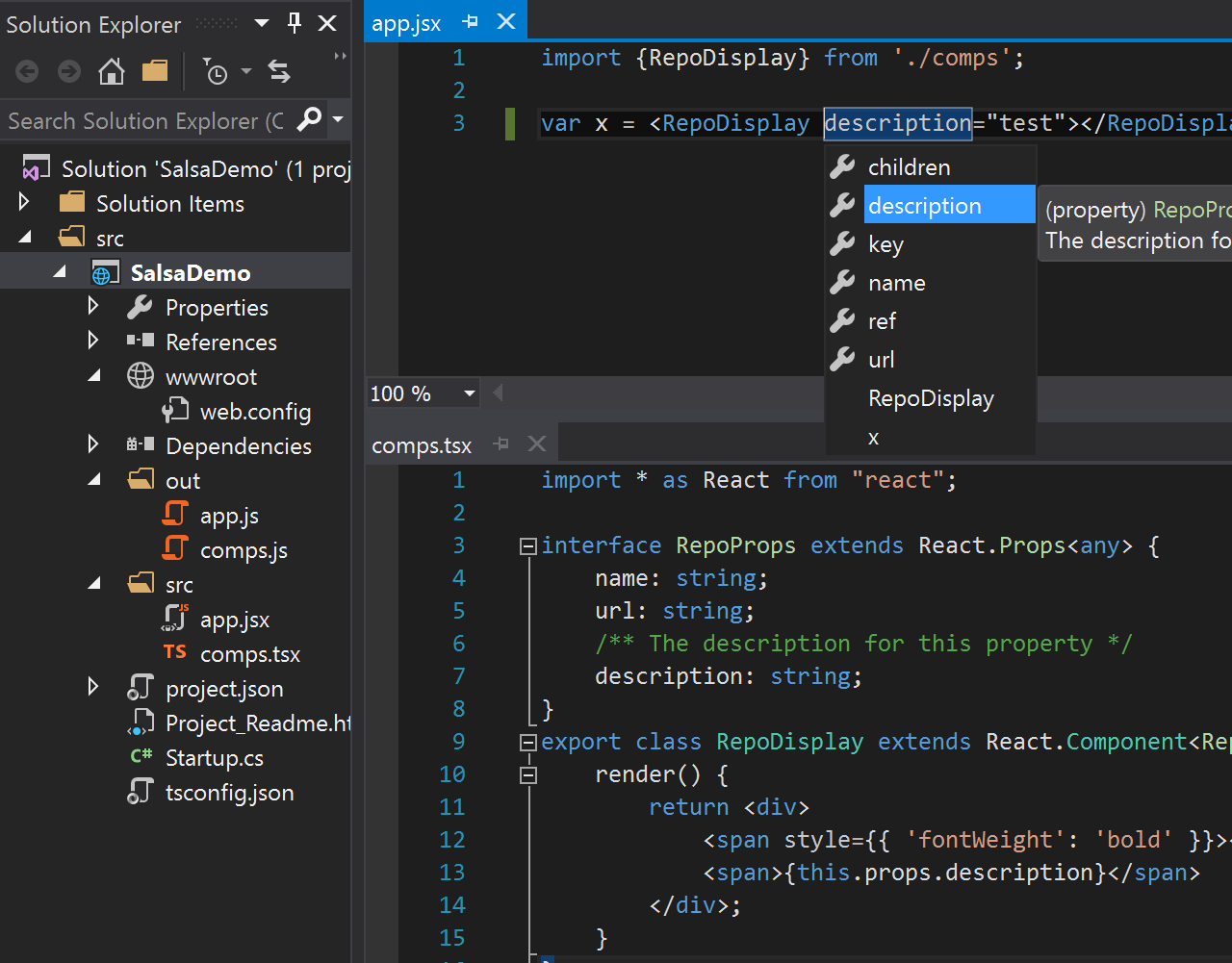
The JavaScript file created at `./out/app.js' upon build would contain the code: "use strict"; var comps_1 = require('./comps'); var x = React.createElement(comps_1.RepoDisplay, {description: "test"}); As Salsa is a completely new language service, there are a few behaviors that will be different or absent from the previous experience.
The most notable of these changes are the replacement of VSDoc with JSDoc, the removal of custom Previously it was fairly complicated to understand at any given moment which files were in your IntelliSense scope.
Sometimes it was desirable to have all your files in scope, other times it wasn't, but this lead to complex configurations involving manual reference management.
Going forward you no longer need to think about reference management and so you don't need triple slash references comments or XML documentation comments, sometimes referred to as VSDocs, could previously be used to decorate your source code with additional data that would be used to buff up IntelliSense results. VSDoc is no longer supported in favor of JSDoc which is easier to write and the accepted standard for JavaScript. Previously, you could author IntelliSense extensions which would allow you to add custom completion results for 3rd party libraries.
These extensions were fairly difficult to write and installing and referencing them was cumbersome, so going forward the new language service won't support these files.
As an easier alternative, you can write a TypeScript definition file to provide the same IntelliSense benefits as the old Because the new language service is powered by static analysis rather than an execution engine (read this issue for information of the differences), there are a few JavaScript patterns that no longer can be detected. The most common pattern is the "expando" pattern. Currently the language service cannot provide IntelliSense on objects that have properties tacked on after declaration. For example: var obj = {}; obj.a = 10; obj.b = "hello world"; obj. // IntelliSense won't show properties a or b You can get around this by declaring the properties during object creation: var obj = { "a": 10, "b": "hello world" } obj. // IntelliSense shows properties a and b You can also add a JSDoc comment as shown above: /** * @type {{a: number, b: string}} */ var obj = {}; obj.a = 10; obj.b = "hello world"; obj. // IntelliSense shows properties a and b News Debugging TypeScript
Contributing to TypeScript
Building Tools for TypeScript
FAQs The Main Repo Clone this wiki locally |
| You are visitor 01402503 — GeezerVison does not store the pages you look up. Best viewed with Netscape Navigator 4.7 or Internet Explorer 6 at 800×600. No cookies required. |