GV

GeezerVison

The World Wide Web, restored to 800 pixels of glory.

Home|About|Gaming cabinet|Archives|How it works|Starter sites

On this site

  • Sign in
  • ActionsCI/CD and automation
  • CodespacesCloud development environments
  • All Features
  • Documentation
  • Training
  • Certifications
  • Build with Copilot
  • Customize Copilot
  • Integrations
  • Trending repos
  • GitHub Sponsors
  • Developer articles
  • Enterprises

This view

  • Original page
  • New address

GeezerVison is showing github.com — GitHub - noobtronics/SmartCore: Arduino hardware package for Noobtronics manufactured boards

BranchesTags
Open more actions menu

Latest commit


History

50 Commits
50 Commits

Folders and files

NameName
Last commit message
Last commit date
avr
avr
 
 
images/guide
images/guide
 
 
LICENSE
LICENSE
 
 
README.md
README.md
 
 
rewrite.txt
rewrite.txt


Repository files navigation

Table of contents

  • Installation:
    • How to Install using Boards Manager
    • How to Install Manually
  • Credits

How to Install using Boards Manager

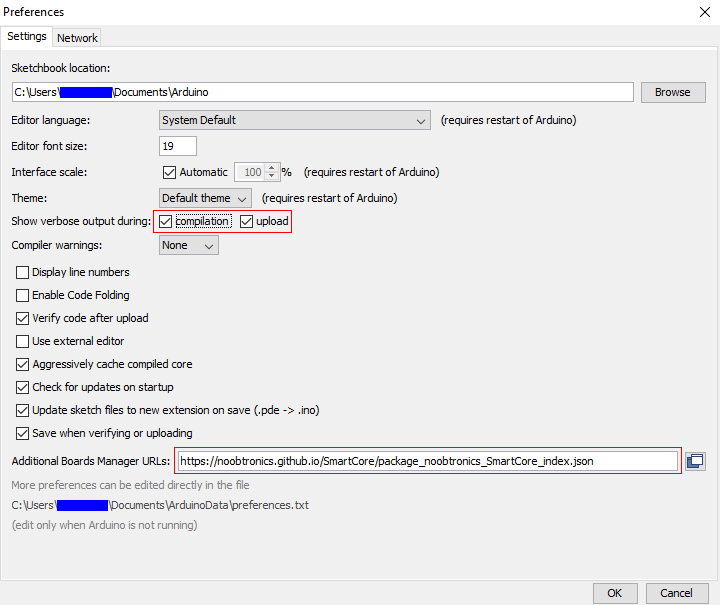
  1. In Arduino IDE, Open File->Preferences

  2. Copy following URL in 'Additional Boards Manager URLs': https://noobtronics.github.io/SmartCore/package_noobtronics_SmartCore_index.json

  3. Make sure you have tick marked the 'compilation' and 'upload' in 'Show verbose output during' setting
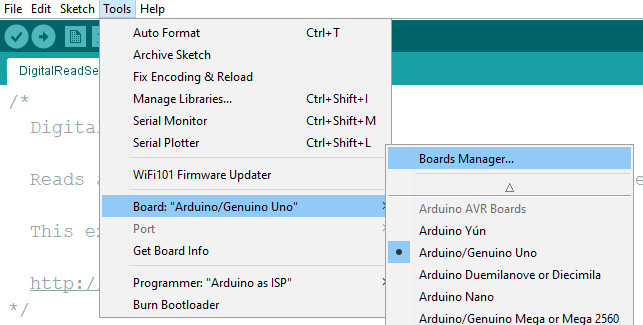
  4. Click OK. Then open Boards Manager from Tools -> Board -> Boards Manager
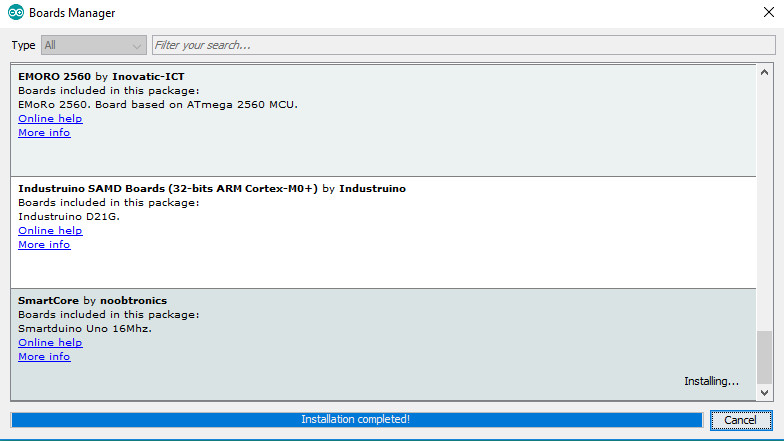
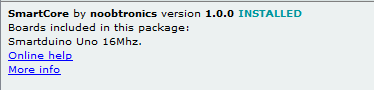
  5. You should see 'SmartCore' library by noobtronics in the end of Boards Manager windows like below. If you don't something is wrong with your setup. Try reinstalling Arduino IDE to fix the issue or contact us.
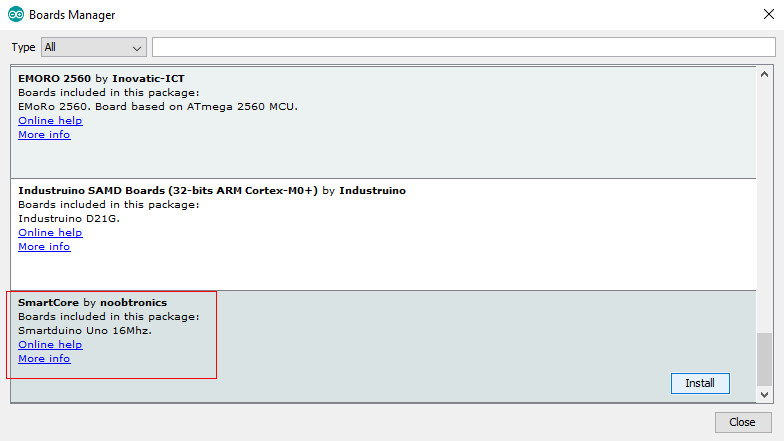
  6. Click Install

  7. You also need to install AVR Boards Libray by Arduino. Look at the top in Boards Manager
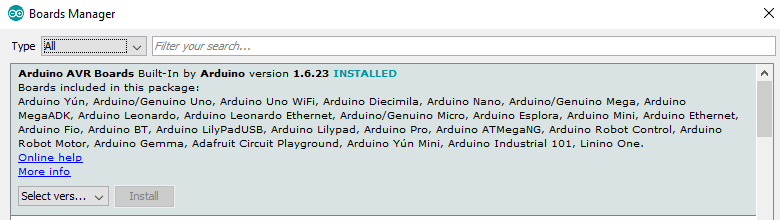
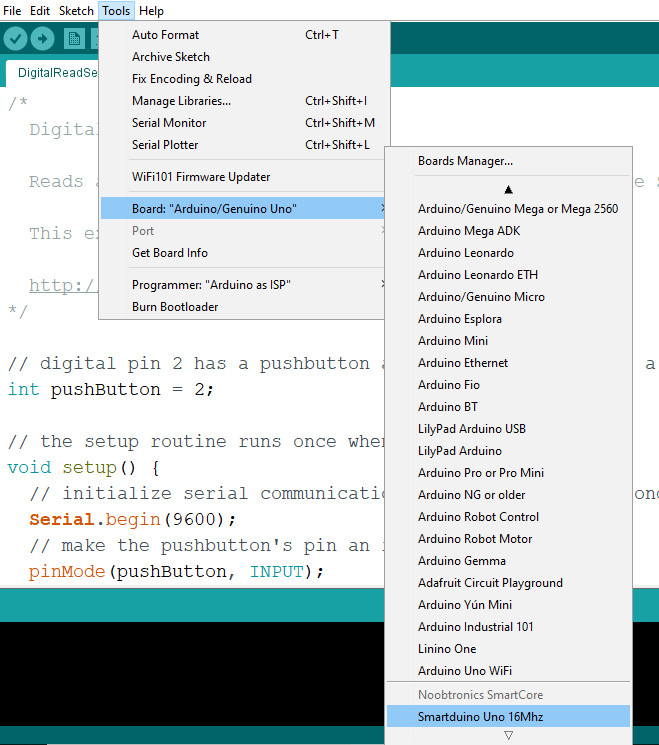
  8. Close Boards Manager and check if Noobtronics boards are coming in the boards list
How to Install Manually

  1. If your board manager is not working as expected, you can install SmartCore library manually. Download the library from here - https://github.com/noobtronics/SmartCore/archive/master.zip
  2. Extract the Zip File. Copy the SmartCore folder in hardware directory of Arduino IDE Folder. eg. Arduino IDE Path is -

C:\Program Files (x86)\Arduino

You should copy SmartCore folder so that directory structure is as follows:

C:\Program Files (x86)\Arduino\hardware\SmartCore\avr\boards.txt

  1. Start / Restart IDE and you should see SmartCore boards in the Boards List.

Credits

  • Credit of ATMega328PB library goes to MCUdude's MiniCore package - https://github.com/MCUdude/MiniCore

About

Arduino hardware package for Noobtronics manufactured boards

noobtronics.in

Topics

atmega328pbsmartduino-uno-16mhz

Resources

Readme
LGPL-2.1 license
Activity
Custom properties

Stars

2 stars

Watchers

0 watching

Forks

0 forks
Report repository

Releases

Packages

Contributors

Languages

You are visitor 01402775 — GeezerVison does not store the pages you look up.
Best viewed with Netscape Navigator 4.7 or Internet Explorer 6 at 800×600. No cookies required.