GV

GeezerVison

The World Wide Web, restored to 800 pixels of glory.

Home|About|Gaming cabinet|Archives|How it works|Starter sites

On this site

  • Sign in
  • ActionsCI/CD and automation
  • CodespacesCloud development environments
  • All Features
  • Documentation
  • Training
  • Certifications
  • Build with Copilot
  • Customize Copilot
  • Integrations
  • Trending repos
  • GitHub Sponsors
  • Developer articles
  • Enterprises

This view

  • Original page
  • New address

GeezerVison is showing github.com — GitHub - python-summit/web-sps20: The current website

BranchesTags
Open more actions menu

Latest commit


History

430 Commits
430 Commits

Folders and files

NameName
Last commit message
Last commit date
.vscode
.vscode
 
 
doc
doc
 
 
scripts/recordings
scripts/recordings
 
 
sps20
sps20
 
 
.gitignore
.gitignore
 
 
.sass-lint.yml
.sass-lint.yml
 
 
README.md
README.md
 
 
build.sh
build.sh
 
 
makefile
makefile
 
 
netlify.toml
netlify.toml
 
 
requirements.txt
requirements.txt
 
 
runtime.txt
runtime.txt


Repository files navigation

Static Website for the Swiss Python Summit

See www.python-summit.ch

Development

General

  • This project is made with Lektor. Lektor is a static content management and pages can be easy written in Markdown
  • The design uses Spectre as its base. Spectre is a lightweight CSS framework with a lot of components you can use.

Run website for local development

  • Clone the repository or open in GitHub Codespace
  • Create a venv* and activate it
  • nstall requirements with make install
  • Run Lektor server with make serve for live preview of the website (on port 5000)

* Note: For some reason, lektor works only if installed in a virtual environment

Tips & Tricks

  • To treat *.lr Lector files as Markdown in vscode, add these settings
        "files.associations": {
          "*.lr": "markdown"
      }

Branch and merge rules

Please follow these rules to keep the repo clean:

  • Name branches with prefix spsYY- e.g. sps24-open-cfp
  • Do so also for the pull request
  • You can see a preview for reviews in a pull requests: preview
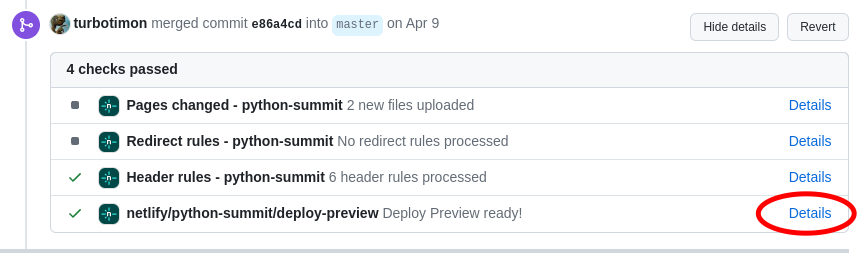
Deployment

  • The main branch is automatically live deployed with Netlify, so be careful what you push here!
  • The build.sh is executed in the Netlify build process

How to add a talk recording

Manually

  • Go to http://localhost:5000/admin/root:recordings/edit
  • Click "Add Page"
  • Choose the "Recording" model
  • Set the "Title" field to the talk title
  • Click "Add Child Page"
  • Fill in the data and save
  • Click "Add Attachment"
  • Upload PDF file with slides
  • Click on the attachment in the left navigation
  • Change the attachment type to "Slides"

Note: The playlist URLs are stored in databags/playlists.json.

Semi-Automatic from Pretalx JSON

  • See Scripts in scripts/recordings
  • These scripts will provide you with the folder structure.
  • Thinks to do manually:
    • Add the youtube urls in the contents.lr files (per talk)
    • Add the playlist URLs in databags/playlists.json
    • Add the slides pdf and give it the same filename as the <name>.pdf.lr provided

About

The current website

www.python-summit.ch/

Resources

Readme
Activity
Custom properties

Stars

0 stars

Watchers

12 watching

Forks

4 forks
Report repository

Used by

Contributors

Languages

You are visitor 01402503 — GeezerVison does not store the pages you look up.
Best viewed with Netscape Navigator 4.7 or Internet Explorer 6 at 800×600. No cookies required.