This page takes you from zero to a deployed Layout: install the CLI, get a storefront project, sign in and run your
first deployment.
| Requirement |
Details |
| Node.js |
Version 14 or later (engines.node is >=14.0.0). npm or yarn. |
| Selldone account |
Sign up at selldone.com. Deploying Layouts requires a premium account; see Deployment Workflow. |
| A free local port |
The login callback listens on http://localhost:3777. |
| A web browser |
Used for the OAuth2 sign-in page. |
| A storefront project |
A folder with manifest.json and a build-production script that writes to dist/. The Storefront project has both. |
| GitHub CLI (optional) |
Only needed for the New action, which clones the Storefront project with gh. |
npm install -g selldone-cli
Other options: npm install selldone-cli --save-dev or yarn add selldone-cli --dev. The CLI changes often, so
update it before each session:
npm update -g selldone-cli
2. Get a storefront project
Option A: let the CLI create it. Run selldone in an empty working folder and choose New:
mkdir layouts && cd layouts
selldone
# ? Please select an action:  New
The New action:
- Stops if a
storefront folder already exists in the current directory.
- Detects your package manager or asks you to pick npm or yarn.
- Checks for the GitHub CLI (
gh). If it is missing, it tries to install it (apt-get on Linux, brew on macOS,
winget on Windows) and asks you to reopen the terminal and run the command again.
- Runs
gh auth login if you are not signed in to GitHub.
- Runs
gh repo clone selldone/storefront, enters the storefront folder and runs <package manager> install and
<package manager> setup.
- Asks for a unique package name (12–64 characters, lowercase letters, digits,
- and .) and a Layout name
(8–255 characters), then writes them to manifest.json with version 0.0.1.
Option B: clone it yourself.
git clone https://github.com/selldone/storefront.git
cd storefront
yarn install
yarn setup
Then edit manifest.json. See Deployment Workflow for the field rules.
Deploying signs you in automatically, but you can sign in first:
selldone
# ? Please select an action:  Login
Your browser opens the Selldone login page. After you approve, the CLI may ask for your six-digit 2FA code and then
prints You are logged in as: <name> (<email>). Details are on the Authentication page.
From the project root (the folder that contains manifest.json):
The CLI validates the manifest, checks the version with Selldone, asks you to confirm by typing yes, runs
build-production, zips dist/ into dist.zip and uploads it.
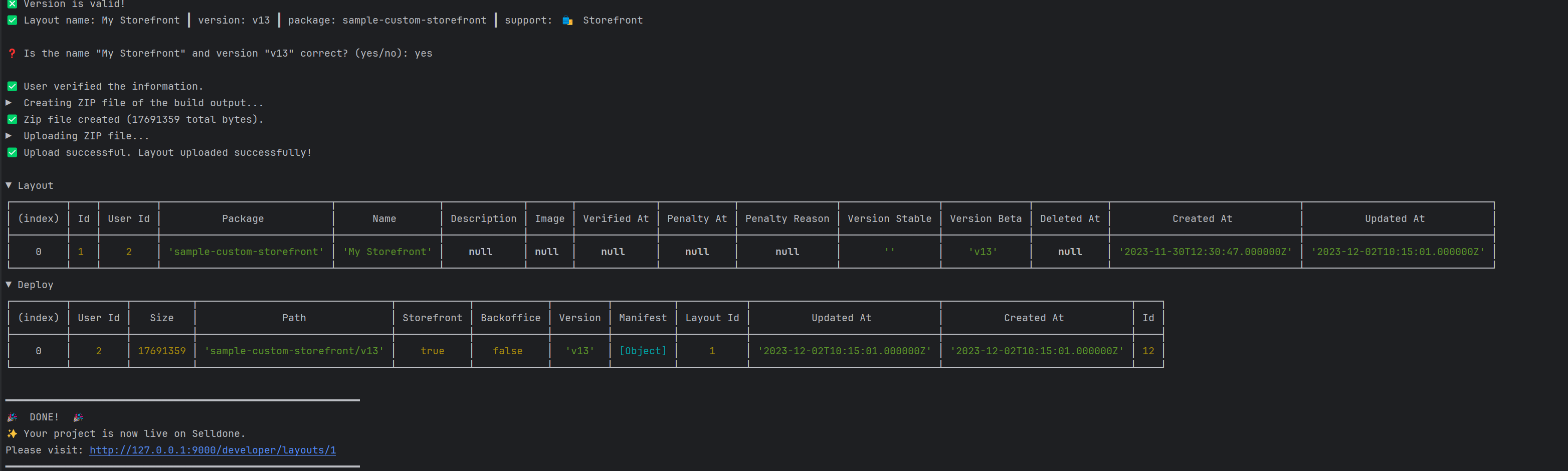
When you see DONE!, open the printed link (https://selldone.com/developer/layouts/<layout_id>) or go to the
Layouts dashboard to manage the new version.
5. Release the next version
- Make your changes.
- Increase
version in manifest.json (for example 0.0.1 to 0.0.2). Every deployment needs a new version.
- Run
selldone deploy again.