🚀 Online verze / Live web app: https://school.vibemaker.cz/codeflowchart/
(Run directly in your browser · Offline-ready PWA · No registration)
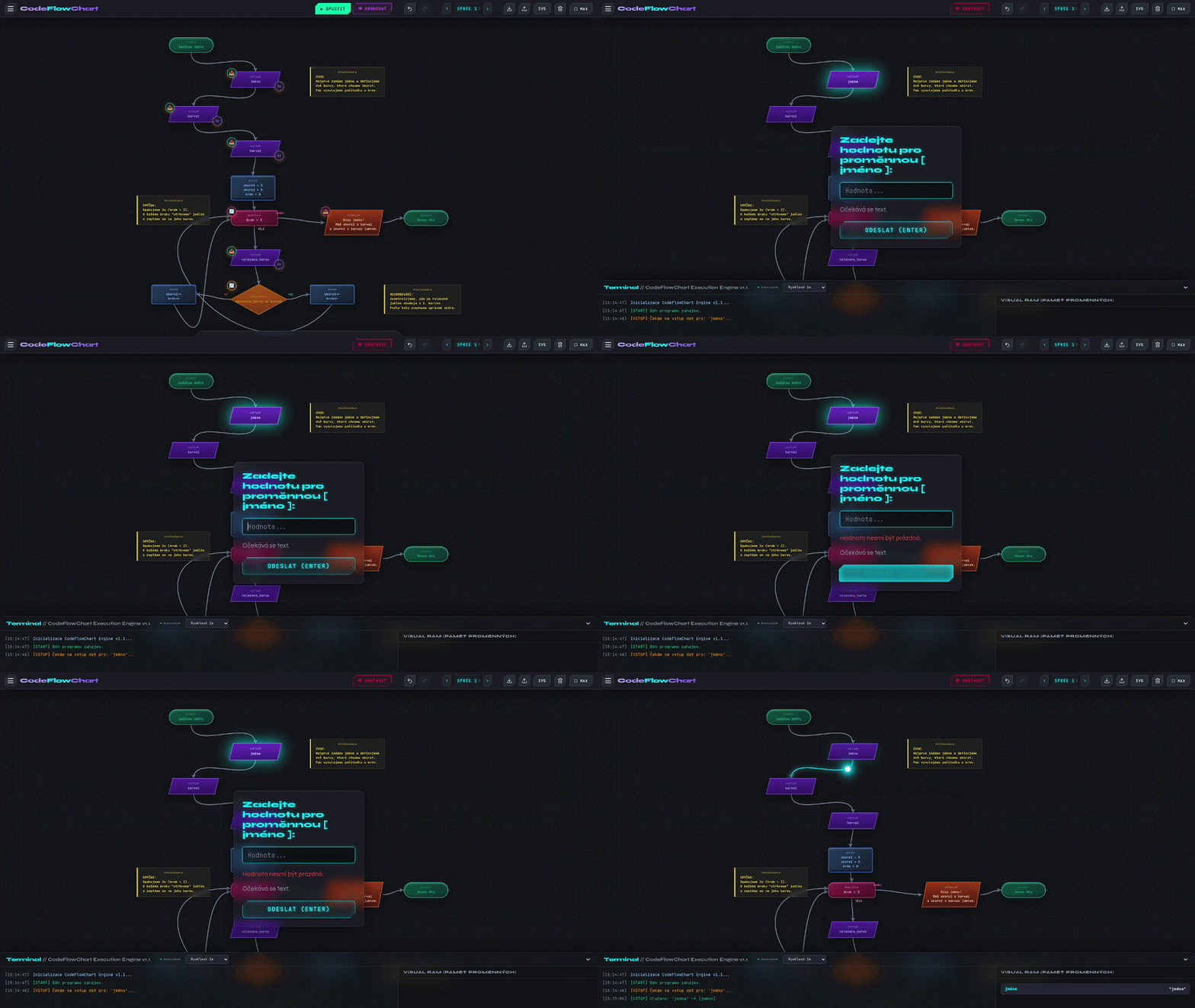
An offline flowchart editor and simulator for introductory algorithms. Build blocks and connections, run or step through a program, inspect variables in Visual RAM and verify missions with test cases.
The service ship HEFAISTOS and robot ŠROUB guide 14 missions: eight for the Czech H vocational profile and six for the E/J support profile. Five SPACE workspaces support free experimentation. These curriculum profiles retain their Czech meanings in the English interface.
The application is a single HTML file requiring no build step, backend or external dependencies:
- Online: Open https://school.vibemaker.cz/codeflowchart/
- Offline / Local: Download or clone the repository and open
index.htmldirectly in any modern browser (double-click is enough).
PWA installation and offline service-worker caching activate when served over HTTPS. Fonts are embedded directly in the HTML file, so no Google Fonts connection is needed. An isolated HTML copy has inline icon and manifest fallbacks.
A Czech primary browser language selects Czech; other browser languages select English. This does not use location. CS/EN saves a manual preference locally. Switching preserves blocks, connections, variables, workspace, progress and camera.
Interface labels, mission briefs, hints, diagnostics and certificate captions are translated. Built-in start/end captions, descriptive action labels and explanatory notes also have translated display labels. Their original source text remains in the saved program. User-authored block text, variable names, string literals and program output retain their exact content. Variable identifiers and executable expressions use their actual source spelling consistently in the diagram, editor, input dialogs and RAM. Opening and saving a caption without changes preserves its source; changing a built-in caption makes it user-authored. Existing Czech sample programs and their code comments are kept so execution and JSON compatibility remain stable. English missions use the same original test vectors and thresholds.
Choose Add to home screen in the menu. Supported browsers provide a native installation prompt. Other browsers receive manual instructions.
- iPhone/iPad: Safari → Share → Add to Home Screen; keep Open as Web App enabled when offered
- Android: browser menu → Install app / Add to Home Screen
- macOS Safari: File → Add to Dock
Wait for Ready offline before disconnecting. Browsers may evict cached files. Icons include a 180 px Apple touch icon, 192/512 px PNGs, an Android maskable variant and editable SVG sources. Physical-device installation remains a manual check.
New versions offer Save and update. Stop a running simulation and close open dialogs first. The app saves the active workspace before reloading. Other tabs show their own update action. For the first upgrade from an older release without this action, close all app tabs/windows once to let the waiting version activate.
New diagrams open at a readable scale on phones. Whole diagram (F) fits every block; Readable start returns to the start block at a larger scale. Resizing preserves the current camera center and scale. Saved workspaces keep their saved camera.
Workspaces, progress and the optional student name are stored locally in the browser. Desktop data expires after 90 minutes without pointer, keyboard or wheel activity, including while the page is open. Autosave does not extend the session. Expiration clears the in-memory work and undo history as well. Background tabs resume from the fresh saved session before editing. Mobile/tablet data is cleared manually using RESET. Save a JSON export to keep a portable copy. Browser storage is not a substitute for a backup.
JSON exports preserve all missions, SPACE workspaces, active context, optional name and save time. Import restores the snapshot. SVG diagram export keeps source identifiers and expressions. Built-in explanatory captions and certificate captions follow the interface language. Certificates with a supplied name contain that name. The local game is inspectable and is not a secured examination system.
There is no telemetry or remote API. The service worker caches only a fixed list of application files, not browser-storage data or generated exports. Author links open only when selected. Fictional CNC/production tasks illustrate algorithms, not machine-operation instructions.
- Verification and limitations
- Changelog
PLAN.mdandcodeflowchart.pdf: original Czech project documents, retained for reference
MIT, copyright © 2026 Luděk Sušický. See LICENSE. Embedded JetBrains Mono and Syne fonts retain their SIL Open Font License notices in licenses/.
Luděk Sušický — biologist, secondary-school and university teacher of computing subjects
- E-mail: [email protected]
- X: @ludeksusicky
- LinkedIn: Luděk Sušický
- GitHub: @siberius — more educational projects and open-source applications
The app is an example of an SPA (Single Page Application) in a single HTML file.
Generative AI tools were used during development. The educational content, its revisions and responsibility for the final application lie with the author.