Put interactive HTML and React UI on real Three.js meshes—without giving up UV mapping, depth occlusion, browser input, or lifecycle control.
Live demo · 日本語 · API · Browser support

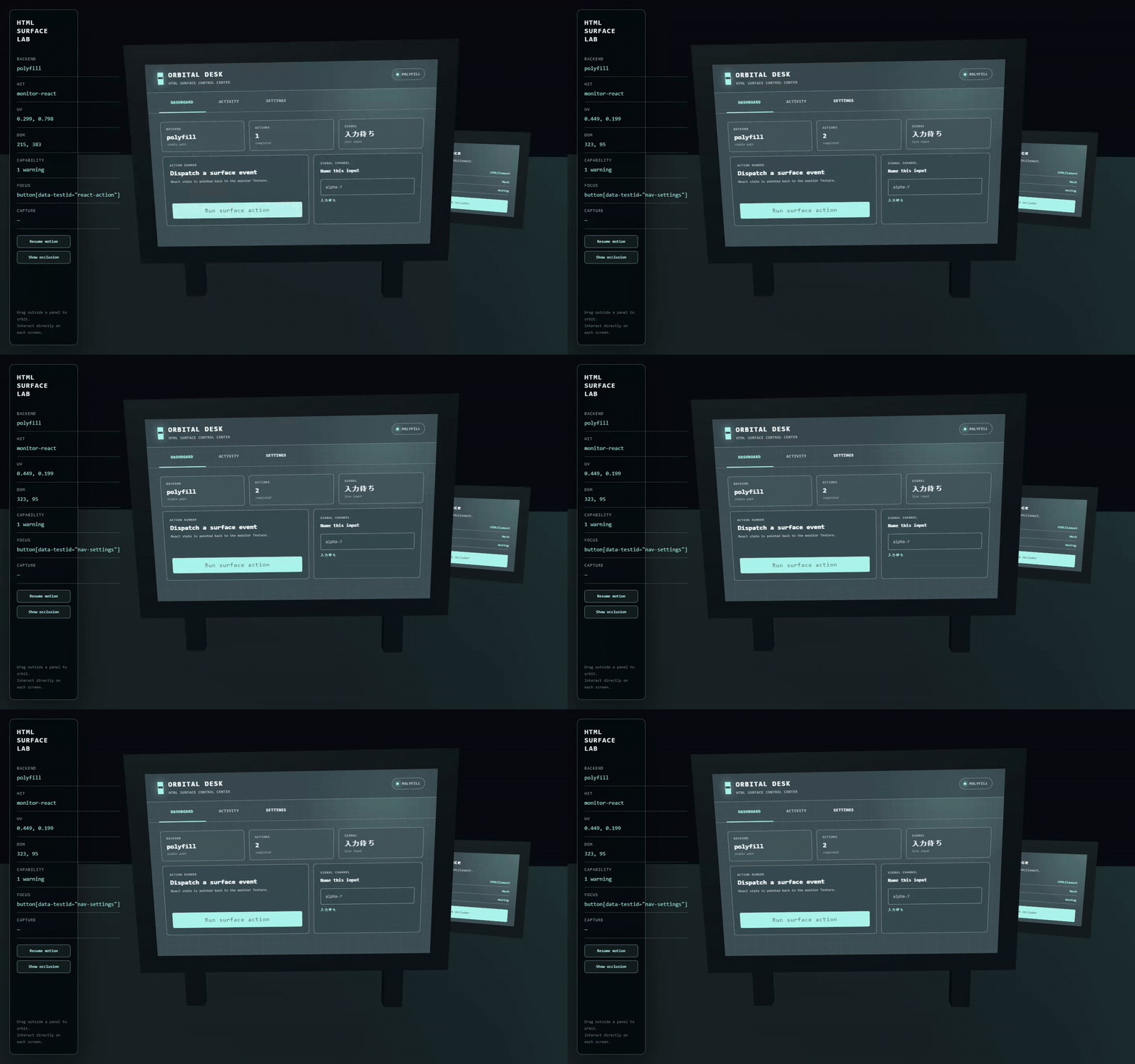
An HTML Surface is more than an HTML texture. It treats an HTMLElement as the rendering source and a Three.js Mesh as the display target, then manages these concerns as one unit:
- HTML-derived texture creation and invalidation
- material slot, map property, and texture transform binding
- raycast UV to DOM coordinate mapping
- browser-native hit testing, focus, keyboard, pointer, wheel, and touch routing
- input occlusion by ordinary scene meshes
- multiple surfaces, ownership, restoration, and disposal
HTML-in-Canvas, Three.js HTMLTexture, and three-html-render are replaceable rendering backends or low-level building blocks. HTML Surface Three is the interaction and lifecycle layer above them: it binds any UV-mapped mesh, routes input through the scene, and keeps cleanup reversible.
| A rendering primitive gives you | HTML Surface Three adds |
|---|---|
| DOM → pixels | Backend selection and explicit invalidation |
| A Texture | Mesh, material slot, map property, and UV transform binding |
| A visual result | UV → DOM targeting and browser interaction |
| One rendered element | Multiple-surface registry and ownership |
| Mesh depth while rendering | The same scene-aware occlusion for input |
This is not a DOM overlay. The UI is uploaded as a Texture, so it follows Mesh deformation, camera perspective, depth testing, and occlusion.
npm install html-surface-three [email protected]
Requirements:
- Node.js
^20.19.0or>=22.12.0 - Three.js
>=0.184.0 <0.186.0 - a stable browser with WebGL
The core is framework-independent. Give the manager a live HTMLElement and an existing Mesh with UVs:
import * as THREE from 'three';
import { HtmlSurfaceManager } from 'html-surface-three';

const panel = document.createElement('section');
panel.style.cssText = 'width: 640px; height: 420px';
panel.innerHTML = `
  <button type="button">Run action</button>
  <label>Signal <input aria-label="Signal" /></label>
  <div style="height: 120px; overflow: auto">...</div>
`;

const manager = new HtmlSurfaceManager({
  renderer,
  camera,
  scene,
  backend: 'auto',
  raycastRoots: [world, uiSurfaces],
});

const surface = manager.add({
  id: 'monitor',
  element: panel,
  mesh: monitorScreen,
  materialIndex: 0,
  mapProperty: 'map',
  transformUv(uv, texture) {
    texture.transformUv(uv);
  },
});

function frame() {
  manager.update();
  renderer.render(scene, camera);
  requestAnimationFrame(frame);
}
frame();

await surface.ready;

// Cleanup
surface.dispose();
manager.dispose();
disposeMaterial and disposeGeometry default to false. Resources owned by your application are not destroyed implicitly.
DOM mutations and input, change, scroll, and compositionend events invalidate the texture automatically. Call surface.invalidate() only for paint changes the library cannot observe, such as externally loaded assets or canvas content.
React is an integration example, not a core dependency. Mount React into an ordinary element and pass that element to the same Vanilla API:
import { createRoot } from 'react-dom/client';

const element = document.createElement('div');
element.style.cssText = 'width: 640px; height: 420px';

const surface = manager.add({
  id: 'react-monitor',
  element,
  mesh: monitorScreen,
});

const root = createRoot(element);
root.render(<ControlPanel />);

// Stop React before disposing the Surface.
root.unmount();
surface.dispose();
The live demo mounts a complete React dashboard—with navigation, button state, text input, checkbox, range drag, and scrolling—on a moving and rotating 3D monitor. A second Vanilla Surface demonstrates multi-surface routing and occlusion.
By default, pointer routing recursively raycasts scene.children, preserving ordinary scene-mesh occlusion. In a large scene, pass a small set of non-overlapping roots instead:
const raycastRoots = [interactiveWorld, uiSurfaces];
const manager = new HtmlSurfaceManager({
  renderer,
  camera,
  scene,
  raycastRoots,
});

// The same array is read on every route.
raycastRoots.push(newlyLoadedArea);
Every interactive surface and every occluder that should block it must be below one of these roots. An empty array intentionally disables pointer hits.
| Option | Behavior |
|---|---|
auto |
Stable-first. Uses the polyfill path even if a native experimental API is present. |
polyfill |
Uses three-html-render explicitly. |
native |
Uses native HTML-in-Canvas only when detected. Experimental and opt-in. |
The Backend SPI is isolated behind html-surface-three/experimental, keeping experimental Three.js APIs out of the stable facade. See Texture Backends.
Support is intentionally tiered:
| Tier | Browser | Coverage |
|---|---|---|
| Tier 1 | stable Chrome and Edge | moving and rotated surfaces, navigation, button, input, keyboard, IME composition, checkbox, range drag, scroll, multiple surfaces, occlusion, pointer capture, touch |
| Tier 2 | Playwright Firefox and WebKit | startup, rendering, button, input, and scroll smoke tests |
| Manual | Safari | published checklist; Playwright WebKit is not claimed as Safari |
| Experimental | native HTML-in-Canvas environments | detection and explicit selection only |
The default Backend is the stable polyfill path. See the complete browser matrix and Safari checklist.
- The polyfill path uses SVG
foreignObjectand texture uploads. - Cross-origin media, iframe content, DRM, complex CSS, and native form styling remain browser-constrained.
- Overlapping UVs, alternate UV channels,
SkinnedMesh, andInstancedMeshare outside the stable guarantee. - Pointer routing uses recursive raycasting; restrict it with
raycastRootsin very large scenes. - The DOM accessibility tree and the visual 3D position are not the same thing.
- React Three Fiber and WebXR adapters are planned, not stable APIs.
See current limitations for details and mitigation ideas.
- API reference
- Texture Backends
- Browser support
- Current limitations
- Migration from the prototype
- Related technology research
- Changelog
npm install
npm run dev

npm run typecheck
npm test
npm run build
npm run test:e2e:tier1
npm run test:e2e:smoke
npm run test:visual
npm run verify:package
- library ESM and declarations:
dist/ - production demo:
dist-demo/ - browser evidence:
artifacts/
Read CONTRIBUTING before opening a pull request. Report vulnerabilities through the process in SECURITY.
This project is not an HTML rasterizer, UI component kit, DOM overlay, React-only library, image/video decoder, or media player.