
GV

GeezerVison

The World Wide Web, restored to 800 pixels of glory.

Home|About|Gaming cabinet|Archives|How it works|Starter sites

On this site

  • Sign in
  • ActionsCI/CD and automation
  • CodespacesCloud development environments
  • All Features
  • Documentation
  • Training
  • Certifications
  • Build with Copilot
  • Customize Copilot
  • Integrations
  • Trending repos
  • GitHub Sponsors
  • Developer articles
  • Enterprises

This view

  • Original page
  • New address

GeezerVison is showing github.com — GitHub - spytify/spytify

BranchesTags
Open more actions menu

Latest commit


History

1,198 Commits
1,198 Commits

Folders and files

NameName
Last commit message
Last commit date
.github
.github
 
 
assets
assets
 
 
cmd
cmd
 
 
internal
internal
 
 
macos
macos
 
 
packaging
packaging
 
 
pkg/proto
pkg/proto
 
 
psd
psd
 
 
scripts
scripts
 
 
test
test
 
 
testdata
testdata
 
 
windows
windows
 
 
.env.example
.env.example
 
 
.gitignore
.gitignore
 
 
CONTRIBUTING.md
CONTRIBUTING.md
 
 
LICENSE
LICENSE
 
 
PRIVACY.md
PRIVACY.md
 
 
README.md
README.md
 
 
go.mod
go.mod
 
 
go.sum
go.sum


Repository files navigation

Spytify

Build Tests Latest release Downloads Sub Reddit Donate

Records an application's audio, splits it into tracks and tags them.
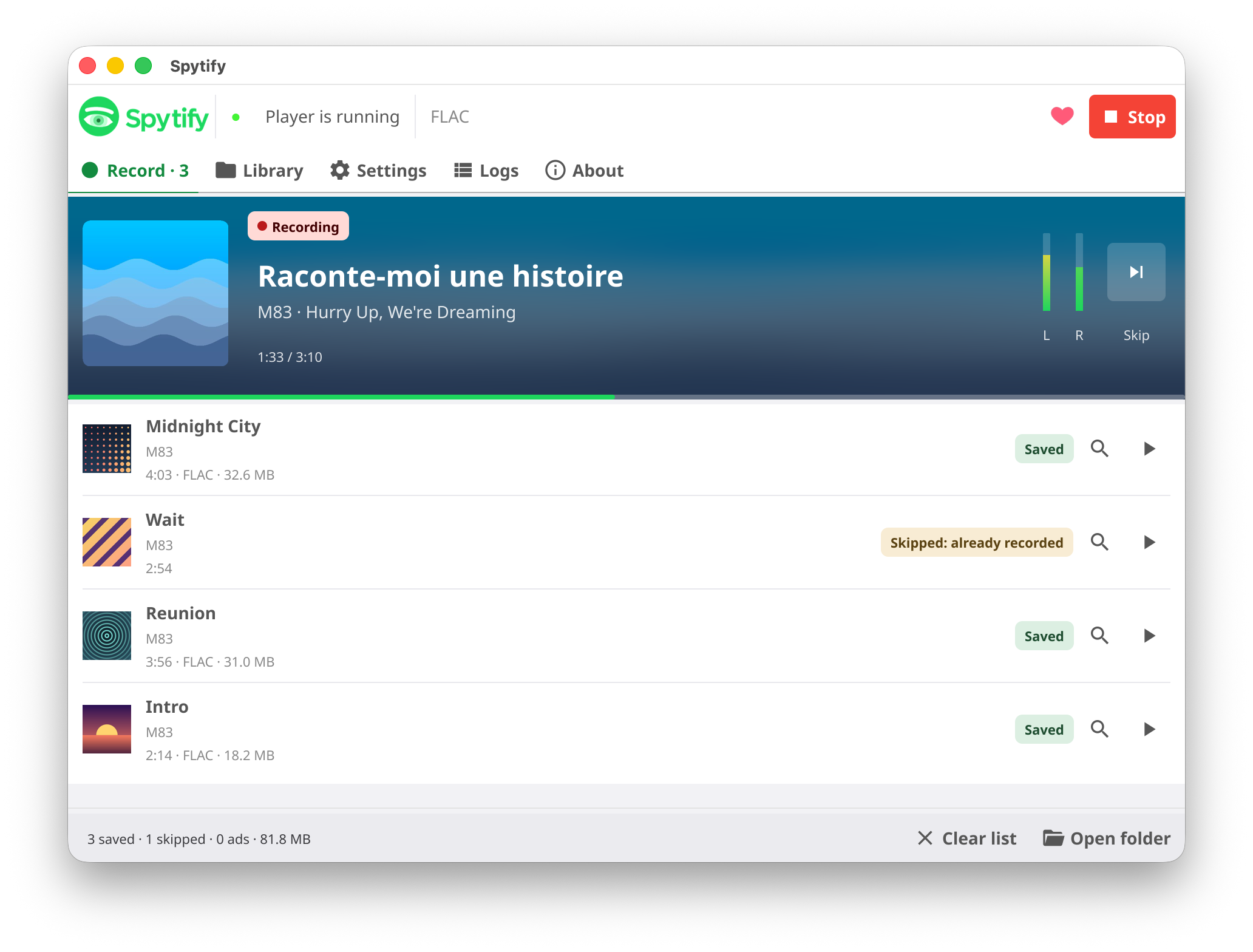
Spytify recording a session in FLAC: the current track on its cover's colours at 1:33 of 3:10 with its L and R level, three files saved and one skipped as already recorded

Spytify records the sound one application plays, nothing else, and saves each track as its own file, cut at the right sample and tagged with the title, artist, album and cover the application reports. It runs on Linux, macOS 14.2 or later and Windows 10 version 2004 or later.

Download · Install · Documentation · FAQ

A recorder, not a downloader

Spytify records what your computer already plays, like Audio Hijack or OBS. It downloads nothing, emulates no streaming protocol and circumvents no DRM.

Stream downloaders pull files through a service's own protocol; those are what services go after with legal action. Recording can break a service's terms, and what the service may do then is close your account. It is rare and has never happened to the maintainer, but use a separate free account. This is not legal advice: see Legal.

Privacy

Spytify's bug tracker, Sentry, is on by default. Untick it at the first launch or in Settings > Privacy, and nothing is sent at all.

  • Sent: crashes, errors with a picture of the window, and recording counts, with the system, the version and the country: what it takes to fix a bug and to know where it happened.
  • Never kept: your computer's name, your user name, your home folder, your IP address or any MAC address. Sentry reads the country from the IP address, then drops it.
  • Your computer is known only by a code made from its machine ID, for Spytify alone.

Everything the bug tracker sends: PRIVACY.md.

Build and contribute

Building from source, the architecture, the tests and releases: see CONTRIBUTING.md.

License

MIT, see LICENSE.

About

spytify.github.io/spytify/

Topics

mediamp3musicrecorderspotifywindows

Resources

Readme
MIT license

Contributing

Contributing
Activity
Custom properties

Stars

2.4k stars

Watchers

39 watching

Forks

162 forks
Report repository

Releases

Packages

Used by

Contributors

Languages

You are visitor 01402503 — GeezerVison does not store the pages you look up.
Best viewed with Netscape Navigator 4.7 or Internet Explorer 6 at 800×600. No cookies required.